
Area Converter
Quickly convert between various area units with the Examples.com Area Converter. Input your measurements for precise and instant conversions.
Area Converters to Square Kilometer (sq km)
Area Converters to Square Meter (sq m)
Area Converters to Square Yard (sq yd)
Area Converters to Square Mile (sq mi)
Area Converters to Square Foot (sq ft)
Area Converters to Square Inch (sq in)
Area Converters to Hectare
Area Converters to Acre
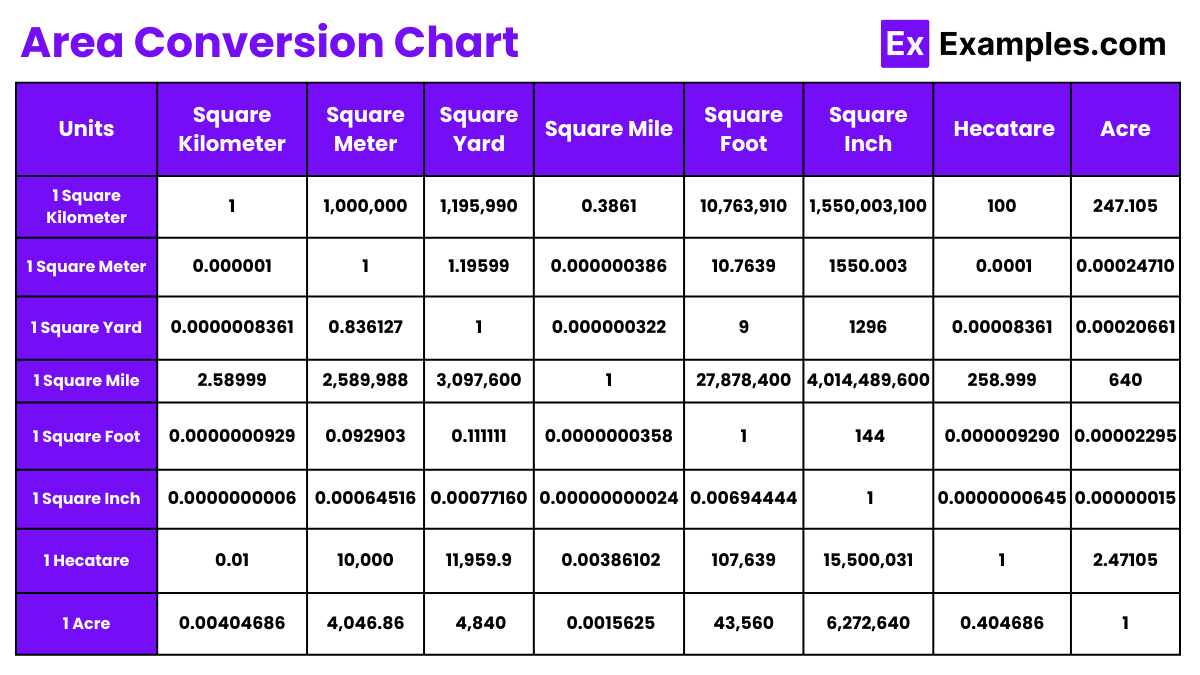
Area Conversion Chart
How to use Area Converter
Converting area measurements between different units can be crucial for various purposes such as real estate, construction, agriculture, and academic projects. An area converter is a tool that helps you effortlessly switch between units like square feet, square meters, acres, hectares, and more. Here’s a straightforward guide on how to use an area converter effectively.
Step 1: Select Your Converter
First, choose an area converter tool. Many websites and apps offer free conversion tools that can instantly convert area units. Opt for a reliable and user-friendly converter that supports a range of units.
Step 2: Enter the Area Value
Once you have your converter ready:
- Locate the input field.
- Type in the area value you need to convert. Make sure you input the correct unit (e.g., square meters, acres) associated with this value.
Step 3: Choose the Unit to Convert From
Select the unit of the area you are starting with. This is the unit of the value you entered in the previous step. Most converters will have a dropdown menu or a selection list for this purpose.
Step 4: Select the Unit to Convert To
Now, choose the unit you want to convert your area into. Like the previous step, this will typically be done via a dropdown menu or a list.
Step 5: Convert
Click the convert button. The converter will process the input value and display the converted area in the new unit. Ensure you double-check the output to make sure it makes sense given the context of your needs.
Step 6: Use the Converted Value
You can now use the converted value as needed. If you require conversion for multiple units, simply repeat the steps above.
How accurate are area converters?
Most area converters are highly accurate, provided they use up-to-date conversion factors. Accuracy also depends on the source of the tool. Reputable websites and apps maintain precision by regularly updating their data.
Are area converters free to use?
Many online area converters are available for free. They provide quick and easy conversions without any need for payment or software installation.
How is land area calculated?
Land area is calculated by measuring the length and width of the property and then multiplying these dimensions. For regular shapes like rectangles or squares, this method is straightforward and accurate.
How to calculate the area of an irregular shaped piece of land?
For irregular shapes, the area can be estimated by dividing the land into a combination of simpler shapes (such as triangles and rectangles), calculating the area of these individual pieces, and then summing them up.
Can I calculate land area from a map?
Yes, land area can be calculated from a map using scale measurements. By measuring the map distance and converting it using the map’s scale, you can estimate the real-world area.
Do I need an internet connection to use an area converter?
For online converters, yes, an internet connection is necessary. However, there are also downloadable apps that can function offline.
Can an area converter be used for educational purposes?
Absolutely. Area converters are great educational tools for teaching students about different measurement units and how to convert between them, enhancing their mathematical and practical understanding.
Is there a limit to how much area I can convert at one time?
Most online converters do not have a limit on the amount of area you can convert, although extremely large numbers might not be accurately represented in some tools due to technical constraints.