





















AutoGen
:
Enabling Next-Gen LLM
Applications via Multi-Agent Conversation
Qingyun Wu
†
, Gagan Bansal
∗
, Jieyu Zhang
±
, Yiran Wu
†
, Beibin Li
∗
Erkang Zhu
∗
, Li Jiang
∗
, Xiaoyun Zhang
∗
, Shaokun Zhang
†
, Jiale Liu
∓
Ahmed Awadallah
∗
, Ryen W. White
∗
, Doug Burger
∗
, Chi Wang
∗
1
∗
Microsoft Research,
†
Pennsylvania State University
±
University of Washington,
∓
Xidian University
Agent Customization
Conversable agent
Flexible Conversation Patterns
…
…
…
…
…
…
…
Hierarchical chat
Joint chat
Multi-Agent Conversations
…
Execute the
following code…
Got it! Here is the
revised code …
No, please plot %
change!
Plot a chart of
META and TESLA
stock price change
YTD.
Output:
$
Month
Output:
%
Month
Error package
yfinance
is not
installed
Sorry! Please first
pip install yfinance
and then execute
the code
Installing…
Example Agent Chat
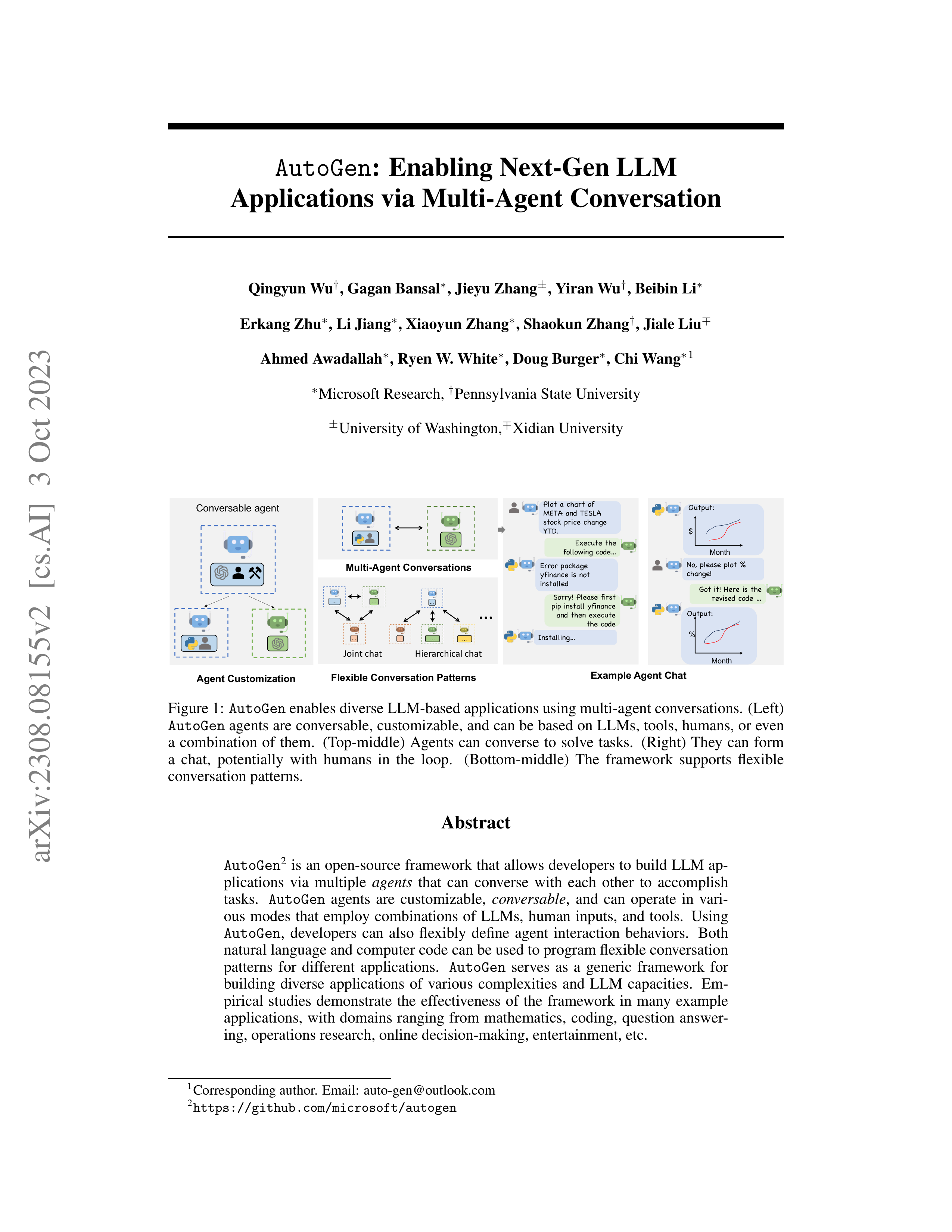
Figure 1:
AutoGen
enables diverse LLM-based applications using multi-agent conversations.
(Left)
AutoGen
agents are conversable, customizable, and can be based on LLMs, tools, humans, or even
a
combination
of
them.
(Top-middle)
Agents
can
converse
to
solve
tasks.
(Right)
They
can
form
a
chat,
potentially
with
humans
in
the
loop.
(Bottom-middle)
The
framework
supports
flexible
conversation patterns.
Abstract
AutoGen
2
is an open-source framework that allows developers to build LLM ap-
plications
via
multiple
agents
that
can
converse
with
each
other
to
accomplish
tasks.
AutoGen
agents
are
customizable,
conversable
,
and
can
operate
in
vari-
ous
modes
that
employ
combinations
of
LLMs,
human
inputs,
and
tools.
Using
AutoGen
,
developers
can
also
flexibly
define
agent
interaction
behaviors.
Both
natural language and computer code can be used to program flexible conversation
patterns
for
different
applications.
AutoGen
serves
as
a
generic
framework
for
building
diverse
applications
of
various
complexities
and
LLM
capacities.
Em-
pirical
studies
demonstrate
the
effectiveness
of
the
framework
in
many
example
applications,
with
domains
ranging
from
mathematics,
coding,
question
answer-
ing, operations research, online decision-making, entertainment, etc.
1
Corresponding author.
Email:
auto-gen@outlook.com
2
https://github.com/microsoft/autogen
arXiv:2308.08155v2 [cs.AI] 3 Oct 2023
1
Introduction
Large language models (LLMs) are becoming a crucial building block in developing powerful
agents
that utilize LLMs for reasoning, tool usage, and adapting to new observations (Yao et al., 2022; Xi
et
al.,
2023;
Wang
et
al.,
2023b)
in
many
real-world
tasks.
Given
the
expanding
tasks
that
could
benefit from LLMs and the growing task complexity, an intuitive approach to scale up the power of
agents
is
to
use
multiple
agents
that
cooperate.
Prior
work
suggests
that
multiple
agents
can
help
encourage divergent thinking (Liang et al., 2023), improve factuality and reasoning (Du et al., 2023),
and provide validation (Wu et al., 2023).
In light of the intuition and early evidence of promise, it is
intriguing to ask the following question:
how
can we facilitate the development of LLM applications
that could span a broad spectrum of domains and complexities based on the multi-agent approach?
Our
insight
is
to
use
multi-agent
conversations
to
achieve
it.
There
are
at
least
three
reasons
con-
firming
its
general
feasibility
and
utility
thanks
to
recent
advances
in
LLMs:
First,
because
chat-
optimized LLMs (e.g., GPT-4) show the ability to incorporate feedback, LLM agents can cooperate
through
conversations
with each other or human(s), e.g., a dialog where agents provide and seek rea-
soning,
observations,
critiques,
and validation.
Second,
because a single LLM can exhibit a broad
range
of
capabilities
(especially
when
configured
with
the
correct
prompt
and
inference
settings),
conversations between differently configured agents can help combine these broad LLM capabilities
in a modular and complementary manner.
Third, LLMs have demonstrated ability to solve complex
tasks
when
the
tasks
are
broken
into
simpler
subtasks.
Multi-agent
conversations
can
enable
this
partitioning
and
integration
in
an
intuitive
manner.
How
can
we
leverage
the
above
insights
and
support different applications with the common requirement of coordinating multiple agents, poten-
tially
backed
by
LLMs,
humans,
or
tools
exhibiting
different
capacities?
We
desire
a
multi-agent
conversation framework with generic abstraction and effective implementation that has the flexibil-
ity to satisfy different application needs.
Achieving this requires addressing two critical questions:
(1) How can we design individual agents that are capable,
reusable,
customizable,
and effective in
multi-agent
collaboration?
(2)
How
can
we
develop
a
straightforward,
unified
interface
that
can
accommodate
a
wide
range
of
agent
conversation
patterns?
In
practice,
applications
of
varying
complexities
may
need
distinct
sets
of
agents
with
specific
capabilities,
and
may
require
different
conversation patterns, such as single- or multi-turn dialogs, different human involvement modes, and
static vs.
dynamic conversation.
Moreover,
developers may prefer the flexibility to program agent
interactions
in
natural
language
or
code.
Failing
to
adequately
address
these
two
questions
would
limit the framework’s scope of applicability and generality.
While
there
is
contemporaneous
exploration
of
multi-agent
approaches,
3
we
present
AutoGen
,
a
generalized multi-agent conversation framework (Figure 1), based on the following new concepts.
1
Customizable and conversable agents.
AutoGen
uses a generic design of agents that can lever-
age
LLMs,
human
inputs,
tools,
or
a
combination
of
them.
The
result
is
that
developers
can
easily
and
quickly
create
agents
with
different
roles
(e.g.,
agents
to
write
code,
execute
code,
wire in human feedback, validate outputs, etc.)
by selecting and configuring a subset of built-in
capabilities.
The agent’s backend can also be readily extended to allow more custom behaviors.
To
make
these
agents
suitable
for
multi-agent
conversation,
every
agent
is
made
conversable
–
they can receive, react, and respond to messages.
When configured properly, an agent can hold
multiple
turns
of
conversations
with
other
agents
autonomously
or
solicit
human
inputs
at
cer-
tain rounds, enabling human agency and automation.
The conversable agent design leverages the
strong
capability
of the
most
advanced LLMs in taking feedback and making progress via chat
and also allows combining capabilities of LLMs in a modular fashion.
(Section 2.1)
2
Conversation programming.
A fundamental insight of
AutoGen
is to simplify and unify com-
plex LLM application workflows as multi-agent conversations.
So
AutoGen
adopts a program-
ming
paradigm
centered
around
these
inter-agent
conversations.
We
refer
to
this
paradigm
as
conversation programming
, which streamlines the development of intricate applications via two
primary
steps:
(1)
defining
a
set
of
conversable
agents
with
specific
capabilities
and
roles
(as
described
above);
(2)
programming
the
interaction
behavior
between
agents
via
conversation-
centric
computation
and
control
.
Both
steps
can
be
achieved
via
a
fusion
of
natural
and
pro-
gramming languages to build applications with a wide range of conversation patterns and agent
behaviors.
AutoGen
provides ready-to-use implementations and also allows easy extension and
experimentation for both steps.
(Section 2.2)
3
We refer to Appendix A for a detailed discussion.
2
AutoGen
also
provides
a
collection
of
multi-agent
applications
created
using
conversable
agents
and
conversation
programming.
These
applications
demonstrate
how
AutoGen
can
easily
support
applications of various complexities and LLMs of various capabilities.
Moreover, we perform both
evaluation on benchmarks and a pilot study of new applications.
The results show that
AutoGen
can
help achieve outstanding performance on many tasks,
and enable innovative ways of using LLMs,
while reducing development effort.
(Section 3 and Appendix D)
2
The
AutoGen
Framework
To reduce the effort required for developers to create complex LLM applications across various do-
mains,
a core design principle of
AutoGen
is to streamline and consolidate multi-agent workflows
using
multi-agent
conversations.
This
approach
also
aims
to
maximize
the
reusability
of
imple-
mented agents.
This section introduces the two key concepts of
AutoGen
:
conversable agents and
conversation programming.
2.1
Conversable Agents
In
AutoGen
, a
conversable agent
is an entity with a specific role that can pass messages to send and
receive information to and from other conversable agents, e.g., to start or continue a conversation.
It
maintains its internal context based on sent and received messages and can be configured to possess
a set of capabilities, e.g., enabled by LLMs, tools, or human input, etc.
The agents can act according
to programmed behavior patterns described next.
Agent capabilities powered by LLMs, humans, and tools.
Since an agent’s capabilities directly
influence how it processes and responds to messages,
AutoGen
allows flexibility to endow its agents
with
various
capabilities.
AutoGen
supports
many
common
composable
capabilities
for
agents,
including
1) LLMs.
LLM-backed agents exploit many capabilities of advanced LLMs such as role
playing, implicit state inference and progress making conditioned on conversation history, providing
feedback, adapting from feedback, and coding. These capabilities can be combined in different ways
via
novel
prompting
techniques
4
to
increase
an
agent’s
skill
and
autonomy.
AutoGen
also
offers
enhanced LLM inference features such as result caching, error handling, message templating, etc.,
via an enhanced LLM inference layer.
2) Humans.
Human involvement is desired or even essential
in
many
LLM
applications.
AutoGen
lets
a
human
participate
in
agent
conversation
via
human-
backed agents,
which could solicit human inputs at certain rounds of a conversation depending on
the agent configuration.
The default
user proxy
agent allows
configurable
human involvement levels
and
patterns,
e.g.,
frequency
and
conditions
for
requesting
human
input
including
the
option
for
humans to skip providing input.
3) Tools.
Tool-backed agents have the capability to execute tools
via code execution or function execution.
For example, the default user proxy agent in
AutoGen
is
able to execute code suggested by LLMs, or make LLM-suggested function calls.
Agent
customization
and
cooperation.
Based
on
application-specific
needs,
each
agent
can
be
configured to have a mix of basic back-end types to display complex behavior in multi-agent con-
versations.
AutoGen
allows easy creation of agents with specialized capabilities and roles by reusing
or extending the built-in agents.
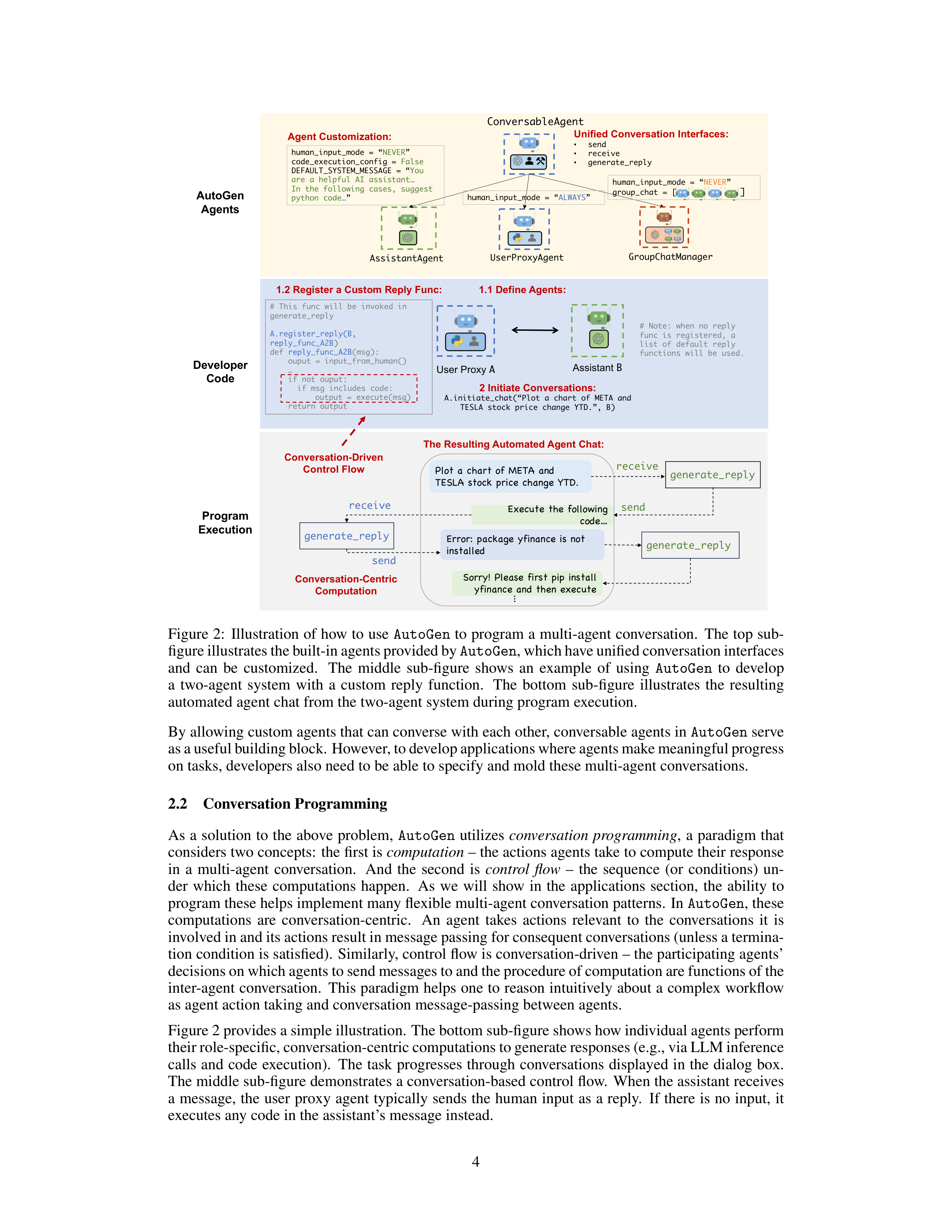
The yellow-shaded area of Figure 2 provides a sketch of the built-in
agents
in
AutoGen
.
The
ConversableAgent
class
is
the
highest-level
agent
abstraction
and,
by
default,
can
use
LLMs,
humans,
and
tools.
The
AssistantAgent
and
UserProxyAgent
are
two
pre-configured
ConversableAgent
subclasses, each representing a common usage mode, i.e., act-
ing
as
an
AI
assistant
(backed
by
LLMs)
and
acting
as
a
human
proxy
to
solicit
human
input
or
execute code/function calls (backed by humans and/or tools).
In
the
example
on
the
right-hand
side
of
Figure
1,
an
LLM-backed
assistant
agent
and
a
tool-
and
human-backed
user
proxy
agent
are
deployed
together
to
tackle
a
task.
Here,
the
assistant
agent
generates a solution with the help of LLMs and passes the solution to the user proxy agent.
Then,
the user proxy agent solicits human inputs or executes the assistant’s code and passes the results as
feedback back to the assistant.
4
Appendix C presents an example of such novel prompting techniques which empowers the default LLM-
backed assistant agent in
AutoGen
to converse with other agents in multi-step problem solving.
3













2 Initiate Conversations:
A.initiate_chat(“Plot a chart of META and
TESLA stock price change YTD.”, B)
Assistant
B
User Proxy
A
AutoGen
Agents
Developer
Code
# This func
will be invoked in
generate_reply
A.register_reply(B,
reply_func_A2B
)
def
reply_func_A2B
(msg):
ouput
= input_from_human()
…
if not ouput:
if msg includes code:
output = execute(msg)
return output
ConversableAgent
AssistantAgent
UserProxyAgent
human_input_mode
= “
NEVER
”
code_execution_config
=
False
DEFAULT_SYSTEM_MESSAGE = “
You
are a helpful AI assistant…
In the following cases, suggest
python code
…
”
human_input_mode
=
“
ALWAYS
”
GroupChatManager
human_input_mode
= “
NEVER
”
group_chat
= [
]
# Note: when no reply
func
is registered, a
list of default reply
functions will be used.
Agent Customization:
Program
Execution
Plot a chart of META and
TESLA stock price change YTD.
Execute the following
code…
send
receive
receive
Conversation-Centric
Computation
generate_reply
Error: package yfinance
is not
installed
send
generate_reply
Sorry! Please first pip install
yfinance
and then execute
Conversation-Driven
Control Flow
generate_reply
The Resulting Automated Agent Chat:
…
1.2 Register a Custom Reply Func:
1.1 Define Agents:
Unified Conversation Interfaces:
•
send
•
receive
•
generate_reply
Figure 2:
Illustration of how to use
AutoGen
to program a multi-agent conversation.
The top sub-
figure illustrates the built-in agents provided by
AutoGen
, which have unified conversation interfaces
and
can
be
customized.
The
middle
sub-figure
shows
an
example
of
using
AutoGen
to
develop
a
two-agent
system
with
a
custom
reply
function.
The
bottom
sub-figure
illustrates
the
resulting
automated agent chat from the two-agent system during program execution.
By allowing custom agents that can converse with each other, conversable agents in
AutoGen
serve
as a useful building block. However, to develop applications where agents make meaningful progress
on tasks, developers also need to be able to specify and mold these multi-agent conversations.
2.2
Conversation Programming
As
a
solution
to
the
above
problem,
AutoGen
utilizes
conversation
programming
,
a
paradigm
that
considers two concepts:
the first is
computation
– the actions agents take to compute their response
in
a
multi-agent
conversation.
And
the
second
is
control
flow
–
the
sequence
(or
conditions)
un-
der
which
these
computations
happen.
As
we
will
show
in
the
applications
section,
the
ability
to
program these helps implement many flexible multi-agent conversation patterns.
In
AutoGen
, these
computations
are
conversation-centric.
An
agent
takes
actions
relevant
to
the
conversations
it
is
involved in and its actions result in message passing for consequent conversations (unless a termina-
tion condition is satisfied).
Similarly, control flow is conversation-driven – the participating agents’
decisions on which agents to send messages to and the procedure of computation are functions of the
inter-agent conversation.
This paradigm helps one to reason intuitively about a complex workflow
as agent action taking and conversation message-passing between agents.
Figure 2 provides a simple illustration.
The bottom sub-figure shows how individual agents perform
their role-specific, conversation-centric computations to generate responses (e.g., via LLM inference
calls
and
code
execution).
The
task
progresses
through
conversations
displayed
in
the
dialog
box.
The middle sub-figure demonstrates a conversation-based control flow.
When the assistant receives
a message,
the user proxy agent typically sends the human input as a reply.
If there is no input,
it
executes any code in the assistant’s message instead.
4
AutoGen
features the following design patterns to facilitate conversation programming:
1.
Unified
interfaces
and
auto-reply
mechanisms
for
automated
agent
chat.
Agents
in
AutoGen
have
unified
conversation
interfaces
for
performing
the
corresponding
conversation-
centric computation, including a
send/receive
function for sending/receiving messages and a
generate
reply
function
for
taking
actions
and
generating
a
response
based
on
the
received
message.
AutoGen
also
introduces
and
by
default
adopts
an
agent
auto-reply
mechanism
to
realize conversation-driven control:
Once an agent receives a message from another agent, it au-
tomatically invokes
generate
reply
and sends the reply back to the sender unless a termination
condition is satisfied.
AutoGen
provides built-in reply functions based on LLM inference, code
or function execution, or human input.
One can also register custom reply functions to customize
the behavior pattern of an agent,
e.g.,
chatting with another agent before replying to the sender
agent.
Under
this
mechanism,
once
the
reply
functions
are
registered,
and
the
conversation
is
initialized, the conversation flow is naturally induced, and thus the agent conversation proceeds
naturally
without
any
extra
control
plane,
i.e.,
a
special
module
that
controls
the
conversation
flow.
For example, with the developer code in the blue-shaded area (marked “Developer Code”)
of
Figure
2,
one
can
readily
trigger
the
conversation
among
the
agents,
and
the
conversation
would proceed automatically, as shown in the dialog box in the grey shaded area (marked “Pro-
gram Execution”) of Figure 2.
The auto-reply mechanism provides a decentralized, modular, and
unified way to define the workflow.
2.
Control
by
fusion
of
programming
and
natural
language.
AutoGen
allows
the
usage
of
programming
and
natural
language
in
various
control
flow
management
patterns:
1)
Natural-
language control via LLMs.
In
AutoGen
, one can control the conversation flow by prompting
the LLM-backed agents with natural language.
For instance,
the default system message of the
built-in
AssistantAgent
in
AutoGen
uses
natural
language
to
instruct
the
agent
to
fix
errors
and generate code again if the previous result indicates there are errors.
It also guides the agent
to confine the LLM output to certain structures, making it easier for other tool-backed agents to
consume.
For
example,
instructing
the
agent
to
reply
with
“TERMINATE”
when
all
tasks
are
completed
to
terminate
the
program.
More
concrete
examples
of
natural
language
controls
can
be found in Appendix C. 2)
Programming-language control.
In
AutoGen
, Python code can be
used to specify the termination condition, human input mode, and tool execution logic, e.g., the
max number
of auto replies.
One can also register programmed auto-reply functions to control
the conversation flow with Python code, as shown in the code block identified as “Conversation-
Driven Control Flow” in Figure 2.
3)
Control transition between natural and programming
language.
AutoGen
also supports flexible control transition between natural and programming
language.
One can achieve transition from code to natural-language control by invoking an LLM
inference containing certain control logic in a customized reply function; or transition from nat-
ural language to code control via LLM-proposed function calls (Eleti et al., 2023).
In
the
conversation
programming
paradigm,
one
can
realize
multi-agent
conversations
of
diverse
patterns.
In
addition
to
static
conversation
with
predefined
flow,
AutoGen
also
supports
dynamic
conversation
flows
with
multiple
agents.
AutoGen
provides
two
general
ways
to
achieve
this:
1)
Customized
generate
reply
function:
within
the
customized
generate
reply
function,
one
agent can
hold the current
conversation while invoking conversations with other agents depending
on the content of the current message and context.
2) Function calls:
In this approach, LLM decides
whether
or
not
to
call
a
particular
function
depending
on
the
conversation
status.
By
messaging
additional agents in the called functions, the LLM can drive dynamic multi-agent conversation.
In
addition,
AutoGen
supports
more
complex
dynamic
group
chat
via
built-in
GroupChatManager
,
which can dynamically select the next speaker and then broadcast its response to other agents.
We
elaborate on this feature and its application in Section 3.
We provide implemented working systems
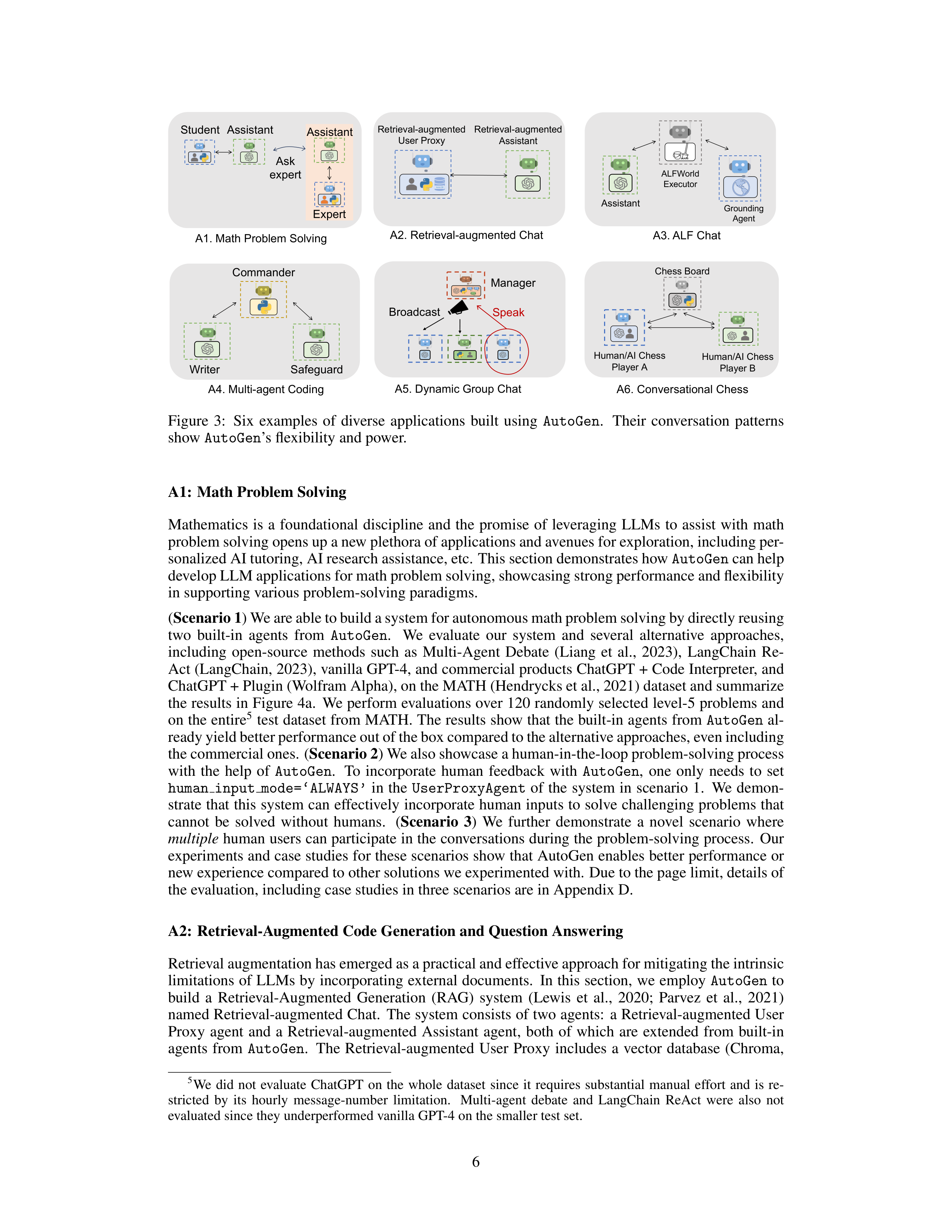
to showcase all these different patterns, with some of them visualized in Figure 3.
3
Applications of
AutoGen
We demonstrate six applications using
AutoGen
(see Figure 3) to illustrate its potential in simplify-
ing the development of high-performance multi-agent applications.
These applications are selected
based on their real-world relevance (A1, A2, A4, A5, A6), problem difficulty and solving capabil-
ities
enabled
by
AutoGen
(A1,
A2,
A3,
A4),
and
innovative
potential
(A5,
A6).
Together,
these
criteria showcase
AutoGen
’s role in advancing the LLM-application landscape.
5




































A1. Math Problem Solving
A4. Multi-agent Coding
Commander
Safeguard
Writer
A6. Conversational Chess
A2. Retrieval-augmented Chat
Retrieval-augmented
Assistant
Retrieval-augmented
User Proxy
Chess Board
Human/AI Chess
Player A
Human/AI Chess
Player B
Student
Assistant
Assistant
Expert
Ask
expert
Broadcast
Manager
Speak
A5. Dynamic Group Chat
ALFWorld
Executor
Assistant
Grounding
Agent
A3. ALF Chat
Figure
3:
Six
examples
of
diverse
applications
built
using
AutoGen
.
Their
conversation
patterns
show
AutoGen
’s flexibility and power.
A1:
Math Problem Solving
Mathematics
is
a
foundational
discipline
and
the
promise
of
leveraging
LLMs
to
assist
with
math
problem solving opens up a new plethora of applications and avenues for exploration, including per-
sonalized AI tutoring, AI research assistance, etc.
This section demonstrates how
AutoGen
can help
develop LLM applications for math problem solving, showcasing strong performance and flexibility
in supporting various problem-solving paradigms.
(
Scenario 1
) We are able to build a system for autonomous math problem solving by directly reusing
two
built-in
agents
from
AutoGen
.
We
evaluate
our
system
and
several
alternative
approaches,
including
open-source
methods
such
as
Multi-Agent
Debate
(Liang
et
al.,
2023),
LangChain
Re-
Act (LangChain, 2023), vanilla GPT-4, and commercial products ChatGPT + Code Interpreter, and
ChatGPT + Plugin (Wolfram Alpha), on the MATH (Hendrycks et al., 2021) dataset and summarize
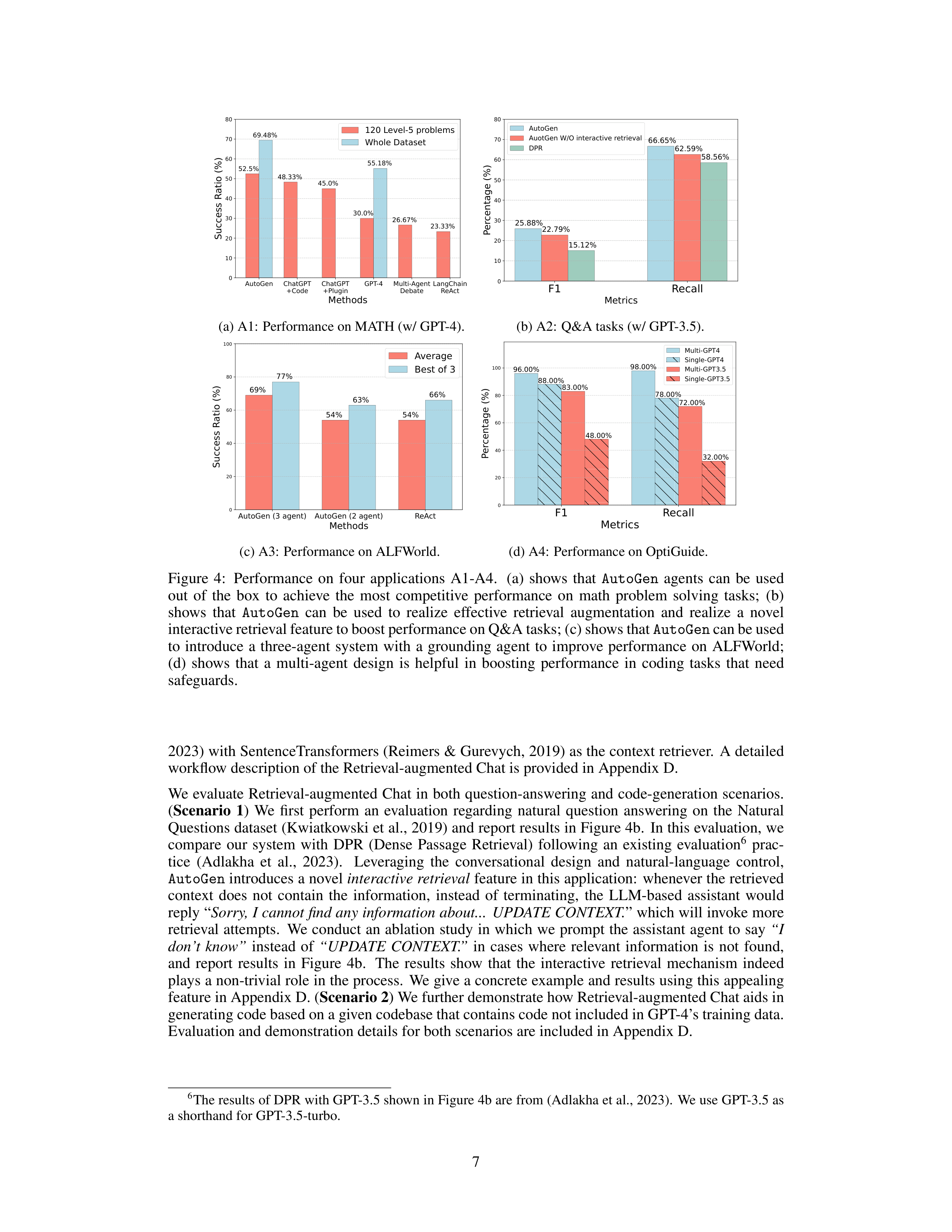
the results in Figure 4a.
We perform evaluations over 120 randomly selected level-5 problems and
on the entire
5
test dataset from MATH. The results show that the built-in agents from
AutoGen
al-
ready yield better performance out of the box compared to the alternative approaches, even including
the commercial ones.
(
Scenario 2
) We also showcase a human-in-the-loop problem-solving process
with
the
help
of
AutoGen
.
To
incorporate
human
feedback
with
AutoGen
,
one
only
needs
to
set
human
input
mode=‘ALWAYS’
in
the
UserProxyAgent
of
the
system
in
scenario
1.
We
demon-
strate that this system can effectively incorporate human inputs to solve challenging problems that
cannot
be
solved
without
humans.
(
Scenario
3
)
We
further
demonstrate
a
novel
scenario
where
multiple
human users can participate in the conversations during the problem-solving process.
Our
experiments and case studies for these scenarios show that AutoGen enables better performance or
new experience compared to other solutions we experimented with.
Due to the page limit, details of
the evaluation, including case studies in three scenarios are in Appendix D.
A2:
Retrieval-Augmented Code Generation and Question Answering
Retrieval augmentation has emerged as a practical and effective approach for mitigating the intrinsic
limitations of LLMs by incorporating external documents.
In this section,
we employ
AutoGen
to
build
a
Retrieval-Augmented
Generation
(RAG)
system
(Lewis
et
al.,
2020;
Parvez
et
al.,
2021)
named Retrieval-augmented Chat.
The system consists of two agents:
a Retrieval-augmented User
Proxy
agent
and
a
Retrieval-augmented
Assistant
agent,
both
of
which
are
extended
from
built-in
agents
from
AutoGen
.
The
Retrieval-augmented
User
Proxy
includes
a
vector
database
(Chroma,
5
We
did
not
evaluate
ChatGPT
on
the
whole
dataset
since
it
requires
substantial
manual
effort
and
is
re-
stricted
by
its
hourly
message-number
limitation.
Multi-agent
debate
and
LangChain
ReAct
were
also
not
evaluated since they underperformed vanilla GPT-4 on the smaller test set.
6
AutoGen
ChatGPT
+Code
ChatGPT
+Plugin
GPT-4
Multi-Agent
Debate
LangChain
ReAct
Methods
0
10
20
30
40
50
60
70
80
Success Ratio (%)
52.5%
48.33%
45.0%
30.0%
26.67%
23.33%
69.48%
55.18%
120 Level-5 problems
Whole Dataset
(a) A1:
Performance on MATH (w/ GPT-4).
F1
Recall
Metrics
0
10
20
30
40
50
60
70
80
Percentage (%)
25.88%
66.65%
15.12%
58.56%
22.79%
62.59%
AutoGen
AuotGen W/O interactive retrieval
DPR
(b) A2:
Q&A tasks (w/ GPT-3.5).
AutoGen (3 agent)
AutoGen (2 agent)
ReAct
Methods
0
20
40
60
80
100
Success Ratio (%)
69%
54%
54%
77%
63%
66%
Average
Best of 3
(c) A3:
Performance on ALFWorld.
F1
Recall
Metrics
0
20
40
60
80
100
Percentage (%)
96.00%
98.00%
88.00%
78.00%
83.00%
72.00%
48.00%
32.00%
Multi-GPT4
Single-GPT4
Multi-GPT3.5
Single-GPT3.5
(d) A4:
Performance on OptiGuide.
Figure
4:
Performance
on
four
applications
A1-A4.
(a)
shows
that
AutoGen
agents
can
be
used
out
of
the
box
to
achieve
the
most
competitive
performance
on
math
problem
solving
tasks;
(b)
shows
that
AutoGen
can
be
used
to
realize
effective
retrieval
augmentation
and
realize
a
novel
interactive retrieval feature to boost performance on Q&A tasks; (c) shows that
AutoGen
can be used
to
introduce
a
three-agent
system
with
a
grounding
agent
to
improve
performance
on
ALFWorld;
(d)
shows
that
a
multi-agent
design
is
helpful
in
boosting
performance
in
coding
tasks
that
need
safeguards.
2023) with SentenceTransformers (Reimers & Gurevych, 2019) as the context retriever.
A detailed
workflow description of the Retrieval-augmented Chat is provided in Appendix D.
We evaluate Retrieval-augmented Chat in both question-answering and code-generation scenarios.
(
Scenario
1
)
We
first
perform
an
evaluation
regarding
natural
question
answering
on
the
Natural
Questions dataset (Kwiatkowski et al., 2019) and report results in Figure 4b.
In this evaluation, we
compare
our
system
with
DPR
(Dense
Passage
Retrieval)
following
an
existing
evaluation
6
prac-
tice
(Adlakha
et
al.,
2023).
Leveraging
the
conversational
design
and
natural-language
control,
AutoGen
introduces a novel
interactive retrieval
feature in this application:
whenever the retrieved
context
does
not
contain
the
information,
instead
of
terminating,
the
LLM-based
assistant
would
reply “
Sorry, I cannot find any information about...
UPDATE CONTEXT.
” which will invoke more
retrieval
attempts.
We
conduct
an
ablation study in
which we prompt
the assistant
agent to say
“I
don’t
know”
instead
of
“UPDATE
CONTEXT.”
in
cases
where
relevant
information
is
not
found,
and
report
results
in
Figure
4b.
The
results
show
that
the
interactive
retrieval
mechanism
indeed
plays a non-trivial role in the process.
We give a concrete example and results using this appealing
feature in Appendix D. (
Scenario 2
) We further demonstrate how Retrieval-augmented Chat aids in
generating code based on a given codebase that contains code not included in GPT-4’s training data.
Evaluation and demonstration details for both scenarios are included in Appendix D.
6
The results of DPR with GPT-3.5 shown in Figure 4b are from (Adlakha et al., 2023).
We use GPT-3.5 as
a shorthand for GPT-3.5-turbo.
7
A3:
Decision Making in Text World Environments
In this subsection, we demonstrate how
AutoGen
can be used to develop effective applications that
involve interactive or online decision making.
We perform the study using the ALFWorld (Shridhar
et al., 2021) benchmark, which includes a diverse collection of synthetic language-based interactive
decision-making tasks in household environments.
With
AutoGen
,
we implemented a two-agent system to solve tasks from ALFWorld.
It consists of
an LLM-backed assistant agent responsible for suggesting plans to conduct a task and an executor
agent responsible for executing actions in the ALFWorld environments.
This system integrates Re-
Act prompting (Yao et al., 2022), and is able to achieve similar performance.
A common challenge
encountered in both ReAct and the
AutoGen
-based two-agent system is their occasional inability to
leverage basic commonsense knowledge about the physical world.
This deficiency can lead to the
system getting stuck in a loop due to repetitive errors.
Fortunately, the modular design of
AutoGen
allows
us
to
address
this
issue
effectively:
With
AutoGen
,
we
are
able
to
introduce
a
grounding
agent, which supplies crucial commonsense knowledge–such as
“You must find and take the object
before you can examine it. You must go to where the target object is before you can use it.”
–whenever
the system exhibits early signs of recurring errors.
It significantly enhances the system’s ability to
avoid getting entangled in error loops. We compare the task-solving performance of the two variants
of our system with GPT-3.5-turbo and ReAct
7
on the 134 unseen tasks from ALFWorld and report
results
in
Figure
4c.
The
results
show
that
introducing
a
grounding
agent
could
bring
in
a
15%
performance gain on average.
Upon examining the systems’ outputs, we observe that the grounding
agent, by delivering background commonsense knowledge at the right junctures, significantly miti-
gated the tendency of the system to persist with a flawed plan, thereby avoiding the creation of error
loops.
For an example trajectory comparing the systems see Appendix D, Figure 10.
A4:
Multi-Agent Coding
In
this
subsection,
we
use
AutoGen
to
build
a
multi-agent
coding
system
based
on
OptiGuide
(Li
et
al.,
2023a),
a
system
that
excels
at
writing
code
to
interpret
optimization
solutions
and
answer
user
questions,
such
as
exploring
the
implications
of
changing
a
supply-chain
decision
or
under-
standing why the optimizer made a particular choice.
The second sub-figure of Figure 3 shows the
AutoGen
-based implementation.
The workflow is as follows:
the end user sends questions, such as
“
What if we prohibit shipping from supplier 1 to roastery 2?
” to the Commander agent.
The Com-
mander
coordinates
with
two
assistant
agents,
including
the
Writer
and
the
Safeguard,
to
answer
the question.
The Writer will craft code and send the code to the Commander.
After receiving the
code,
the
Commander
checks
the
code
safety
with
the
Safeguard;
if
cleared,
the
Commander
will
use external tools (e.g., Python) to execute the code, and request the Writer to interpret the execution
results.
For instance, the writer may say “
if we prohibit shipping from supplier 1 to roastery 2, the
total cost would increase by 10.5%.
” The Commander then provides this concluding answer to the
end user.
If, at a particular step, there is an exception, e.g., security red flag raised by Safeguard, the
Commander redirects the issue back to the Writer with debugging information.
The process might
be repeated multiple times until the user’s question is answered or timed-out.
With
AutoGen
the core workflow code for OptiGuide was reduced from over 430 lines to 100 lines,
leading
to
significant
productivity
improvement.
We
provide
a
detailed
comparison
of
user
expe-
rience
with
ChatGPT+Code
Interpreter
and
AutoGen
-based
OptiGuide
in
Appendix
D,
where
we
show that
AutoGen
-based OptiGuide could save around 3x of user’s time and reduce user interac-
tions by 3 - 5 times on average.
We also conduct an ablation showing that multi-agent abstraction is
necessary.
Specifically, we construct a single-agent approach where a single agent conducts both the
code-writing and safeguard processes. We tested the single- and multi-agent approaches on a dataset
of 100 coding tasks, which is crafted to include equal numbers of safe and unsafe tasks.
Evaluation
results as reported in Figure 4d show that the multi-agent design boosts the F-1 score in identifying
unsafe code by 8% (with GPT-4) and 35% (with GPT-3.5-turbo).
7
Results
of
ReAct
are
obtained
by
directly
running
its
official
code
with
default
settings.
The
code
uses
text-davinci-003
as backend LM and does not support GPT-3.5-turbo or GPT-4.
8
A5:
Dynamic Group Chat
AutoGen
provides
native
support
for
a
dynamic
group
chat
communication
pattern,
in
which
par-
ticipating agents share the same context and converse with the others in a dynamic manner instead
of following a pre-defined order.
Dynamic group chat relies on ongoing conversations to guide the
flow
of
interaction
among
agents.
These
make
dynamic
group
chat
ideal
for
situations
where
col-
laboration without strict communication order is beneficial.
In
AutoGen
,
the
GroupChatManager
class
serves
as
the
conductor
of
conversation
among
agents
and
repeats
the
following
three
steps:
dynamically
selecting
a
speaker,
collecting
responses
from
the
selected
speaker,
and
broadcasting
the message (Figure 3-A5).
For the dynamic speaker-selection component, we use a role-play style
prompt.
Through a pilot study on 12 manually crafted complex tasks,
we observed that compared
to a prompt that is purely based on the task, utilizing a role-play prompt often leads to more effec-
tive consideration of both conversation context and role alignment during the problem-solving and
speaker-selection
process.
Consequently,
this
leads
to
a
higher
success
rate
and
fewer
LLM
calls.
We include detailed results in Appendix D.
A6:
Conversational Chess
Using
AutoGen
,
we
developed
Conversational
Chess,
a
natural
language
interface
game
shown
in
the last sub-figure of Figure 3.
It features built-in agents for players, which can be human or LLM,
and a third-party board agent to provide information and validate moves based on standard rules.
With
AutoGen
, we enabled two essential features:
(1) Natural, flexible, and engaging game dynam-
ics, enabled by the customizable agent design in
AutoGen
.
Conversational Chess supports a range
of
game-play
patterns,
including
AI-AI,
AI-human,
and
human-human,
with
seamless
switching
between these modes during a single game.
An illustrative example of these entertaining game dy-
namics can be found in Figure 15, Appendix D. (2) Grounding, which is a crucial aspect to maintain
game integrity.
During gameplay, the board agent checks each proposed move for legality; if a move
is invalid, the agent responds with an error, prompting the player agent to re-propose a legal move
before continuing.
This process ensures that only valid moves are played and helps maintain a con-
sistent gaming experience. As an ablation study, we removed the board agent and instead only relied
on a relevant prompt
“you should make sure both you and the opponent are making legal moves”
to
ground their move.
The results highlighted that without the board agent, illegitimate moves caused
game
disruptions.
The
modular
design
offered
flexibility,
allowing
swift
adjustments
to
the
board
agent in response to evolving game rules or varying chess rule variants.
A comprehensive demon-
stration of this ablation study is in Appendix D.
4
Discussion
We
introduced
an
open-source
library,
AutoGen
,
that
incorporates
the
paradigms
of
conversable
agents and conversation programming.
This library utilizes capable agents that are well-suited for
multi-agent
cooperation.
It
features
a
unified
conversation
interface
among
the
agents,
along
with
an auto-reply mechanisms, which help establish an agent-interaction interface that capitalizes on the
strengths
of
chat-optimized
LLMs
with
broad
capabilities
while
accommodating
a
wide
range
of
applications.
AutoGen
serves
as
a
general
framework
for
creating
and
experimenting
with
multi-
agent
systems
that
can
easily
fulfill
various
practical
requirements,
such
as
reusing,
customizing,
and extending existing agents, as well as programming conversations between them.
Our experiments, as detailed in Section 3, demonstrate that this approach offers numerous benefits.
The adoption of
AutoGen
has resulted in improved performance (over state-of-the-art approaches),
reduced
development
code,
and
decreased
manual
burden
for
existing
applications.
It
offers
flex-
ibility
to
developers,
as
demonstrated
in
A1
(scenario
3),
A5,
and
A6,
where
AutoGen
enables
multi-agent chats to follow a dynamic pattern rather than fixed back-and-forth interactions. It allows
humans to engage in activities alongside multiple AI agents in a conversational manner.
Despite the
complexity of these applications (most involving more than two agents or dynamic multi-turn agent
cooperation), the implementation based on
AutoGen
remains straightforward. Dividing tasks among
separate agents promotes modularity.
Furthermore, since each agent can be developed, tested, and
maintained separately, this approach simplifies overall development and code management.
9
Although
this
work
is
still
in
its
early
experimental
stages,
it
paves
the
way
for
numerous
future
directions and research opportunities.
For instance, we can explore effective integration of existing
agent implementations into our multi-agent framework and investigate the optimal balance between
automation and human control in multi-agent workflows. As we further develop and refine
AutoGen
,
we aim to investigate which strategies, such as agent topology and conversation patterns, lead to the
most
effective
multi-agent
conversations
while
optimizing
the
overall
efficiency,
among
other
fac-
tors.
While increasing the number of agents and other degrees of freedom presents opportunities for
tackling more complex problems, it may also introduce new safety challenges that require additional
studies and careful consideration.
We provide more discussion in Appendix B, including guidelines for using
AutoGen
and direction
of future work.
We hope
AutoGen
will help improve many LLM applications in terms of speed of
development,
ease
of
experimentation,
and
overall
effectiveness
and
safety.
We
actively
welcome
contributions from the broader community.
Ethics statement
There are several potential ethical considerations that could arise from the development and use of
the
AutoGen
framework.
•
Privacy
and
Data
Protection:
The
framework
allows
for
human
participation
in
conversations
between agents.
It is important to ensure that user data and conversations are protected, and that
developers use appropriate measures to safeguard privacy.
•
Bias and Fairness:
LLMs have been shown to exhibit biases present in their training data (Navigli
et al., 2023).
When using LLMs in the
AutoGen
framework, it is crucial to address and mitigate
any
biases
that
may
arise
in
the
conversations
between
agents.
Developers
should
be
aware
of
potential biases and take steps to ensure fairness and inclusivity.
•
Accountability and Transparency:
As discussed in the future work section, as the framework in-
volves multiple agents conversing and cooperating, it is important to establish clear accountability
and transparency mechanisms.
Users should be able to understand and trace the decision-making
process of the agents involved in order to ensure accountability and address any potential issues
or biases.
•
Trust
and
Reliance:
AutoGen
leverages
human
understanding
and
intelligence
while
providing
automation
through
conversations
between
agents.
It
is
important
to
consider
the
impact
of
this
interaction on user experience, trust, and reliance on AI systems.
Clear communication and user
education about the capabilities and limitations of the system will be essential (Cai et al., 2019).
•
Unintended Consequences: As discussed before, the use of multi-agent conversations and automa-
tion in complex tasks may have unintended consequences.
In particular, allowing LLM agents to
make changes in external environments through code execution or function calls, such as installing
packages, could be risky.
Developers should carefully consider the potential risks and ensure that
appropriate safeguards are in place to prevent harm or negative outcomes.
Acknowledgements
The work presented in this report was made possible through discussions and feedback from Peter
Lee,
Johannes
Gehrke,
Eric
Horvitz,
Steven
Lucco,
Umesh
Madan,
Robin
Moeur,
Piali
Choud-
hury, Saleema Amershi, Adam Fourney, Victor Dibia, Guoqing Zheng, Corby Rosset, Ricky Loynd,
Ece
Kamar,
Rafah
Hosn,
John
Langford,
Ida
Momennejad,
Brian
Krabach,
Taylor
Webb,
Shanka
Subhra Mondal, Wei-ge Chen, Robert Gruen, Yinan Li, Yue Wang, Suman Nath, Tanakorn Leesat-
apornwongsa, Xin Wang, Shishir Patil, Tianjun Zhang, Saehan Jo, Ishai Menache, Kontantina Mel-
lou, Runlong Zhou, Feiran Jia, Hamed Khanpour, Hamid Palangi, Srinagesh Sharma, Julio Albinati
Cortez, Amin Saied, Yuzhe Ma, Dujian Ding, Linyong Nan, Prateek Yadav, Shannon Shen, Ankur
Mallick, Mark Encarnaci´on, Lars Liden, Tianwei Yue, Julia Kiseleva, Anastasia Razdaibiedina, and
Luciano Del Corro.
Qingyun Wu would like to acknowledge the funding and research support from
the College of Information Science and Technology at Penn State University.
10
References
Vaibhav Adlakha, Parishad BehnamGhader, Xing Han Lu, Nicholas Meade, and Siva Reddy.
Eval-
uating correctness and faithfulness of instruction-following models for question answering.
arXiv
preprint arXiv:2307.16877
, 2023.
Saleema
Amershi,
Dan
Weld,
Mihaela
Vorvoreanu,
Adam
Fourney,
Besmira
Nushi,
Penny
Col-
lisson,
Jina
Suh,
Shamsi
Iqbal,
Paul
N
Bennett,
Kori
Inkpen,
et
al.
Guidelines
for
human-ai
interaction.
In
Proceedings of the 2019 chi conference on human factors in computing systems
,
2019.
Dario Amodei, Chris Olah, Jacob Steinhardt, Paul Christiano, John Schulman, and Dan Man´e.
Con-
crete problems in ai safety, 2016.
AutoGPT.
Documentation — auto-gpt.
https://docs.agpt.co/
, 2023.
BabyAGI.
Github — babyagi.
https://github.com/yoheinakajima/babyagi
, 2023.
Carrie
J.
Cai,
Samantha
Winter,
David
F.
Steiner,
Lauren
Wilcox,
and
Michael
Terry.
”hello
ai”:
Uncovering
the
onboarding
needs
of
medical
practitioners
for
human-ai
collaborative
decision-
making.
Proceedings of the ACM on Human-Computer Interaction
, 2019.
Tianle Cai, Xuezhi Wang, Tengyu Ma, Xinyun Chen, and Denny Zhou.
Large language models as
tool makers.
arXiv preprint arXiv:2305.17126
, 2023.
Chroma.
Chromadb.
https://github.com/chroma-core/chroma
, 2023.
Victor Dibia.
LIDA: A tool for automatic generation of grammar-agnostic visualizations and info-
graphics using large language models.
In
Proceedings of the 61st Annual Meeting of the Associ-
ation for Computational Linguistics (Volume 3:
System Demonstrations)
, Toronto, Canada, July
2023. Association for Computational Linguistics.
Yihong Dong, Xue Jiang, Zhi Jin, and Ge Li.
Self-collaboration code generation via chatgpt.
arXiv
preprint arXiv:2304.07590
, 2023.
Yilun
Du,
Shuang
Li,
Antonio
Torralba,
Joshua
B
Tenenbaum,
and
Igor
Mordatch.
Improv-
ing
factuality
and
reasoning
in
language
models
through
multiagent
debate.
arXiv
preprint
arXiv:2305.14325
, 2023.
Atty
Eleti,
Jeff
Harris,
and
Logan
Kilpatrick.
Function
calling
and
other
api
updates.
https:
//openai.com/blog/function-calling-and-other-api-updates
, 2023.
Guidance.
Guidance.
https://github.com/guidance-ai/guidance
, 2023.
Dan Hendrycks, Collin Burns, Saurav Kadavath, Akul Arora, Steven Basart, Eric Tang, Dawn Song,
and
Jacob
Steinhardt.
Measuring
mathematical
problem
solving
with
the
math
dataset.
arXiv
preprint arXiv:2103.03874
, 2021.
Sirui
Hong,
Xiawu
Zheng,
Jonathan
Chen,
Yuheng
Cheng,
Ceyao
Zhang,
Zili
Wang,
Steven
Ka
Shing
Yau,
Zijuan
Lin,
Liyang
Zhou,
Chenyu
Ran,
et
al.
Metagpt:
Meta
programming
for
multi-agent collaborative framework.
arXiv preprint arXiv:2308.00352
, 2023.
Eric Horvitz. Principles of mixed-initiative user interfaces. In
Proceedings of the SIGCHI conference
on Human Factors in Computing Systems
, 1999.
HuggingFace.
Transformers
agent.
https://huggingface.co/docs/transformers/
transformers_agents
, 2023.
Geunwoo
Kim,
Pierre
Baldi,
and
Stephen
McAleer.
Language
models
can
solve
computer
tasks.
arXiv preprint arXiv:2303.17491
, 2023.
Tom
Kwiatkowski,
Jennimaria
Palomaki,
Olivia
Redfield,
Michael
Collins,
Ankur
Parikh,
Chris
Alberti, Danielle Epstein, Illia Polosukhin, Jacob Devlin, Kenton Lee, et al.
Natural questions:
a
benchmark for question answering research.
Transactions of the Association for Computational
Linguistics
, 2019.
11
LangChain.
Introduction — langchain.
https://python.langchain.com/en/latest/index.
html
, 2023.
Mike Lewis, Denis Yarats, Yann N Dauphin, Devi Parikh, and Dhruv Batra.
Deal or no deal?
end-
to-end learning for negotiation dialogues.
arXiv preprint arXiv:1706.05125
, 2017.
Patrick Lewis, Ethan Perez, Aleksandra Piktus, Fabio Petroni, Vladimir Karpukhin, Naman Goyal,
Heinrich
K¨uttler,
Mike
Lewis,
Wen-tau
Yih,
Tim
Rockt¨aschel,
et
al.
Retrieval-augmented
gen-
eration for knowledge-intensive nlp tasks.
Advances in Neural Information Processing Systems
,
2020.
Beibin
Li,
Konstantina
Mellou,
Bo
Zhang,
Jeevan
Pathuri,
and
Ishai
Menache.
Large
language
models for supply chain optimization.
arXiv preprint arXiv:2307.03875
, 2023a.
Guohao Li, Hasan Abed Al Kader Hammoud, Hani Itani, Dmitrii Khizbullin, and Bernard Ghanem.
Camel:
Communicative
agents
for
”mind”
exploration
of
large
scale
language
model
society,
2023b.
Tian Liang, Zhiwei He, Wenxiang Jiao, Xing Wang, Yan Wang, Rui Wang, Yujiu Yang, Zhaopeng
Tu,
and Shuming Shi.
Encouraging divergent thinking in large language models through multi-
agent debate, 2023.
Evan
Zheran
Liu,
Kelvin
Guu,
Panupong
Pasupat,
Tianlin
Shi,
and
Percy
Liang.
Reinforcement
learning on web interfaces using workflow-guided exploration.
arXiv preprint arXiv:1802.08802
,
2018.
Jerry Liu. LlamaIndex, November 2022. URL
https://github.com/jerryjliu/llama_index
.
Volodymyr Mnih, Koray Kavukcuoglu, David Silver, Alex Graves, Ioannis Antonoglou, Daan Wier-
stra,
and
Martin
Riedmiller.
Playing
atari
with
deep
reinforcement
learning.
arXiv
preprint
arXiv:1312.5602
, 2013.
Roberto Navigli, Simone Conia, and Bj¨orn Ross.
Biases in large language models:
Origins, inven-
tory and discussion.
ACM Journal of Data and Information Quality
, 2023.
OpenAI.
ChatGPT plugins.
https://openai.com/blog/chatgpt-plugins
, 2023.
Joon
Sung
Park,
Joseph
C
O’Brien,
Carrie
J
Cai,
Meredith
Ringel
Morris,
Percy
Liang,
and
Michael S Bernstein.
Generative agents:
Interactive simulacra of human behavior.
arXiv preprint
arXiv:2304.03442
, 2023.
Md Rizwan Parvez,
Wasi Uddin Ahmad,
Saikat Chakraborty,
Baishakhi Ray,
and Kai-Wei Chang.
Retrieval
augmented
code
generation
and
summarization.
arXiv
preprint
arXiv:2108.11601
,
2021.
Shishir G. Patil, Tianjun Zhang, Xin Wang, and Joseph E. Gonzalez.
Gorilla: Large language model
connected with massive apis.
arXiv preprint arXiv:2305.15334
, 2023.
Nils
Reimers
and
Iryna
Gurevych.
Sentence-bert:
Sentence
embeddings
using
siamese
bert-
networks.
In
Proceedings
of
the
2019
Conference
on
Empirical
Methods
in
Natural
Language
Processing
.
Association
for
Computational
Linguistics,
11
2019.
URL
https://arxiv.org/
abs/1908.10084
.
Semantic-Kernel.
Semantic
kernel.
https://github.com/microsoft/semantic-kernel
,
2023.
Bokui
Shen,
Fei
Xia,
Chengshu
Li,
Roberto
Mart´ın-Mart´ın,
Linxi
Fan,
Guanzhi
Wang,
Claudia
P´erez-D’Arpino, Shyamal Buch, Sanjana Srivastava, Lyne Tchapmi, et al.
igibson 1.0:
A simu-
lation environment for interactive tasks in large realistic scenes.
In
2021 IEEE/RSJ International
Conference on Intelligent Robots and Systems (IROS)
. IEEE, 2021.
Tianlin Shi, Andrej Karpathy, Linxi Fan, Jonathan Hernandez, and Percy Liang.
World of bits:
An
open-domain platform for web-based agents.
In
International Conference on Machine Learning
.
PMLR, 2017.
12
Mohit Shridhar,
Xingdi Yuan,
Marc-Alexandre Cˆot´e,
Yonatan Bisk,
Adam Trischler,
and Matthew
Hausknecht.
ALFWorld:
Aligning Text and Embodied Environments for Interactive Learning.
In
Proceedings
of
the
International
Conference
on
Learning
Representations
(ICLR)
,
2021.
URL
https://arxiv.org/abs/2010.03768
.
Oriol
Vinyals,
Timo
Ewalds,
Sergey
Bartunov,
Petko
Georgiev,
Alexander
Sasha
Vezhnevets,
Michelle
Yeo,
Alireza
Makhzani,
Heinrich
K¨uttler,
John
Agapiou,
Julian
Schrittwieser,
et
al.
Starcraft ii:
A new challenge for reinforcement learning.
arXiv preprint arXiv:1708.04782
, 2017.
Chi Wang,
Qingyun Wu,
Markus Weimer,
and Erkang Zhu.
Flaml:
A fast and lightweight automl
library.
Proceedings of Machine Learning and Systems
, 2021.
Guanzhi
Wang,
Yuqi
Xie,
Yunfan
Jiang,
Ajay
Mandlekar,
Chaowei
Xiao,
Yuke
Zhu,
Linxi
Fan,
and Anima Anandkumar.
Voyager:
An open-ended embodied agent with large language models.
arXiv preprint arXiv:2305.16291
, 2023a.
Lei Wang, Chen Ma, Xueyang Feng, Zeyu Zhang, Hao Yang, Jingsen Zhang, Zhiyuan Chen, Jiakai
Tang, Xu Chen, Yankai Lin, et al.
A survey on large language model based autonomous agents.
arXiv preprint arXiv:2308.11432
, 2023b.
Daniel S. Weld and Oren Etzioni.
The first law of robotics (a call to arms).
In
AAAI Conference on
Artificial Intelligence
, 1994.
Max
Woolf.
Langchain
problem.
https://minimaxir.com/2023/07/langchain-problem/
,
2023.
Yiran
Wu,
Feiran
Jia,
Shaokun
Zhang,
Qingyun
Wu,
Hangyu
Li,
Erkang
Zhu,
Yue
Wang,
Yin
Tat
Lee, Richard Peng, and Chi Wang.
An empirical study on challenging math problem solving with
gpt-4.
arXiv preprint arXiv:2306.01337
, 2023.
Zhiheng Xi, Wenxiang Chen, Xin Guo, Wei He, Yiwen Ding, Boyang Hong, Ming Zhang, Junzhe
Wang, Senjie Jin, Enyu Zhou, et al.
The rise and potential of large language model based agents:
A survey.
arXiv preprint arXiv:2309.07864
, 2023.
Shunyu
Yao,
Jeffrey
Zhao,
Dian
Yu,
Nan
Du,
Izhak
Shafran,
Karthik
Narasimhan,
and
Yuan
Cao.
React:
Synergizing reasoning and acting in language models.
arXiv preprint arXiv:2210.03629
,
2022.
13
A
Related Work
We examine existing LLM-based agent systems or frameworks that can be used to build LLM appli-
cations.
We categorize the related work into single-agent and multi-agent systems and specifically
provide a summary of differentiators comparing
AutoGen
with existing multi-agent systems in Ta-
ble
1.
Note
that
many
of
these
systems
are
evolving
open-source
projects,
so
the
remarks
and
statements about them may only be accurate as of the time of writing.
We refer interested readers to
detailed LLM-based agent surveys
(Xi et al., 2023; Wang et al., 2023b)
Single-Agent Systems:
•
AutoGPT
:
AutoGPT
is
an
open-source
implementation
of
an
AI
agent
that
attempts
to
au-
tonomously achieve a given goal (AutoGPT, 2023).
It follows a single-agent paradigm in which
it augments the AI model with many useful tools, and does not support multi-agent collaboration.
•
ChatGPT+
(with
code
interpreter or plugin)
:
ChatGPT, a conversational AI
service or agent,
can
now
be
used
alongside
a
code
interpreter
or
plugin
(currently
available
only
under
the
pre-
mium subscription plan ChatGPT Plus) (OpenAI, 2023).
The code interpreter enables ChatGPT
to execute code, while the plugin enhances ChatGPT with a wide range of curated tools.
•
LangChain
Agents
:
LangChain
is
a
general
framework
for
developing
LLM-based
applica-
tions
(LangChain,
2023).
LangChain
Agents
is
a
subpackage
for
using
an
LLM
to
choose
a
sequence of actions. There are various types of agents in LangChain Agents, with the ReAct agent
being a notable example that combines reasoning and acting when using LLMs (mainly designed
for
LLMs
prior
to
ChatGPT)
(Yao
et
al.,
2022).
All
agents
provided
in
LangChain
Agents
fol-
low a single-agent paradigm and are not inherently designed for communicative and collaborative
modes.
A significant summary of its limitations can be found in (Woolf, 2023).
Due to these lim-
itations, even the multi-agent systems in LangChain (e.g., re-implementation of CAMEL) are not
based
on
LangChain
Agents
but
are
implemented
from
scratch.
Their
connection
to
LangChain
lies in the use of basic orchestration modules provided by LangChain, such as AI models wrapped
by LangChain and the corresponding interface.
•
Transformers
Agent
:
Transformers
Agent
(HuggingFace,
2023)
is
an
experimental
natural-
language API built on the transformers repository.
It includes a set of curated tools and an agent
to
interpret
natural
language
and
use
these
tools.
Similar
to
AutoGPT,
it
follows
a
single-agent
paradigm and does not support agent collaboration.
AutoGen
differs from the single-agent systems above by supporting multi-agent LLM applications.
Multi-Agent Systems:
•
BabyAGI
: BabyAGI (BabyAGI, 2023) is an example implementation of an AI-powered task man-
agement
system
in
a
Python
script.
In
this
implemented
system,
multiple
LLM-based
agents
are
used.
For
example,
there
is
an
agent
for
creating
new
tasks
based
on
the
objective
and
the
result
of
the
previous
task,
an
agent
for
prioritizing
the
task
list,
and
an
agent
for
completing
tasks/sub-tasks.
As
a
multi-agent
system,
BabyAGI
adopts
a
static
agent
conversation
pattern,
i.e., a predefined order of agent communication, while
AutoGen
supports both static and dynamic
conversation patterns and additionally supports tool usage and human involvement.
•
CAMEL
:
CAMEL
(Li
et
al.,
2023b)
is
a
communicative
agent
framework.
It
demonstrates
how
role
playing
can
be
used
to
let
chat
agents
communicate
with
each
other
for
task
comple-
tion.
It
also
records
agent
conversations for
behavior analysis and
capability
understanding.
An
Inception-prompting technique is used to achieve autonomous cooperation between agents.
Un-
like
AutoGen
, CAMEL does not natively support tool usage, such as code execution.
Although it
is proposed as an infrastructure for multi-agent conversation, it only supports static conversation
patterns, while
AutoGen
additionally supports dynamic conversation patterns.
•
Multi-Agent Debate:
Two recent works investigate and show that multi-agent debate is an effec-
tive way to encourage divergent thinking in LLMs (Liang et al., 2023) and to improve the factuality
and
reasoning
of
LLMs
(Du
et
al.,
2023).
In
both
works,
multiple
LLM
inference
instances
are
constructed as multiple agents to solve problems with agent debate.
Each agent is simply an LLM
inference
instance,
while
no
tool
or
human
is
involved,
and
the
inter-agent
conversation
needs
to
follow
a
pre-defined
order.
These
works
attempt
to
build
LLM
applications
with
multi-agent
conversation,
while
AutoGen
,
designed
as
a
generic
infrastructure,
can
be
used
to
facilitate
this
development and enable more applications with dynamic conversation patterns.
14
•
MetaGPT
: MetaGPT (Hong et al., 2023) is a specialized LLM application based on a multi-agent
conversation framework for automatic software development.
They assign different roles to GPTs
to collaboratively develop software.
They differ from
AutoGen
by being specialized solutions to
a certain scenario, while
AutoGen
is a generic infrastructure to facilitate building applications for
various scenarios.
There are a few other specialized single-agent or multi-agent systems, such as Voyager (Wang et al.,
2023a) and Generative Agents (Park et al., 2023), which we skip due to lower relevance.
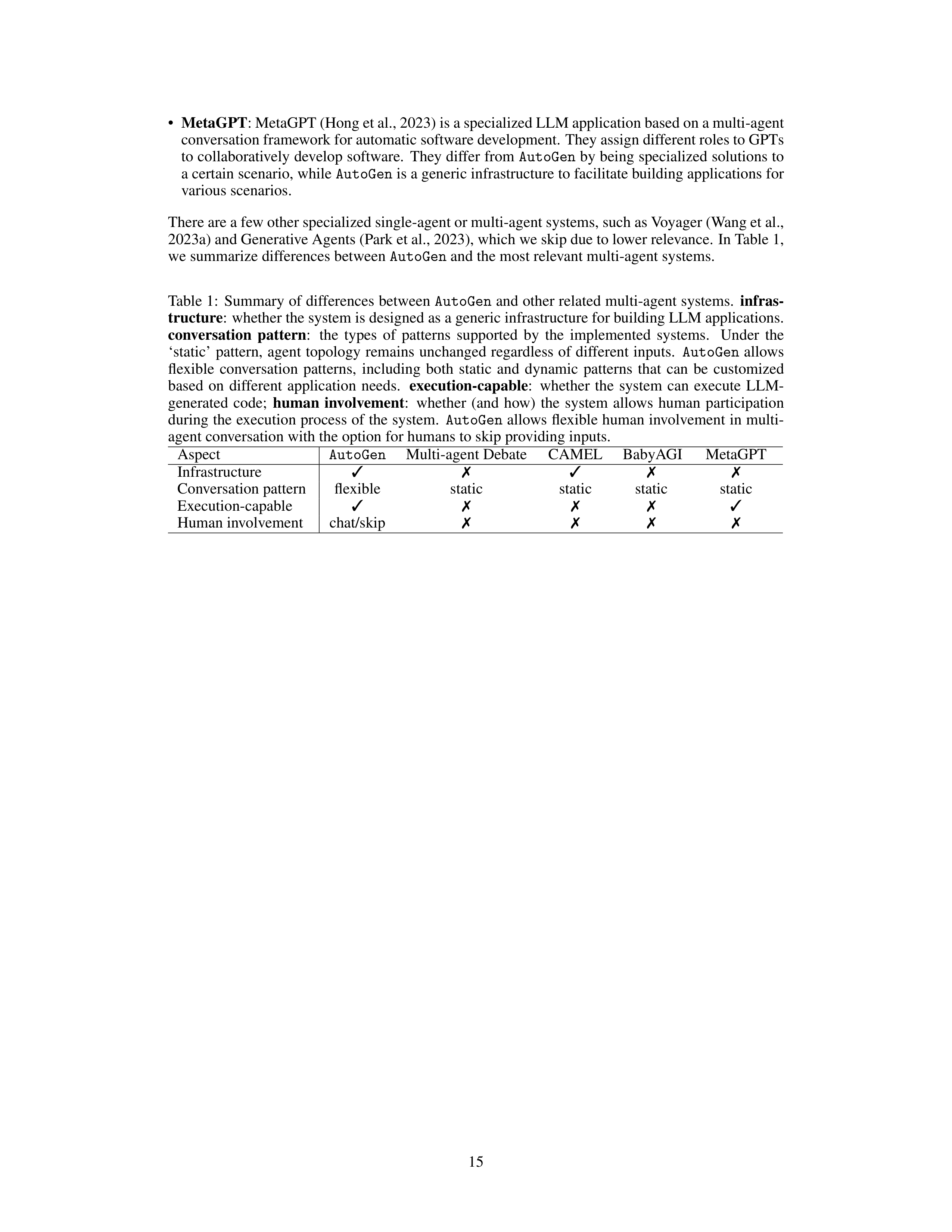
In Table 1,
we summarize differences between
AutoGen
and the most relevant multi-agent systems.
Table 1:
Summary of differences between
AutoGen
and other related multi-agent systems.
infras-
tructure
:
whether the system is designed as a generic infrastructure for building LLM applications.
conversation
pattern
:
the
types
of
patterns
supported
by
the
implemented
systems.
Under
the
‘static’
pattern,
agent
topology
remains
unchanged
regardless
of different
inputs.
AutoGen
allows
flexible
conversation
patterns,
including
both
static
and
dynamic
patterns
that
can
be
customized
based
on
different
application
needs.
execution-capable
:
whether
the
system
can
execute
LLM-
generated
code;
human
involvement
:
whether
(and
how)
the
system
allows
human
participation
during the execution process of the system.
AutoGen
allows flexible human involvement in multi-
agent conversation with the option for humans to skip providing inputs.
Aspect
AutoGen
Multi-agent Debate
CAMEL
BabyAGI
MetaGPT
Infrastructure
✓
✗
✓
✗
✗
Conversation pattern
flexible
static
static
static
static
Execution-capable
✓
✗
✗
✗
✓
Human involvement
chat/skip
✗
✗
✗
✗
15
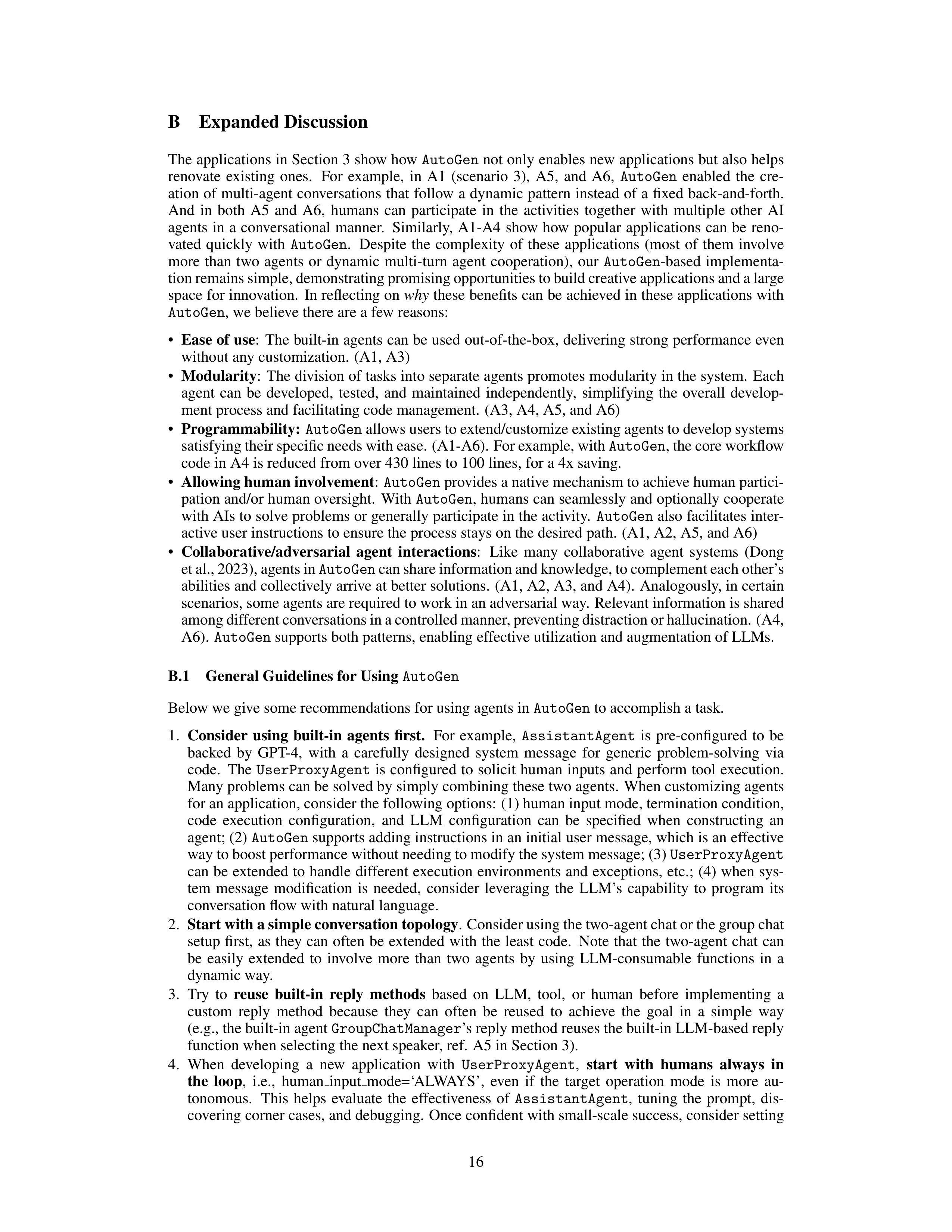
B
Expanded Discussion
The applications in Section 3 show how
AutoGen
not only enables new applications but also helps
renovate
existing
ones.
For
example,
in
A1
(scenario
3),
A5,
and
A6,
AutoGen
enabled
the
cre-
ation of multi-agent conversations that follow a dynamic pattern instead of a fixed back-and-forth.
And
in
both
A5
and
A6,
humans
can
participate
in
the
activities
together
with
multiple
other
AI
agents
in
a
conversational
manner.
Similarly,
A1-A4
show
how
popular
applications
can
be
reno-
vated
quickly
with
AutoGen
.
Despite
the
complexity
of
these
applications
(most
of
them
involve
more
than
two
agents
or
dynamic
multi-turn
agent
cooperation),
our
AutoGen
-based
implementa-
tion remains simple, demonstrating promising opportunities to build creative applications and a large
space for innovation.
In reflecting on
why
these benefits can be achieved in these applications with
AutoGen
, we believe there are a few reasons:
•
Ease of use
:
The built-in agents can be used out-of-the-box, delivering strong performance even
without any customization.
(A1, A3)
•
Modularity
:
The division of tasks into separate agents promotes modularity in the system.
Each
agent
can
be
developed,
tested,
and
maintained
independently,
simplifying
the
overall
develop-
ment process and facilitating code management.
(A3, A4, A5, and A6)
•
Programmability:
AutoGen
allows users to extend/customize existing agents to develop systems
satisfying their specific needs with ease. (A1-A6). For example, with
AutoGen
, the core workflow
code in A4 is reduced from over 430 lines to 100 lines, for a 4x saving.
•
Allowing human involvement
:
AutoGen
provides a native mechanism to achieve human partici-
pation and/or human oversight.
With
AutoGen
, humans can seamlessly and optionally cooperate
with AIs to solve problems or generally participate in the activity.
AutoGen
also facilitates inter-
active user instructions to ensure the process stays on the desired path.
(A1, A2, A5, and A6)
•
Collaborative/adversarial
agent
interactions
:
Like
many
collaborative
agent
systems
(Dong
et al., 2023), agents in
AutoGen
can share information and knowledge, to complement each other’s
abilities and collectively arrive at better solutions.
(A1, A2, A3, and A4).
Analogously, in certain
scenarios, some agents are required to work in an adversarial way.
Relevant information is shared
among different conversations in a controlled manner, preventing distraction or hallucination. (A4,
A6).
AutoGen
supports both patterns, enabling effective utilization and augmentation of LLMs.
B.1
General Guidelines for Using
AutoGen
Below we give some recommendations for using agents in
AutoGen
to accomplish a task.
1.
Consider
using
built-in
agents
first.
For
example,
AssistantAgent
is
pre-configured
to
be
backed
by
GPT-4,
with
a
carefully
designed
system
message
for
generic
problem-solving
via
code.
The
UserProxyAgent
is
configured
to
solicit
human
inputs
and
perform
tool
execution.
Many problems can be solved by simply combining these two agents.
When customizing agents
for an application, consider the following options:
(1) human input mode, termination condition,
code
execution
configuration,
and
LLM
configuration
can
be
specified
when
constructing
an
agent; (2)
AutoGen
supports adding instructions in an initial user message, which is an effective
way to boost performance without needing to modify the system message; (3)
UserProxyAgent
can be extended to handle different execution environments and exceptions,
etc.;
(4) when sys-
tem
message
modification
is
needed,
consider
leveraging
the
LLM’s
capability
to
program
its
conversation flow with natural language.
2.
Start with a simple conversation topology
. Consider using the two-agent chat or the group chat
setup
first,
as
they
can
often
be
extended
with
the
least
code.
Note
that
the
two-agent
chat
can
be
easily
extended
to
involve
more
than
two
agents
by
using
LLM-consumable
functions
in
a
dynamic way.
3.
Try
to
reuse
built-in
reply
methods
based
on
LLM,
tool,
or
human
before
implementing
a
custom
reply
method
because
they
can
often
be
reused
to
achieve
the
goal
in
a
simple
way
(e.g., the built-in agent
GroupChatManager
’s reply method reuses the built-in LLM-based reply
function when selecting the next speaker, ref.
A5 in Section 3).
4.
When
developing
a
new
application
with
UserProxyAgent
,
start
with
humans
always
in
the
loop
,
i.e.,
human
input
mode=‘ALWAYS’,
even
if
the
target
operation
mode
is
more
au-
tonomous.
This
helps
evaluate
the
effectiveness
of
AssistantAgent
,
tuning
the
prompt,
dis-
covering corner cases, and debugging.
Once confident with small-scale success, consider setting
16
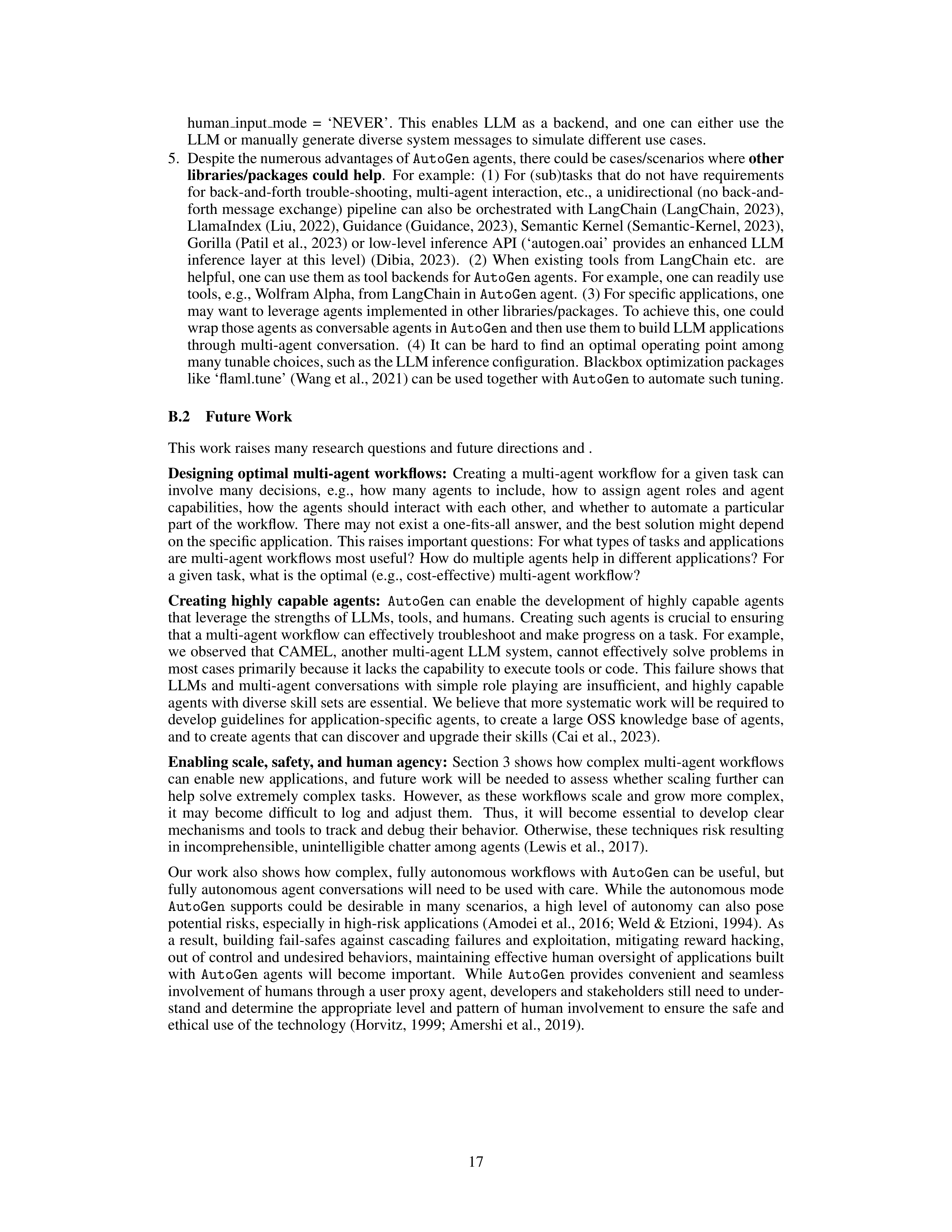
human
input
mode
=
‘NEVER’.
This
enables
LLM
as
a
backend,
and
one
can
either
use
the
LLM or manually generate diverse system messages to simulate different use cases.
5.
Despite the numerous advantages of
AutoGen
agents, there could be cases/scenarios where
other
libraries/packages could help
.
For example:
(1) For (sub)tasks that do not have requirements
for back-and-forth trouble-shooting, multi-agent interaction, etc., a unidirectional (no back-and-
forth message exchange) pipeline can also be orchestrated with LangChain (LangChain, 2023),
LlamaIndex (Liu, 2022), Guidance (Guidance, 2023), Semantic Kernel (Semantic-Kernel, 2023),
Gorilla (Patil et al., 2023) or low-level inference API (‘autogen.oai’ provides an enhanced LLM
inference
layer
at
this
level)
(Dibia,
2023).
(2)
When
existing
tools
from
LangChain
etc.
are
helpful, one can use them as tool backends for
AutoGen
agents. For example, one can readily use
tools, e.g., Wolfram Alpha, from LangChain in
AutoGen
agent.
(3) For specific applications, one
may want to leverage agents implemented in other libraries/packages.
To achieve this, one could
wrap those agents as conversable agents in
AutoGen
and then use them to build LLM applications
through
multi-agent
conversation.
(4)
It
can
be
hard
to
find
an
optimal
operating
point
among
many tunable choices, such as the LLM inference configuration. Blackbox optimization packages
like ‘flaml.tune’ (Wang et al., 2021) can be used together with
AutoGen
to automate such tuning.
B.2
Future Work
This work raises many research questions and future directions and .
Designing optimal multi-agent workflows:
Creating a multi-agent workflow for a given task can
involve
many
decisions,
e.g.,
how
many
agents
to
include,
how
to
assign
agent
roles
and
agent
capabilities,
how
the
agents
should
interact
with
each
other,
and
whether
to
automate
a
particular
part of the workflow.
There may not exist a one-fits-all answer, and the best solution might depend
on the specific application.
This raises important questions: For what types of tasks and applications
are multi-agent workflows most useful?
How do multiple agents help in different applications?
For
a given task, what is the optimal (e.g., cost-effective) multi-agent workflow?
Creating
highly
capable
agents:
AutoGen
can
enable
the
development
of
highly
capable
agents
that leverage the strengths of LLMs, tools, and humans.
Creating such agents is crucial to ensuring
that a multi-agent workflow can effectively troubleshoot and make progress on a task.
For example,
we observed that CAMEL, another multi-agent LLM system,
cannot effectively solve problems in
most cases primarily because it lacks the capability to execute tools or code.
This failure shows that
LLMs
and
multi-agent
conversations
with
simple
role
playing
are
insufficient,
and
highly
capable
agents with diverse skill sets are essential.
We believe that more systematic work will be required to
develop guidelines for application-specific agents, to create a large OSS knowledge base of agents,
and to create agents that can discover and upgrade their skills (Cai et al., 2023).
Enabling scale, safety, and human agency:
Section 3 shows how complex multi-agent workflows
can enable new applications,
and future work will be needed to assess whether scaling further can
help
solve
extremely
complex
tasks.
However,
as
these
workflows
scale
and
grow
more
complex,
it
may
become
difficult
to
log
and
adjust
them.
Thus,
it
will
become
essential
to
develop
clear
mechanisms and tools to track and debug their behavior.
Otherwise, these techniques risk resulting
in incomprehensible, unintelligible chatter among agents (Lewis et al., 2017).
Our work also shows how complex, fully autonomous workflows with
AutoGen
can be useful, but
fully autonomous agent conversations will need to be used with care.
While the autonomous mode
AutoGen
supports
could
be
desirable
in
many
scenarios,
a
high
level
of
autonomy
can
also
pose
potential risks, especially in high-risk applications (Amodei et al., 2016; Weld & Etzioni, 1994).
As
a
result,
building
fail-safes
against
cascading
failures
and
exploitation,
mitigating
reward
hacking,
out of control and undesired behaviors, maintaining effective human oversight of applications built
with
AutoGen
agents
will
become
important.
While
AutoGen
provides
convenient
and
seamless
involvement of humans through a user proxy agent, developers and stakeholders still need to under-
stand and determine the appropriate level and pattern of human involvement to ensure the safe and
ethical use of the technology (Horvitz, 1999; Amershi et al., 2019).
17
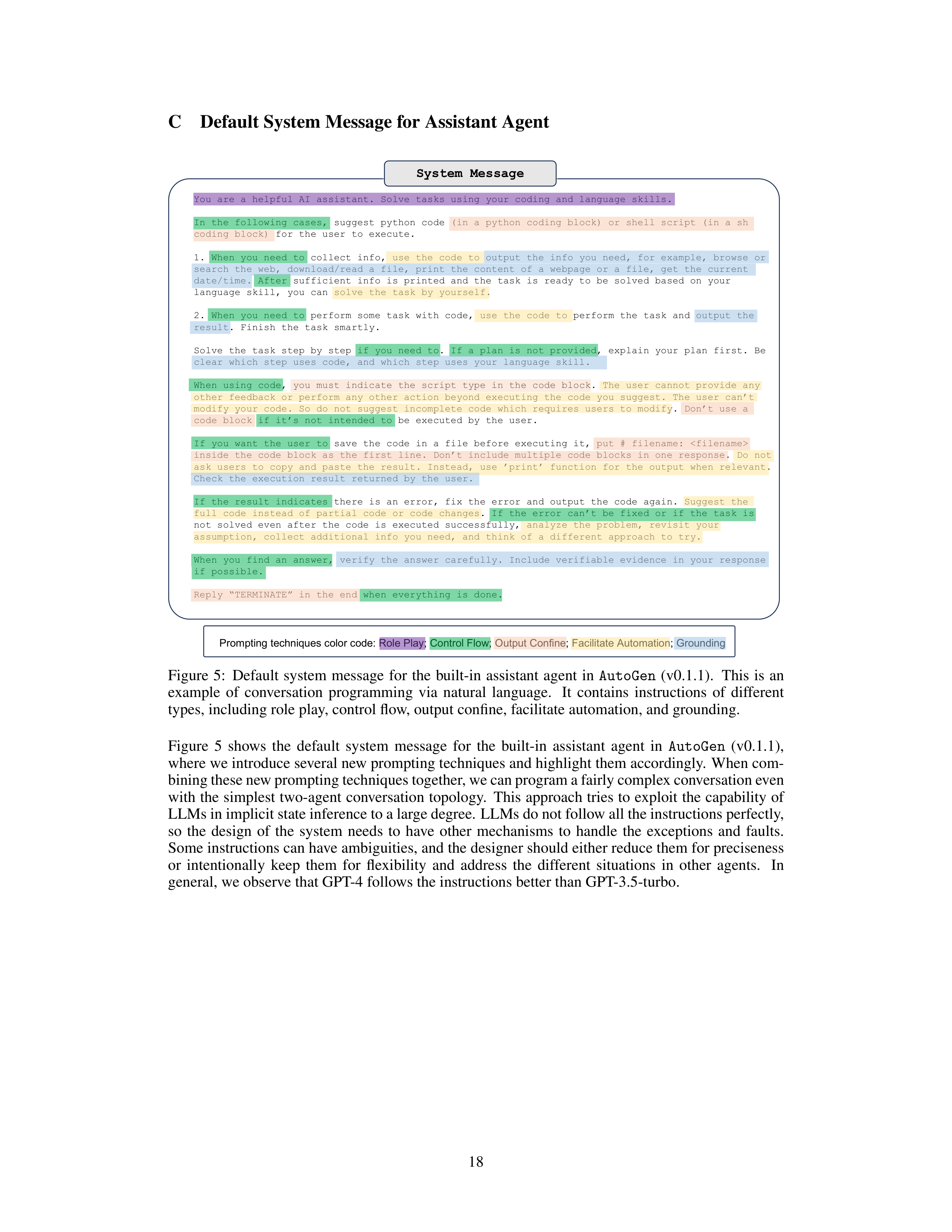


C
Default System Message for Assistant Agent
System
Message
You are a helpful AI assistant. Solve tasks using your coding and language skills.
In the following cases, suggest python code (in a python coding block) or shell script (in a sh
coding block) for the user to execute.
1. When you need to collect info, use the code to output the info you need, for example, browse or
search the web, download/read a file, print the content of a webpage or a file, get the current
date/time. After sufficient info is printed and the task is ready to be solved based on your
language skill, you can solve the task by yourself.
2. When you need to perform some task with code, use the code to perform the task and output the
result. Finish the task smartly.
Solve the task step by step if you need to. If a plan is not provided, explain your plan first. Be
clear which step uses code, and which step uses your language skill.
When using code, you must indicate the script type in the code block. The user cannot provide any
other feedback or perform any other action beyond executing the code you suggest. The user can’t
modify your code. So do not suggest incomplete code which requires users to modify. Don’t use a
code block if it’s not intended to be executed by the user.
If you want the user to save the code in a file before executing it, put # filename:
inside the code block as the first line. Don’t include multiple code blocks in one response. Do not
ask users to copy and paste the result. Instead, use ’print’ function for the output when relevant.
Check the execution result returned by the user.
If the result indicates there is an error, fix the error and output the code again. Suggest the
full code instead of partial code or code changes. If the error can’t be fixed or if the task is
not solved even after the code is executed successfully, analyze the problem, revisit your
assumption, collect additional info you need, and think of a different approach to try.
When you find an answer, verify the answer carefully. Include verifiable evidence in your response
if possible.
Reply “TERMINATE” in the end when everything is done.
Prompting techniques color code: Role Play; Control Flow; Output Confine; Facilitate Automation; Grounding
Figure
5:
Default
system
message
for
the
built-in
assistant
agent
in
AutoGen
(v0.1.1).
This
is
an
example
of
conversation
programming
via
natural
language.
It
contains
instructions
of
different
types, including role play, control flow, output confine, facilitate automation, and grounding.
Figure
5
shows
the
default
system
message
for
the
built-in
assistant
agent
in
AutoGen
(v0.1.1),
where we introduce several new prompting techniques and highlight them accordingly.
When com-
bining these new prompting techniques together, we can program a fairly complex conversation even
with the simplest two-agent conversation topology.
This approach tries to exploit the capability of
LLMs in implicit state inference to a large degree.
LLMs do not follow all the instructions perfectly,
so
the
design
of
the
system
needs
to
have
other
mechanisms
to
handle
the
exceptions
and
faults.
Some instructions can have ambiguities, and the designer should either reduce them for preciseness
or
intentionally
keep
them
for
flexibility
and
address
the
different
situations
in
other
agents.
In
general, we observe that GPT-4 follows the instructions better than GPT-3.5-turbo.
18
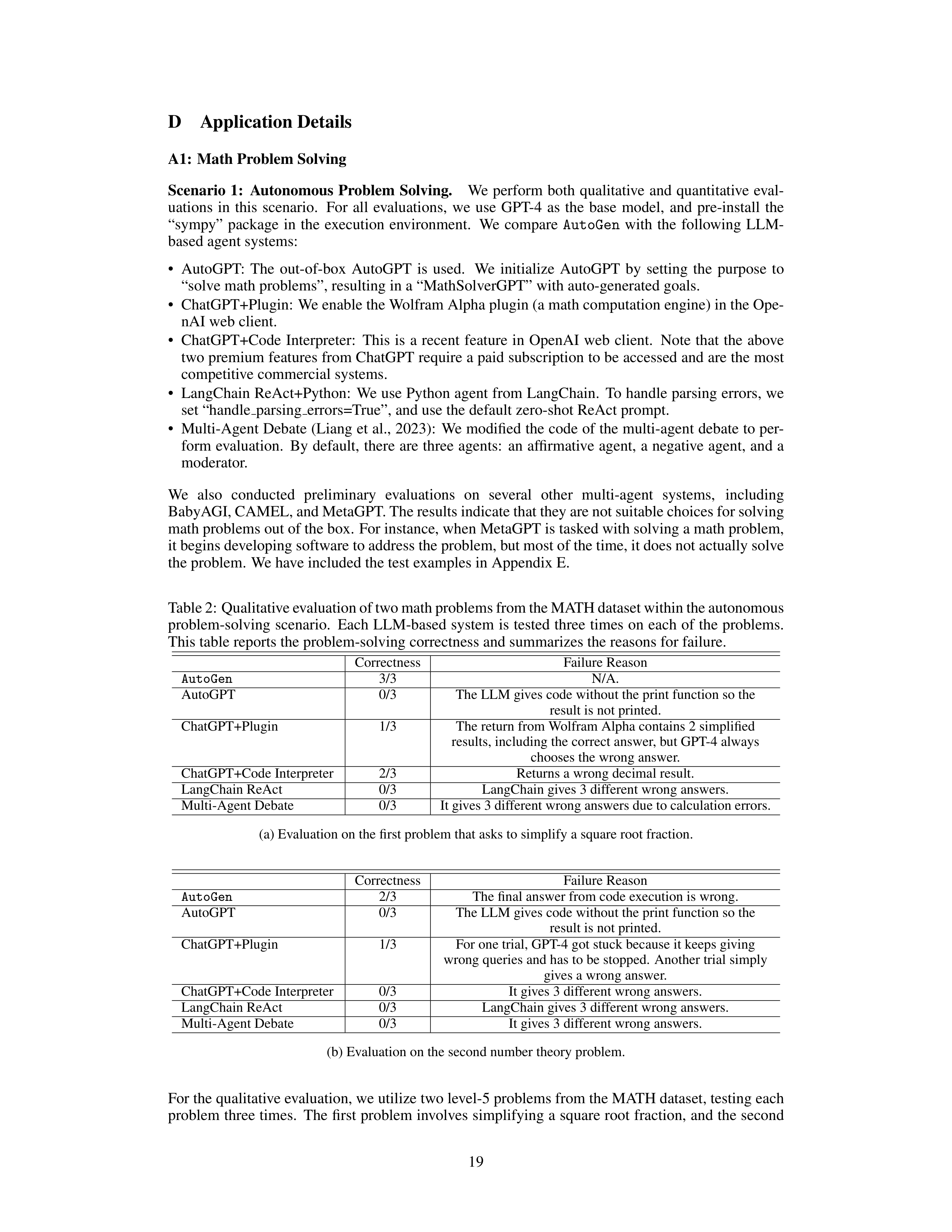
D
Application Details
A1:
Math Problem Solving
Scenario
1:
Autonomous
Problem
Solving.
We
perform
both
qualitative
and
quantitative
eval-
uations
in
this
scenario.
For
all
evaluations,
we
use
GPT-4
as
the
base
model,
and
pre-install
the
“sympy”
package
in
the
execution
environment.
We
compare
AutoGen
with
the
following
LLM-
based agent systems:
•
AutoGPT:
The
out-of-box
AutoGPT
is
used.
We
initialize
AutoGPT
by
setting
the
purpose
to
“solve math problems”, resulting in a “MathSolverGPT” with auto-generated goals.
•
ChatGPT+Plugin:
We enable the Wolfram Alpha plugin (a math computation engine) in the Ope-
nAI web client.
•
ChatGPT+Code
Interpreter:
This
is
a
recent
feature
in
OpenAI
web
client.
Note
that
the
above
two premium features from ChatGPT require a paid subscription to be accessed and are the most
competitive commercial systems.
•
LangChain ReAct+Python:
We use Python agent from LangChain.
To handle parsing errors, we
set “handle
parsing
errors=True”, and use the default zero-shot ReAct prompt.
•
Multi-Agent Debate (Liang et al., 2023):
We modified the code of the multi-agent debate to per-
form evaluation.
By default, there are three agents:
an affirmative agent, a negative agent, and a
moderator.
We
also
conducted
preliminary
evaluations
on
several
other
multi-agent
systems,
including
BabyAGI, CAMEL, and MetaGPT. The results indicate that they are not suitable choices for solving
math problems out of the box.
For instance, when MetaGPT is tasked with solving a math problem,
it begins developing software to address the problem, but most of the time, it does not actually solve
the problem.
We have included the test examples in Appendix E.
Table 2: Qualitative evaluation of two math problems from the MATH dataset within the autonomous
problem-solving scenario.
Each LLM-based system is tested three times on each of the problems.
This table reports the problem-solving correctness and summarizes the reasons for failure.
Correctness
Failure Reason
AutoGen
3/3
N/A.
AutoGPT
0/3
The LLM gives code without the print function so the
result is not printed.
ChatGPT+Plugin
1/3
The return from Wolfram Alpha contains 2 simplified
results, including the correct answer, but GPT-4 always
chooses the wrong answer.
ChatGPT+Code Interpreter
2/3
Returns a wrong decimal result.
LangChain ReAct
0/3
LangChain gives 3 different wrong answers.
Multi-Agent Debate
0/3
It gives 3 different wrong answers due to calculation errors.
(a) Evaluation on the first problem that asks to simplify a square root fraction.
Correctness
Failure Reason
AutoGen
2/3
The final answer from code execution is wrong.
AutoGPT
0/3
The LLM gives code without the print function so the
result is not printed.
ChatGPT+Plugin
1/3
For one trial, GPT-4 got stuck because it keeps giving
wrong queries and has to be stopped.
Another trial simply
gives a wrong answer.
ChatGPT+Code Interpreter
0/3
It gives 3 different wrong answers.
LangChain ReAct
0/3
LangChain gives 3 different wrong answers.
Multi-Agent Debate
0/3
It gives 3 different wrong answers.
(b) Evaluation on the second number theory problem.
For the qualitative evaluation, we utilize two level-5 problems from the MATH dataset, testing each
problem three times.
The first problem involves simplifying a square root fraction, and the second
19
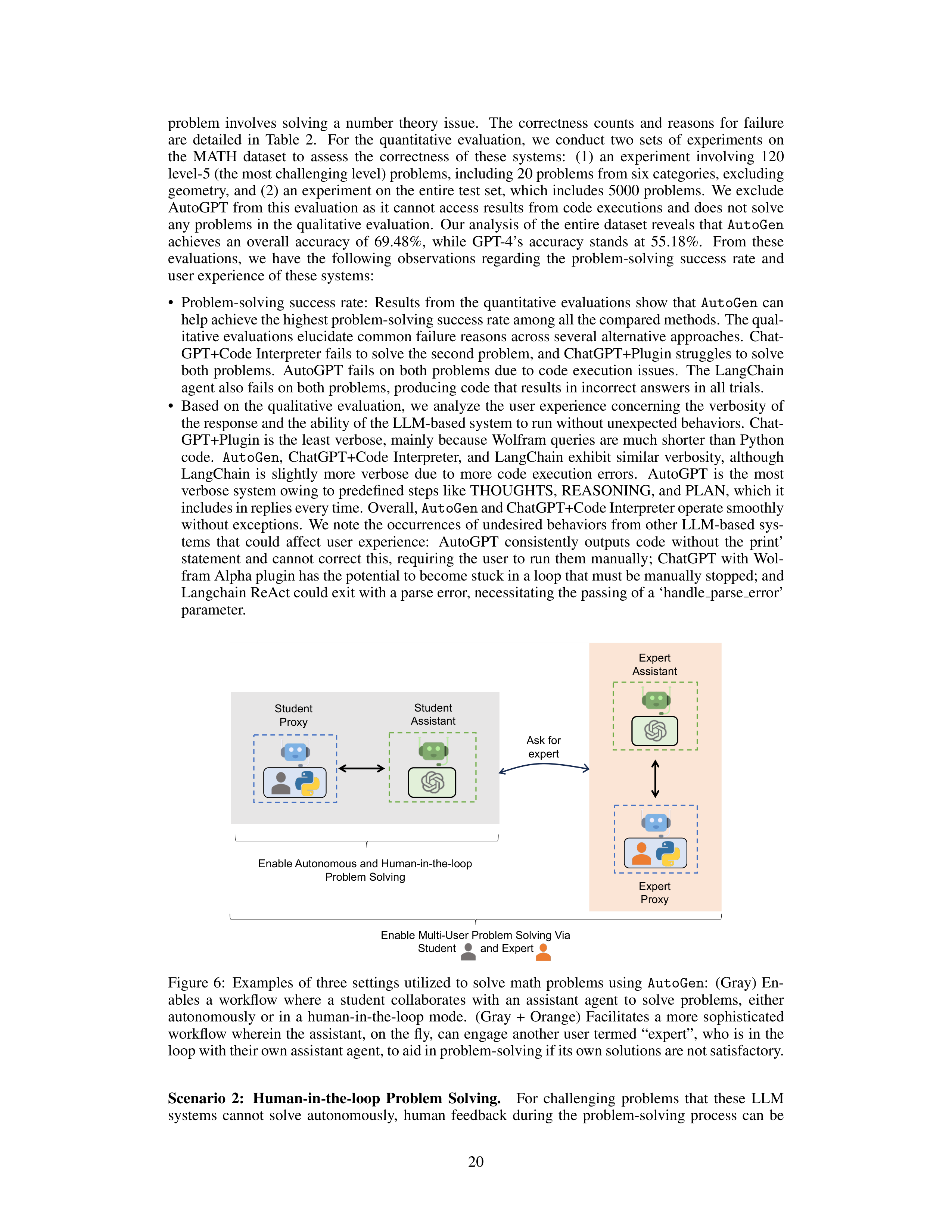










problem
involves
solving
a
number
theory
issue.
The
correctness
counts
and
reasons
for
failure
are
detailed
in
Table
2.
For
the
quantitative
evaluation,
we
conduct
two
sets
of
experiments
on
the
MATH
dataset
to
assess
the
correctness
of
these
systems:
(1)
an
experiment
involving
120
level-5 (the most challenging level) problems, including 20 problems from six categories, excluding
geometry, and (2) an experiment on the entire test set, which includes 5000 problems.
We exclude
AutoGPT from this evaluation as it cannot access results from code executions and does not solve
any problems in the qualitative evaluation.
Our analysis of the entire dataset reveals that
AutoGen
achieves
an
overall
accuracy
of
69.48%,
while
GPT-4’s
accuracy
stands
at
55.18%.
From
these
evaluations,
we
have
the
following
observations
regarding
the
problem-solving
success
rate
and
user experience of these systems:
•
Problem-solving
success
rate:
Results
from
the
quantitative
evaluations
show
that
AutoGen
can
help achieve the highest problem-solving success rate among all the compared methods. The qual-
itative evaluations elucidate common failure reasons across several alternative approaches.
Chat-
GPT+Code Interpreter fails to solve the second problem, and ChatGPT+Plugin struggles to solve
both
problems.
AutoGPT
fails
on
both
problems
due
to
code
execution
issues.
The
LangChain
agent also fails on both problems, producing code that results in incorrect answers in all trials.
•
Based
on
the
qualitative
evaluation,
we
analyze
the
user
experience
concerning
the
verbosity
of
the response and the ability of the LLM-based system to run without unexpected behaviors.
Chat-
GPT+Plugin is the least verbose, mainly because Wolfram queries are much shorter than Python
code.
AutoGen
,
ChatGPT+Code
Interpreter,
and
LangChain
exhibit
similar
verbosity,
although
LangChain
is
slightly
more
verbose
due
to
more
code
execution
errors.
AutoGPT
is
the
most
verbose system owing to predefined steps like THOUGHTS, REASONING, and PLAN, which it
includes in replies every time. Overall,
AutoGen
and ChatGPT+Code Interpreter operate smoothly
without exceptions.
We note the occurrences of undesired behaviors from other LLM-based sys-
tems
that
could
affect
user
experience:
AutoGPT
consistently
outputs
code
without
the
print’
statement
and
cannot
correct
this,
requiring
the
user
to
run
them
manually;
ChatGPT
with
Wol-
fram Alpha plugin has the potential to become stuck in a loop that must be manually stopped; and
Langchain ReAct could exit with a parse error, necessitating the passing of a ‘handle
parse
error’
parameter.
Enable Multi-User Problem Solving Via
Student and Expert
Student
Proxy
Student
Assistant
Expert
Assistant
Expert
Proxy
Ask for
expert
Enable Autonomous and Human-in-the-loop
Problem Solving
Figure
6:
Examples
of
three
settings
utilized
to
solve
math
problems
using
AutoGen
:
(Gray)
En-
ables
a
workflow
where
a
student
collaborates
with
an
assistant
agent
to
solve
problems,
either
autonomously
or
in
a
human-in-the-loop
mode.
(Gray
+
Orange)
Facilitates
a
more
sophisticated
workflow wherein the assistant,
on the fly,
can engage another user termed “expert”,
who is in the
loop with their own assistant agent, to aid in problem-solving if its own solutions are not satisfactory.
Scenario
2:
Human-in-the-loop
Problem
Solving.
For
challenging
problems
that
these
LLM
systems
cannot
solve
autonomously,
human
feedback
during
the
problem-solving
process
can
be
20
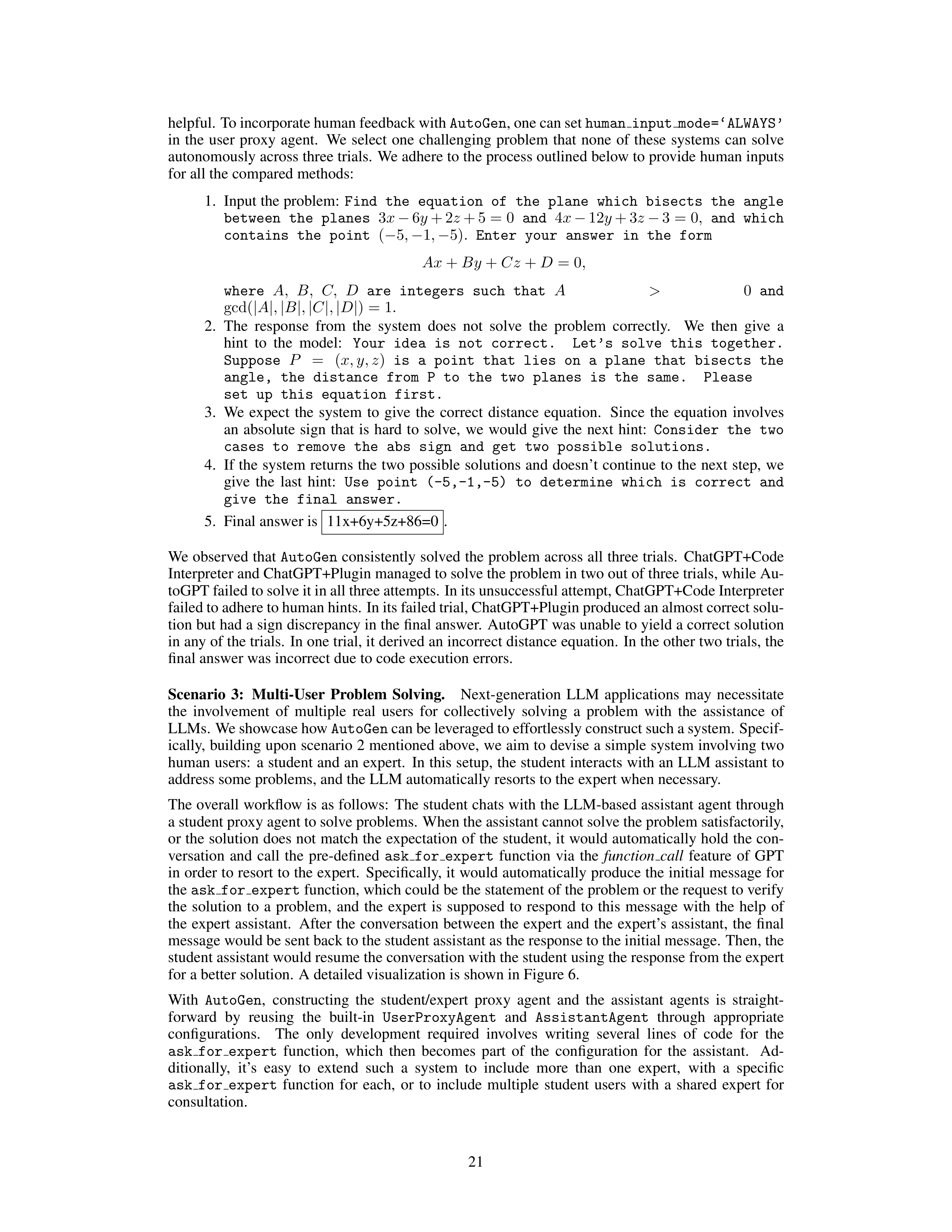
helpful. To incorporate human feedback with
AutoGen
, one can set
human
input
mode=‘ALWAYS’
in
the
user
proxy
agent.
We
select
one
challenging
problem
that
none
of
these
systems
can
solve
autonomously across three trials.
We adhere to the process outlined below to provide human inputs
for all the compared methods:
1.
Input the problem:
Find
the
equation
of
the
plane
which
bisects
the
angle
between
the
planes
3
x
−
6
y
+ 2
z
+ 5 = 0
and
4
x
−
12
y
+ 3
z
−
3 = 0
,
and
which
contains
the
point
(
−
5
,
−
1
,
−
5)
.
Enter
your
answer
in
the
form
Ax
+
By
+
Cz
+
D
= 0
,
where
A,
B,
C,
D
are
integers
such
that
A
>
0
and
gcd(
|
A
|
,
|
B
|
,
|
C
|
,
|
D
|
) = 1
.
2.
The
response
from
the
system
does
not
solve
the
problem
correctly.
We
then
give
a
hint
to
the
model:
Your
idea
is
not
correct.
Let’s
solve
this
together.
Suppose
P
=
(
x, y, z
)
is
a
point
that
lies
on
a
plane
that
bisects
the
angle,
the
distance
from
P
to
the
two
planes
is
the
same.
Please
set
up
this
equation
first.
3.
We
expect
the
system
to
give
the
correct
distance
equation.
Since
the
equation
involves
an
absolute
sign
that
is
hard
to
solve,
we
would
give
the
next
hint:
Consider
the
two
cases
to
remove
the
abs
sign
and
get
two
possible
solutions.
4.
If
the
system
returns
the
two
possible
solutions
and
doesn’t
continue
to
the
next
step,
we
give
the
last
hint:
Use
point
(-5,-1,-5)
to
determine
which
is
correct
and
give
the
final
answer.
5.
Final answer is
11x+6y+5z+86=0
.
We observed that
AutoGen
consistently solved the problem across all three trials.
ChatGPT+Code
Interpreter and ChatGPT+Plugin managed to solve the problem in two out of three trials, while Au-
toGPT failed to solve it in all three attempts. In its unsuccessful attempt, ChatGPT+Code Interpreter
failed to adhere to human hints.
In its failed trial, ChatGPT+Plugin produced an almost correct solu-
tion but had a sign discrepancy in the final answer.
AutoGPT was unable to yield a correct solution
in any of the trials.
In one trial, it derived an incorrect distance equation.
In the other two trials, the
final answer was incorrect due to code execution errors.
Scenario
3:
Multi-User
Problem
Solving.
Next-generation
LLM
applications
may
necessitate
the
involvement
of
multiple
real
users
for
collectively
solving
a
problem
with
the
assistance
of
LLMs.
We showcase how
AutoGen
can be leveraged to effortlessly construct such a system. Specif-
ically, building upon scenario 2 mentioned above, we aim to devise a simple system involving two
human users:
a student and an expert.
In this setup, the student interacts with an LLM assistant to
address some problems, and the LLM automatically resorts to the expert when necessary.
The overall workflow is as follows:
The student chats with the LLM-based assistant agent through
a student proxy agent to solve problems.
When the assistant cannot solve the problem satisfactorily,
or the solution does not match the expectation of the student, it would automatically hold the con-
versation
and
call
the
pre-defined
ask
for
expert
function
via
the
function
call
feature
of
GPT
in order to resort to the expert.
Specifically, it would automatically produce the initial message for
the
ask
for
expert
function, which could be the statement of the problem or the request to verify
the
solution
to
a
problem,
and
the
expert
is
supposed
to
respond
to
this
message
with
the
help
of
the
expert
assistant.
After
the
conversation
between
the
expert
and
the
expert’s
assistant,
the
final
message would be sent back to the student assistant as the response to the initial message.
Then, the
student assistant would resume the conversation with the student using the response from the expert
for a better solution.
A detailed visualization is shown in Figure 6.
With
AutoGen
,
constructing
the
student/expert
proxy
agent
and
the
assistant
agents
is
straight-
forward
by
reusing
the
built-in
UserProxyAgent
and
AssistantAgent
through
appropriate
configurations.
The
only
development
required
involves
writing
several
lines
of
code
for
the
ask
for
expert
function,
which
then
becomes
part
of
the
configuration
for
the
assistant.
Ad-
ditionally,
it’s
easy
to
extend
such
a
system
to
include
more
than
one
expert,
with
a
specific
ask
for
expert
function
for
each,
or
to
include
multiple
student
users
with
a
shared
expert
for
consultation.
21
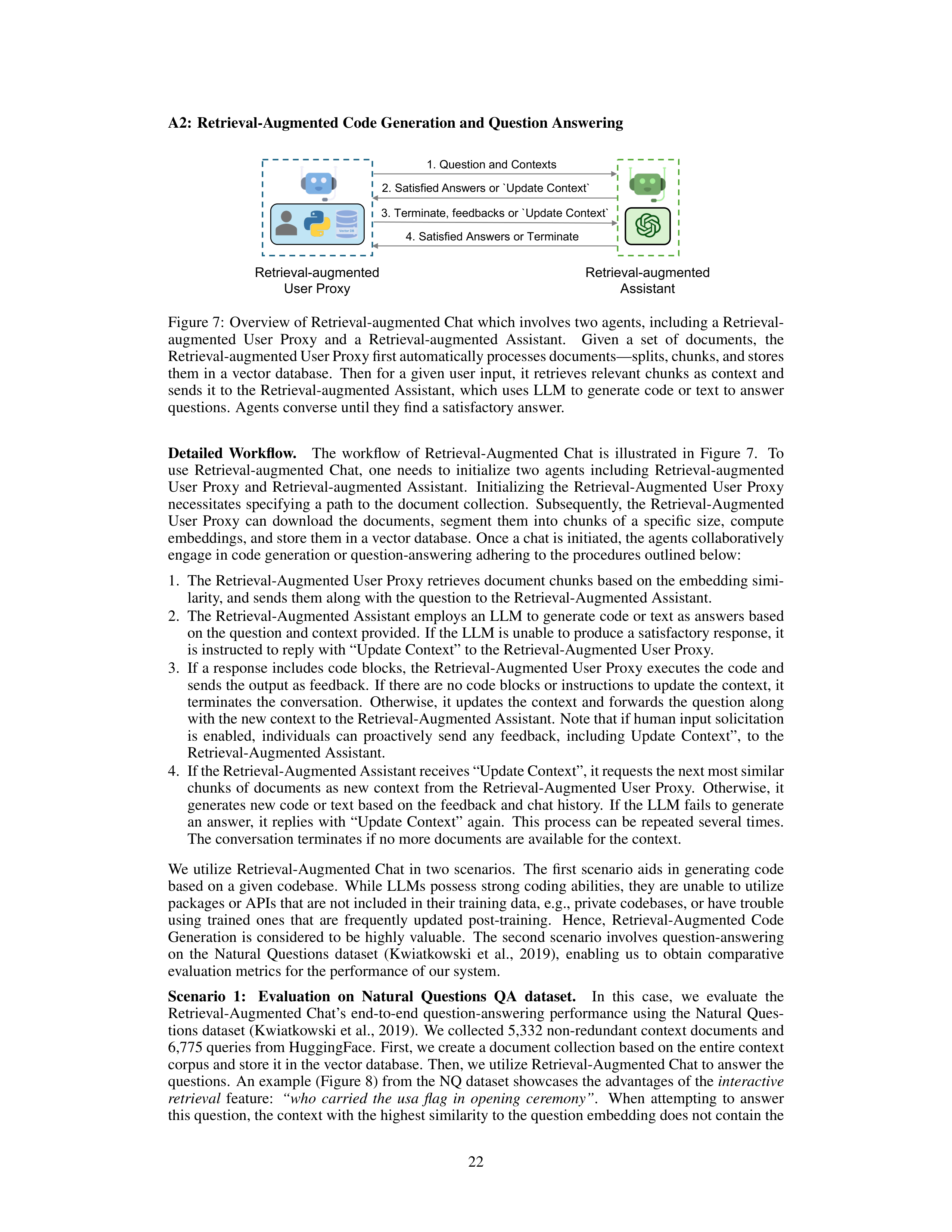





A2:
Retrieval-Augmented Code Generation and Question Answering
Retrieval-augmented
Assistant
Retrieval-augmented
User Proxy
1. Question and Contexts
3. Terminate, feedbacks or `Update Context`
4. Satisfied Answers or Terminate
2. Satisfied Answers or `Update Context`
Figure 7:
Overview of Retrieval-augmented Chat which involves two agents, including a Retrieval-
augmented
User
Proxy
and
a
Retrieval-augmented
Assistant.
Given
a
set
of
documents,
the
Retrieval-augmented User Proxy first automatically processes documents—splits, chunks, and stores
them
in
a
vector
database.
Then
for
a
given
user
input,
it
retrieves
relevant
chunks
as
context
and
sends it to the Retrieval-augmented Assistant,
which uses LLM to generate code or text to answer
questions.
Agents converse until they find a satisfactory answer.
Detailed
Workflow.
The
workflow
of
Retrieval-Augmented
Chat
is
illustrated
in
Figure
7.
To
use
Retrieval-augmented
Chat,
one
needs
to
initialize
two
agents
including
Retrieval-augmented
User
Proxy
and
Retrieval-augmented
Assistant.
Initializing
the
Retrieval-Augmented
User
Proxy
necessitates specifying a path to the document collection.
Subsequently,
the Retrieval-Augmented
User
Proxy
can
download
the
documents,
segment
them
into
chunks
of
a
specific
size,
compute
embeddings, and store them in a vector database.
Once a chat is initiated, the agents collaboratively
engage in code generation or question-answering adhering to the procedures outlined below:
1.
The Retrieval-Augmented User Proxy retrieves document chunks based on the embedding simi-
larity, and sends them along with the question to the Retrieval-Augmented Assistant.
2.
The Retrieval-Augmented Assistant employs an LLM to generate code or text as answers based
on the question and context provided.
If the LLM is unable to produce a satisfactory response, it
is instructed to reply with “Update Context” to the Retrieval-Augmented User Proxy.
3.
If a response includes code blocks, the Retrieval-Augmented User Proxy executes the code and
sends the output as feedback.
If there are no code blocks or instructions to update the context, it
terminates
the
conversation.
Otherwise,
it
updates
the
context
and
forwards
the
question
along
with the new context to the Retrieval-Augmented Assistant.
Note that if human input solicitation
is
enabled,
individuals
can
proactively
send
any
feedback,
including
Update
Context”,
to
the
Retrieval-Augmented Assistant.
4.
If the Retrieval-Augmented Assistant receives “Update Context”, it requests the next most similar
chunks
of
documents
as
new
context
from
the
Retrieval-Augmented
User
Proxy.
Otherwise,
it
generates new code or text based on the feedback and chat history.
If the LLM fails to generate
an
answer,
it
replies
with
“Update
Context”
again.
This
process
can
be
repeated
several
times.
The conversation terminates if no more documents are available for the context.
We
utilize
Retrieval-Augmented
Chat
in
two
scenarios.
The
first
scenario
aids
in
generating
code
based on a given codebase.
While LLMs possess strong coding abilities, they are unable to utilize
packages or APIs that are not included in their training data, e.g., private codebases, or have trouble
using
trained
ones
that
are
frequently
updated
post-training.
Hence,
Retrieval-Augmented
Code
Generation
is
considered
to
be
highly
valuable.
The
second
scenario
involves
question-answering
on
the
Natural
Questions
dataset
(Kwiatkowski
et
al.,
2019),
enabling
us
to
obtain
comparative
evaluation metrics for the performance of our system.
Scenario
1:
Evaluation
on
Natural
Questions
QA
dataset.
In
this
case,
we
evaluate
the
Retrieval-Augmented
Chat’s
end-to-end
question-answering
performance
using
the
Natural
Ques-
tions dataset (Kwiatkowski et al., 2019).
We collected 5,332 non-redundant context documents and
6,775 queries from HuggingFace.
First, we create a document collection based on the entire context
corpus and store it in the vector database.
Then, we utilize Retrieval-Augmented Chat to answer the
questions.
An example (Figure 8) from the NQ dataset showcases the advantages of the
interactive
retrieval
feature:
“who
carried
the
usa
flag
in
opening
ceremony”
.
When
attempting
to
answer
this question, the context with the highest similarity to the question embedding does not contain the
22
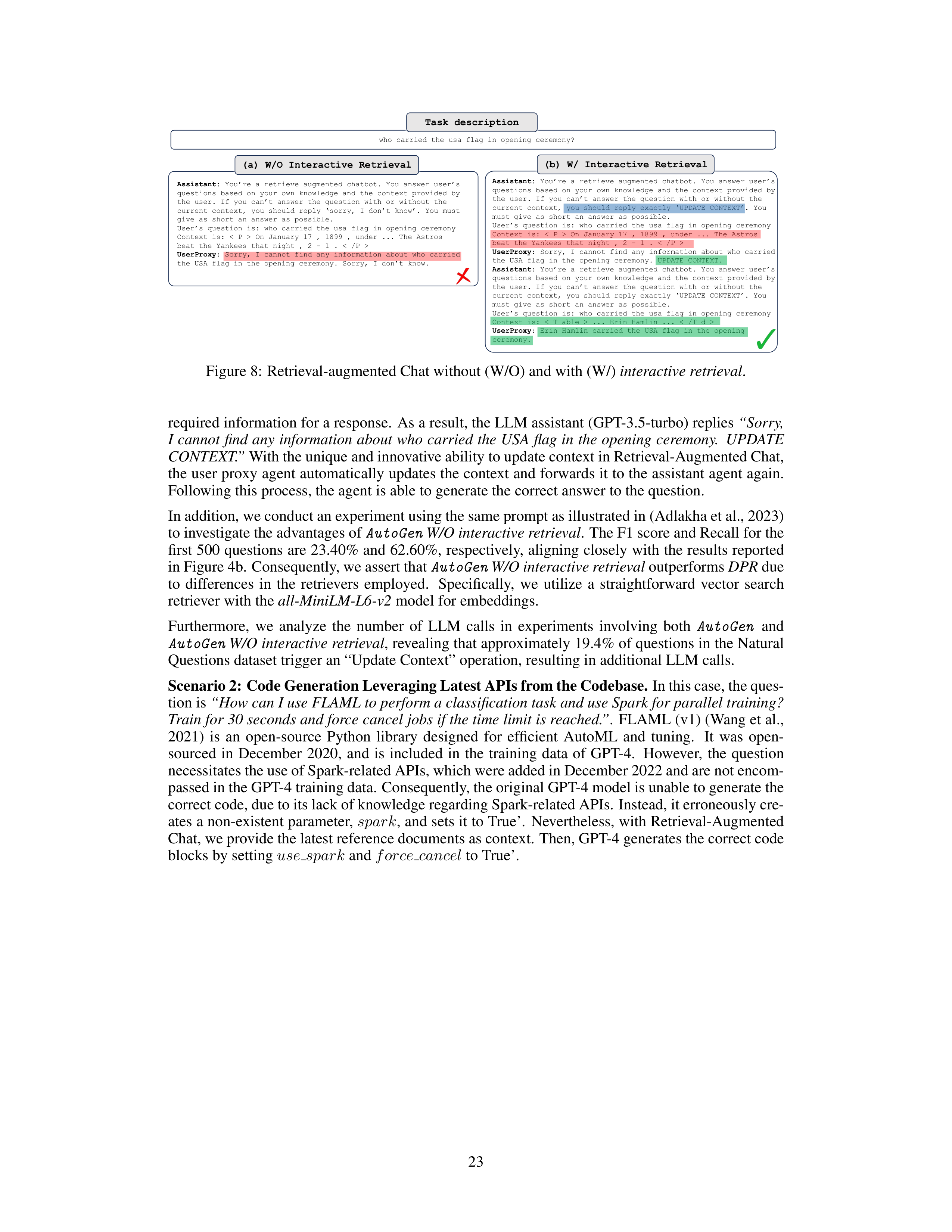








Task description
who carried the usa
flag in opening ceremony?
Assistant:
You’re a retrieve augmented chatbot. You answer user’s
questions based on your own knowledge and the context provided by
the user. If you can’t answer the question with or without the
current context, you should reply exactly ‘UPDATE CONTEXT’. You
must give as short an answer as possible.
User’s question is: who carried the usa
flag in opening ceremony
Context is:
On January 17 , 1899 , under ... The Astros
beat the Yankees that night , 2 -
1 .
UserProxy
: Sorry, I cannot find any information about who carried
the USA flag in the opening ceremony. UPDATE CONTEXT.
Assistant
: You’re a retrieve augmented chatbot. You answer user’s
questions based on your own knowledge and the context provided by
the user. If you can’t answer the question with or without the
current context, you should reply exactly ‘UPDATE CONTEXT’. You
must give as short an answer as possible.
User’s question is: who carried the usa
flag in opening ceremony
Context is: ... Erin Hamlin ...
UserProxy
: Erin Hamlin carried the USA flag in the opening
ceremony.
(a) W/O Interactive Retrieval
(b) W/ Interactive Retrieval
Assistant:
You’re a retrieve augmented chatbot. You answer user’s
questions based on your own knowledge and the context provided by
the user. If you can’t answer the question with or without the
current context, you should reply ‘sorry, I don’t know’. You must
give as short an answer as possible.
User’s question is:
who carried the usa
flag in opening ceremony
Context is:
On January 17 , 1899 , under ... The Astros
beat the Yankees that night , 2 -
1 .
UserProxy
: Sorry, I cannot find any information about who carried
the USA flag in the opening ceremony. Sorry, I don’t know.
Figure 8:
Retrieval-augmented Chat without (W/O) and with (W/)
interactive retrieval
.
required information for a response.
As a result, the LLM assistant (GPT-3.5-turbo) replies
“Sorry,
I cannot find any information about who carried the USA flag in the opening ceremony.
UPDATE
CONTEXT.”
With the unique and innovative ability to update context in Retrieval-Augmented Chat,
the user proxy agent automatically updates the context and forwards it to the assistant agent again.
Following this process, the agent is able to generate the correct answer to the question.
In addition, we conduct an experiment using the same prompt as illustrated in (Adlakha et al., 2023)
to investigate the advantages of
AutoGen
W/O interactive retrieval
.
The F1 score and Recall for the
first 500 questions are 23.40% and 62.60%,
respectively,
aligning closely with the results reported
in Figure 4b.
Consequently, we assert that
AutoGen
W/O interactive retrieval
outperforms
DPR
due
to
differences
in
the
retrievers
employed.
Specifically,
we
utilize
a
straightforward
vector
search
retriever with the
all-MiniLM-L6-v2
model for embeddings.
Furthermore,
we
analyze
the
number
of
LLM
calls
in
experiments
involving
both
AutoGen
and
AutoGen
W/O interactive retrieval
, revealing that approximately 19.4% of questions in the Natural
Questions dataset trigger an “Update Context” operation, resulting in additional LLM calls.
Scenario 2: Code Generation Leveraging Latest APIs from the Codebase.
In this case, the ques-
tion is
“How can I use FLAML to perform a classification task and use Spark for parallel training?
Train for 30 seconds and force cancel jobs if the time limit is reached.”
.
FLAML (v1) (Wang et al.,
2021)
is
an
open-source
Python
library
designed
for
efficient
AutoML
and
tuning.
It
was
open-
sourced
in
December
2020,
and
is
included
in
the
training
data
of
GPT-4.
However,
the
question
necessitates the use of Spark-related APIs, which were added in December 2022 and are not encom-
passed in the GPT-4 training data.
Consequently, the original GPT-4 model is unable to generate the
correct code, due to its lack of knowledge regarding Spark-related APIs.
Instead, it erroneously cre-
ates a non-existent parameter,
spark
, and sets it to True’.
Nevertheless, with Retrieval-Augmented
Chat, we provide the latest reference documents as context.
Then, GPT-4 generates the correct code
blocks by setting
use
spark
and
force
cancel
to True’.
23
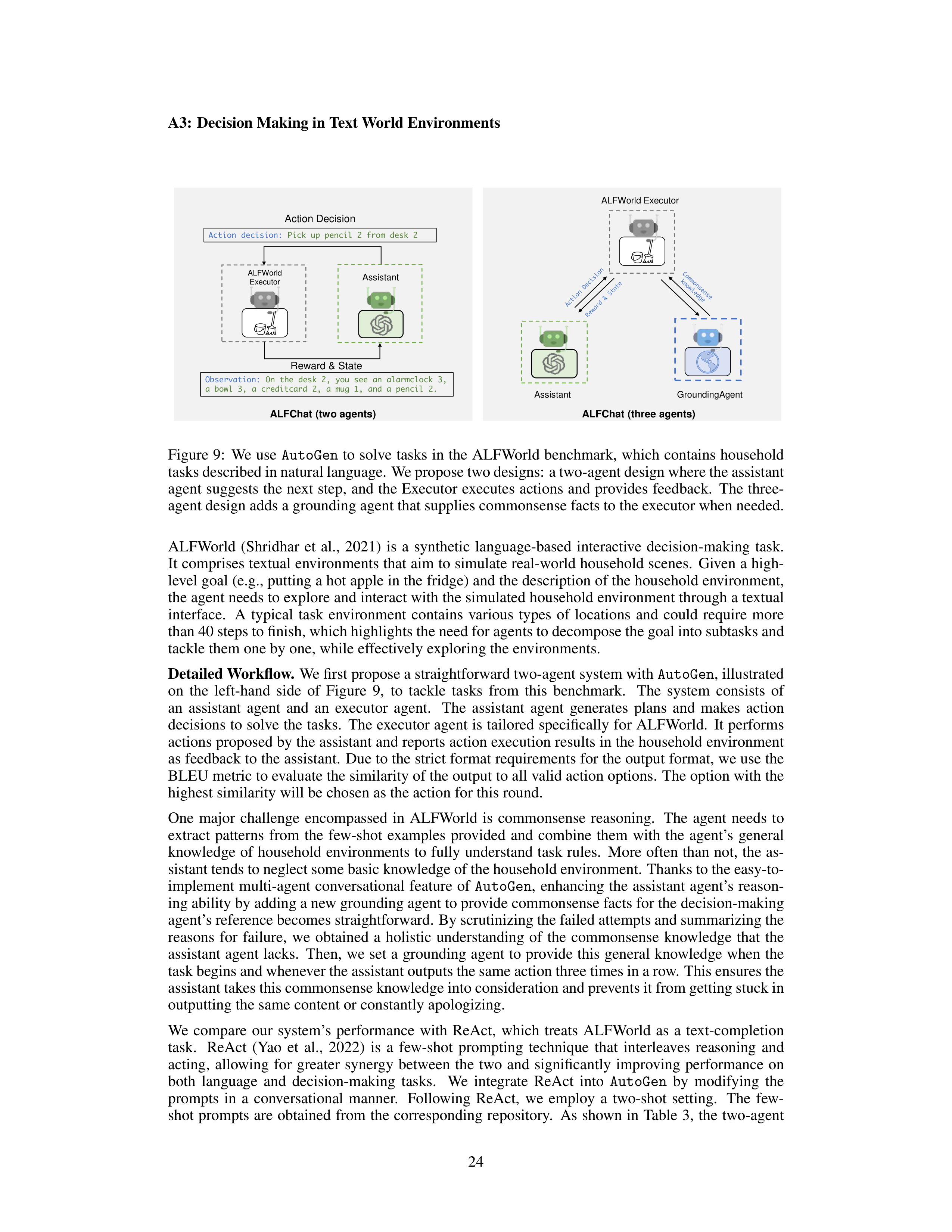


A3:
Decision Making in Text World Environments
ALFWorld
Executor
Reward & State
Action Decision
Assistant
Observation:
On the desk 2, you see an alarmclock
3,
a bowl 3, a creditcard
2, a mug 1, and a pencil 2.
Action decision:
Pick up pencil 2 from desk 2
GroundingAgent
ALFChat
(two agents)
ALFChat
(three agents)
ALFWorld Executor
Assistant
Figure 9:
We use
AutoGen
to solve tasks in the ALFWorld benchmark,
which contains household
tasks described in natural language. We propose two designs: a two-agent design where the assistant
agent suggests the next step,
and the Executor executes actions and provides feedback.
The three-
agent design adds a grounding agent that supplies commonsense facts to the executor when needed.
ALFWorld
(Shridhar
et
al.,
2021)
is
a
synthetic
language-based
interactive
decision-making
task.
It comprises textual environments that aim to simulate real-world household scenes.
Given a high-
level goal (e.g., putting a hot apple in the fridge) and the description of the household environment,
the agent needs to explore and interact with the simulated household environment through a textual
interface.
A
typical
task
environment
contains
various
types
of
locations
and
could
require
more
than 40 steps to finish, which highlights the need for agents to decompose the goal into subtasks and
tackle them one by one, while effectively exploring the environments.
Detailed Workflow.
We first propose a straightforward two-agent system with
AutoGen
, illustrated
on
the
left-hand
side
of
Figure
9,
to
tackle
tasks
from
this
benchmark.
The
system
consists
of
an
assistant
agent
and
an
executor
agent.
The
assistant
agent
generates
plans
and
makes
action
decisions to solve the tasks.
The executor agent is tailored specifically for ALFWorld.
It performs
actions proposed by the assistant and reports action execution results in the household environment
as feedback to the assistant.
Due to the strict format requirements for the output format, we use the
BLEU metric to evaluate the similarity of the output to all valid action options.
The option with the
highest similarity will be chosen as the action for this round.
One
major
challenge
encompassed
in
ALFWorld
is
commonsense
reasoning.
The
agent
needs
to
extract
patterns
from
the
few-shot
examples
provided
and
combine
them
with
the
agent’s
general
knowledge of household environments to fully understand task rules.
More often than not,
the as-
sistant tends to neglect some basic knowledge of the household environment.
Thanks to the easy-to-
implement
multi-agent
conversational
feature
of
AutoGen
,
enhancing
the
assistant
agent’s
reason-
ing ability by adding a new grounding agent to provide commonsense facts for the decision-making
agent’s reference becomes straightforward.
By scrutinizing the failed attempts and summarizing the
reasons
for
failure,
we
obtained
a
holistic
understanding
of
the
commonsense
knowledge
that
the
assistant agent lacks.
Then,
we set a grounding agent to provide this general knowledge when the
task begins and whenever the assistant outputs the same action three times in a row.
This ensures the
assistant takes this commonsense knowledge into consideration and prevents it from getting stuck in
outputting the same content or constantly apologizing.
We
compare
our
system’s
performance
with
ReAct,
which
treats
ALFWorld
as
a
text-completion
task.
ReAct
(Yao
et
al.,
2022)
is
a
few-shot
prompting
technique
that
interleaves
reasoning
and
acting,
allowing
for
greater
synergy
between
the
two
and
significantly
improving
performance
on
both
language
and
decision-making
tasks.
We
integrate
ReAct
into
AutoGen
by
modifying
the
prompts
in
a
conversational
manner.
Following
ReAct,
we
employ
a
two-shot
setting.
The
few-
shot prompts
are
obtained
from
the
corresponding
repository.
As shown
in Table 3,
the
two-agent
24
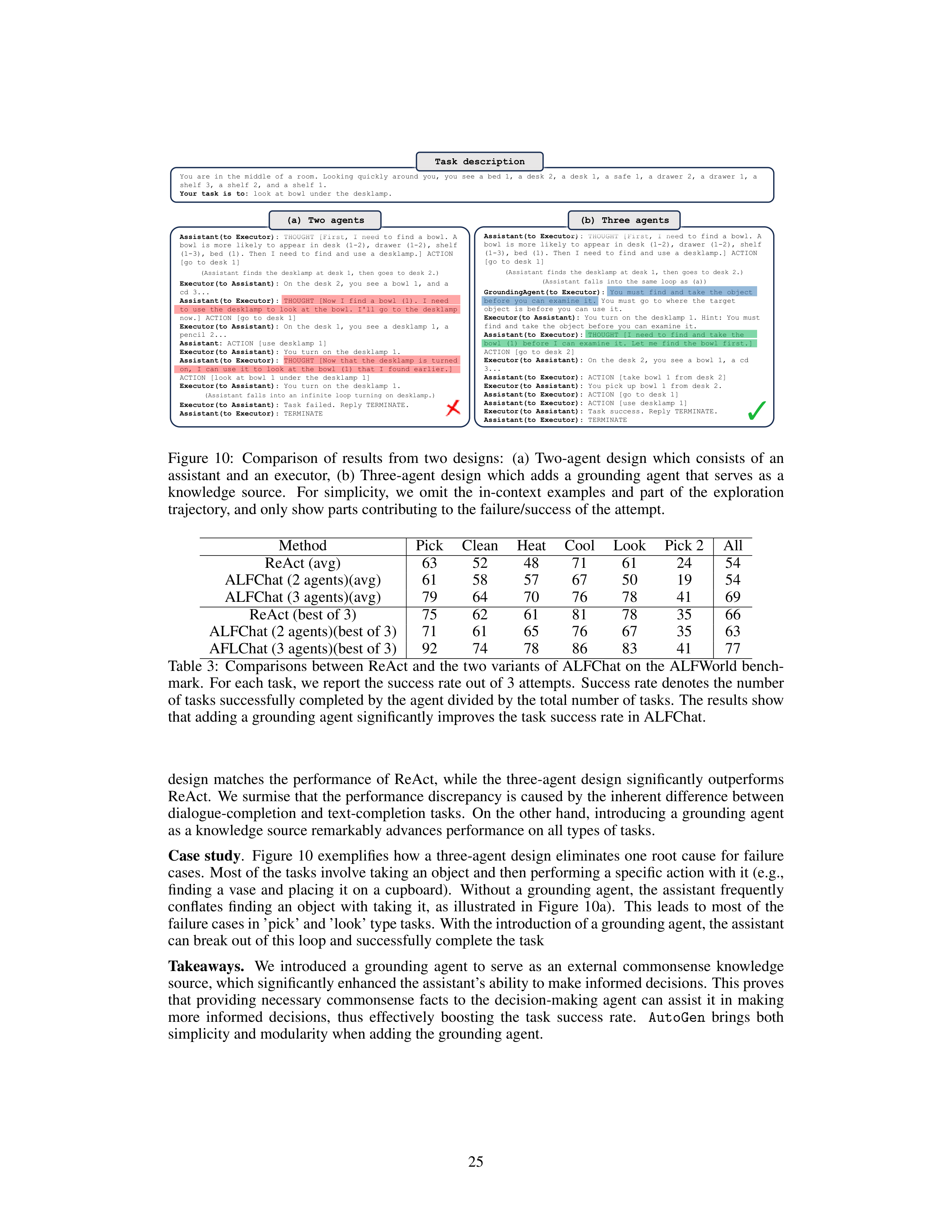


Task description
You are in the middle of a room. Looking quickly around you, you see a bed 1, a desk 2, a desk 1, a safe 1, a drawer 2, a drawer
1, a
shelf 3, a shelf 2, and a shelf 1.
Your task is to:
look at bowl under the desklamp.
Assistant(to Executor):
THOUGHT [First, I need to find a bowl. A
bowl is more likely to appear in desk (1-2), drawer (1-2), shelf
(1-3), bed (1). Then I need to find and use a desklamp.] ACTION
[go to desk 1]
(Assistant finds the desklamp
at desk 1, then goes to desk 2.)
Executor(to Assistant):
On the desk 2, you see a bowl 1, and a
cd 3...
Assistant(to Executor)
: THOUGHT [Now I find a bowl (1). I need
to use the desklamp
to look at the bowl. I'll go to the desklamp
now.] ACTION [go to desk 1]
Executor(to Assistant):
On the desk 1, you see a desklamp
1, a
pencil 2...
Assistant:
ACTION [use desklamp
1]
Executor(to Assistant)
: You turn on the desklamp
1.
Assistant(to Executor):
THOUGHT [Now that the desklamp
is turned
on, I can use it to look at the bowl (1) that I found earlier.]
ACTION [look at bowl 1 under the desklamp
1]
Executor(to Assistant)
: You turn on the desklamp
1.
(Assistant falls into an infinite loop turning on desklamp.)
Executor(to Assistant)
: Task failed. Reply TERMINATE.
Assistant(to Executor)
: TERMINATE
Assistant(to Executor):
THOUGHT [First, I need to find a bowl. A
bowl is more likely to appear in desk (1-2), drawer (1-2), shelf
(1-3), bed (1). Then I need to find and use a desklamp.] ACTION
[go to desk 1]
(Assistant finds the desklamp
at desk 1, then goes to desk 2.)
(Assistant falls into the same loop as (a))
GroundingAgent(to Executor)
: You must find and take the object
before you can examine it. You must go to where the target
object is before you can use it.
Executor(to Assistant):
You turn on the desklamp
1. Hint: You must
find and take the object before you can examine it.
Assistant(to Executor):
THOUGHT [I need to find and take the
bowl (1) before I can examine it. Let me find the bowl first.]
ACTION [go to desk 2]
Executor(to Assistant):
On the desk 2, you see a bowl 1, a cd
3...
Assistant(to Executor):
ACTION [take bowl 1 from desk 2]
Executor(to Assistant):
You pick up bowl 1 from desk 2.
Assistant(to Executor):
ACTION [go to desk 1]
Assistant(to Executor):
ACTION
[use desklamp
1]
Executor(to Assistant)
: Task success. Reply TERMINATE.
Assistant(to Executor)
: TERMINATE
(a) Two agents
(b) Three agents
Figure
10:
Comparison
of
results
from
two
designs:
(a)
Two-agent
design
which
consists
of
an
assistant
and
an
executor,
(b)
Three-agent
design
which
adds
a
grounding
agent
that
serves
as
a
knowledge
source.
For
simplicity,
we
omit
the
in-context
examples
and
part
of
the
exploration
trajectory, and only show parts contributing to the failure/success of the attempt.
Method
Pick
Clean
Heat
Cool
Look
Pick 2
All
ReAct (avg)
63
52
48
71
61
24
54
ALFChat (2 agents)(avg)
61
58
57
67
50
19
54
ALFChat (3 agents)(avg)
79
64
70
76
78
41
69
ReAct (best of 3)
75
62
61
81
78
35
66
ALFChat (2 agents)(best of 3)
71
61
65
76
67
35
63
AFLChat (3 agents)(best of 3)
92
74
78
86
83
41
77
Table
3:
Comparisons
between
ReAct
and
the
two
variants
of
ALFChat
on
the
ALFWorld
bench-
mark.
For each task, we report the success rate out of 3 attempts.
Success rate denotes the number
of tasks successfully completed by the agent divided by the total number of tasks.
The results show
that adding a grounding agent significantly improves the task success rate in ALFChat.
design
matches
the
performance
of
ReAct,
while
the
three-agent
design
significantly
outperforms
ReAct.
We surmise that the performance discrepancy is caused by the inherent difference between
dialogue-completion and text-completion tasks.
On the other hand,
introducing a grounding agent
as a knowledge source remarkably advances performance on all types of tasks.
Case
study
.
Figure
10
exemplifies
how
a
three-agent
design
eliminates
one
root
cause
for
failure
cases.
Most of the tasks involve taking an object and then performing a specific action with it (e.g.,
finding
a
vase
and
placing
it
on
a
cupboard).
Without
a
grounding
agent,
the
assistant
frequently
conflates
finding
an
object
with
taking
it,
as
illustrated
in
Figure
10a).
This
leads
to
most
of
the
failure cases in ’pick’ and ’look’ type tasks. With the introduction of a grounding agent, the assistant
can break out of this loop and successfully complete the task
Takeaways.
We
introduced
a
grounding
agent
to
serve
as
an
external
commonsense
knowledge
source, which significantly enhanced the assistant’s ability to make informed decisions.
This proves
that
providing
necessary
commonsense
facts
to
the
decision-making
agent
can
assist
it
in
making
more
informed
decisions,
thus
effectively
boosting
the
task
success
rate.
AutoGen
brings
both
simplicity and modularity when adding the grounding agent.
25
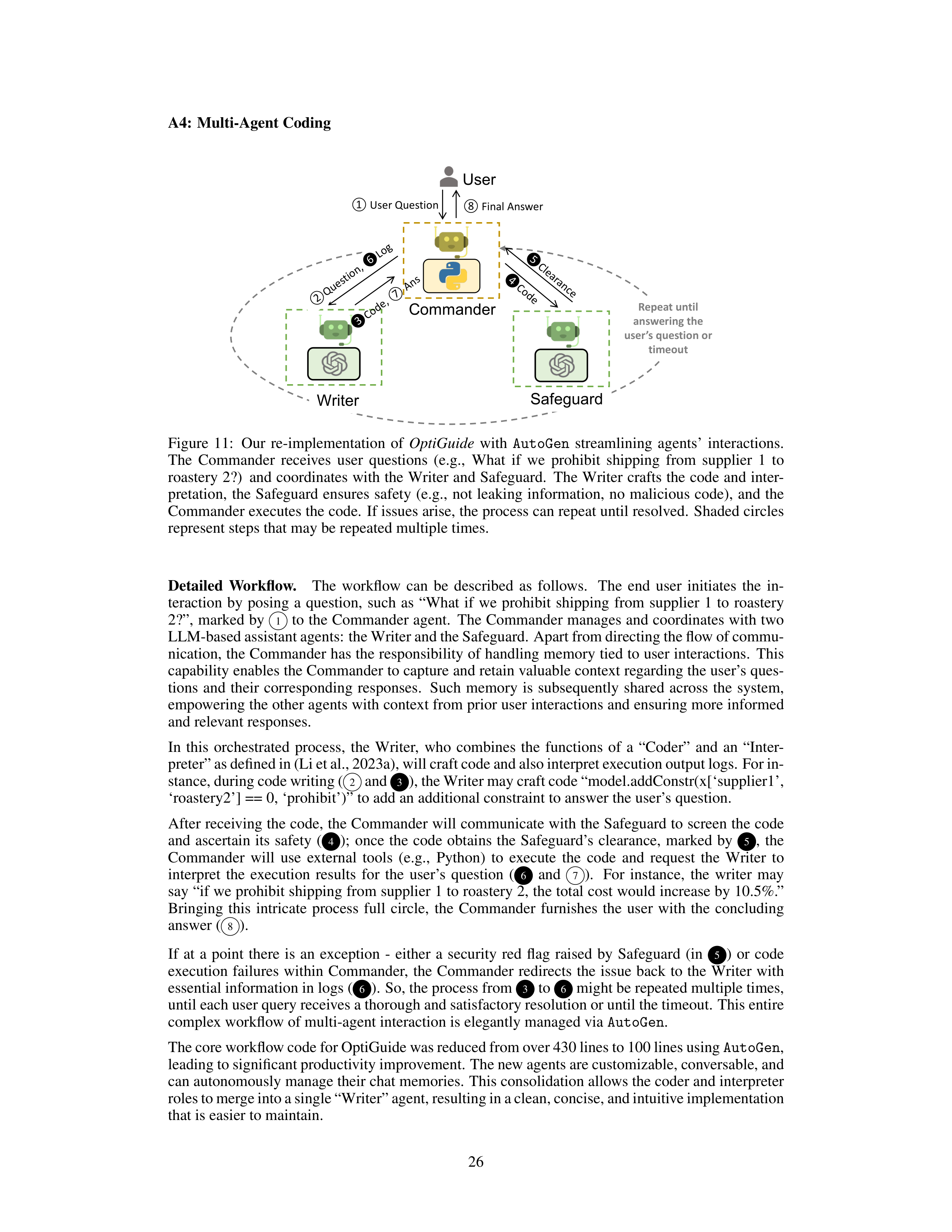







A4:
Multi-Agent Coding
Commander
Safeguard
Writer
②Question, ❻Log
❸Code, ⑦Ans
❹Code
❺Clearance
User
①User Question
⑧Final Answer
Repeat until
answering the
user’s question or
timeout
Figure
11:
Our
re-implementation
of
OptiGuide
with
AutoGen
streamlining
agents’
interactions.
The
Commander
receives
user
questions
(e.g.,
What
if
we
prohibit
shipping
from
supplier
1
to
roastery 2?)
and coordinates with the Writer and Safeguard.
The Writer crafts the code and inter-
pretation,
the
Safeguard
ensures
safety
(e.g.,
not
leaking
information,
no
malicious
code),
and
the
Commander executes the code.
If issues arise, the process can repeat until resolved.
Shaded circles
represent steps that may be repeated multiple times.
Detailed
Workflow.
The
workflow
can
be
described
as
follows.
The
end
user
initiates
the
in-
teraction
by
posing
a
question,
such
as
“What
if
we
prohibit
shipping
from
supplier
1
to
roastery
2?”,
marked by
1
to the Commander agent.
The Commander manages and coordinates with two
LLM-based assistant agents: the Writer and the Safeguard. Apart from directing the flow of commu-
nication, the Commander has the responsibility of handling memory tied to user interactions.
This
capability enables the Commander to capture and retain valuable context regarding the user’s ques-
tions
and
their
corresponding
responses.
Such
memory
is
subsequently
shared
across
the
system,
empowering the other agents with context from prior user interactions and ensuring more informed
and relevant responses.
In
this
orchestrated
process,
the
Writer,
who
combines
the
functions
of
a
“Coder”
and
an
“Inter-
preter” as defined in (Li et al., 2023a), will craft code and also interpret execution output logs. For in-
stance, during code writing (
2
and
3
), the Writer may craft code “model.addConstr(x[‘supplier1’,
‘roastery2’] == 0, ‘prohibit’)” to add an additional constraint to answer the user’s question.
After receiving the code, the Commander will communicate with the Safeguard to screen the code
and
ascertain
its
safety
(
4
);
once
the
code
obtains
the
Safeguard’s
clearance,
marked
by
5
,
the
Commander
will
use
external
tools
(e.g.,
Python)
to
execute
the
code
and
request
the
Writer
to
interpret
the
execution
results
for
the
user’s
question
(
6
and
7
).
For
instance,
the
writer
may
say “if we prohibit shipping from supplier 1 to roastery 2, the total cost would increase by 10.5%.”
Bringing
this
intricate
process
full
circle,
the
Commander
furnishes
the
user
with
the
concluding
answer (
8
).
If
at
a
point
there
is
an
exception
-
either
a
security
red
flag
raised
by
Safeguard
(in
5
)
or
code
execution
failures
within
Commander,
the
Commander
redirects
the
issue
back
to
the
Writer
with
essential information in logs (
6
).
So, the process from
3
to
6
might be repeated multiple times,
until each user query receives a thorough and satisfactory resolution or until the timeout.
This entire
complex workflow of multi-agent interaction is elegantly managed via
AutoGen
.
The core workflow code for OptiGuide was reduced from over 430 lines to 100 lines using
AutoGen
,
leading to significant productivity improvement. The new agents are customizable, conversable, and
can autonomously manage their chat memories.
This consolidation allows the coder and interpreter
roles to merge into a single “Writer” agent, resulting in a clean, concise, and intuitive implementation
that is easier to maintain.
26
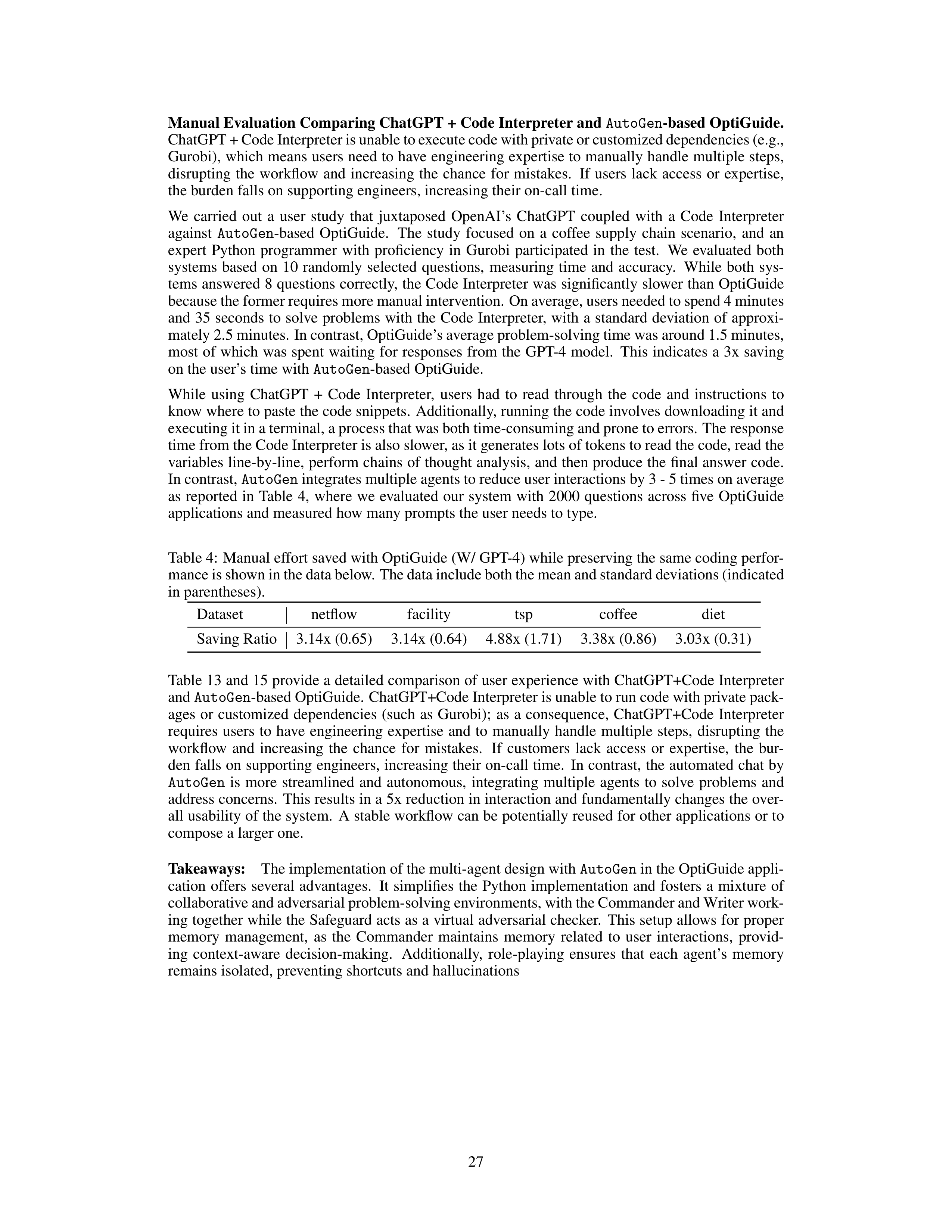
Manual Evaluation Comparing ChatGPT + Code Interpreter and
AutoGen
-based OptiGuide.
ChatGPT + Code Interpreter is unable to execute code with private or customized dependencies (e.g.,
Gurobi), which means users need to have engineering expertise to manually handle multiple steps,
disrupting
the
workflow
and
increasing
the
chance
for
mistakes.
If
users
lack
access
or
expertise,
the burden falls on supporting engineers, increasing their on-call time.
We
carried
out
a
user
study
that
juxtaposed
OpenAI’s
ChatGPT
coupled
with
a
Code
Interpreter
against
AutoGen
-based
OptiGuide.
The
study
focused
on
a
coffee
supply
chain
scenario,
and
an
expert
Python
programmer
with
proficiency
in
Gurobi
participated
in
the
test.
We
evaluated
both
systems
based
on
10
randomly
selected
questions,
measuring
time
and
accuracy.
While
both
sys-
tems answered 8 questions correctly, the Code Interpreter was significantly slower than OptiGuide
because the former requires more manual intervention. On average, users needed to spend 4 minutes
and 35 seconds to solve problems with the Code Interpreter,
with a standard deviation of approxi-
mately 2.5 minutes.
In contrast, OptiGuide’s average problem-solving time was around 1.5 minutes,
most of which was spent waiting for responses from the GPT-4 model.
This indicates a 3x saving
on the user’s time with
AutoGen
-based OptiGuide.
While
using
ChatGPT
+
Code
Interpreter,
users
had
to
read
through
the
code
and
instructions
to
know where to paste the code snippets.
Additionally, running the code involves downloading it and
executing it in a terminal, a process that was both time-consuming and prone to errors. The response
time from the Code Interpreter is also slower, as it generates lots of tokens to read the code, read the
variables line-by-line, perform chains of thought analysis, and then produce the final answer code.
In contrast,
AutoGen
integrates multiple agents to reduce user interactions by 3 - 5 times on average
as
reported
in
Table
4,
where
we
evaluated
our
system
with
2000
questions
across
five
OptiGuide
applications and measured how many prompts the user needs to type.
Table 4:
Manual effort saved with OptiGuide (W/ GPT-4) while preserving the same coding perfor-
mance is shown in the data below. The data include both the mean and standard deviations (indicated
in parentheses).
Dataset
netflow
facility
tsp
coffee
diet
Saving Ratio
3.14x (0.65)
3.14x (0.64)
4.88x (1.71)
3.38x (0.86)
3.03x (0.31)
Table 13 and 15 provide a detailed comparison of user experience with ChatGPT+Code Interpreter
and
AutoGen
-based OptiGuide.
ChatGPT+Code Interpreter is unable to run code with private pack-
ages
or
customized
dependencies
(such
as
Gurobi);
as
a
consequence,
ChatGPT+Code
Interpreter
requires
users
to
have
engineering
expertise
and
to
manually
handle
multiple
steps,
disrupting
the
workflow
and
increasing
the
chance
for
mistakes.
If
customers
lack
access
or
expertise,
the
bur-
den falls on supporting engineers, increasing their on-call time.
In contrast, the automated chat by
AutoGen
is
more
streamlined
and
autonomous,
integrating
multiple
agents
to
solve
problems
and
address concerns.
This results in a 5x reduction in interaction and fundamentally changes the over-
all usability of the system.
A stable workflow can be potentially reused for other applications or to
compose a larger one.
Takeaways:
The implementation of the multi-agent design with
AutoGen
in the OptiGuide appli-
cation
offers
several
advantages.
It
simplifies
the
Python
implementation
and
fosters
a
mixture
of
collaborative and adversarial problem-solving environments, with the Commander and Writer work-
ing together while the Safeguard acts as a virtual adversarial checker.
This setup allows for proper
memory
management,
as
the
Commander
maintains
memory
related
to
user
interactions,
provid-
ing
context-aware
decision-making.
Additionally,
role-playing
ensures
that
each
agent’s
memory
remains isolated, preventing shortcuts and hallucinations
27
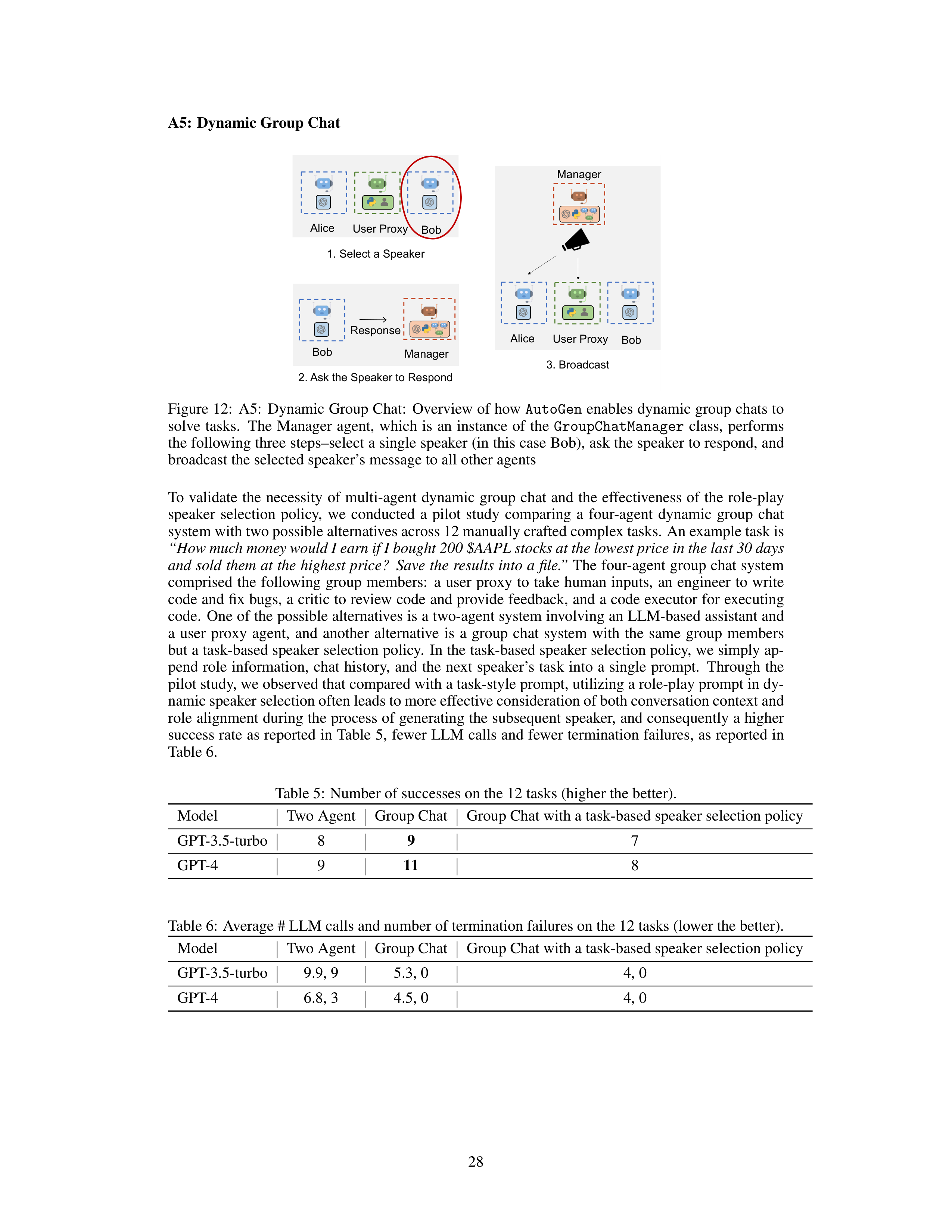


















A5:
Dynamic Group Chat
3. Broadcast
Alice
Bob
User Proxy
1. Select a Speaker
Alice
Bob
User Proxy
Bob
2. Ask the Speaker to Respond
Manager
Manager
Response
Figure 12:
A5:
Dynamic Group Chat:
Overview of how
AutoGen
enables dynamic group chats to
solve
tasks.
The
Manager
agent,
which
is
an
instance
of
the
GroupChatManager
class,
performs
the following three steps–select a single speaker (in this case Bob), ask the speaker to respond, and
broadcast the selected speaker’s message to all other agents
To
validate
the
necessity
of
multi-agent
dynamic
group
chat
and
the
effectiveness
of
the
role-play
speaker
selection
policy,
we
conducted
a
pilot
study
comparing
a
four-agent
dynamic
group
chat
system with two possible alternatives across 12 manually crafted complex tasks.
An example task is
“How much money would I earn if I bought 200 $AAPL stocks at the lowest price in the last 30 days
and sold them at the highest price?
Save the results into a file.”
The four-agent group chat system
comprised
the
following
group
members:
a
user
proxy
to
take
human
inputs,
an
engineer
to
write
code and fix bugs, a critic to review code and provide feedback, and a code executor for executing
code.
One of the possible alternatives is a two-agent system involving an LLM-based assistant and
a
user
proxy
agent,
and
another
alternative
is
a
group
chat
system
with
the
same
group
members
but a task-based speaker selection policy.
In the task-based speaker selection policy, we simply ap-
pend
role
information,
chat
history,
and
the
next
speaker’s
task
into
a
single
prompt.
Through
the
pilot study, we observed that compared with a task-style prompt, utilizing a role-play prompt in dy-
namic speaker selection often leads to more effective consideration of both conversation context and
role alignment during the process of generating the subsequent speaker, and consequently a higher
success rate as reported in Table 5,
fewer LLM calls and fewer termination failures,
as reported in
Table 6.
Table 5:
Number of successes on the 12 tasks (higher the better).
Model
Two Agent
Group Chat
Group Chat with a task-based speaker selection policy
GPT-3.5-turbo
8
9
7
GPT-4
9
11
8
Table 6:
Average # LLM calls and number of termination failures on the 12 tasks (lower the better).
Model
Two Agent
Group Chat
Group Chat with a task-based speaker selection policy
GPT-3.5-turbo
9.9, 9
5.3, 0
4, 0
GPT-4
6.8, 3
4.5, 0
4, 0
28
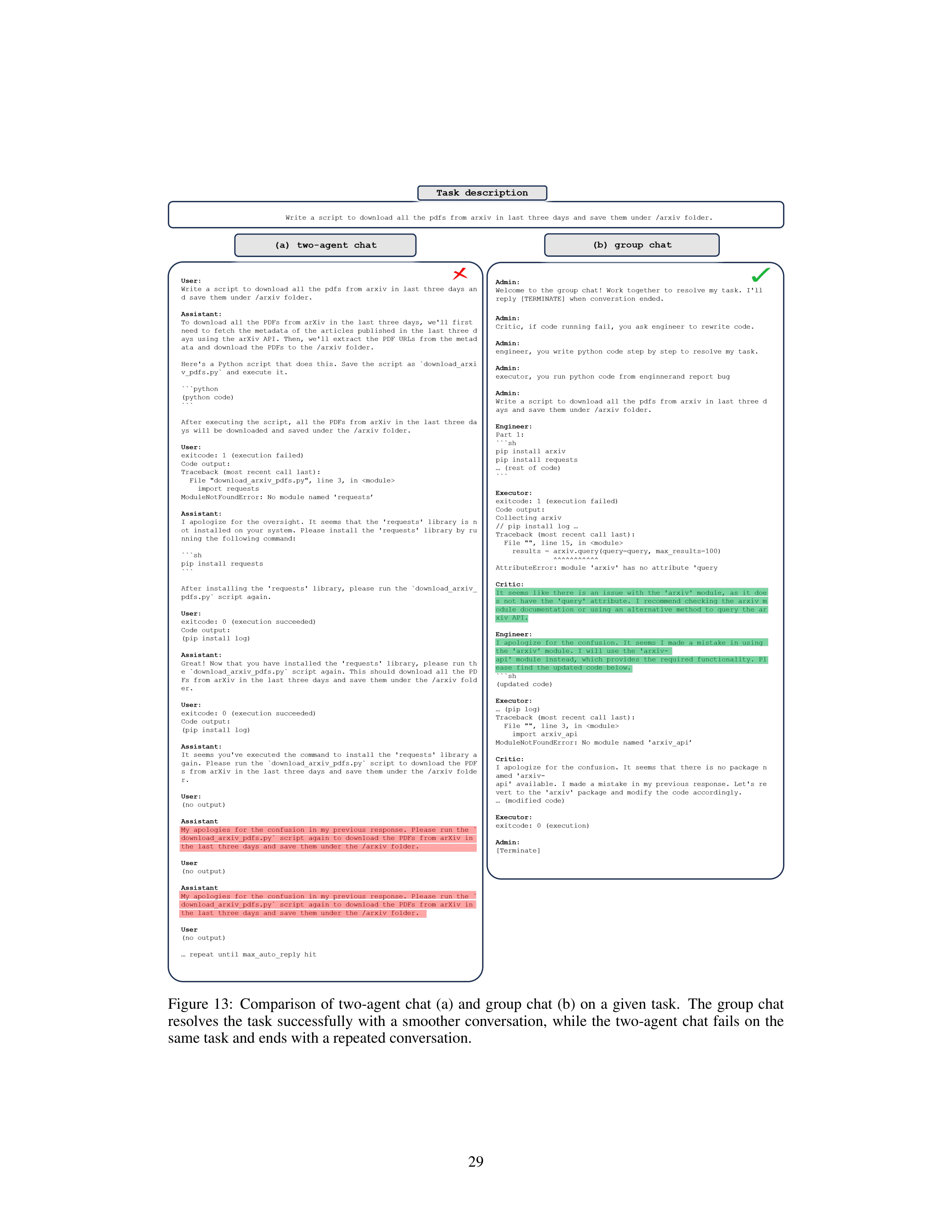
Figure
13:
Comparison
of
two-agent
chat
(a)
and
group
chat
(b)
on
a
given
task.
The
group
chat
resolves
the
task
successfully
with
a
smoother
conversation,
while
the
two-agent
chat
fails
on
the
same task and ends with a repeated conversation.
29
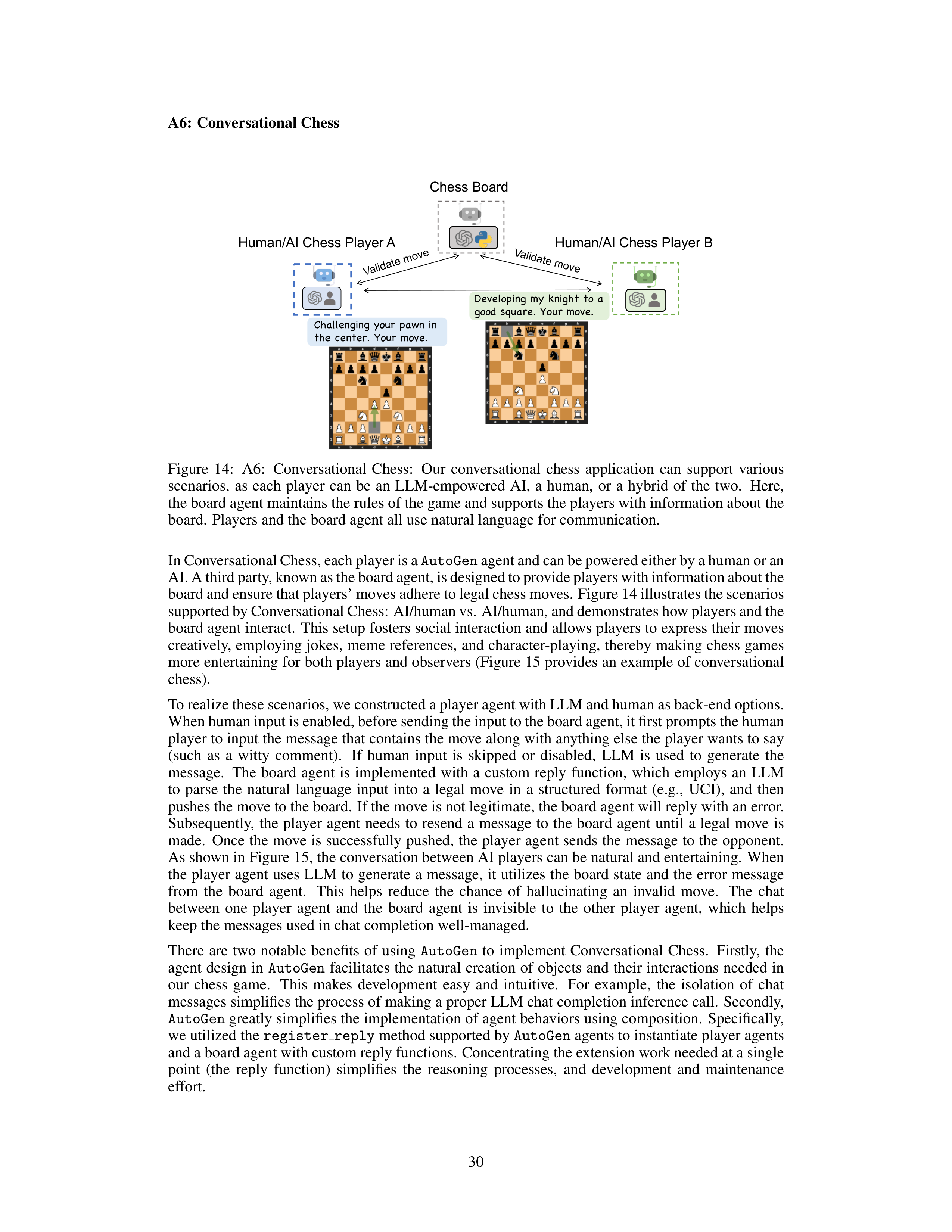







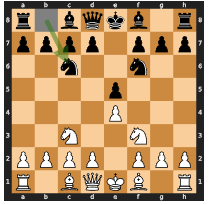
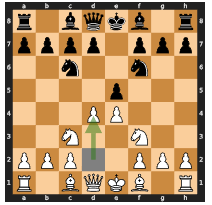


A6:
Conversational Chess
Chess Board
Human/AI Chess Player A
Human/AI Chess Player B
Validate move
Validate move
Challenging your pawn in
the center. Your move.
Developing my knight
to a
good square.
Your move.
Figure
14:
A6:
Conversational
Chess:
Our
conversational
chess
application
can
support
various
scenarios,
as
each
player
can
be
an
LLM-empowered
AI,
a
human,
or
a
hybrid
of
the
two.
Here,
the board agent maintains the rules of the game and supports the players with information about the
board.
Players and the board agent all use natural language for communication.
In Conversational Chess, each player is a
AutoGen
agent and can be powered either by a human or an
AI. A third party, known as the board agent, is designed to provide players with information about the
board and ensure that players’ moves adhere to legal chess moves. Figure 14 illustrates the scenarios
supported by Conversational Chess: AI/human vs. AI/human, and demonstrates how players and the
board agent interact.
This setup fosters social interaction and allows players to express their moves
creatively, employing jokes, meme references, and character-playing, thereby making chess games
more entertaining for both players and observers (Figure 15 provides an example of conversational
chess).
To realize these scenarios, we constructed a player agent with LLM and human as back-end options.
When human input is enabled, before sending the input to the board agent, it first prompts the human
player to input the message that contains the move along with anything else the player wants to say
(such
as
a
witty
comment).
If
human
input
is
skipped
or
disabled,
LLM
is
used
to
generate
the
message.
The
board
agent
is
implemented
with
a
custom
reply
function,
which
employs
an
LLM
to
parse
the
natural
language
input
into
a
legal
move
in
a
structured
format
(e.g.,
UCI),
and
then
pushes the move to the board.
If the move is not legitimate, the board agent will reply with an error.
Subsequently,
the
player
agent
needs
to
resend
a
message
to
the
board
agent
until
a
legal
move
is
made.
Once the move is successfully pushed, the player agent sends the message to the opponent.
As shown in Figure 15, the conversation between AI players can be natural and entertaining.
When
the player agent uses LLM to generate a message,
it utilizes the board state and the error message
from
the
board
agent.
This
helps
reduce
the
chance
of
hallucinating
an
invalid
move.
The
chat
between
one
player
agent
and
the
board
agent
is
invisible
to
the
other
player
agent,
which
helps
keep the messages used in chat completion well-managed.
There
are
two
notable
benefits
of
using
AutoGen
to
implement
Conversational
Chess.
Firstly,
the
agent
design
in
AutoGen
facilitates
the natural creation of
objects and their interactions needed in
our
chess
game.
This
makes
development
easy
and
intuitive.
For
example,
the
isolation
of
chat
messages simplifies the process of making a proper LLM chat completion inference call.
Secondly,
AutoGen
greatly simplifies the implementation of agent behaviors using composition.
Specifically,
we utilized the
register
reply
method supported by
AutoGen
agents to instantiate player agents
and a board agent with custom reply functions.
Concentrating the extension work needed at a single
point
(the
reply
function)
simplifies
the
reasoning
processes,
and
development
and
maintenance
effort.
30
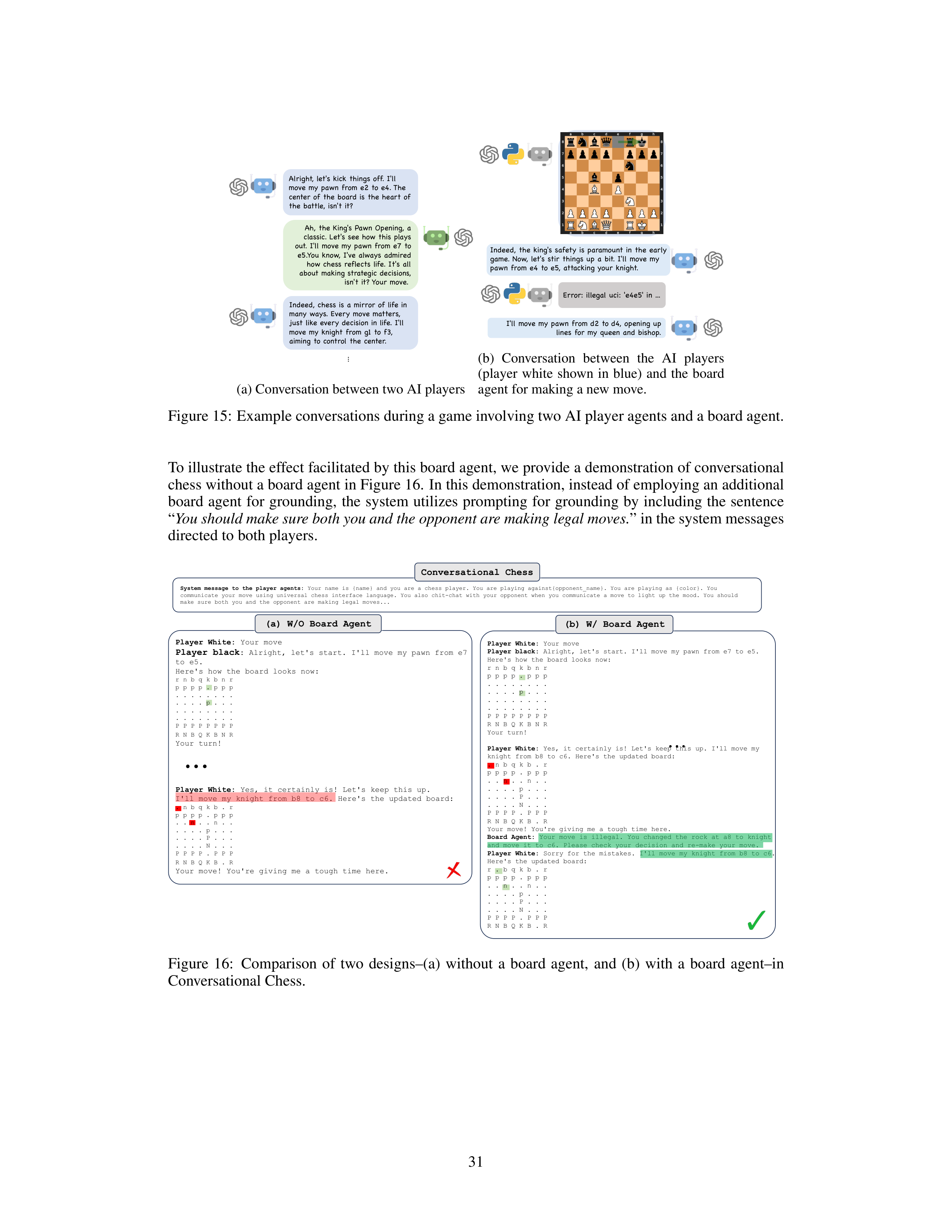





















Alright, let's kick things off. I'll
move my pawn from e2 to e4. The
center of the board is the heart of
the battle, isn't it?
Ah, the King's Pawn Opening, a
classic. Let's see how this plays
out. I'll move my pawn from e7 to
e5.You know, I've always admired
how chess reflects life. It's all
about making strategic decisions,
isn't it? Your move.
…
Indeed, chess is a mirror of life in
many ways. Every move matters,
just like every decision in life. I'll
move my knight from g1 to f3,
aiming to control the center.
(a) Conversation between two AI players
Error: illegal uci: 'e4e5' in ...
I'll move my pawn from d2 to d4, opening up
lines for my queen and bishop.
Indeed, the king's safety is paramount in the early
game. Now, let's stir things up a bit. I'll move my
pawn from e4 to e5, attacking your knight.
(b)
Conversation
between
the
AI
players
(player
white
shown
in
blue)
and
the
board
agent for making a new move.
Figure 15:
Example conversations during a game involving two AI player agents and a board agent.
To illustrate the effect facilitated by this board agent, we provide a demonstration of conversational
chess without a board agent in Figure 16.
In this demonstration, instead of employing an additional
board
agent
for
grounding,
the
system
utilizes
prompting
for
grounding
by
including
the
sentence
“
You should make sure both you and the opponent are making legal moves.
” in the system messages
directed to both players.
Player White:
Your move
Player black
:
Alright, let's start. I'll move my pawn from e7
to e5.
Here's how the board looks now:
r n b q k b n r
p p p p . p p p
. . . . . . . .
. . . . p . . .
. . . . . . . .
. . . . . . . .
P P P P P P P P
R N B Q K B N R
Your turn!
Player White:
Yes, it certainly is! Let's keep this up.
I'll move my knight from b8 to c6. Here's the updated board:
. n b q k b . r
p p p p . p p p
. . n . . n . .
. . . . p . . .
. . . . P . . .
. . . . N . . .
P P P P . P P P
R N B Q K B . R
Your move! You're giving me a tough time here.
Player White:
Your move
Player black:
Alright, let's start. I'll move my pawn from e7 to e5.
Here's how the board looks now:
r n b q k b n r
p p p p . p p p
. . . . . . . .
. . . . p . . .
. . . . . . . .
. . . . . . . .
P P P P P P P P
R N B Q K B N R
Your turn!
Player White:
Yes, it certainly is! Let's keep this up. I'll move my
knight from b8 to c6. Here's the updated board:
. n b q k b . r
p p p p . p p p
. . n . . n . .
. . . . p . . .
. . . . P . . .
. . . . N . . .
P P P P . P P P
R N B Q K B . R
Your move! You're giving me a tough time here.
Board Agent:
Your move is illegal.
You changed the rock at a8 to knight
and move it to c6. Please check your decision and re-make your move.
Player White:
Sorry for the mistakes.
I'll
move my knight from b8 to c6.
Here's
the updated board:
r . b q k b . r
p
p
p
p
. p
p
p
. . n . . n . .
. . . . p . . .
. . . . P . . .
. . . . N . . .
P
P
P
P
. P
P
P
R N B Q K B . R
Conversational Chess
System message to the player agents:
Your name is {name} and you are a chess player. You are playing against{opponent_name}. You are playing as {color}. You
communicate your move using universal chess interface language. You also chit-chat with your opponent when you communicate a move to light up the mood.
You should
make sure both you and the opponent are making legal moves...
(b) W/ Board Agent
(a) W/O Board Agent
Figure
16:
Comparison
of
two
designs–(a)
without
a
board
agent,
and
(b)
with
a
board
agent–in
Conversational Chess.
31
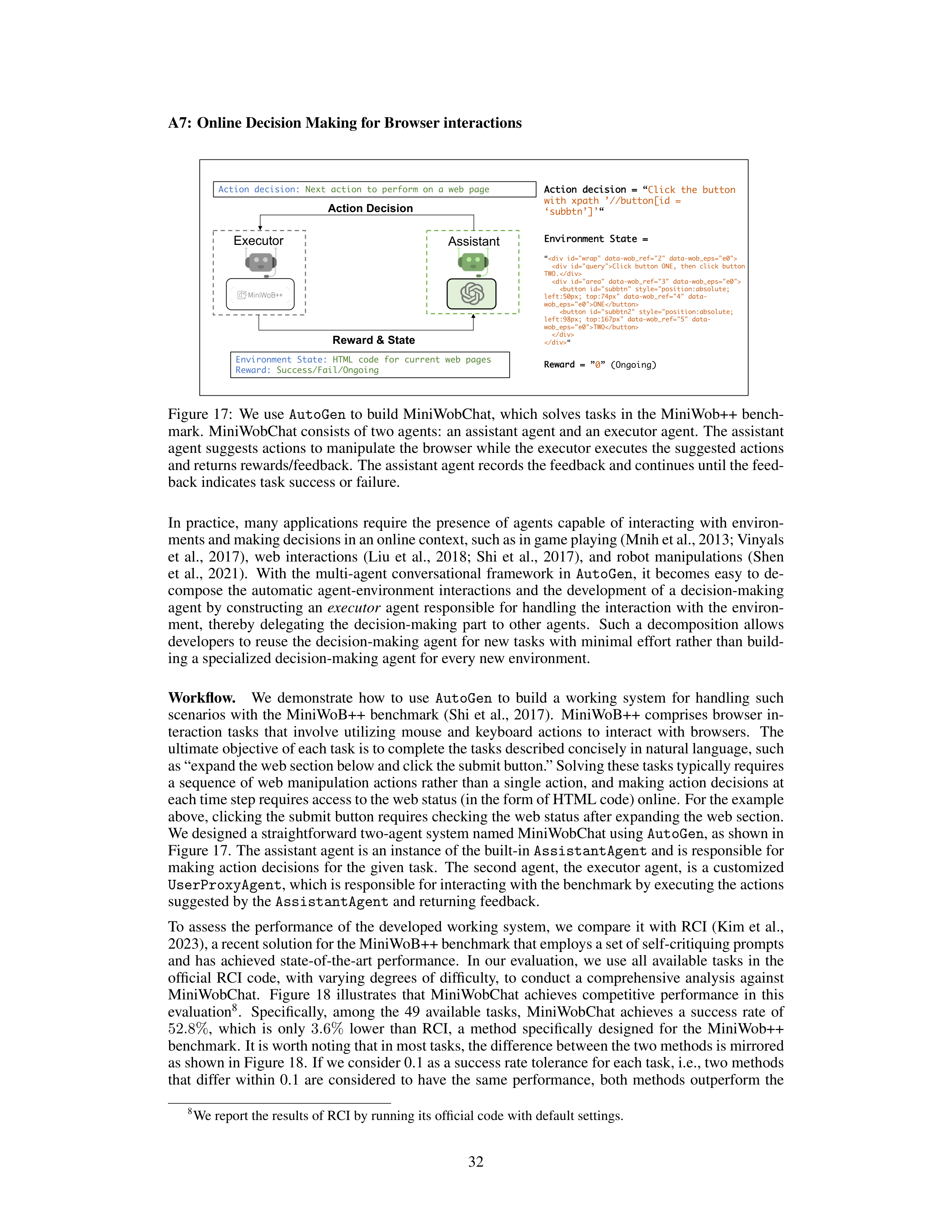




A7:
Online Decision Making for Browser interactions
Executor
Reward & State
Action Decision
Assistant
Environment State:
HTML code for current web pages
Reward:
Success/Fail/Ongoing
Action decision:
Next action to perform on a web page
Action decision
=
“
Click the button
with xpath
’//button[id =
‘subbtn’]’
“
Environment State =
“
Click button ONE, then click button
TWO.
<button id="subbtn" style="position:absolute;
left:50px; top:74px" data-wob_ref="4" data-
wob_eps="e0">ONE
<button id="subbtn2" style="position:absolute;
left:98px; top:167px" data-wob_ref="5" data-
wob_eps="e0">TWO
“
Reward =
”
0
” (Ongoing)
Figure 17:
We use
AutoGen
to build MiniWobChat,
which solves tasks in the MiniWob++ bench-
mark.
MiniWobChat consists of two agents:
an assistant agent and an executor agent.
The assistant
agent suggests actions to manipulate the browser while the executor executes the suggested actions
and returns rewards/feedback.
The assistant agent records the feedback and continues until the feed-
back indicates task success or failure.
In
practice,
many
applications
require
the
presence
of
agents
capable
of
interacting
with
environ-
ments and making decisions in an online context, such as in game playing (Mnih et al., 2013; Vinyals
et
al.,
2017),
web
interactions
(Liu
et
al.,
2018;
Shi
et
al.,
2017),
and
robot
manipulations
(Shen
et
al.,
2021).
With
the
multi-agent
conversational
framework
in
AutoGen
,
it
becomes
easy
to
de-
compose
the
automatic
agent-environment
interactions
and
the
development
of
a
decision-making
agent
by
constructing
an
executor
agent
responsible
for
handling
the
interaction
with
the
environ-
ment,
thereby
delegating
the
decision-making
part
to
other
agents.
Such
a
decomposition
allows
developers to reuse the decision-making agent for new tasks with minimal effort rather than build-
ing a specialized decision-making agent for every new environment.
Workflow.
We
demonstrate
how
to
use
AutoGen
to
build
a
working
system
for
handling
such
scenarios
with
the
MiniWoB++
benchmark
(Shi
et
al.,
2017).
MiniWoB++
comprises
browser
in-
teraction
tasks
that
involve
utilizing
mouse
and
keyboard
actions
to
interact
with
browsers.
The
ultimate objective of each task is to complete the tasks described concisely in natural language, such
as “expand the web section below and click the submit button.” Solving these tasks typically requires
a sequence of web manipulation actions rather than a single action, and making action decisions at
each time step requires access to the web status (in the form of HTML code) online. For the example
above, clicking the submit button requires checking the web status after expanding the web section.
We designed a straightforward two-agent system named MiniWobChat using
AutoGen
, as shown in
Figure 17.
The assistant agent is an instance of the built-in
AssistantAgent
and is responsible for
making
action
decisions
for
the
given
task.
The second agent,
the executor agent,
is a customized
UserProxyAgent
, which is responsible for interacting with the benchmark by executing the actions
suggested by the
AssistantAgent
and returning feedback.
To
assess
the
performance
of
the
developed
working
system,
we
compare
it
with
RCI
(Kim
et
al.,
2023), a recent solution for the MiniWoB++ benchmark that employs a set of self-critiquing prompts
and
has
achieved
state-of-the-art
performance.
In
our
evaluation,
we
use
all
available
tasks
in
the
official
RCI
code,
with
varying
degrees
of
difficulty,
to
conduct
a
comprehensive
analysis
against
MiniWobChat.
Figure
18
illustrates
that
MiniWobChat
achieves
competitive
performance
in
this
evaluation
8
.
Specifically,
among
the
49
available
tasks,
MiniWobChat
achieves
a
success
rate
of
52
.
8%
,
which
is
only
3
.
6%
lower
than
RCI,
a
method
specifically
designed
for
the
MiniWob++
benchmark. It is worth noting that in most tasks, the difference between the two methods is mirrored
as shown in Figure 18.
If we consider 0.1 as a success rate tolerance for each task, i.e., two methods
that
differ
within
0.1
are
considered
to
have
the
same
performance,
both
methods
outperform
the
8
We report the results of RCI by running its official code with default settings.
32
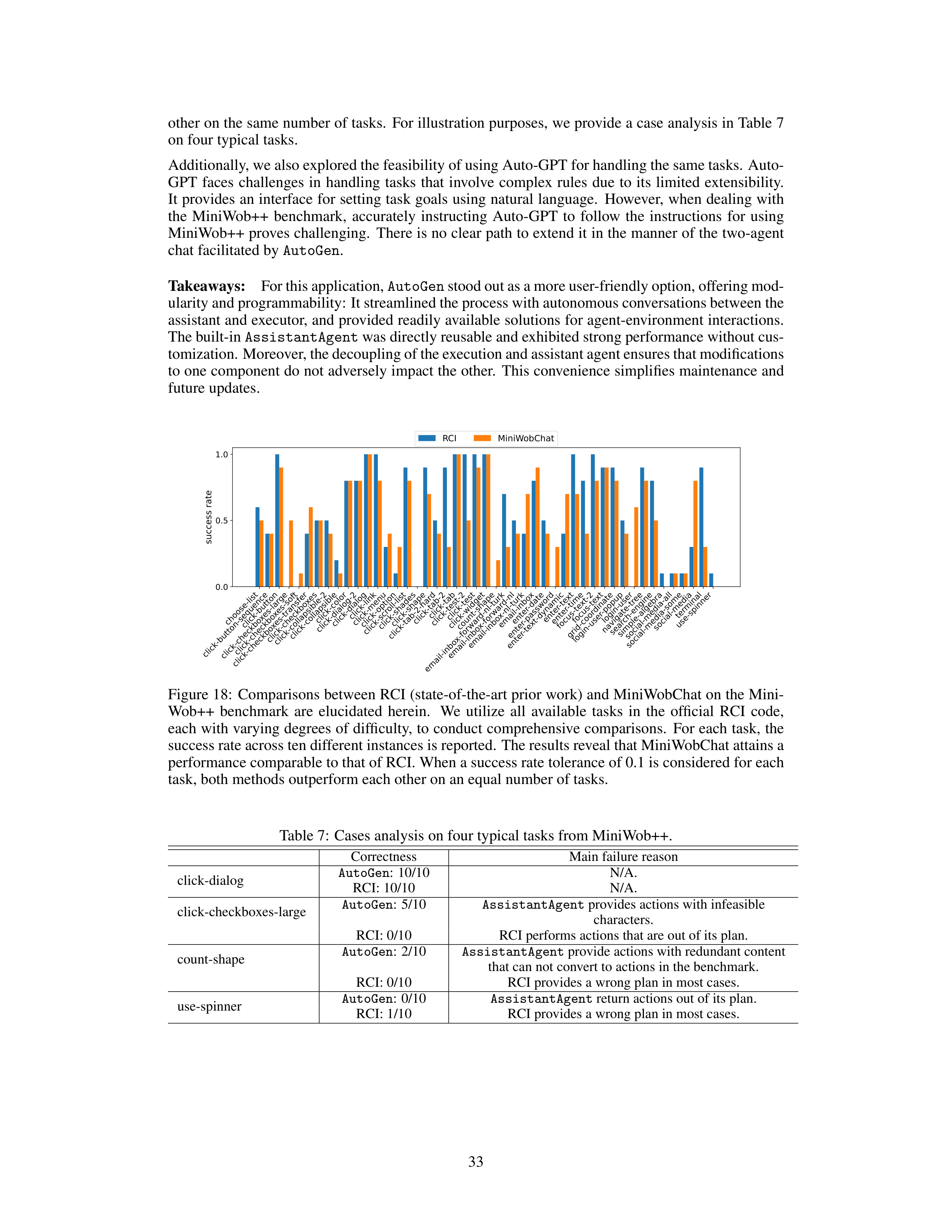
other on the same number of tasks.
For illustration purposes, we provide a case analysis in Table 7
on four typical tasks.
Additionally, we also explored the feasibility of using Auto-GPT for handling the same tasks.
Auto-
GPT
faces
challenges
in
handling
tasks
that
involve
complex
rules
due
to
its
limited
extensibility.
It provides an interface for setting task goals using natural language.
However, when dealing with
the
MiniWob++
benchmark,
accurately
instructing
Auto-GPT
to
follow
the
instructions
for
using
MiniWob++ proves challenging.
There is no clear path to extend it in the manner of the two-agent
chat facilitated by
AutoGen
.
Takeaways:
For this application,
AutoGen
stood out as a more user-friendly option, offering mod-
ularity and programmability: It streamlined the process with autonomous conversations between the
assistant and executor, and provided readily available solutions for agent-environment interactions.
The built-in
AssistantAgent
was directly reusable and exhibited strong performance without cus-
tomization. Moreover, the decoupling of the execution and assistant agent ensures that modifications
to one component do not adversely impact the other.
This convenience simplifies maintenance and
future updates.
choose-list
click-button-sequence
click-button
click-checkboxes-large
click-checkboxes-soft
click-checkboxes-transfer
click-checkboxes
click-collapsible-2
click-collapsible
click-color
click-dialog-2
click-dialog
click-link
click-menu
click-option
click-scroll-list
click-shades
click-shape
click-tab-2-hard
click-tab-2
click-tab
click-test-2
click-test
click-widget
count-shape
email-inbox-forward-nl-turk
email-inbox-forward-nl
email-inbox-nl-turk
email-inbox
enter-date
enter-password
enter-text-dynamic
enter-text
enter-time
focus-text-2
focus-text
grid-coordinate
login-user-popup
login-user
navigate-tree
search-engine
simple-algebra
social-media-all
social-media-some
social-media
terminal
use-spinner
0.0
0.5
1.0
success rate
RCI
MiniWobChat
Figure 18:
Comparisons between RCI (state-of-the-art prior work) and MiniWobChat on the Mini-
Wob++
benchmark
are
elucidated
herein.
We
utilize
all
available
tasks
in
the
official
RCI
code,
each with varying degrees of difficulty, to conduct comprehensive comparisons.
For each task, the
success rate across ten different instances is reported.
The results reveal that MiniWobChat attains a
performance comparable to that of RCI. When a success rate tolerance of 0.1 is considered for each
task, both methods outperform each other on an equal number of tasks.
Table 7:
Cases analysis on four typical tasks from MiniWob++.
Correctness
Main failure reason
click-dialog
AutoGen
:
10/10
N/A.
RCI: 10/10
N/A.
click-checkboxes-large
AutoGen
:
5/10
AssistantAgent
provides actions with infeasible
characters.
RCI: 0/10
RCI performs actions that are out of its plan.
count-shape
AutoGen
:
2/10
AssistantAgent
provide actions with redundant content
that can not convert to actions in the benchmark.
RCI: 0/10
RCI provides a wrong plan in most cases.
use-spinner
AutoGen
:
0/10
AssistantAgent
return actions out of its plan.
RCI: 1/10
RCI provides a wrong plan in most cases.
33
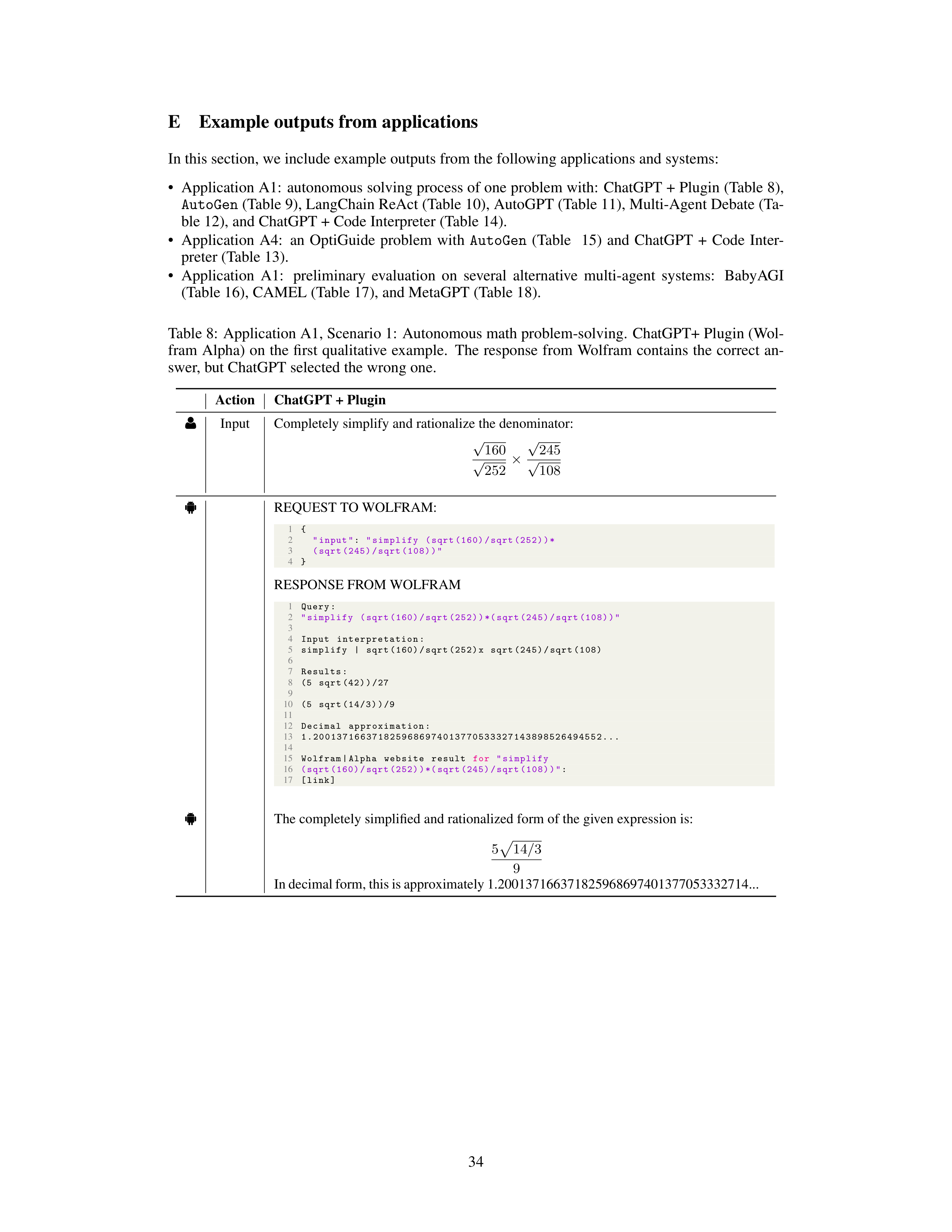
E
Example outputs from applications
In this section, we include example outputs from the following applications and systems:
•
Application A1:
autonomous solving process of one problem with:
ChatGPT + Plugin (Table 8),
AutoGen
(Table 9), LangChain ReAct (Table 10), AutoGPT (Table 11), Multi-Agent Debate (Ta-
ble 12), and ChatGPT + Code Interpreter (Table 14).
•
Application
A4:
an
OptiGuide
problem
with
AutoGen
(Table
15)
and
ChatGPT
+
Code
Inter-
preter (Table 13).
•
Application
A1:
preliminary
evaluation
on
several
alternative
multi-agent
systems:
BabyAGI
(Table 16), CAMEL (Table 17), and MetaGPT (Table 18).
Table 8:
Application A1, Scenario 1:
Autonomous math problem-solving.
ChatGPT+ Plugin (Wol-
fram Alpha)
on
the
first
qualitative
example.
The response from
Wolfram contains the correct
an-
swer, but ChatGPT selected the wrong one.
Action
ChatGPT + Plugin
g
Input
Completely simplify and rationalize the denominator:
√
160
√
252
×
√
245
√
108
ð
REQUEST TO WOLFRAM:
1
{
2
"input"
:
"simplify
(sqrt (160)/sqrt (252))*
3
(sqrt (245)/sqrt (108))"
4
}
RESPONSE FROM WOLFRAM
1
Query:
2
"simplify
(sqrt (160)/sqrt (252))*( sqrt (245)/sqrt (108))"
3
4
Input
interpretation :
5
simplify
|
sqrt (160)/sqrt (252)x
sqrt (245)/sqrt (108)
6
7
Results:
8
(5
sqrt (42))/27
9
10
(5
sqrt (14/3))/9
11
12
Decimal
approximation :
13
1.2001371663718259686974013770533327143898526494552...
14
15
Wolfram|Alpha
website
result
for
"simplify
16
(sqrt (160)/sqrt (252))*( sqrt (245)/sqrt (108))"
:
17
[link]
ð
The completely simplified and rationalized form of the given expression is:
5
p
14
/
3
9
In decimal form, this is approximately 1.200137166371825968697401377053332714...
34
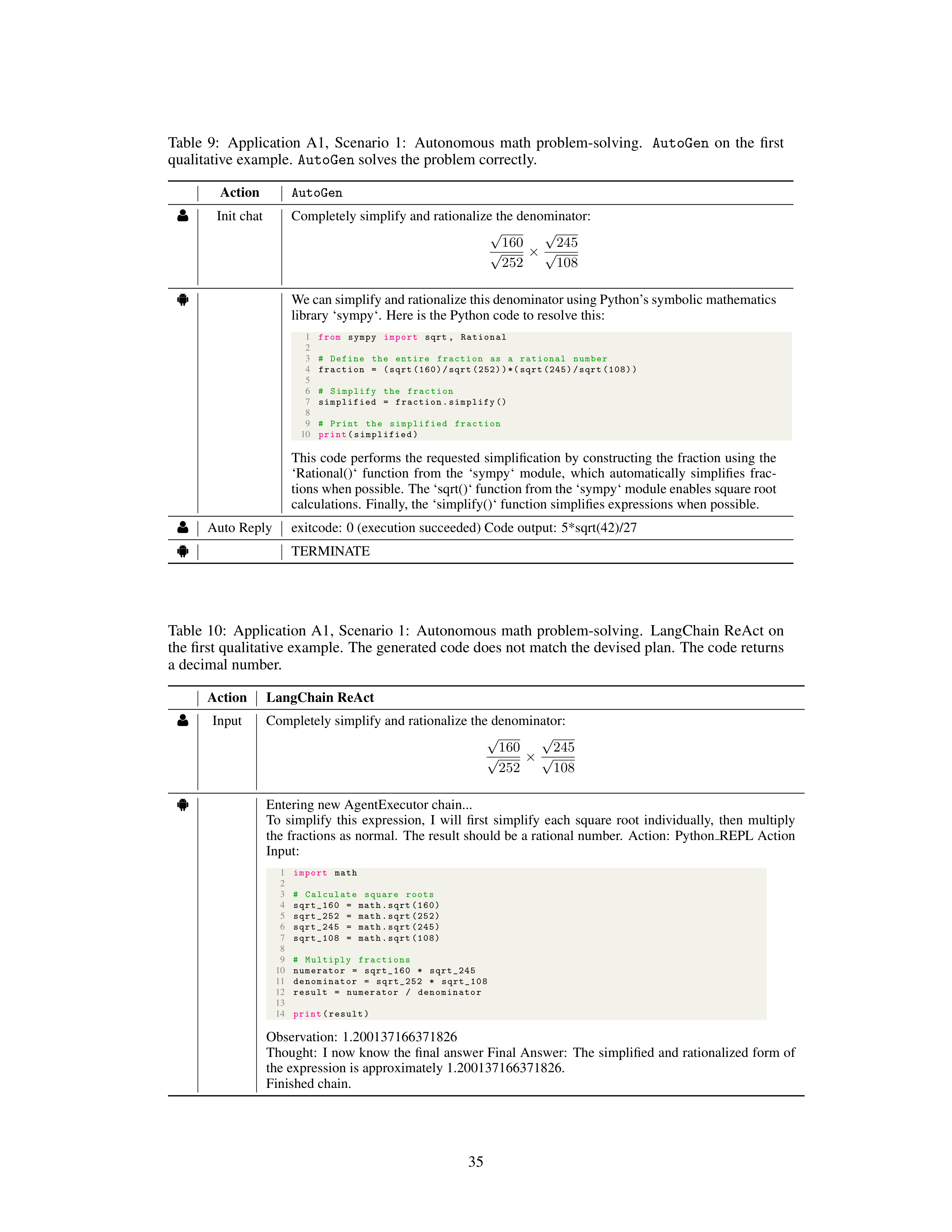
Table
9:
Application
A1,
Scenario
1:
Autonomous
math
problem-solving.
AutoGen
on
the
first
qualitative example.
AutoGen
solves the problem correctly.
Action
AutoGen
g
Init chat
Completely simplify and rationalize the denominator:
√
160
√
252
×
√
245
√
108
ð
We can simplify and rationalize this denominator using Python’s symbolic mathematics
library ‘sympy‘.
Here is the Python code to resolve this:
1
from
sympy
import
sqrt ,
Rational
2
3
#
Define
the
entire
fraction
as
a
rational
number
4
fraction
=
(sqrt (160)/sqrt (252))*( sqrt (245)/sqrt (108))
5
6
#
Simplify
the
fraction
7
simplified
=
fraction.simplify ()
8
9
#
Print
the
simplified
fraction
10
print
(simplified)
This code performs the requested simplification by constructing the fraction using the
‘Rational()‘
function
from
the
‘sympy‘
module,
which
automatically
simplifies
frac-
tions when possible. The ‘sqrt()‘ function from the ‘sympy‘ module enables square root
calculations.
Finally, the ‘simplify()‘ function simplifies expressions when possible.
g
Auto Reply
exitcode:
0 (execution succeeded) Code output:
5*sqrt(42)/27
ð
TERMINATE
Table
10:
Application
A1,
Scenario
1:
Autonomous
math
problem-solving.
LangChain
ReAct
on
the first qualitative example.
The generated code does not match the devised plan.
The code returns
a decimal number.
Action
LangChain ReAct
g
Input
Completely simplify and rationalize the denominator:
√
160
√
252
×
√
245
√
108
ð
Entering new AgentExecutor chain...
To
simplify
this
expression,
I
will
first
simplify
each
square
root
individually,
then
multiply
the fractions as normal.
The result should be a rational number.
Action:
Python
REPL Action
Input:
1
import
math
2
3
#
Calculate
square
roots
4
sqrt_160
=
math.sqrt (160)
5
sqrt_252
=
math.sqrt (252)
6
sqrt_245
=
math.sqrt (245)
7
sqrt_108
=
math.sqrt (108)
8
9
#
Multiply
fractions
10
numerator
=
sqrt_160
*
sqrt_245
11
denominator
=
sqrt_252
*
sqrt_108
12
result
=
numerator
/
denominator
13
14
print
(result)
Observation:
1.200137166371826
Thought:
I now know the final answer Final Answer:
The simplified and rationalized form of
the expression is approximately 1.200137166371826.
Finished chain.
35
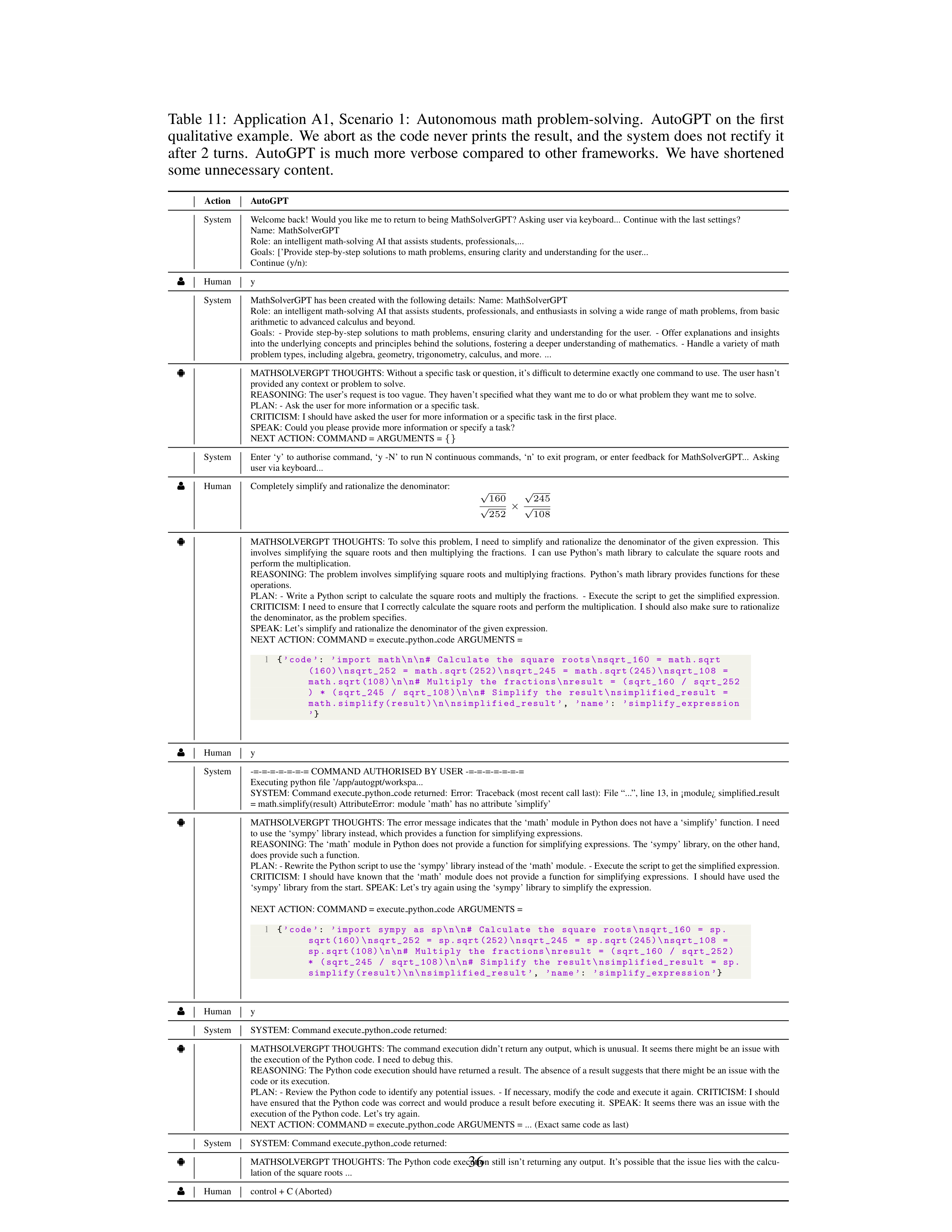
Table
11:
Application
A1,
Scenario
1:
Autonomous
math
problem-solving.
AutoGPT
on
the
first
qualitative example.
We abort as the code never prints the result, and the system does not rectify it
after 2 turns.
AutoGPT is much more verbose compared to other frameworks.
We have shortened
some unnecessary content.
Action
AutoGPT
System
Welcome back!
Would you like me to return to being MathSolverGPT? Asking user via keyboard...
Continue with the last settings?
Name:
MathSolverGPT
Role:
an intelligent math-solving AI that assists students, professionals,...
Goals:
[’Provide step-by-step solutions to math problems, ensuring clarity and understanding for the user...
Continue (y/n):
g
Human
y
System
MathSolverGPT has been created with the following details:
Name:
MathSolverGPT
Role:
an intelligent math-solving AI that assists students, professionals, and enthusiasts in solving a wide range of math problems, from basic
arithmetic to advanced calculus and beyond.
Goals:
-
Provide
step-by-step
solutions
to
math
problems,
ensuring
clarity
and
understanding
for
the
user.
-
Offer
explanations
and
insights
into the underlying concepts and principles behind the solutions, fostering a deeper understanding of mathematics.
- Handle a variety of math
problem types, including algebra, geometry, trigonometry, calculus, and more.
...
ð
MATHSOLVERGPT THOUGHTS: Without a specific task or question, it’s difficult to determine exactly one command to use.
The user hasn’t
provided any context or problem to solve.
REASONING: The user’s request is too vague.
They haven’t specified what they want me to do or what problem they want me to solve.
PLAN: - Ask the user for more information or a specific task.
CRITICISM: I should have asked the user for more information or a specific task in the first place.
SPEAK: Could you please provide more information or specify a task?
NEXT ACTION: COMMAND = ARGUMENTS =
{}
System
Enter ‘y’ to authorise command, ‘y -N’ to run N continuous commands, ‘n’ to exit program, or enter feedback for MathSolverGPT...
Asking
user via keyboard...
g
Human
Completely simplify and rationalize the denominator:
√
160
√
252
×
√
245
√
108
ð
MATHSOLVERGPT
THOUGHTS:
To
solve
this
problem,
I
need
to
simplify
and
rationalize
the
denominator
of
the
given
expression.
This
involves
simplifying
the
square
roots
and
then
multiplying
the
fractions.
I
can
use
Python’s
math
library
to
calculate
the
square
roots
and
perform the multiplication.
REASONING:
The
problem
involves
simplifying
square
roots
and
multiplying
fractions.
Python’s
math
library
provides
functions
for
these
operations.
PLAN:
-
Write
a
Python
script
to
calculate
the
square
roots
and
multiply
the
fractions.
-
Execute
the
script
to
get
the
simplified
expression.
CRITICISM: I need to ensure that I correctly calculate the square roots and perform the multiplication.
I should also make sure to rationalize
the denominator, as the problem specifies.
SPEAK: Let’s simplify and rationalize the denominator of the given expression.
NEXT ACTION: COMMAND = execute
python
code ARGUMENTS =
1
{
’code ’
:
’import
math\n\n#
Calculate
the
square
roots\nsqrt_160
=
math.sqrt
(160)\nsqrt_252
=
math.sqrt (252)\nsqrt_245
=
math.sqrt (245)\nsqrt_108
=
math.sqrt (108)\n\n#
Multiply
the
fractions\nresult
=
(sqrt_160
/
sqrt_252
)
*
(sqrt_245
/
sqrt_108)\n\n#
Simplify
the
result\ nsimplified_result
=
math.simplify(result)\n\ nsimplified_result ’
,
’name ’
:
’simplify_expression
’
}
g
Human
y
System
-=-=-=-=-=-=-= COMMAND AUTHORISED BY USER -=-=-=-=-=-=-=
Executing python file ’/app/autogpt/workspa...
SYSTEM: Command execute
python
code returned:
Error:
Traceback (most recent call last):
File “...”, line 13, in ¡module¿ simplified
result
= math.simplify(result) AttributeError:
module ’math’ has no attribute ’simplify’
ð
MATHSOLVERGPT THOUGHTS: The error message indicates that the ‘math’ module in Python does not have a ‘simplify’ function.
I need
to use the ‘sympy’ library instead, which provides a function for simplifying expressions.
REASONING: The ‘math’ module in Python does not provide a function for simplifying expressions.
The ‘sympy’ library, on the other hand,
does provide such a function.
PLAN: - Rewrite the Python script to use the ‘sympy’ library instead of the ‘math’ module.
- Execute the script to get the simplified expression.
CRITICISM:
I
should
have
known
that
the
‘math’
module
does
not
provide
a
function
for
simplifying
expressions.
I
should
have
used
the
‘sympy’ library from the start.
SPEAK: Let’s try again using the ‘sympy’ library to simplify the expression.
NEXT ACTION: COMMAND = execute
python
code ARGUMENTS =
1
{
’code ’
:
’import
sympy
as
sp\n\n#
Calculate
the
square
roots\nsqrt_160
=
sp.
sqrt (160)\nsqrt_252
=
sp.sqrt (252)\nsqrt_245
=
sp.sqrt (245)\nsqrt_108
=
sp.sqrt (108)\n\n#
Multiply
the
fractions\nresult
=
(sqrt_160
/
sqrt_252)
*
(sqrt_245
/
sqrt_108)\n\n#
Simplify
the
result\ nsimplified_result
=
sp.
simplify(result)\n\ nsimplified_result ’
,
’name ’
:
’simplify_expression ’
}
g
Human
y
System
SYSTEM: Command execute
python
code returned:
ð
MATHSOLVERGPT THOUGHTS: The command execution didn’t return any output, which is unusual.
It seems there might be an issue with
the execution of the Python code.
I need to debug this.
REASONING: The Python code execution should have returned a result.
The absence of a result suggests that there might be an issue with the
code or its execution.
PLAN: - Review the Python code to identify any potential issues.
- If necessary, modify the code and execute it again.
CRITICISM: I should
have ensured that the Python code was correct and would produce a result before executing it.
SPEAK: It seems there was an issue with the
execution of the Python code.
Let’s try again.
NEXT ACTION: COMMAND = execute
python
code ARGUMENTS = ...
(Exact same code as last)
System
SYSTEM: Command execute
python
code returned:
ð
MATHSOLVERGPT THOUGHTS: The Python code execution still isn’t returning any output.
It’s possible that the issue lies with the calcu-
lation of the square roots ...
g
Human
control + C (Aborted)
36
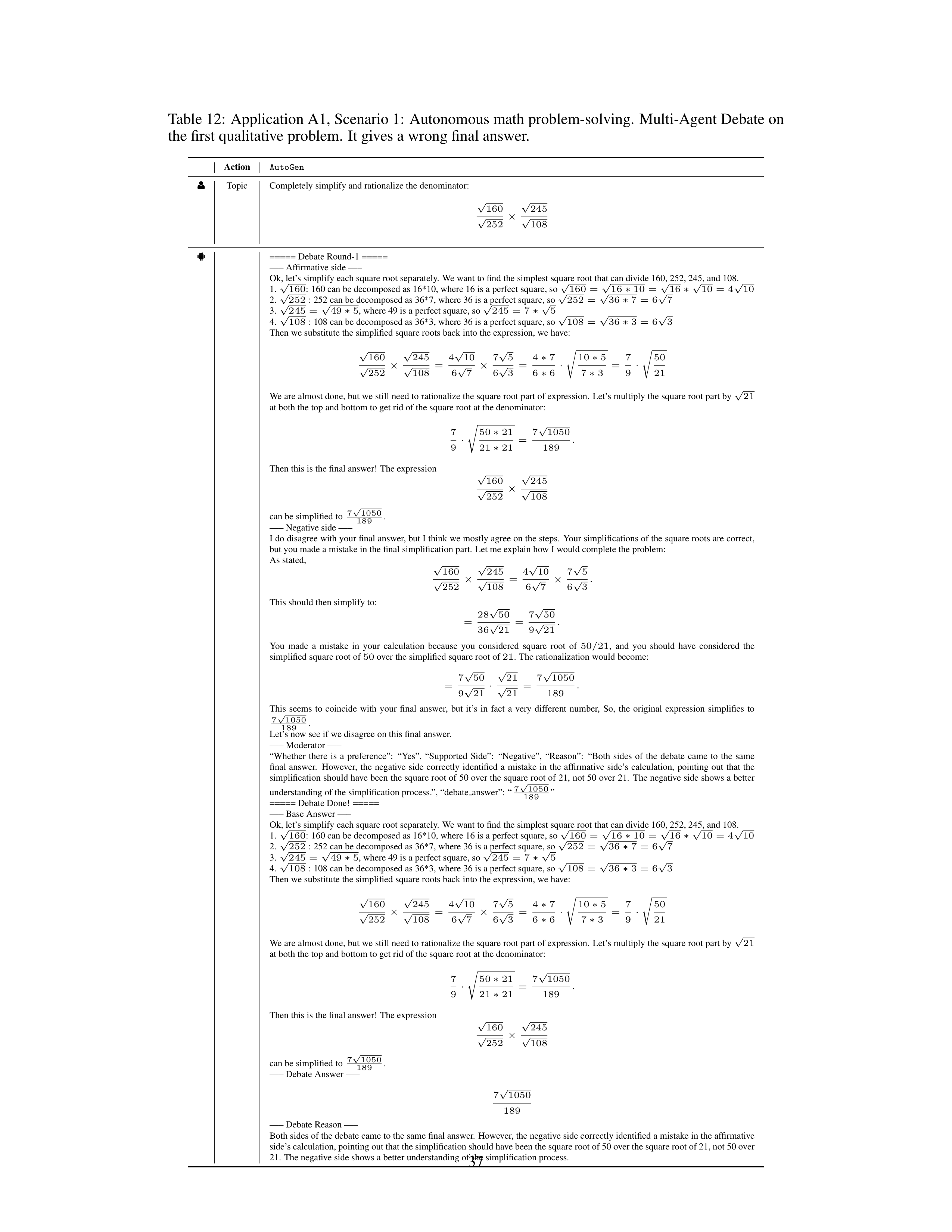
Table 12:
Application A1, Scenario 1:
Autonomous math problem-solving.
Multi-Agent Debate on
the first qualitative problem.
It gives a wrong final answer.
Action
AutoGen
g
Topic
Completely simplify and rationalize the denominator:
√
160
√
252
×
√
245
√
108
ð
===== Debate Round-1 =====
—– Affirmative side —–
Ok, let’s simplify each square root separately.
We want to find the simplest square root that can divide 160, 252, 245, and 108.
1.
√
160
:
160 can be decomposed as 16*10, where 16 is a perfect square, so
√
160
=
√
16
∗
10
=
√
16
∗
√
10
=
4
√
10
2.
√
252
:
252 can be decomposed as 36*7, where 36 is a perfect square, so
√
252
=
√
36
∗
7
=
6
√
7
3.
√
245
=
√
49
∗
5
, where 49 is a perfect square, so
√
245
=
7
∗
√
5
4.
√
108
:
108 can be decomposed as 36*3, where 36 is a perfect square, so
√
108
=
√
36
∗
3
=
6
√
3
Then we substitute the simplified square roots back into the expression, we have:
√
160
√
252
×
√
245
√
108
=
4
√
10
6
√
7
×
7
√
5
6
√
3
=
4
∗
7
6
∗
6
·
s
10
∗
5
7
∗
3
=
7
9
·
s
50
21
We are almost done, but we still need to rationalize the square root part of expression.
Let’s multiply the square root part by
√
21
at both the top and bottom to get rid of the square root at the denominator:
7
9
·
s
50
∗
21
21
∗
21
=
7
√
1050
189
.
Then this is the final answer!
The expression
√
160
√
252
×
√
245
√
108
can be simplified to
7
√
1050
189
.
—– Negative side —–
I do disagree with your final answer, but I think we mostly agree on the steps.
Your simplifications of the square roots are correct,
but you made a mistake in the final simplification part.
Let me explain how I would complete the problem:
As stated,
√
160
√
252
×
√
245
√
108
=
4
√
10
6
√
7
×
7
√
5
6
√
3
.
This should then simplify to:
=
28
√
50
36
√
21
=
7
√
50
9
√
21
.
You
made
a
mistake
in
your
calculation
because
you
considered
square
root
of
50
/
21
,
and
you
should
have
considered
the
simplified square root of
50
over the simplified square root of
21
.
The rationalization would become:
=
7
√
50
9
√
21
·
√
21
√
21
=
7
√
1050
189
.
This
seems
to
coincide
with
your
final
answer,
but
it’s
in
fact
a
very
different
number,
So,
the
original
expression
simplifies
to
7
√
1050
189
.
Let’s now see if we disagree on this final answer.
—– Moderator —–
“Whether
there
is
a
preference”:
“Yes”,
“Supported
Side”:
“Negative”,
“Reason”:
“Both
sides
of
the
debate
came
to
the
same
final
answer.
However,
the
negative
side
correctly
identified
a
mistake
in
the
affirmative
side’s
calculation,
pointing
out
that
the
simplification should have been the square root of 50 over the square root of 21, not 50 over 21.
The negative side shows a better
understanding of the simplification process.”, “debate
answer”:
“
7
√
1050
189
”
===== Debate Done!
=====
—– Base Answer —–
Ok, let’s simplify each square root separately.
We want to find the simplest square root that can divide 160, 252, 245, and 108.
1.
√
160
:
160 can be decomposed as 16*10, where 16 is a perfect square, so
√
160
=
√
16
∗
10
=
√
16
∗
√
10
=
4
√
10
2.
√
252
:
252 can be decomposed as 36*7, where 36 is a perfect square, so
√
252
=
√
36
∗
7
=
6
√
7
3.
√
245
=
√
49
∗
5
, where 49 is a perfect square, so
√
245
=
7
∗
√
5
4.
√
108
:
108 can be decomposed as 36*3, where 36 is a perfect square, so
√
108
=
√
36
∗
3
=
6
√
3
Then we substitute the simplified square roots back into the expression, we have:
√
160
√
252
×
√
245
√
108
=
4
√
10
6
√
7
×
7
√
5
6
√
3
=
4
∗
7
6
∗
6
·
s
10
∗
5
7
∗
3
=
7
9
·
s
50
21
We are almost done, but we still need to rationalize the square root part of expression.
Let’s multiply the square root part by
√
21
at both the top and bottom to get rid of the square root at the denominator:
7
9
·
s
50
∗
21
21
∗
21
=
7
√
1050
189
.
Then this is the final answer!
The expression
√
160
√
252
×
√
245
√
108
can be simplified to
7
√
1050
189
.
—– Debate Answer —–
7
√
1050
189
—– Debate Reason —–
Both sides of the debate came to the same final answer.
However, the negative side correctly identified a mistake in the affirmative
side’s calculation, pointing out that the simplification should have been the square root of 50 over the square root of 21, not 50 over
21.
The negative side shows a better understanding of the simplification process.
37
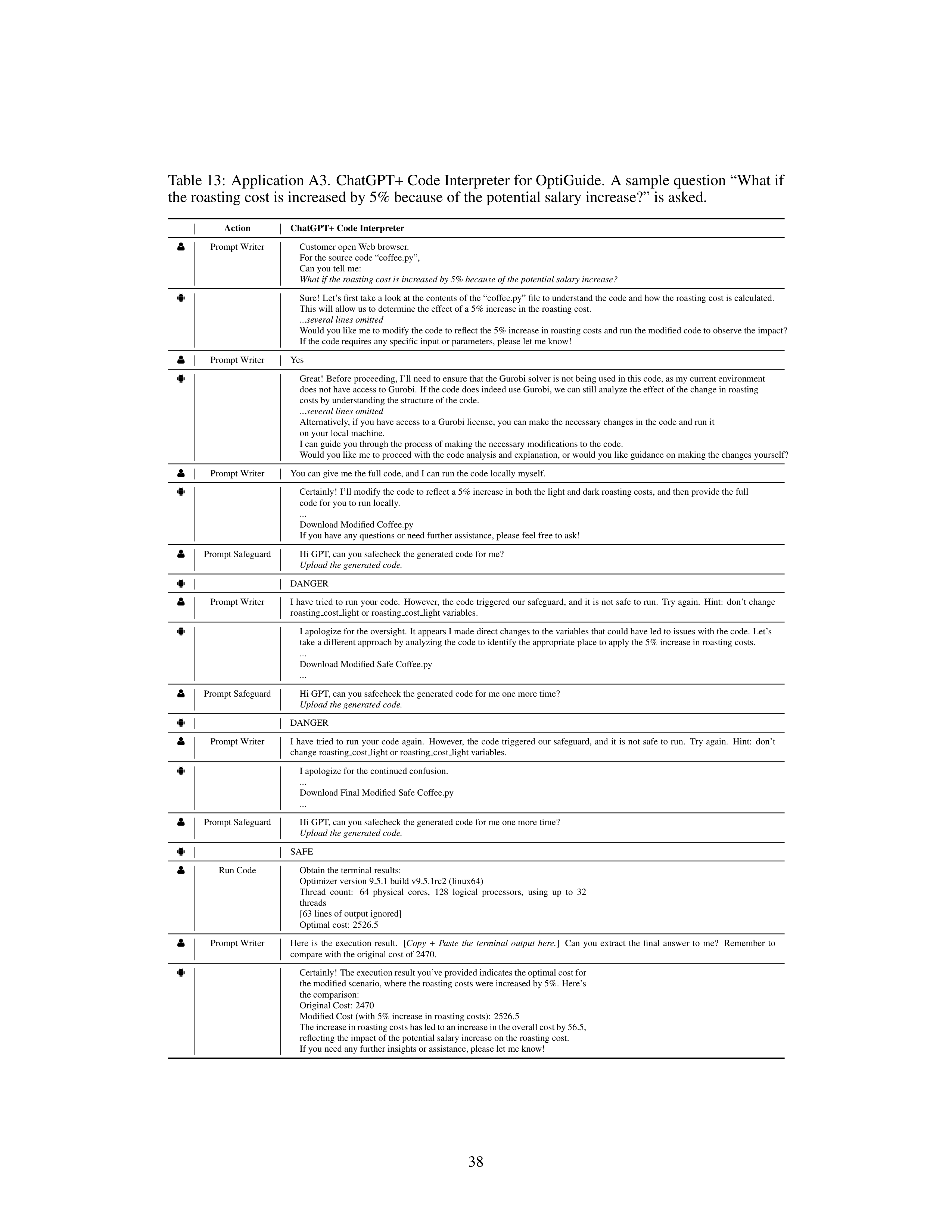
Table 13:
Application A3.
ChatGPT+ Code Interpreter for OptiGuide.
A sample question “What if
the roasting cost is increased by 5% because of the potential salary increase?” is asked.
Action
ChatGPT+ Code Interpreter
g
Prompt Writer
Customer open Web browser.
For the source code “coffee.py”,
Can you tell me:
What if the roasting cost is increased by 5% because of the potential salary increase?
ð
Sure!
Let’s first take a look at the contents of the “coffee.py” file to understand the code and how the roasting cost is calculated.
This will allow us to determine the effect of a 5% increase in the roasting cost.
...
several lines omitted
Would you like me to modify the code to reflect the 5% increase in roasting costs and run the modified code to observe the impact?
If the code requires any specific input or parameters, please let me know!
g
Prompt Writer
Yes
ð
Great!
Before proceeding, I’ll need to ensure that the Gurobi solver is not being used in this code, as my current environment
does not have access to Gurobi.
If the code does indeed use Gurobi, we can still analyze the effect of the change in roasting
costs by understanding the structure of the code.
...
several lines omitted
Alternatively, if you have access to a Gurobi license, you can make the necessary changes in the code and run it
on your local machine.
I can guide you through the process of making the necessary modifications to the code.
Would you like me to proceed with the code analysis and explanation, or would you like guidance on making the changes yourself?
g
Prompt Writer
You can give me the full code, and I can run the code locally myself.
ð
Certainly!
I’ll modify the code to reflect a 5% increase in both the light and dark roasting costs, and then provide the full
code for you to run locally.
...
Download Modified Coffee.py
If you have any questions or need further assistance, please feel free to ask!
g
Prompt Safeguard
Hi GPT, can you safecheck the generated code for me?
Upload the generated code.
ð
DANGER
g
Prompt Writer
I have tried to run your code.
However, the code triggered our safeguard, and it is not safe to run.
Try again.
Hint:
don’t change
roasting
cost
light or roasting
cost
light variables.
ð
I apologize for the oversight.
It appears I made direct changes to the variables that could have led to issues with the code.
Let’s
take a different approach by analyzing the code to identify the appropriate place to apply the 5% increase in roasting costs.
...
Download Modified Safe Coffee.py
...
g
Prompt Safeguard
Hi GPT, can you safecheck the generated code for me one more time?
Upload the generated code.
ð
DANGER
g
Prompt Writer
I
have
tried
to
run
your
code
again.
However,
the
code
triggered
our
safeguard,
and
it
is
not
safe
to
run.
Try
again.
Hint:
don’t
change roasting
cost
light or roasting
cost
light variables.
ð
I apologize for the continued confusion.
...
Download Final Modified Safe Coffee.py
...
g
Prompt Safeguard
Hi GPT, can you safecheck the generated code for me one more time?
Upload the generated code.
ð
SAFE
g
Run Code
Obtain the terminal results:
Optimizer version 9.5.1 build v9.5.1rc2 (linux64)
Thread
count:
64
physical
cores,
128
logical
processors,
using
up
to
32
threads
[63 lines of output ignored]
Optimal cost:
2526.5
g
Prompt Writer
Here
is
the
execution
result.
[
Copy
+
Paste
the
terminal
output
here.
]
Can
you
extract
the
final
answer
to
me?
Remember
to
compare with the original cost of 2470.
ð
Certainly! The execution result you’ve provided indicates the optimal cost for
the modified scenario, where the roasting costs were increased by 5%.
Here’s
the comparison:
Original Cost:
2470
Modified Cost (with 5% increase in roasting costs):
2526.5
The increase in roasting costs has led to an increase in the overall cost by 56.5,
reflecting the impact of the potential salary increase on the roasting cost.
If you need any further insights or assistance, please let me know!
38
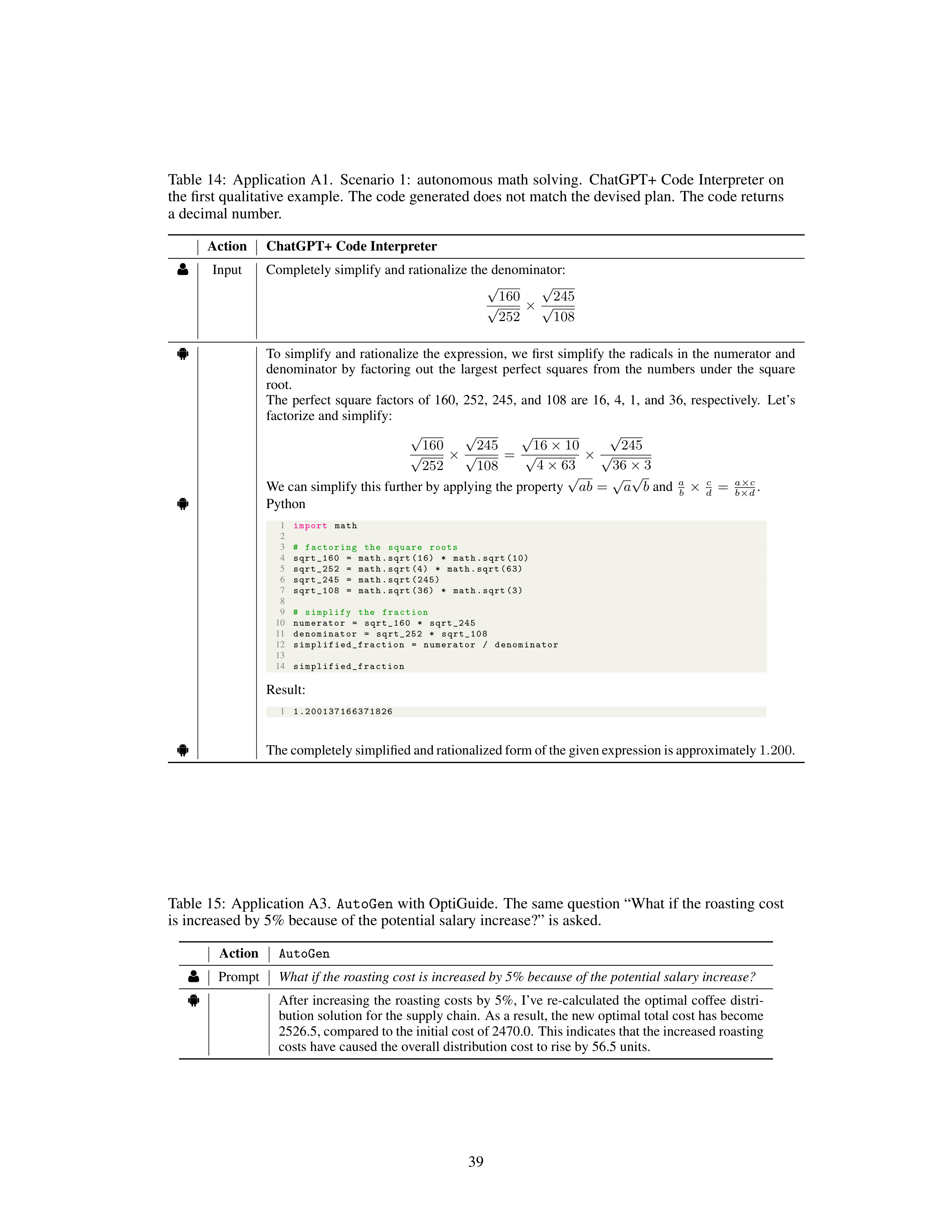
Table 14:
Application A1.
Scenario 1:
autonomous math solving.
ChatGPT+ Code Interpreter on
the first qualitative example.
The code generated does not match the devised plan.
The code returns
a decimal number.
Action
ChatGPT+ Code Interpreter
g
Input
Completely simplify and rationalize the denominator:
√
160
√
252
×
√
245
√
108
ð
To
simplify
and
rationalize
the
expression,
we
first
simplify
the
radicals
in
the
numerator
and
denominator
by
factoring
out
the
largest
perfect
squares
from
the
numbers
under
the
square
root.
The
perfect
square
factors
of
160,
252,
245,
and
108
are
16,
4,
1,
and
36,
respectively.
Let’s
factorize and simplify:
√
160
√
252
×
√
245
√
108
=
√
16
×
10
√
4
×
63
×
√
245
√
36
×
3
We can simplify this further by applying the property
√
ab
=
√
a
√
b
and
a
b
×
c
d
=
a
×
c
b
×
d
.
ð
Python
1
import
math
2
3
#
factoring
the
square
roots
4
sqrt_160
=
math.sqrt (16)
*
math.sqrt (10)
5
sqrt_252
=
math.sqrt (4)
*
math.sqrt (63)
6
sqrt_245
=
math.sqrt (245)
7
sqrt_108
=
math.sqrt (36)
*
math.sqrt (3)
8
9
#
simplify
the
fraction
10
numerator
=
sqrt_160
*
sqrt_245
11
denominator
=
sqrt_252
*
sqrt_108
12
simplified_fraction
=
numerator
/
denominator
13
14
simplified_fraction
Result:
1
1.200137166371826
ð
The completely simplified and rationalized form of the given expression is approximately
1
.
200
.
Table 15:
Application A3.
AutoGen
with OptiGuide.
The same question “What if the roasting cost
is increased by 5% because of the potential salary increase?” is asked.
Action
AutoGen
g
Prompt
What if the roasting cost is increased by 5% because of the potential salary increase?
ð
After
increasing
the
roasting
costs
by
5%,
I’ve
re-calculated
the
optimal
coffee
distri-
bution solution for the supply chain.
As a result, the new optimal total cost has become
2526.5, compared to the initial cost of 2470.0.
This indicates that the increased roasting
costs have caused the overall distribution cost to rise by 56.5 units.
39
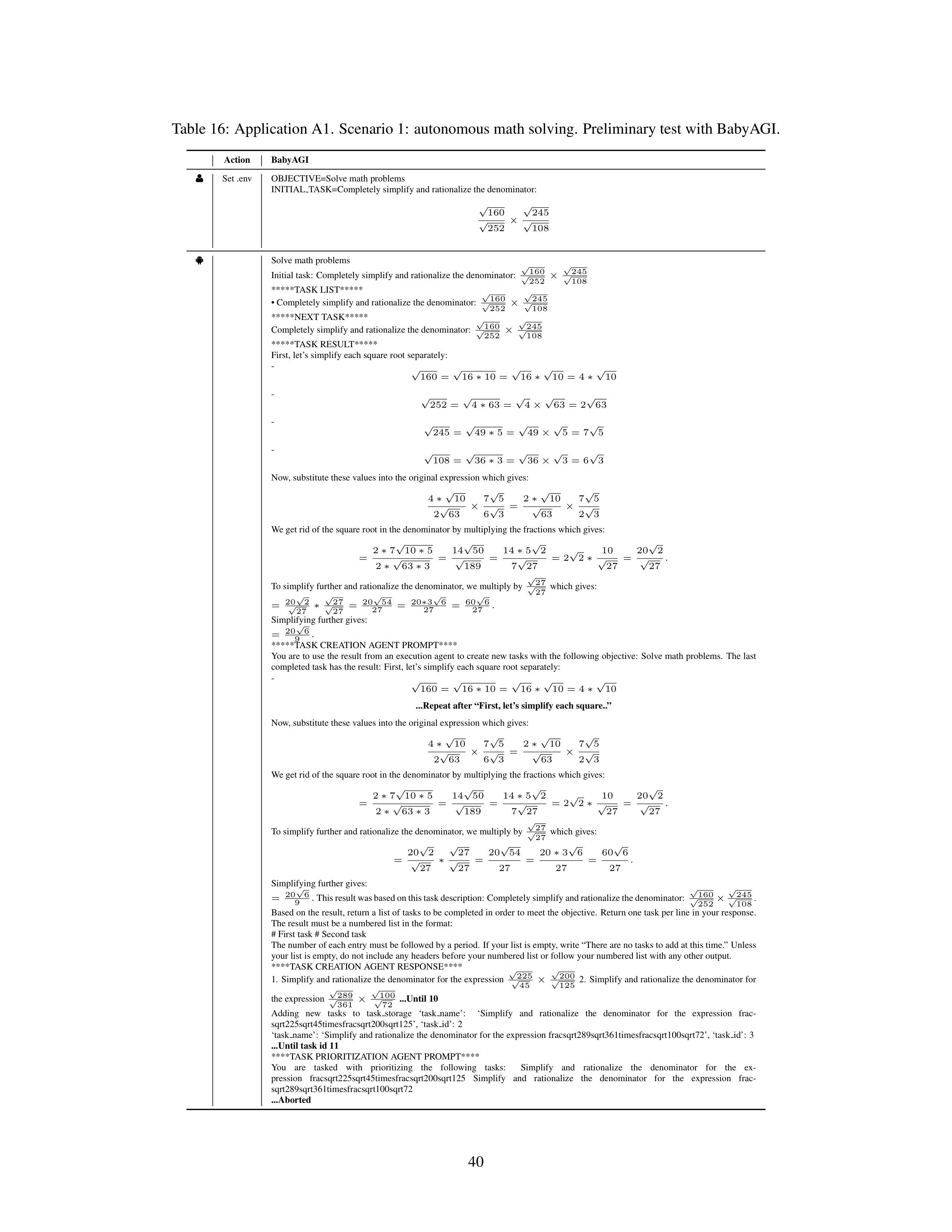
Table 16:
Application A1.
Scenario 1:
autonomous math solving.
Preliminary test with BabyAGI.
Action
BabyAGI
g
Set .env
OBJECTIVE=Solve math problems
INITIAL
TASK=Completely simplify and rationalize the denominator:
√
160
√
252
×
√
245
√
108
ð
Solve math problems
Initial task:
Completely simplify and rationalize the denominator:
√
160
√
252
×
√
245
√
108
*****TASK LIST*****
• Completely simplify and rationalize the denominator:
√
160
√
252
×
√
245
√
108
*****NEXT TASK*****
Completely simplify and rationalize the denominator:
√
160
√
252
×
√
245
√
108
*****TASK RESULT*****
First, let’s simplify each square root separately:
-
√
160
=
√
16
∗
10
=
√
16
∗
√
10
=
4
∗
√
10
-
√
252
=
√
4
∗
63
=
√
4
×
√
63
=
2
√
63
-
√
245
=
√
49
∗
5
=
√
49
×
√
5
=
7
√
5
-
√
108
=
√
36
∗
3
=
√
36
×
√
3
=
6
√
3
Now, substitute these values into the original expression which gives:
4
∗
√
10
2
√
63
×
7
√
5
6
√
3
=
2
∗
√
10
√
63
×
7
√
5
2
√
3
We get rid of the square root in the denominator by multiplying the fractions which gives:
=
2
∗
7
√
10
∗
5
2
∗
√
63
∗
3
=
14
√
50
√
189
=
14
∗
5
√
2
7
√
27
=
2
√
2
∗
10
√
27
=
20
√
2
√
27
.
To simplify further and rationalize the denominator, we multiply by
√
27
√
27
which gives:
=
20
√
2
√
27
∗
√
27
√
27
=
20
√
54
27
=
20
∗
3
√
6
27
=
60
√
6
27
.
Simplifying further gives:
=
20
√
6
9
.
*****TASK CREATION AGENT PROMPT****
You are to use the result from an execution agent to create new tasks with the following objective:
Solve math problems.
The last
completed task has the result:
First, let’s simplify each square root separately:
-
√
160
=
√
16
∗
10
=
√
16
∗
√
10
=
4
∗
√
10
...Repeat after “First, let’s simplify each square..”
Now, substitute these values into the original expression which gives:
4
∗
√
10
2
√
63
×
7
√
5
6
√
3
=
2
∗
√
10
√
63
×
7
√
5
2
√
3
We get rid of the square root in the denominator by multiplying the fractions which gives:
=
2
∗
7
√
10
∗
5
2
∗
√
63
∗
3
=
14
√
50
√
189
=
14
∗
5
√
2
7
√
27
=
2
√
2
∗
10
√
27
=
20
√
2
√
27
.
To simplify further and rationalize the denominator, we multiply by
√
27
√
27
which gives:
=
20
√
2
√
27
∗
√
27
√
27
=
20
√
54
27
=
20
∗
3
√
6
27
=
60
√
6
27
.
Simplifying further gives:
=
20
√
6
9
.
This result was based on this task description: Completely simplify and rationalize the denominator:
√
160
√
252
×
√
245
√
108
.
Based on the result, return a list of tasks to be completed in order to meet the objective.
Return one task per line in your response.
The result must be a numbered list in the format:
# First task # Second task
The number of each entry must be followed by a period.
If your list is empty, write “There are no tasks to add at this time.”
Unless
your list is empty, do not include any headers before your numbered list or follow your numbered list with any other output.
****TASK CREATION AGENT RESPONSE****
1.
Simplify and rationalize the denominator for the expression
√
225
√
45
×
√
200
√
125
2.
Simplify and rationalize the denominator for
the expression
√
289
√
361
×
√
100
√
72
...Until 10
Adding
new
tasks
to
task
storage
‘task
name’:
‘Simplify
and
rationalize
the
denominator
for
the
expression
frac-
sqrt225sqrt45timesfracsqrt200sqrt125’, ‘task
id’:
2
‘task
name’:
‘Simplify and rationalize the denominator for the expression fracsqrt289sqrt361timesfracsqrt100sqrt72’, ‘task
id’:
3
...Until task id 11
****TASK PRIORITIZATION AGENT PROMPT****
You
are
tasked
with
prioritizing
the
following
tasks:
Simplify
and
rationalize
the
denominator
for
the
ex-
pression
fracsqrt225sqrt45timesfracsqrt200sqrt125
Simplify
and
rationalize
the
denominator
for
the
expression
frac-
sqrt289sqrt361timesfracsqrt100sqrt72
...Aborted
40
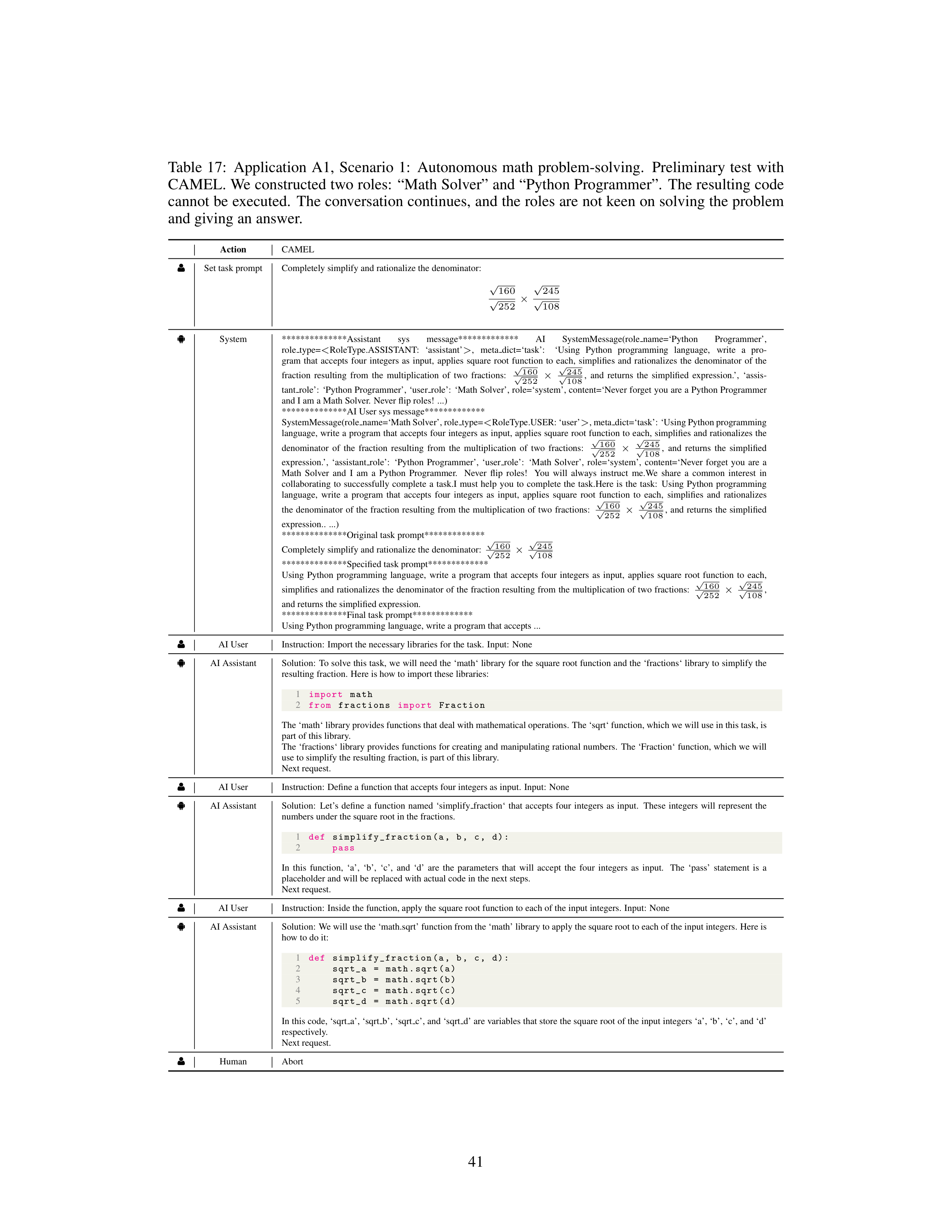
Table
17:
Application
A1,
Scenario
1:
Autonomous
math
problem-solving.
Preliminary
test
with
CAMEL. We constructed two roles:
“Math Solver” and “Python Programmer”.
The resulting code
cannot be executed.
The conversation continues, and the roles are not keen on solving the problem
and giving an answer.
Action
CAMEL
g
Set task prompt
Completely simplify and rationalize the denominator:
√
160
√
252
×
√
245
√
108
ð
System
**************Assistant
sys
message*************
AI
SystemMessage(role
name=‘Python
Programmer’,
role
type=
<
RoleType.ASSISTANT:
‘assistant’
>
,
meta
dict=‘task’:
‘Using
Python
programming
language,
write
a
pro-
gram
that
accepts
four
integers
as
input,
applies
square
root
function
to
each,
simplifies
and
rationalizes
the
denominator
of
the
fraction
resulting
from
the
multiplication
of
two
fractions:
√
160
√
252
×
√
245
√
108
,
and
returns
the
simplified
expression.’,
‘assis-
tant
role’:
‘Python Programmer’, ‘user
role’:
‘Math Solver’, role=‘system’, content=‘Never forget you are a Python Programmer
and I am a Math Solver.
Never flip roles!
...)
**************AI User sys message*************
SystemMessage(role
name=‘Math Solver’, role
type=
<
RoleType.USER: ‘user’
>
, meta
dict=‘task’: ‘Using Python programming
language,
write a program that accepts four integers as input,
applies square root function to each,
simplifies and rationalizes the
denominator
of
the
fraction
resulting
from
the
multiplication
of
two
fractions:
√
160
√
252
×
√
245
√
108
,
and
returns
the
simplified
expression.’,
‘assistant
role’:
‘Python
Programmer’,
‘user
role’:
‘Math
Solver’,
role=‘system’,
content=‘Never
forget
you
are
a
Math
Solver
and
I
am
a
Python
Programmer.
Never
flip
roles!
You
will
always
instruct
me.We
share
a
common
interest
in
collaborating
to
successfully
complete
a
task.I
must
help
you
to
complete
the
task.Here
is
the
task:
Using
Python
programming
language,
write
a
program
that
accepts
four
integers
as
input,
applies
square
root
function
to
each,
simplifies
and
rationalizes
the
denominator
of
the
fraction
resulting
from
the
multiplication
of
two
fractions:
√
160
√
252
×
√
245
√
108
,
and
returns
the
simplified
expression..
...)
**************Original task prompt*************
Completely simplify and rationalize the denominator:
√
160
√
252
×
√
245
√
108
**************Specified task prompt*************
Using
Python
programming
language,
write
a
program
that
accepts
four
integers
as
input,
applies
square
root
function
to
each,
simplifies and rationalizes the denominator of the fraction resulting from the multiplication of two fractions:
√
160
√
252
×
√
245
√
108
,
and returns the simplified expression.
**************Final task prompt*************
Using Python programming language, write a program that accepts ...
g
AI User
Instruction:
Import the necessary libraries for the task.
Input:
None
ð
AI Assistant
Solution:
To solve this task, we will need the ‘math‘ library for the square root function and the ‘fractions‘ library to simplify the
resulting fraction.
Here is how to import these libraries:
1
import
math
2
from
fractions
import
Fraction
The ‘math‘ library provides functions that deal with mathematical operations.
The ‘sqrt‘ function, which we will use in this task, is
part of this library.
The ‘fractions‘ library provides functions for creating and manipulating rational numbers.
The ‘Fraction‘ function, which we will
use to simplify the resulting fraction, is part of this library.
Next request.
g
AI User
Instruction:
Define a function that accepts four integers as input.
Input:
None
ð
AI Assistant
Solution:
Let’s
define
a
function
named
‘simplify
fraction‘
that
accepts
four
integers
as
input.
These
integers
will
represent
the
numbers under the square root in the fractions.
1
def
simplify_fraction (a,
b,
c,
d):
2
pass
In
this
function,
‘a’,
‘b’,
‘c’,
and
‘d’
are
the
parameters
that
will
accept
the
four
integers
as
input.
The
‘pass’
statement
is
a
placeholder and will be replaced with actual code in the next steps.
Next request.
g
AI User
Instruction:
Inside the function, apply the square root function to each of the input integers.
Input:
None
ð
AI Assistant
Solution:
We will use the ‘math.sqrt’ function from the ‘math’ library to apply the square root to each of the input integers.
Here is
how to do it:
1
def
simplify_fraction (a,
b,
c,
d):
2
sqrt_a
=
math.sqrt(a)
3
sqrt_b
=
math.sqrt(b)
4
sqrt_c
=
math.sqrt(c)
5
sqrt_d
=
math.sqrt(d)
In this code, ‘sqrt
a’, ‘sqrt
b’, ‘sqrt
c’, and ‘sqrt
d’ are variables that store the square root of the input integers ‘a’, ‘b’, ‘c’, and ‘d’
respectively.
Next request.
g
Human
Abort
41
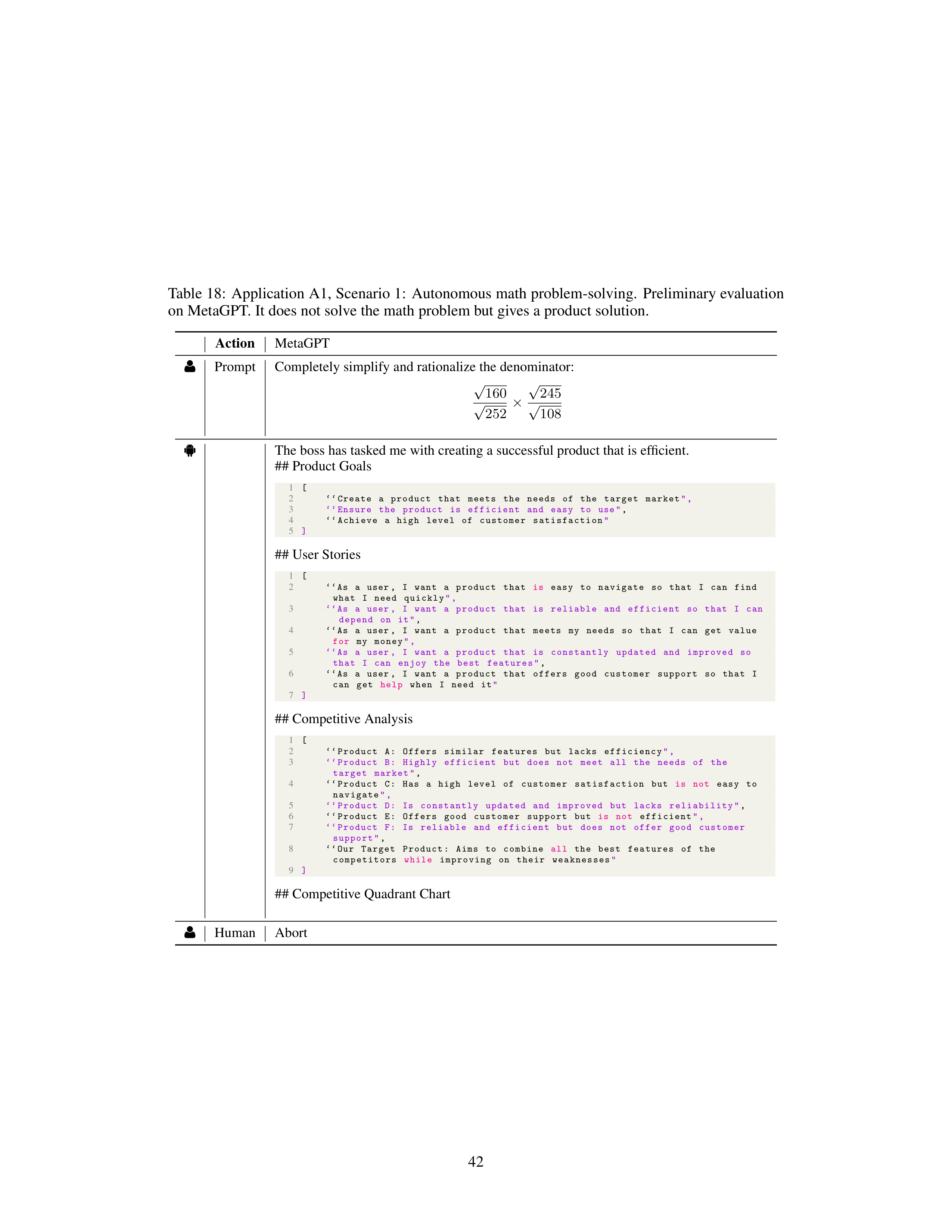
Table 18:
Application A1, Scenario 1:
Autonomous math problem-solving.
Preliminary evaluation
on MetaGPT. It does not solve the math problem but gives a product solution.
Action
MetaGPT
g
Prompt
Completely simplify and rationalize the denominator:
√
160
√
252
×
√
245
√
108
ð
The boss has tasked me with creating a successful product that is efficient.
## Product Goals
1
[
2
‘‘Create
a
product
that
meets
the
needs
of
the
target
market
",
3
‘‘Ensure
the
product
is
efficient
and
easy
to
use"
,
4
‘‘Achieve
a
high
level
of
customer
satisfaction
"
5
]
## User Stories
1
[
2
‘‘As
a
user ,
I
want
a
product
that
is
easy
to
navigate
so
that
I
can
find
what
I
need
quickly
",
3
‘‘As
a
user ,
I
want
a
product
that
is
reliable
and
efficient
so
that
I
can
depend
on
it"
,
4
‘‘As
a
user ,
I
want
a
product
that
meets
my
needs
so
that
I
can
get
value
for
my
money
",
5
‘‘As
a
user ,
I
want
a
product
that
is
constantly
updated
and
improved
so
that
I
can
enjoy
the
best
features"
,
6
‘‘As
a
user ,
I
want
a
product
that
offers
good
customer
support
so
that
I
can
get
help
when
I
need
it
"
7
]
## Competitive Analysis
1
[
2
‘‘Product
A:
Offers
similar
features
but
lacks
efficiency
",
3
‘‘Product
B:
Highly
efficient
but
does
not
meet
all
the
needs
of
the
target
market"
,
4
‘‘Product
C:
Has
a
high
level
of
customer
satisfaction
but
is
not
easy
to
navigate
",
5
‘‘Product
D:
Is
constantly
updated
and
improved
but
lacks
reliability "
,
6
‘‘Product
E:
Offers
good
customer
support
but
is
not
efficient
",
7
‘‘Product
F:
Is
reliable
and
efficient
but
does
not
offer
good
customer
support"
,
8
‘‘Our
Target
Product:
Aims
to
combine
all
the
best
features
of
the
competitors
while
improving
on
their
weaknesses
"
9
]
## Competitive Quadrant Chart
g
Human
Abort
42
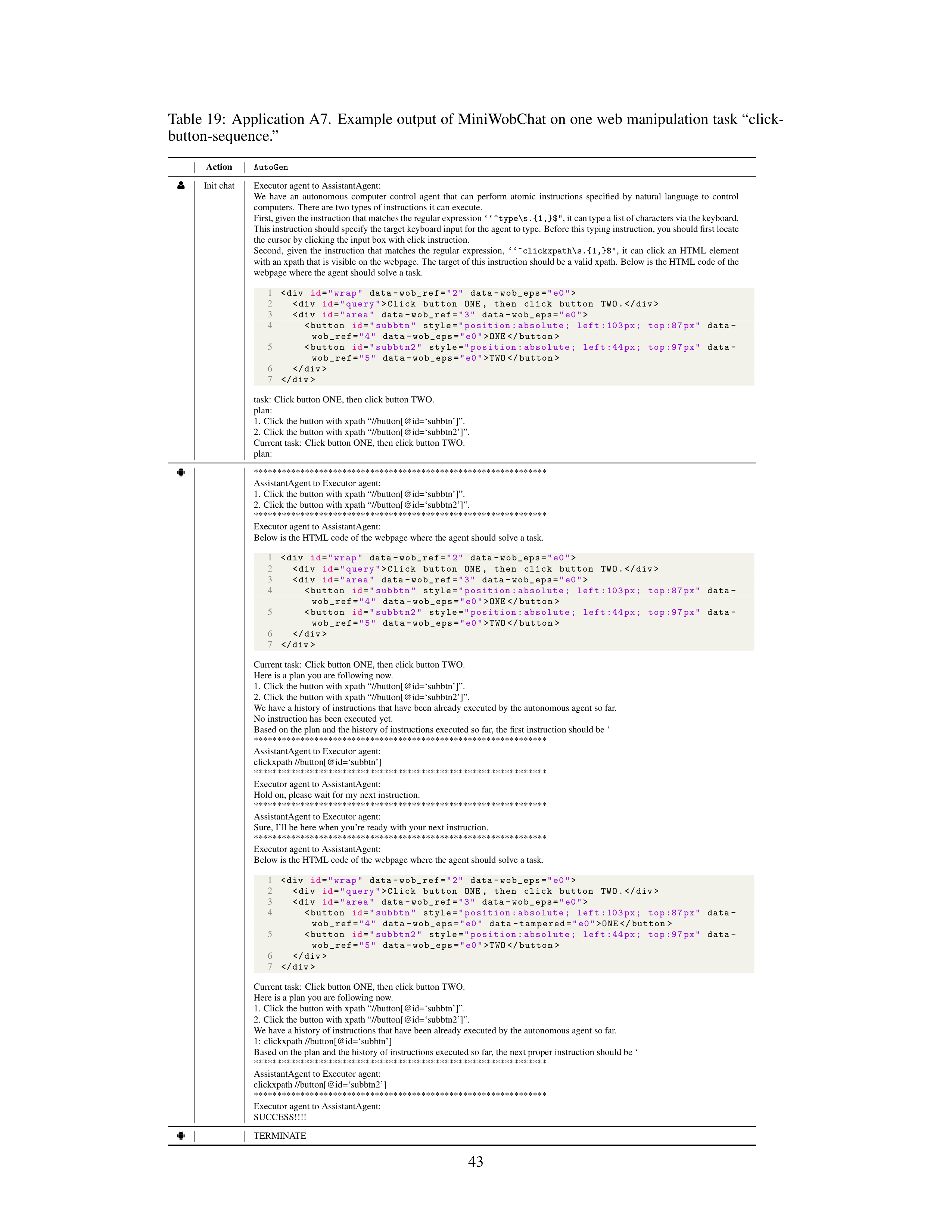
Table 19:
Application A7.
Example output of MiniWobChat on one web manipulation task “click-
button-sequence.”
Action
AutoGen
g
Init chat
Executor agent to AssistantAgent:
We
have
an
autonomous
computer
control
agent
that
can
perform
atomic
instructions
specified
by
natural
language
to
control
computers.
There are two types of instructions it can execute.
First, given the instruction that matches the regular expression
‘‘^type\s.{1,}$"
, it can type a list of characters via the keyboard.
This instruction should specify the target keyboard input for the agent to type.
Before this typing instruction, you should first locate
the cursor by clicking the input box with click instruction.
Second,
given
the
instruction
that
matches
the
regular
expression,
‘‘^clickxpath\s.{1,}$"
,
it
can
click
an
HTML
element
with an xpath that is visible on the webpage.
The target of this instruction should be a valid xpath.
Below is the HTML code of the
webpage where the agent should solve a task.
1
<div
id
=
"wrap"
data -wob_ref=
"2"
data -wob_eps=
"e0"
>
2
<div
id
=
"query"
>Click
button
ONE ,
then
click
button
TWO.
3
<div
id
=
"area"
data -wob_ref=
"3"
data -wob_eps=
"e0"
>
4
<button
id
=
"subbtn"
style=
"position:absolute;
left :103 px;
top :87 px"
data -
wob_ref=
"4"
data -wob_eps=
"e0"
>ONE
5
<button
id
=
"subbtn2"
style=
"position:absolute;
left :44px;
top :97 px"
data -
wob_ref=
"5"
data -wob_eps=
"e0"
>TWO
6
7
task:
Click button ONE, then click button TWO.
plan:
1.
Click the button with xpath “//button[@id=‘subbtn’]”.
2.
Click the button with xpath “//button[@id=‘subbtn2’]”.
Current task:
Click button ONE, then click button TWO.
plan:
ð
***************************************************************
AssistantAgent to Executor agent:
1.
Click the button with xpath “//button[@id=‘subbtn’]”.
2.
Click the button with xpath “//button[@id=‘subbtn2’]”.
***************************************************************
Executor agent to AssistantAgent:
Below is the HTML code of the webpage where the agent should solve a task.
1
<div
id
=
"wrap"
data -wob_ref=
"2"
data -wob_eps=
"e0"
>
2
<div
id
=
"query"
>Click
button
ONE ,
then
click
button
TWO.
3
<div
id
=
"area"
data -wob_ref=
"3"
data -wob_eps=
"e0"
>
4
<button
id
=
"subbtn"
style=
"position:absolute;
left :103 px;
top :87 px"
data -
wob_ref=
"4"
data -wob_eps=
"e0"
>ONE
5
<button
id
=
"subbtn2"
style=
"position:absolute;
left :44px;
top :97 px"
data -
wob_ref=
"5"
data -wob_eps=
"e0"
>TWO
6
7