



Prompts for Work

Prompting Best Practices
Learn tips for writing clear, effective prompts that maximize your learning
and task completion.
Gemini
Discover how the latest Gemini features
-
including image generation, Deep
Research, and Guided Learning - can elevate and support
your work.
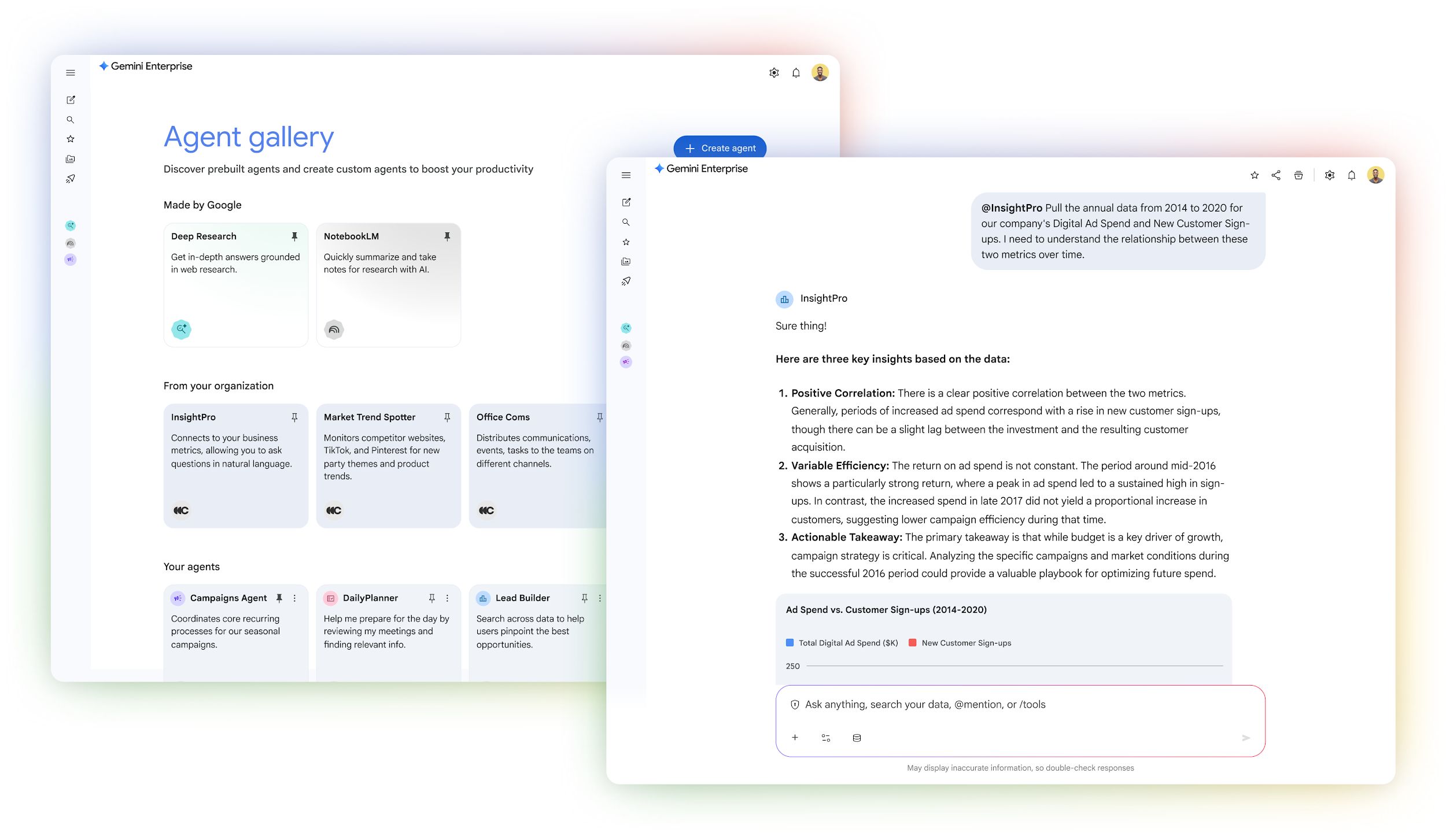
Gemini Enterprise
Transform how you work with AI. Connect Gemini to the apps you use daily
at work - like Google Workspace or Microsoft 365 - chat with Gemini that
knows your work context, use pre-built AI agents, or build custom agents to
automate workflows, with no code needed.
NotebookLM
Use NotebookLM to supercharge your research, summarize information
from multiple sources, establish a central team knowledge hub, and create
custom audio and video overviews.
Google Workspace with Gemini
Explore how Google Workspace with Gemini can help you analyze
data, draft emails, generate meeting notes, and much more.
Ready-to-use Prompts for Professionals
Gain access to real prompts teams can use to accelerate their work.
What’s inside:
grow.google/ai
We hope you find this guide helpful to identify ways to apply AI to your job.
Remember: always follow the policies of your employer when using AI.
-
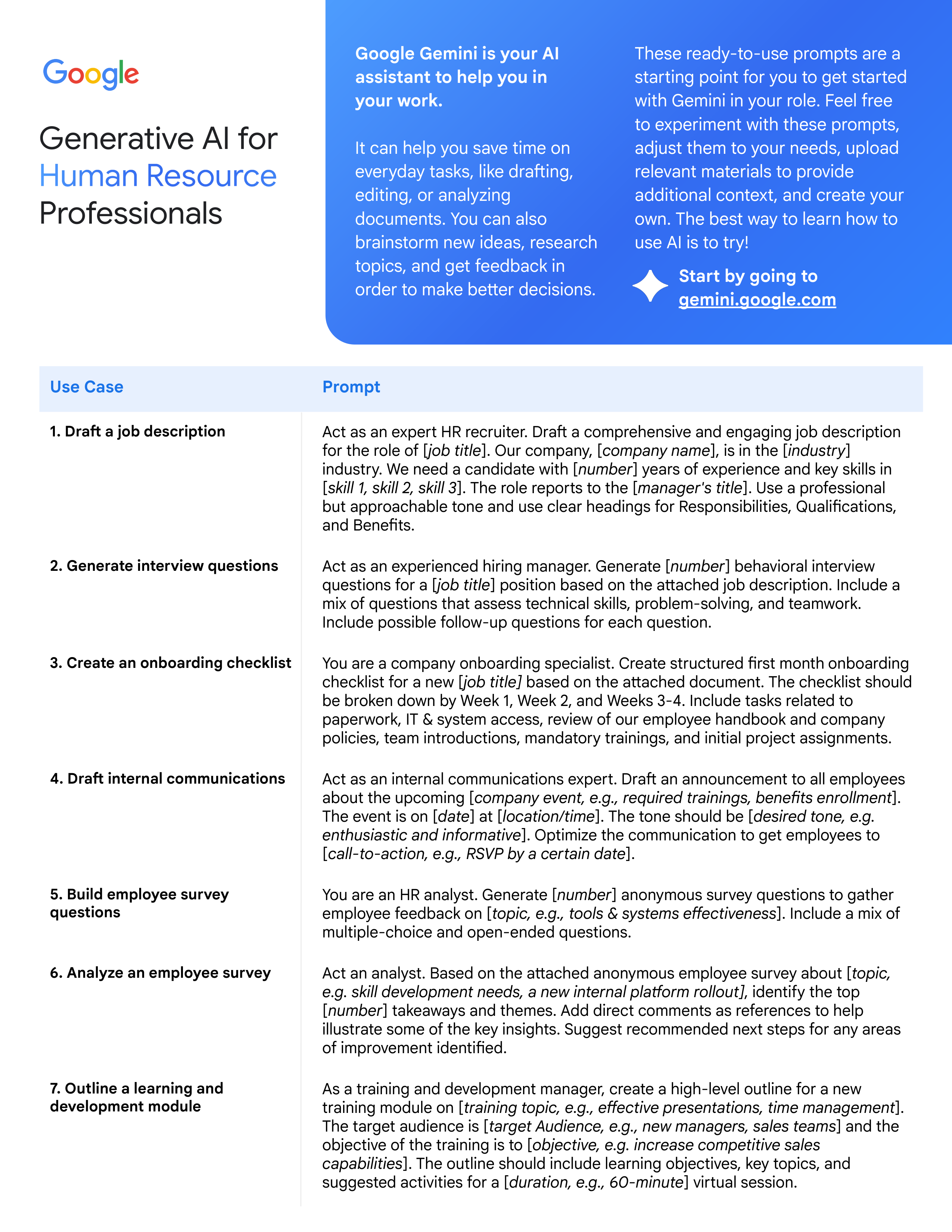
Human resources
-
IT
-
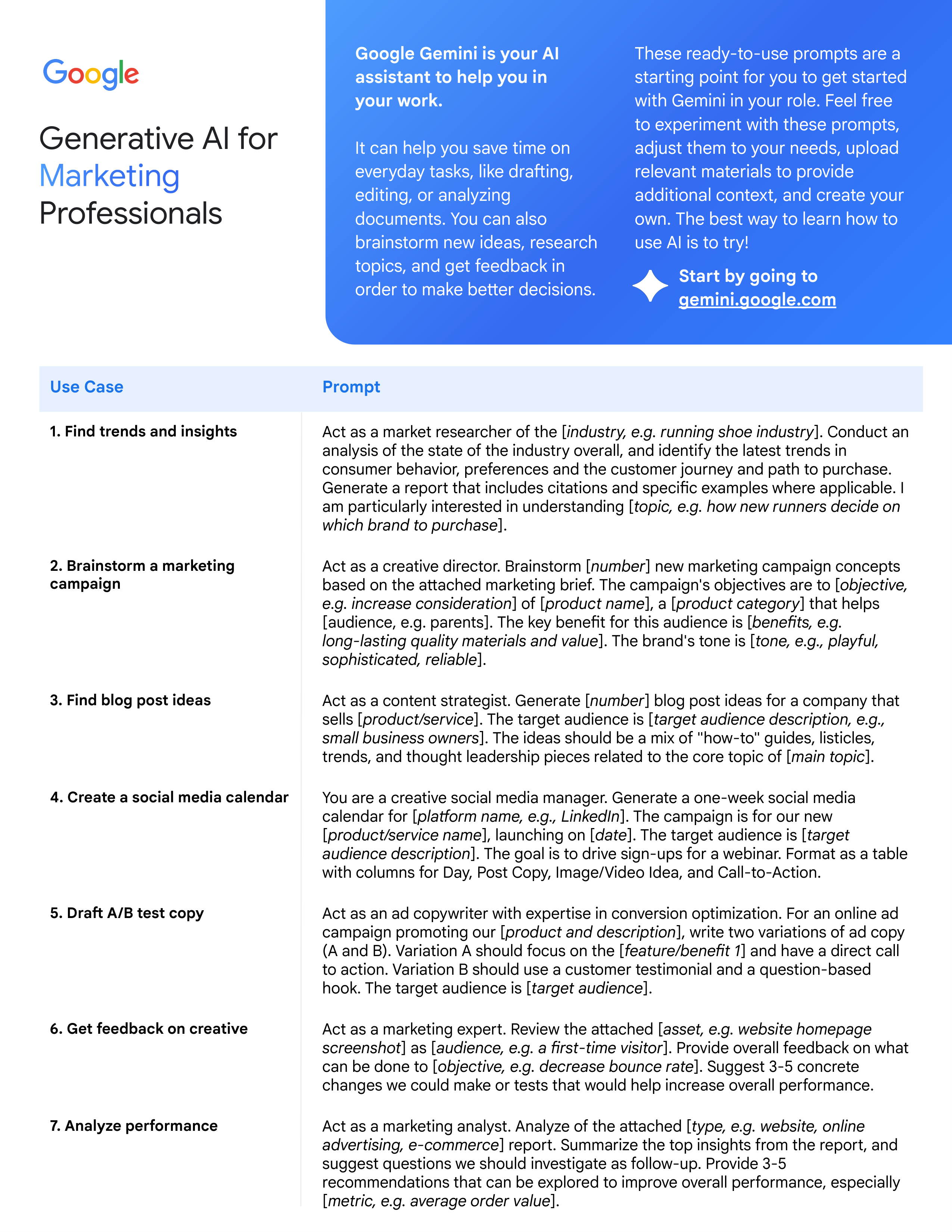
Marketing
-
Project management
-
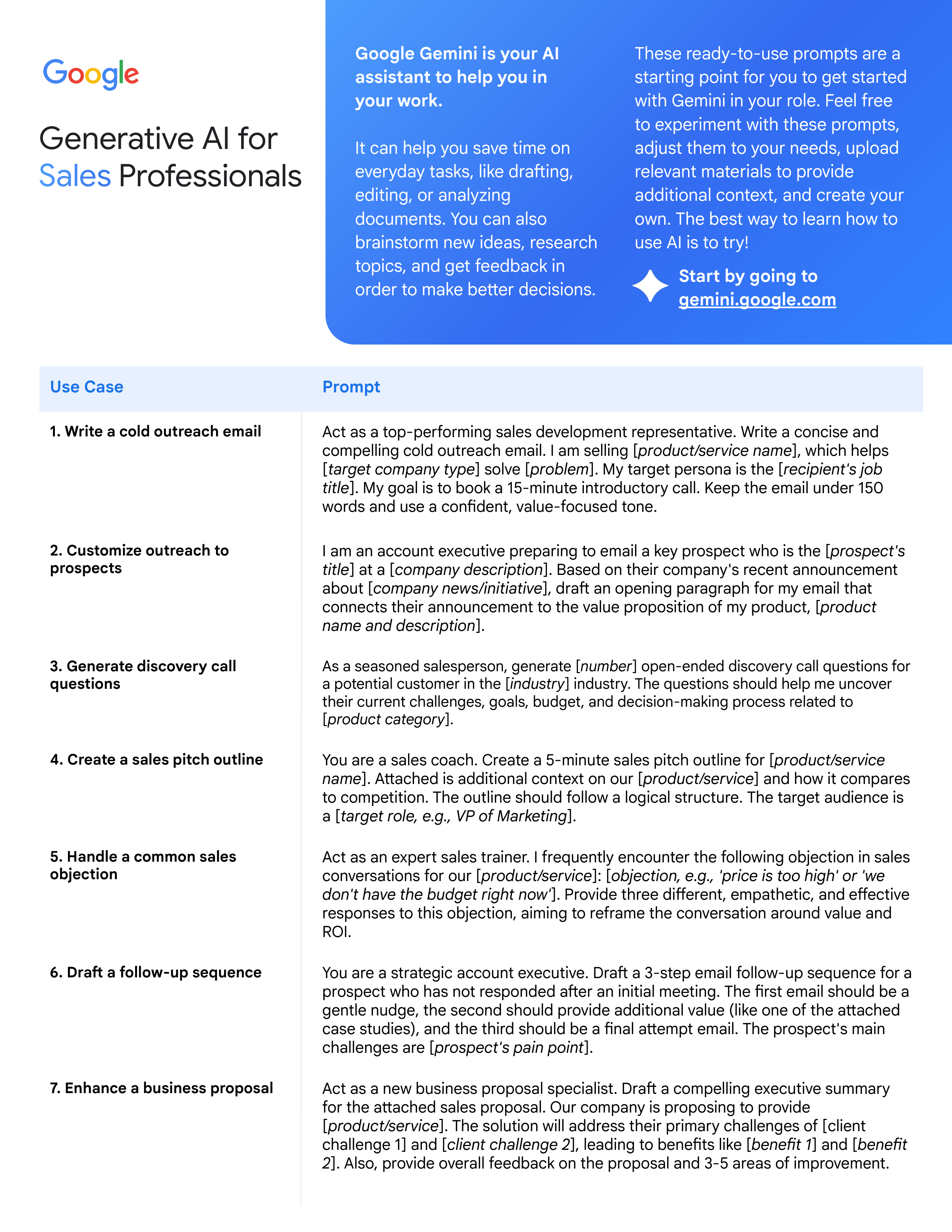
Sales
-
UX design
1
2
3
4
5
6


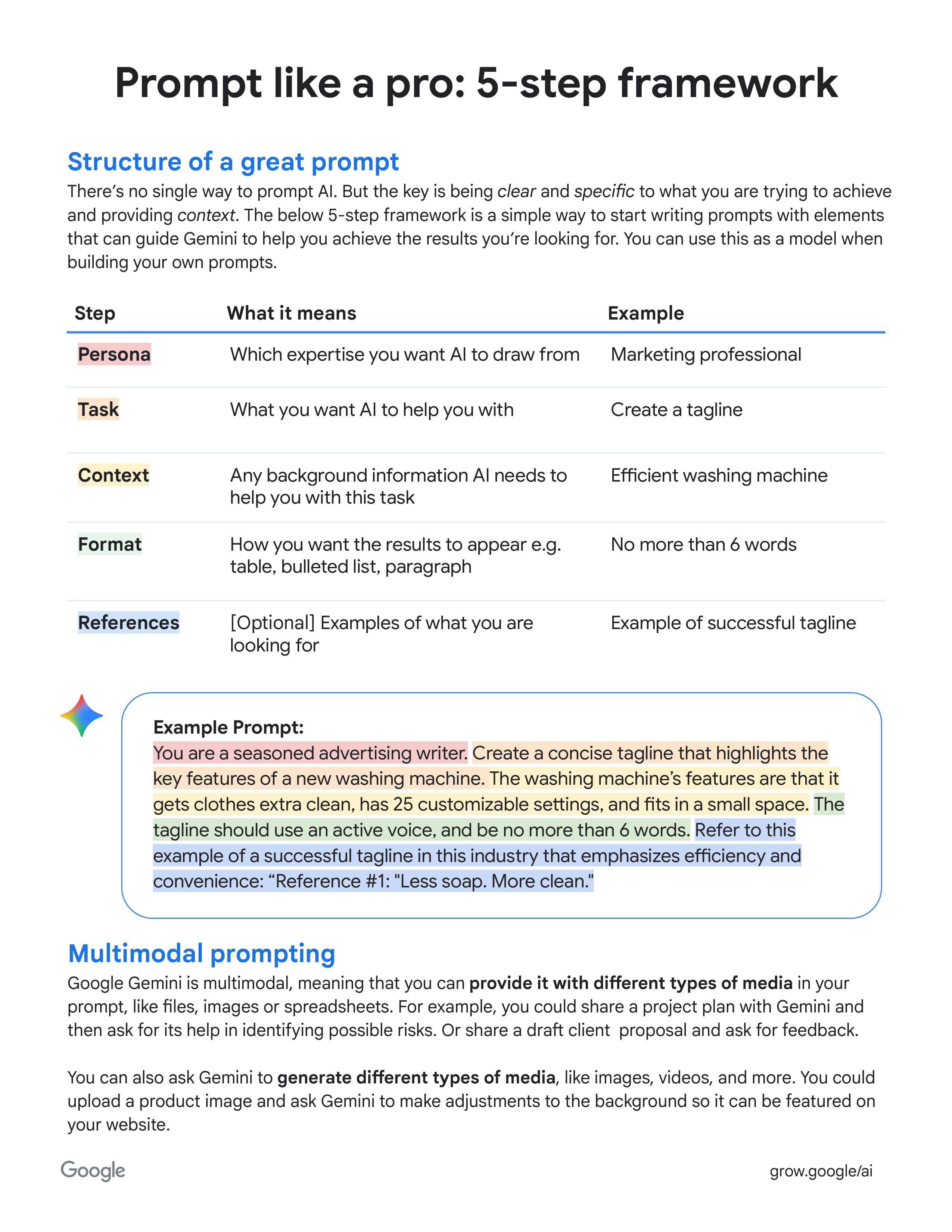
Structure of a great prompt
There’s no single way to prompt AI. But the key is being
clear
and
specific
to what you are trying to achieve
and providing
context
. The below 5-step framework is a simple way to start writing prompts with elements
that can guide Gemini to help you achieve the results you’re looking for. You can use this as a model when
building your own prompts.
Step
What it means
Example
Persona
Which expertise you want AI to draw from
Marketing professional
Task
What you want AI to help you with
Create a tagline
Context
Any background information AI needs to
help you with this task
Efficient washing machine
Format
How you want the results to appear e.g.
table, bulleted list, paragraph
No more than 6 words
References
[Optional]
Examples of what you are
looking for
Example of successful tagline
Prompt like a pro: 5-step framework
Example Prompt:
You are a seasoned advertising writer. Create a concise tagline that highlights the
key features of a new washing machine. The washing machine’s features are that it
gets clothes extra clean, has 25 customizable settings, and fits in a small space. The
tagline should use an active voice, and be no more than 6 words. Refer to this
example of a successful tagline in this industry that emphasizes efficiency and
convenience: “Reference #1: "Less soap. More clean."
Multimodal prompting
Google Gemini is multimodal, meaning that you can
provide it with different types of media
in your
prompt, like files, images or spreadsheets. For example, you could share a project plan with Gemini and
then ask for its help in identifying possible risks. Or share a draft client proposal and ask for feedback.
You can also ask Gemini to
generate different types of media
, like images, videos, and more. You could
upload a product image and ask Gemini to make adjustments to the background so it can be featured on
your website.
grow.google/ai


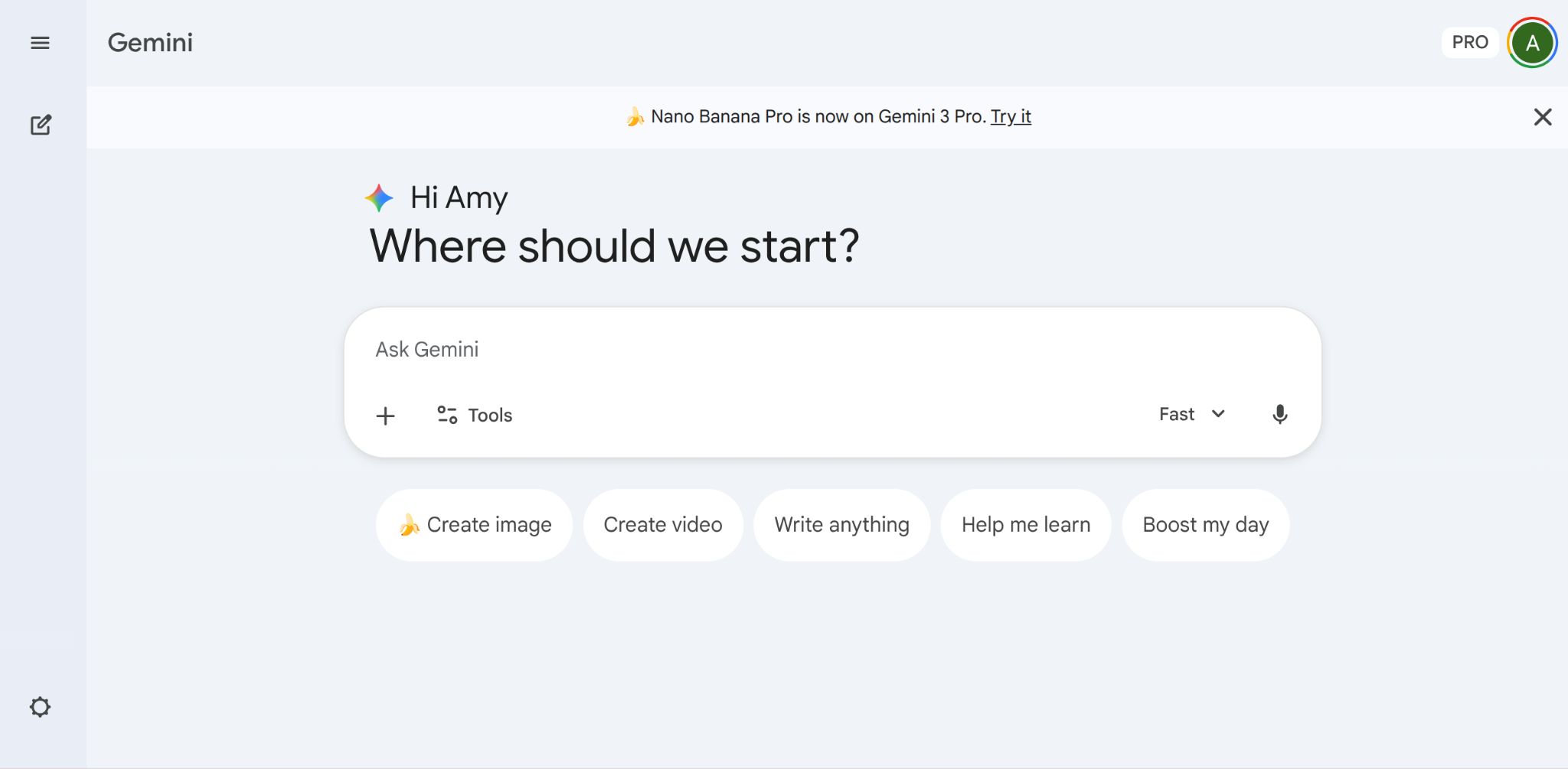
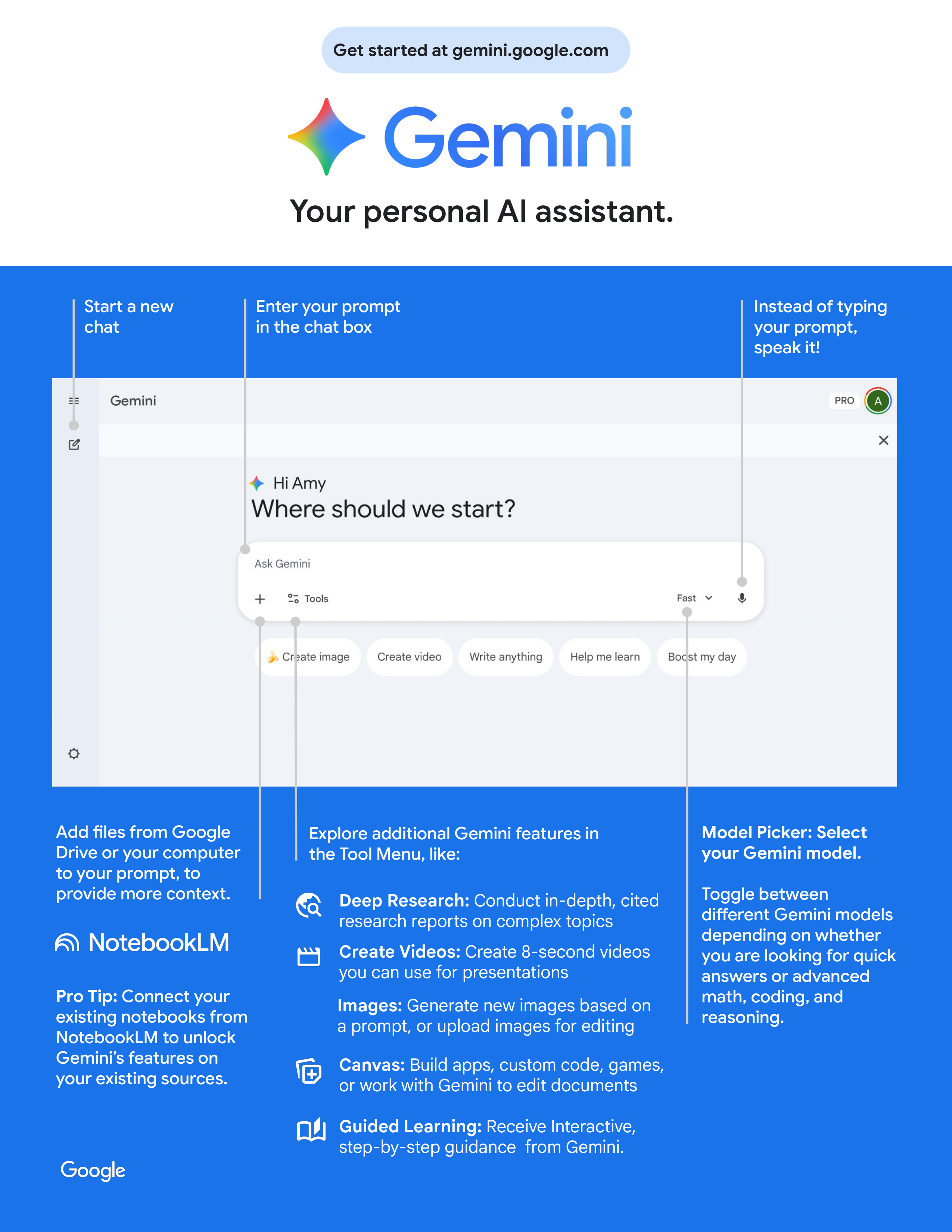
Your personal AI assistant.
Get started at gemini.google.com
Start a new
chat
Add files from Google
Drive or your computer
to your prompt, to
provide more context.
Pro Tip:
Connect your
existing notebooks from
NotebookLM to unlock
Gemini’s features on
your existing sources.
Explore additional Gemini features in
the Tool Menu, like:
Instead of typing
your prompt,
speak it!
Enter your prompt
in the chat box
Model Picker: Select
your Gemini model.
Toggle between
different Gemini models
depending on whether
you are looking for quick
answers or advanced
math, coding, and
reasoning.
Deep Research:
Conduct in-depth, cited
research reports on complex topics
Create Videos:
Create 8-second videos
you can use for presentations
Images:
Generate new images based on
a prompt, or upload images for editing
Canvas:
Build apps, custom code, games,
or work with Gemini to edit documents
Guided Learning:
Receive Interactive,
step-by-step guidance from Gemini.
��


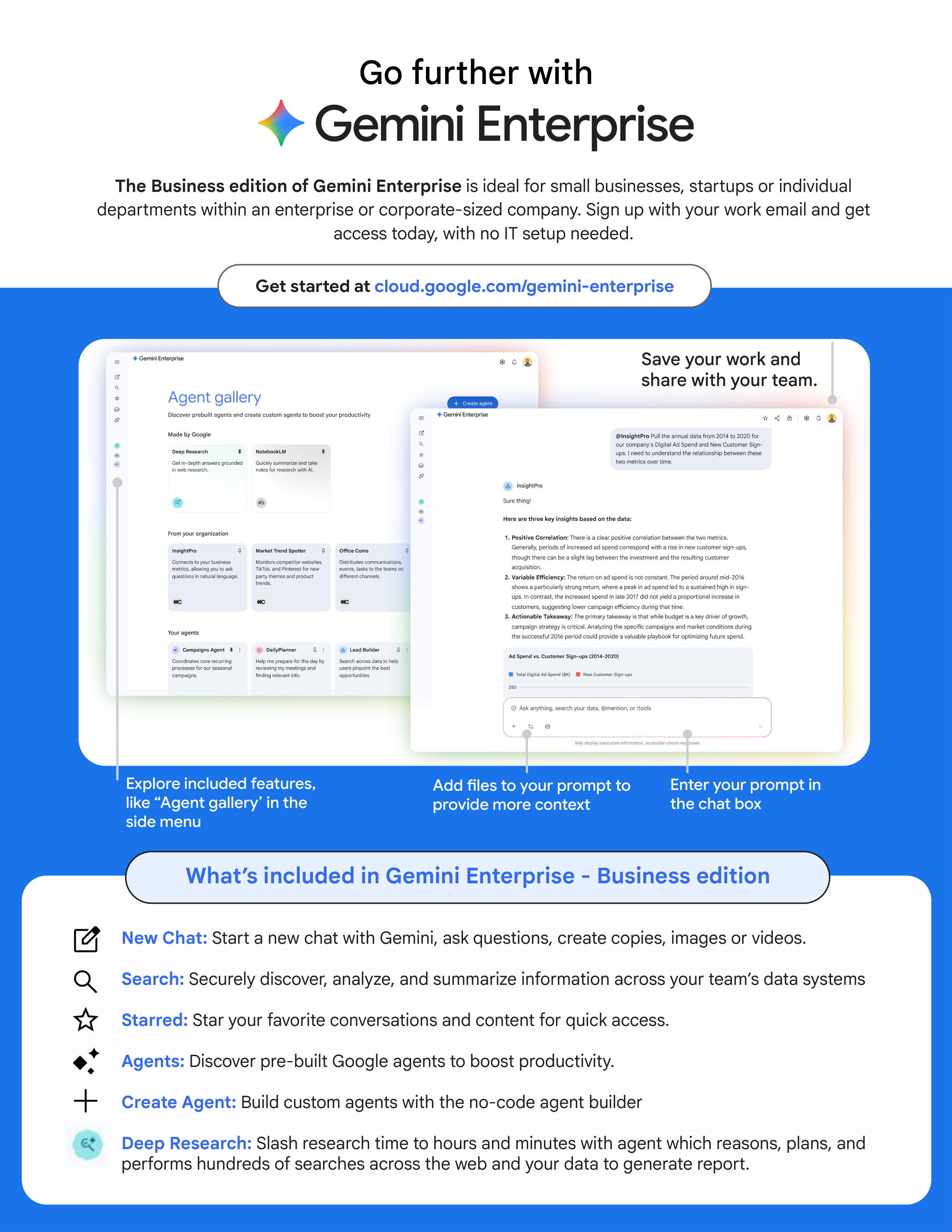
Go further with
Get started at
cloud.google.com/gemini-enterprise
Explore included features,
like “Agent gallery’ in the
side menu
Enter your prompt in
the chat box
Save your work and
share with your team.
Add files to your prompt to
provide more context
The Business edition of Gemini Enterprise
is ideal for small businesses, startups or individual
departments within an enterprise or corporate-sized company. Sign up with your work email and get
access today, with no IT setup needed.
Save your work and
share with your team.
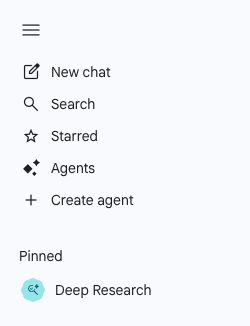
What’s included in Gemini Enterprise - Business edition
New Chat:
Start a new chat with Gemini, ask questions, create copies, images or videos.
Search:
Securely discover, analyze, and summarize information across your team’s data systems
Starred:
Star your favorite conversations and content for quick access.
Agents:
Discover pre-built Google agents to boost productivity.
Create Agent:
Build custom agents with the no-code agent builder
Deep Research:
Slash research time to hours and minutes with agent which reasons, plans, and
performs hundreds of searches across the web and your data to generate report.


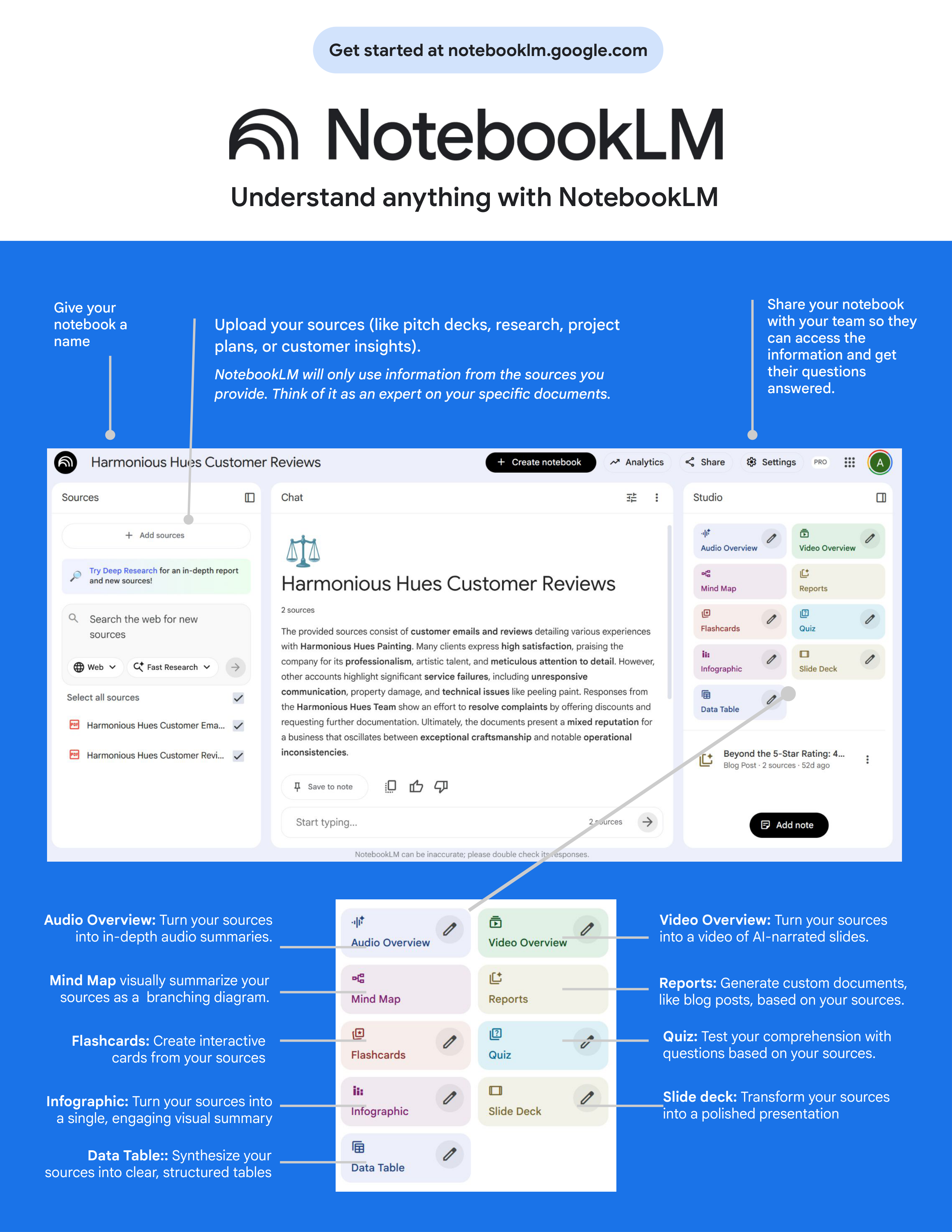
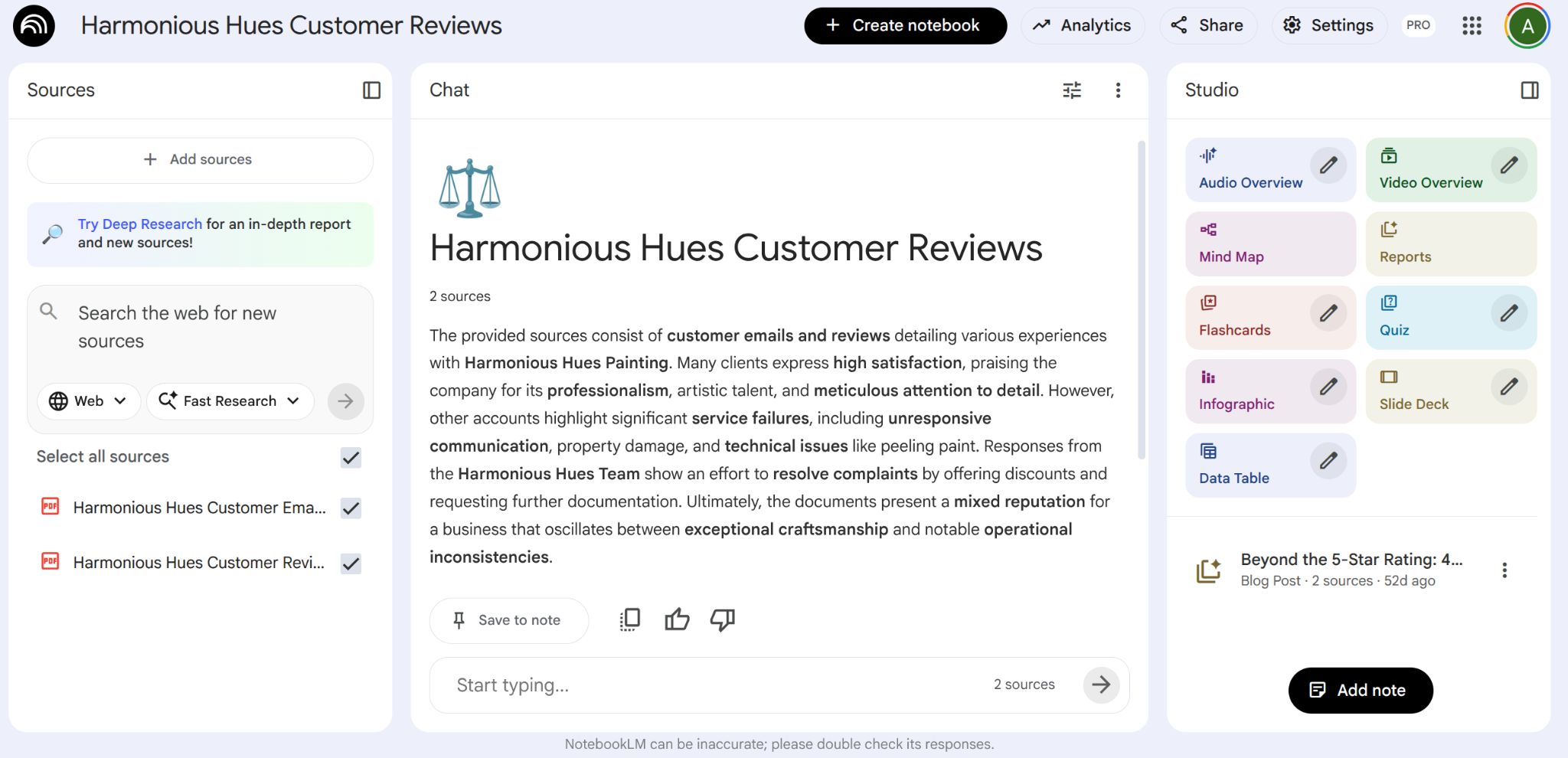
Understand anything with NotebookLM
Give your
notebook a
name
Share your notebook
with your team so they
can access the
information and get
their questions
answered.
Upload your sources (like pitch decks, research, project
plans, or customer insights).
NotebookLM will only use information from the sources you
provide. Think of it as an expert on your specific documents.
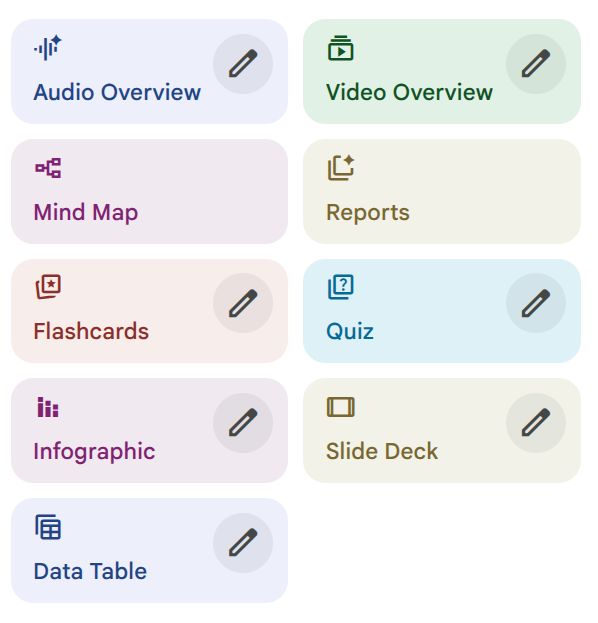
Video Overview:
Turn your sources
into a video of AI-narrated slides.
Audio Overview:
Turn your sources
into in-depth audio summaries.
Mind Map
visually summarize your
sources as a branching diagram.
Reports:
Generate custom documents,
like blog posts, based on your sources.
Quiz:
Test your comprehension with
questions based on your sources.
Flashcards:
Create interactive
cards from your sources
Get started at notebooklm.google.com
Infographic:
Turn your sources into
a single, engaging visual summary
Data Table::
Synthesize your
sources into clear, structured tables
Slide deck:
Transform your sources
into a polished presentation


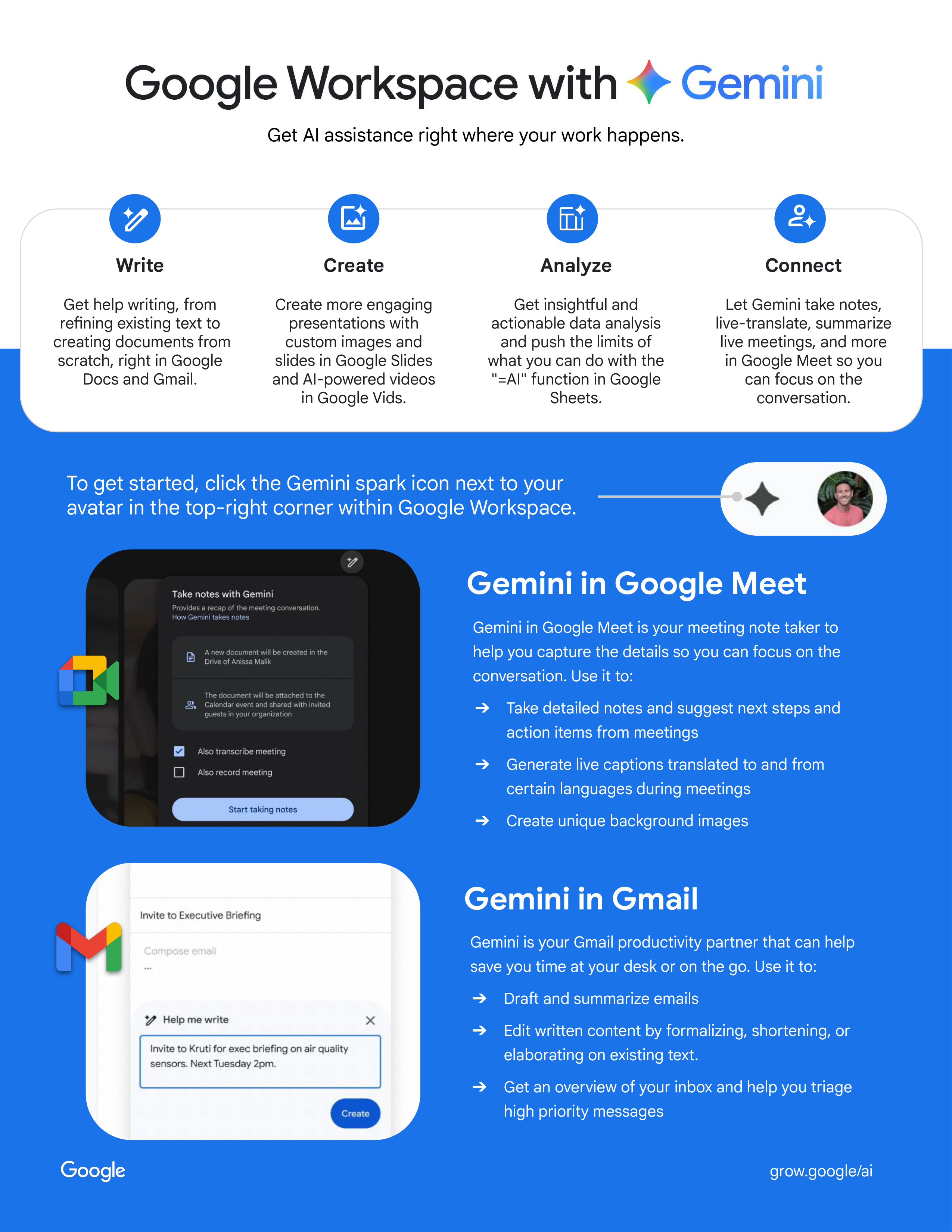
Gemini in Gmail
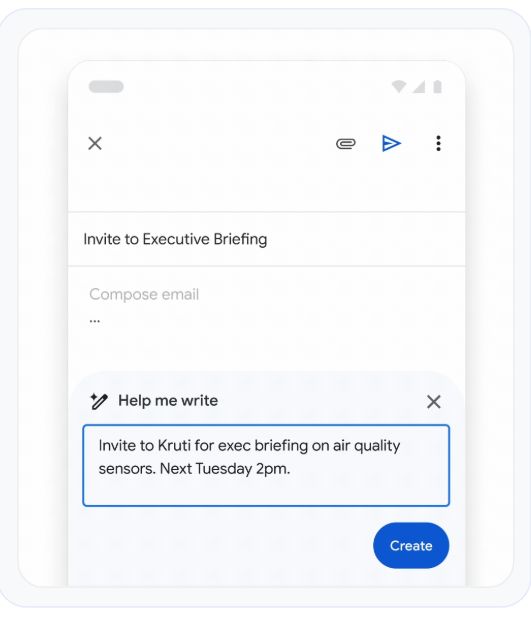
Gemini is your Gmail productivity partner that can help
save you time at your desk or on the go. Use it to:
➔
Draft and summarize emails
➔
Edit written content by formalizing, shortening, or
elaborating on existing text.
➔
Get an overview of your inbox and help you triage
high priority messages
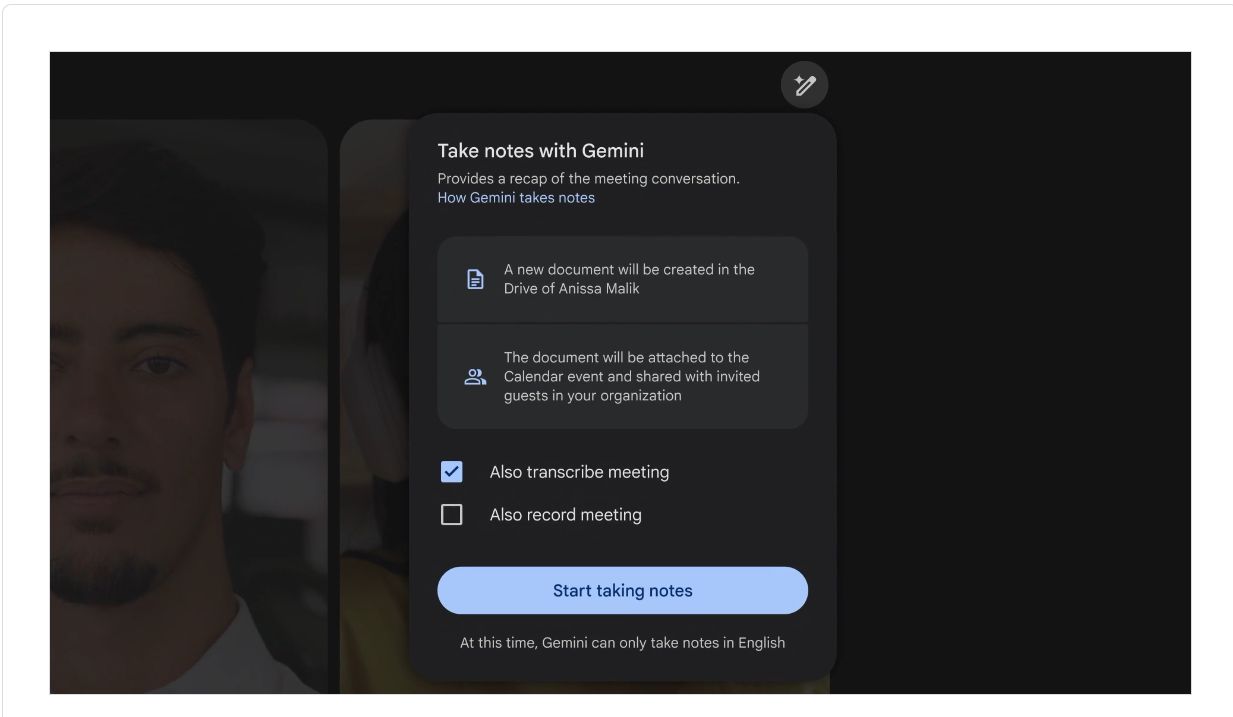
Gemini in Google Meet
Gemini in Google Meet is your meeting note taker to
help you capture the details so you can focus on the
conversation. Use it to:
➔
Take detailed notes and suggest next steps and
action items from meetings
➔
Generate live captions translated to and from
certain languages during meetings
➔
Create unique background images
Write
Get help writing, from
refining existing text to
creating documents from
scratch, right in Google
Docs and Gmail.
Create
Create more engaging
presentations with
custom images and
slides in Google Slides
and AI-powered videos
in Google Vids.
Analyze
Get insightful and
actionable data analysis
and push the limits of
what you can do with the
"=AI" function in Google
Sheets.
Connect
Let Gemini take notes,
live-translate, summarize
live meetings, and more
in Google Meet so you
can focus on the
conversation.
Get AI assistance right where your work happens.
grow.google/ai
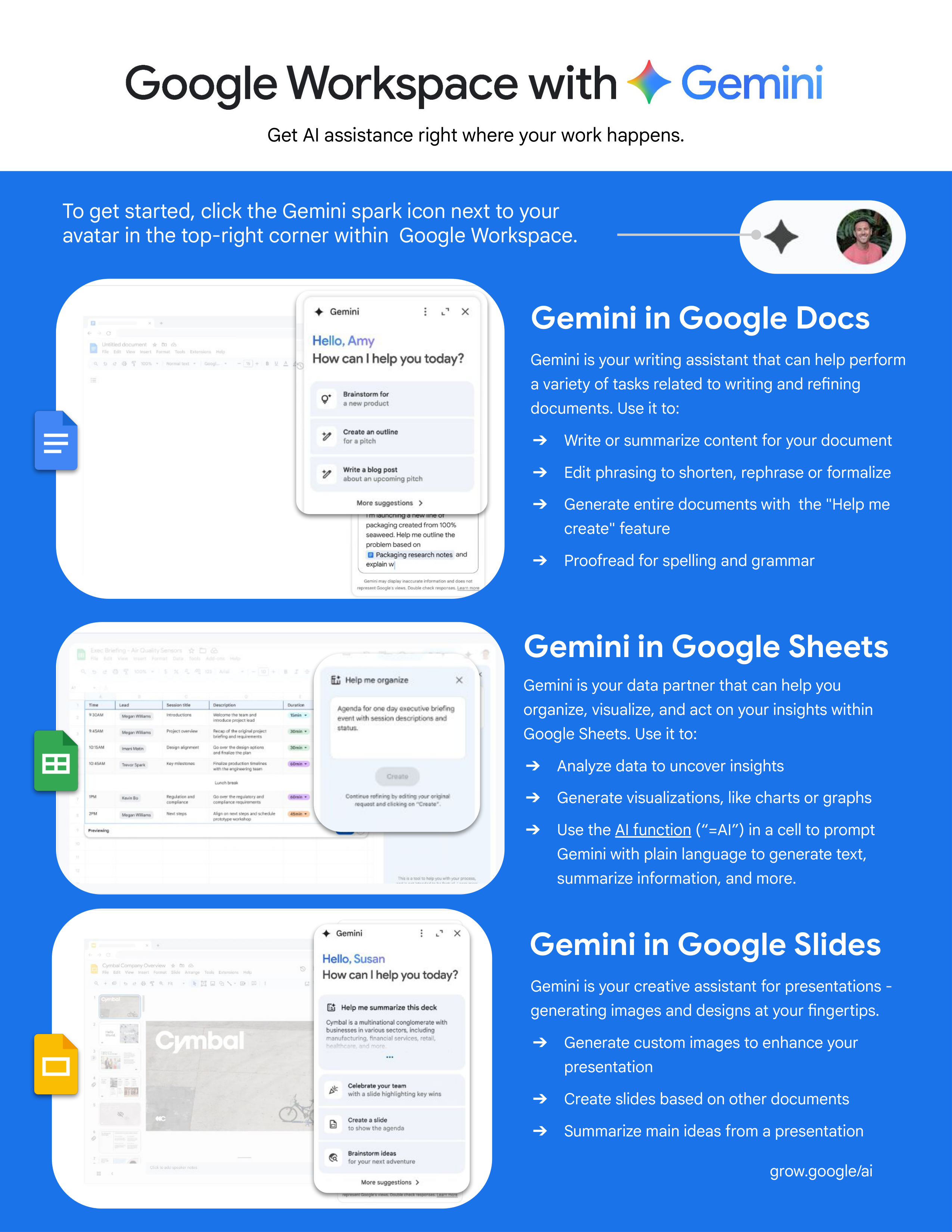
To get started, click the Gemini spark icon next to your
avatar in the top-right corner within Google Workspace.


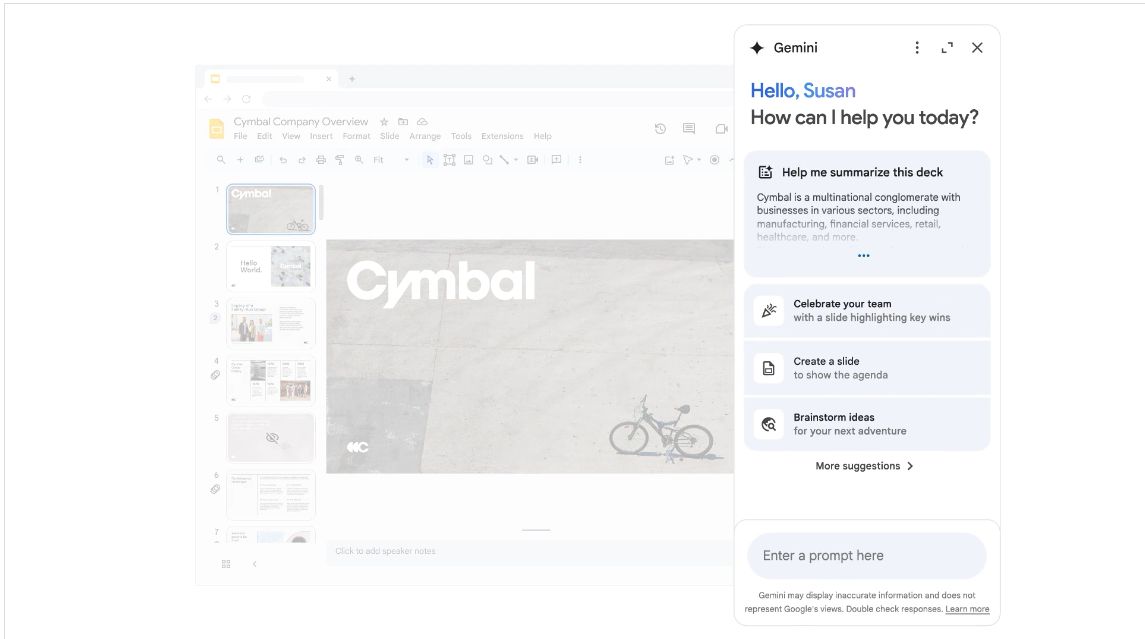
Gemini in Google Slides
Gemini is your creative assistant for presentations -
generating images and designs at your fingertips.
➔
Generate custom images to enhance your
presentation
➔
Create slides based on other documents
➔
Summarize main ideas from a presentation
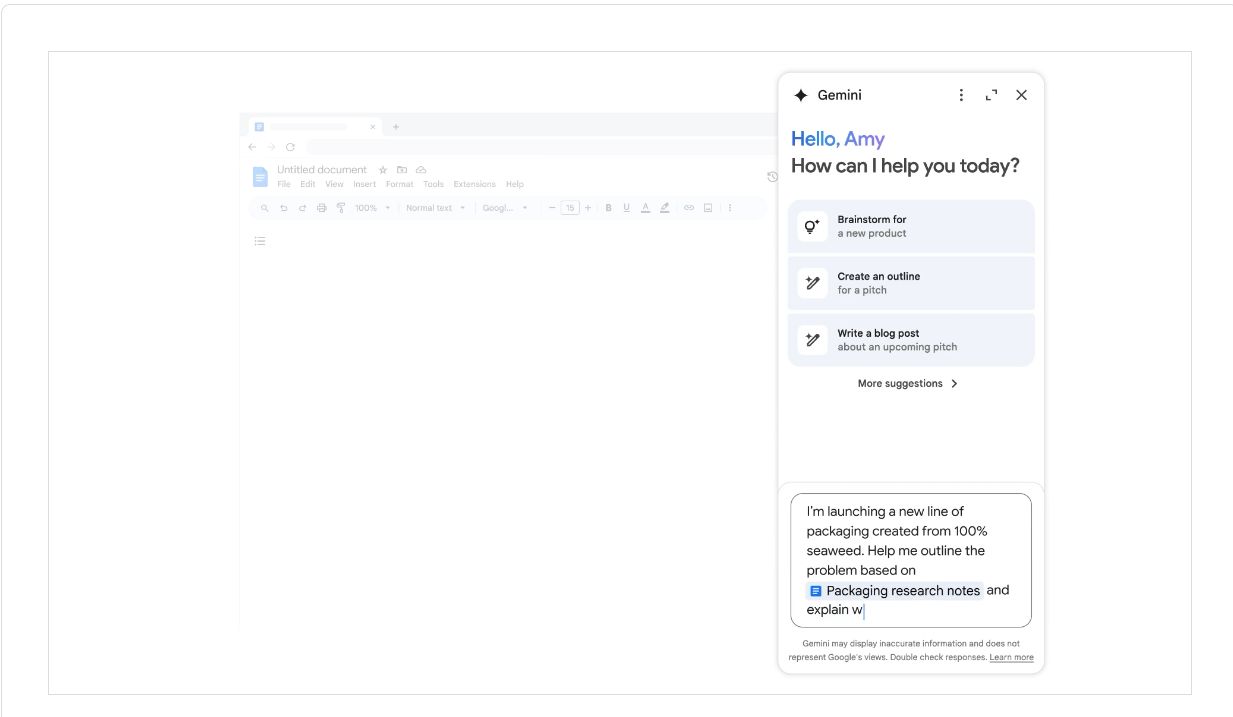
Gemini in Google Docs
Gemini in Google Sheets
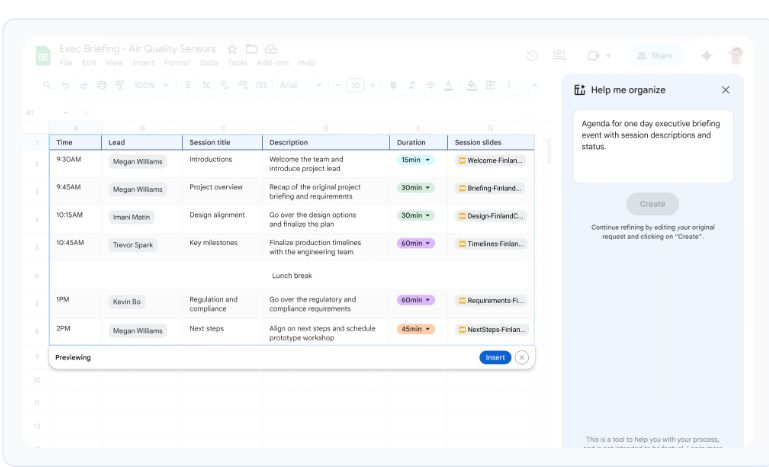
Gemini is your data partner that can help you
organize, visualize, and act on your insights within
Google Sheets. Use it to:
➔
Analyze data to uncover insights
➔
Generate visualizations, like charts or graphs
➔
Use the AI function (“=AI”) in a cell to prompt
Gemini with plain language to generate text,
summarize information, and more.
Gemini is your writing assistant that can help perform
a variety of tasks related to writing and refining
documents. Use it to:
➔
Write or summarize content for your document
➔
Edit phrasing to shorten, rephrase or formalize
➔
Generate entire documents with the "Help me
create" feature
➔
Proofread for spelling and grammar
grow.google/ai
To get started, click the Gemini spark icon next to your
avatar in the top-right corner within Google Workspace.
Get AI assistance right where your work happens.


Ready-to-use
prompts
grow.google/ai


Use Case
Prompt
1. Draft a job description
Act as an expert HR recruiter. Draft a comprehensive and engaging job description
for the role of [
job title
]. Our company, [
company name
], is in the [
industry
]
industry. We need a candidate with [
number
] years of experience and key skills in
[
skill 1, skill 2, skill 3
]. The role reports to the [
manager's title
]. Use a professional
but approachable tone and use clear headings for Responsibilities, Qualifications,
and Benefits.
2. Generate interview questions
Act as an experienced hiring manager. Generate [
number
] behavioral interview
questions for a [
job title
] position based on the attached job description. Include a
mix of questions that assess technical skills, problem-solving, and teamwork.
Include possible follow-up questions for each question.
3. Create an onboarding checklist
You are a company onboarding specialist. Create structured first month onboarding
checklist for a new [
job title]
based on the attached document. The checklist should
be broken down by Week 1, Week 2, and Weeks 3-4. Include tasks related to
paperwork, IT & system access, review of our employee handbook and company
policies, team introductions, mandatory trainings, and initial project assignments.
4. Draft internal communications
Act as an internal communications expert. Draft an announcement to all employees
about the upcoming [
company event, e.g., required trainings, benefits enrollment
].
The event is on [
date
] at [
location/time
]. The tone should be [
desired tone, e.g.
enthusiastic and informative
]. Optimize the communication to get employees to
[
call-to-action, e.g., RSVP by a certain date
].
5. Build employee survey
questions
You are an HR analyst. Generate [
number
] anonymous survey questions to gather
employee feedback on [
topic, e.g., tools & systems effectiveness
]. Include a mix of
multiple-choice and open-ended questions.
6. Analyze an employee survey
Act an analyst. Based on the attached anonymous employee survey about [
topic,
e.g. skill development needs, a new internal platform rollout]
, identify the top
[
number
] takeaways and themes. Add direct comments as references to help
illustrate some of the key insights. Suggest recommended next steps for any areas
of improvement identified.
7. Outline a learning and
development module
As a training and development manager, create a high-level outline for a new
training module on [
training topic, e.g., effective presentations, time management
].
The target audience is [
target Audience, e.g., new managers, sales teams
] and the
objective of the training is to [
objective, e.g. increase competitive sales
capabilities
]. The outline should include learning objectives, key topics, and
suggested activities for a [
duration, e.g., 60-minute
] virtual session.
These ready-to-use prompts are a
starting point for you to get started
with Gemini in your role. Feel free
to experiment with these prompts,
adjust them to your needs, upload
relevant materials to provide
additional context, and create your
own. The best way to learn how to
use AI is to try!
Start by going to
gemini.google.com
Generative AI for
Professionals
Google Gemini is your AI
assistant to help you in
your work.
It can help you save time on
everyday tasks, like drafting,
editing, or analyzing
documents. You can also
brainstorm new ideas, research
topics, and get feedback in
order to make better decisions.




Use Case
Prompt
1. Write a cold outreach email
Act as a top-performing sales development representative. Write a concise and
compelling cold outreach email. I am selling [
product/service name
], which helps
[
target company type
] solve [
problem
]. My target persona is the [
recipient's job
title
]. My goal is to book a 15-minute introductory call. Keep the email under 150
words and use a confident, value-focused tone.
2. Customize outreach to
prospects
I am an account executive preparing to email a key prospect who is the [
prospect's
title
] at a [
company description
]. Based on their company's recent announcement
about [
company news/initiative
], draft an opening paragraph for my email that
connects their announcement to the value proposition of my product, [
product
name and description
].
3. Generate discovery call
questions
As a seasoned salesperson, generate [
number
] open-ended discovery call questions for
a potential customer in the [
industry
] industry. The questions should help me uncover
their current challenges, goals, budget, and decision-making process related to
[
product category
].
4. Create a sales pitch outline
You are a sales coach. Create a 5-minute sales pitch outline for [
product/service
name
]. Attached is additional context on our [
product/service
] and how it compares
to competition. The outline should follow a logical structure. The target audience is
a [
target role, e.g., VP of Marketing
].
5. Handle a common sales
objection
Act as an expert sales trainer. I frequently encounter the following objection in sales
conversations for our [
product/service
]: [
objection, e.g., 'price is too high' or 'we
don't have the budget right now'
]. Provide three different, empathetic, and effective
responses to this objection, aiming to reframe the conversation around value and
ROI.
6. Draft a follow-up sequence
You are a strategic account executive. Draft a 3-step email follow-up sequence for a
prospect who has not responded after an initial meeting. The first email should be a
gentle nudge, the second should provide additional value (like one of the attached
case studies), and the third should be a final attempt email. The prospect's main
challenges are [
prospect's pain point
].
7. Enhance a business proposal
Act as a new business proposal specialist. Draft a compelling executive summary
for the attached sales proposal. Our company is proposing to provide
[
product/service
]. The solution will address their primary challenges of [client
challenge 1] and [
client challenge 2
], leading to benefits like [
benefit 1
] and [
benefit
2
]. Also, provide overall feedback on the proposal and 3-5 areas of improvement.
Generative AI for
Professionals
These ready-to-use prompts are a
starting point for you to get started
with Gemini in your role. Feel free
to experiment with these prompts,
adjust them to your needs, upload
relevant materials to provide
additional context, and create your
own. The best way to learn how to
use AI is to try!
Start by going to
gemini.google.com
Google Gemini is your AI
assistant to help you in
your work.
It can help you save time on
everyday tasks, like drafting,
editing, or analyzing
documents. You can also
brainstorm new ideas, research
topics, and get feedback in
order to make better decisions.



Use Case
Prompt
1. Find trends and insights
Act as a market researcher of the [
industry, e.g. running shoe industry
]. Conduct an
analysis of the state of the industry overall, and identify the latest trends in
consumer behavior, preferences and the customer journey and path to purchase.
Generate a report that includes citations and specific examples where applicable. I
am particularly interested in understanding [
topic, e.g. how new runners decide on
which brand to purchase
].
2. Brainstorm a marketing
campaign
Act as a creative director. Brainstorm [
number
] new marketing campaign concepts
based on the attached marketing brief. The campaign's objectives are to [
objective,
e.g. increase consideration
] of [
product name
], a [
product category
] that helps
[audience, e.g. parents]. The key benefit for this audience is [
benefits, e.g.
long-lasting quality materials and value
]. The brand's tone is [
tone, e.g., playful,
sophisticated, reliable
].
3. Find blog post ideas
Act as a content strategist. Generate [
number
] blog post ideas for a company that
sells [
product/service
]. The target audience is [
target audience description, e.g.,
small business owners
]. The ideas should be a mix of "how-to" guides, listicles,
trends, and thought leadership pieces related to the core topic of [
main topic
].
4. Create a social media calendar
You are a creative social media manager. Generate a one-week social media
calendar for [
platform name, e.g., LinkedIn
]. The campaign is for our new
[
product/service name
], launching on [
date
]. The target audience is [
target
audience description
]. The goal is to drive sign-ups for a webinar. Format as a table
with columns for Day, Post Copy, Image/Video Idea, and Call-to-Action.
5. Draft A/B test copy
Act as an ad copywriter with expertise in conversion optimization. For an online ad
campaign promoting our [
product and description
], write two variations of ad copy
(A and B). Variation A should focus on the [
feature/benefit 1
] and have a direct call
to action. Variation B should use a customer testimonial and a question-based
hook. The target audience is [
target audience
].
6. Get feedback on creative
Act as a marketing expert. Review the attached [
asset, e.g. website homepage
screenshot
] as [
audience, e.g. a first-time visitor
]. Provide overall feedback on what
can be done to [
objective, e.g. decrease bounce rate
]. Suggest 3-5 concrete
changes we could make or tests that would help increase overall performance.
7. Analyze performance
Act as a marketing analyst. Analyze of the attached [
type, e.g. website, online
advertising, e-commerce
] report. Summarize the top insights from the report, and
suggest questions we should investigate as follow-up. Provide 3-5
recommendations that can be explored to improve overall performance, especially
[
metric, e.g. average order value
].
Generative AI for
Professionals
These ready-to-use prompts are a
starting point for you to get started
with Gemini in your role. Feel free
to experiment with these prompts,
adjust them to your needs, upload
relevant materials to provide
additional context, and create your
own. The best way to learn how to
use AI is to try!
Start by going to
gemini.google.com
Google Gemini is your AI
assistant to help you in
your work.
It can help you save time on
everyday tasks, like drafting,
editing, or analyzing
documents. You can also
brainstorm new ideas, research
topics, and get feedback in
order to make better decisions.


Use Case
Prompt
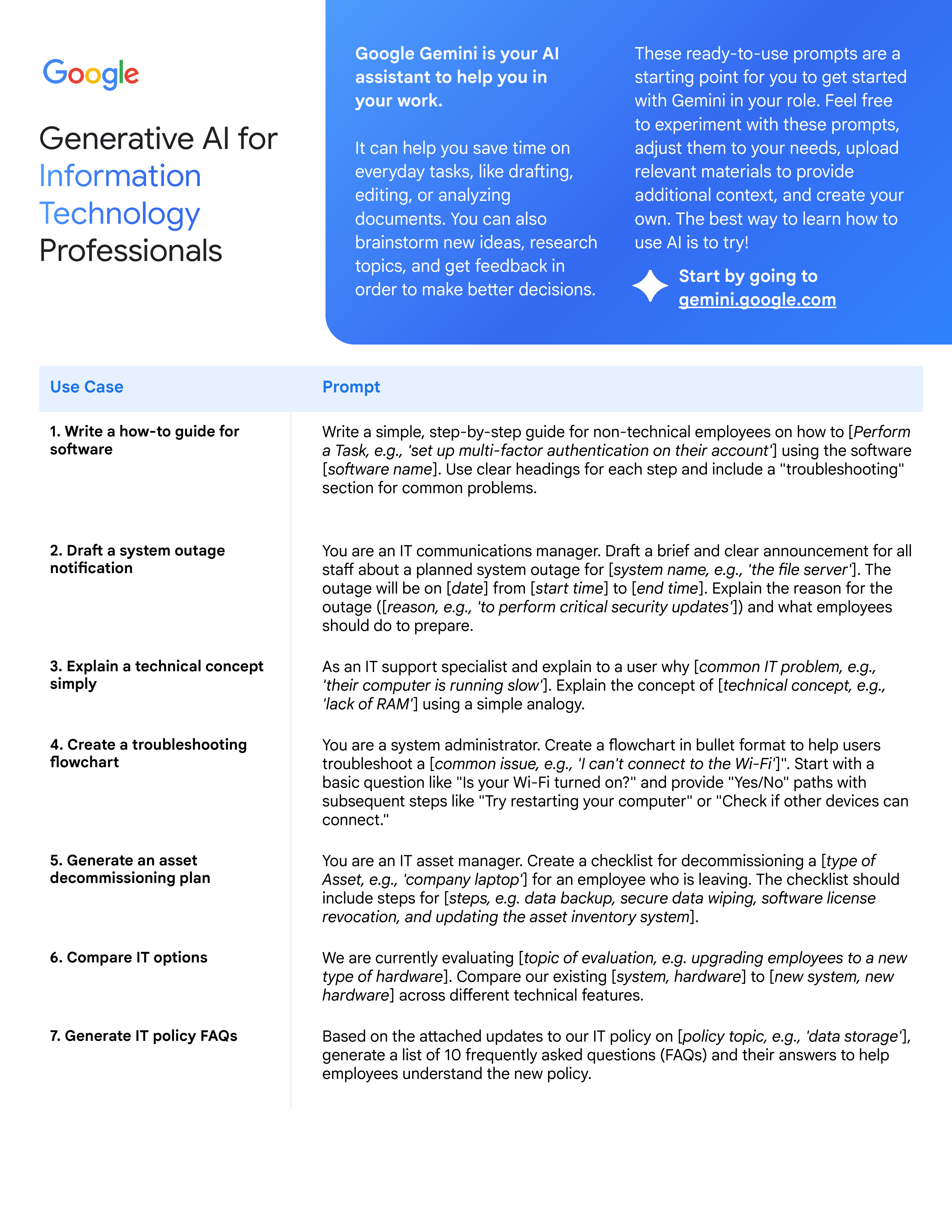
1. Write a how-to guide for
software
Write a simple, step-by-step guide for non-technical employees on how to [
Perform
a Task, e.g., 'set up multi-factor authentication on their account'
] using the software
[
software name
]. Use clear headings for each step and include a "troubleshooting"
section for common problems.
2. Draft a system outage
notification
You are an IT communications manager. Draft a brief and clear announcement for all
staff about a planned system outage for [
system name, e.g., 'the file server'
]. The
outage will be on [
date
] from [
start time
] to [
end time
]. Explain the reason for the
outage ([
reason, e.g., 'to perform critical security updates'
]) and what employees
should do to prepare.
3. Explain a technical concept
simply
As an IT support specialist and explain to a user why [
common IT problem, e.g.,
'their computer is running slow'
]. Explain the concept of [
technical concept, e.g.,
'lack of RAM'
] using a simple analogy.
4. Create a troubleshooting
flowchart
You are a system administrator. Create a flowchart in bullet format to help users
troubleshoot a [
common issue, e.g., 'I can't connect to the Wi-Fi'
]". Start with a
basic question like "Is your Wi-Fi turned on?" and provide "Yes/No" paths with
subsequent steps like "Try restarting your computer" or "Check if other devices can
connect."
5. Generate an asset
decommissioning plan
You are an IT asset manager. Create a checklist for decommissioning a [
type of
Asset, e.g., 'company laptop'
] for an employee who is leaving. The checklist should
include steps for [
steps, e.g. data backup, secure data wiping, software license
revocation, and updating the asset inventory system
].
6. Compare IT options
We are currently evaluating [
topic of evaluation, e.g. upgrading employees to a new
type of hardware
]. Compare our existing [
system, hardware
] to [
new system, new
hardware
] across different technical features.
7. Generate IT policy FAQs
Based on the attached updates to our IT policy on [
policy topic, e.g., 'data storage'
],
generate a list of 10 frequently asked questions (FAQs) and their answers to help
employees understand the new policy.
Generative AI for
Professionals
These ready-to-use prompts are a
starting point for you to get started
with Gemini in your role. Feel free
to experiment with these prompts,
adjust them to your needs, upload
relevant materials to provide
additional context, and create your
own. The best way to learn how to
use AI is to try!
Start by going to
gemini.google.com
Google Gemini is your AI
assistant to help you in
your work.
It can help you save time on
everyday tasks, like drafting,
editing, or analyzing
documents. You can also
brainstorm new ideas, research
topics, and get feedback in
order to make better decisions.



Use Case
Prompt
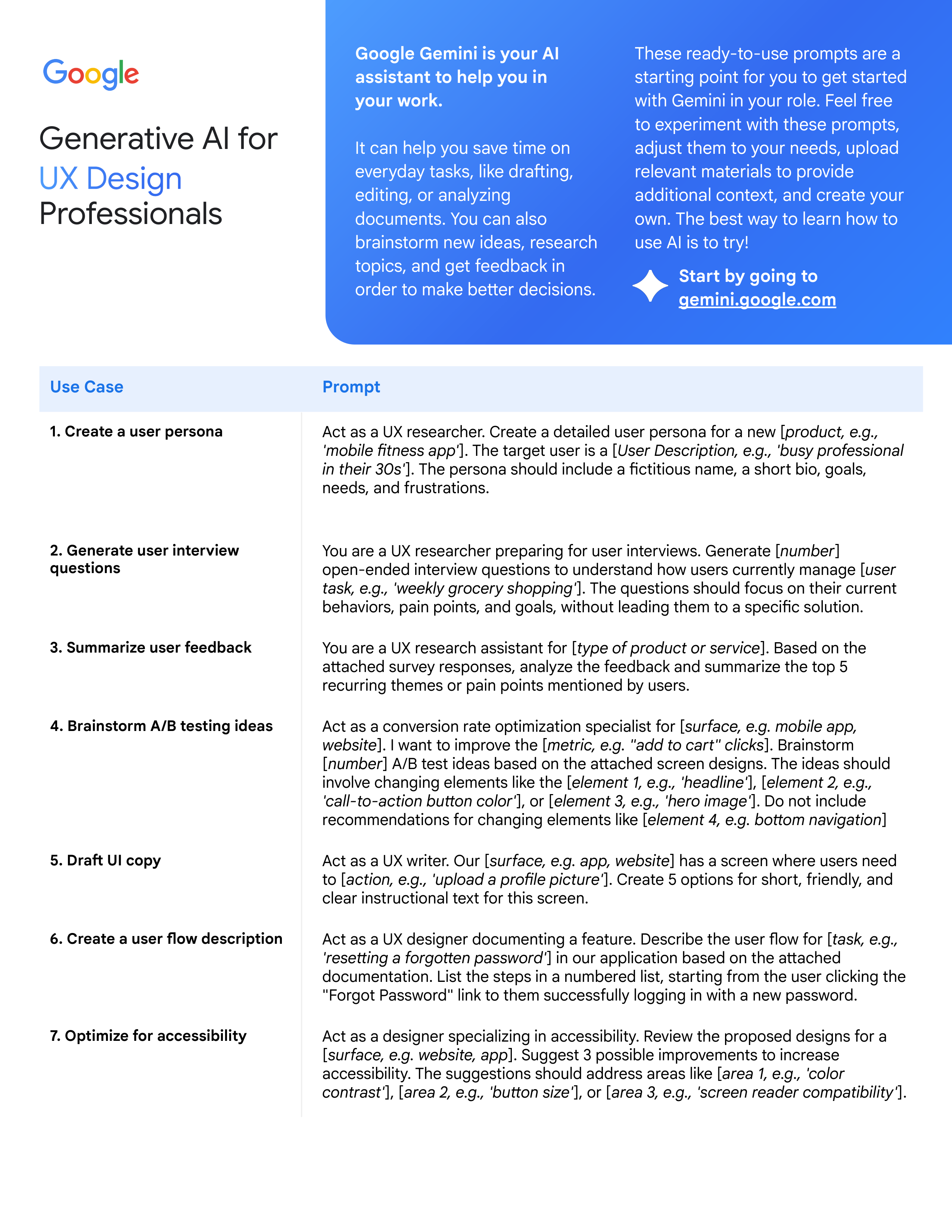
1. Create a user persona
Act as a UX researcher. Create a detailed user persona for a new [
product, e.g.,
'mobile fitness app'
]. The target user is a [
User Description, e.g., 'busy professional
in their 30s'
]. The persona should include a fictitious name, a short bio, goals,
needs, and frustrations.
2. Generate user interview
questions
You are a UX researcher preparing for user interviews. Generate [
number
]
open-ended interview questions to understand how users currently manage [
user
task, e.g., 'weekly grocery shopping'
]. The questions should focus on their current
behaviors, pain points, and goals, without leading them to a specific solution.
3. Summarize user feedback
You are a UX research assistant for [
type of product or service
]. Based on the
attached survey responses, analyze the feedback and summarize the top 5
recurring themes or pain points mentioned by users.
4. Brainstorm A/B testing ideas
Act as a conversion rate optimization specialist for [
surface, e.g. mobile app,
website
]. I want to improve the [
metric, e.g. "add to cart" clicks
]. Brainstorm
[
number
] A/B test ideas based on the attached screen designs. The ideas should
involve changing elements like the [
element 1, e.g., 'headline'
], [
element 2, e.g.,
'call-to-action button color'
], or [
element 3, e.g., 'hero image'
]. Do not include
recommendations for changing elements like [
element 4, e.g. bottom navigation
]
5. Draft UI copy
Act as a UX writer. Our [
surface, e.g. app, website
] has a screen where users need
to [
action, e.g., 'upload a profile picture'
]. Create 5 options for short, friendly, and
clear instructional text for this screen.
6. Create a user flow description
Act as a UX designer documenting a feature. Describe the user flow for [
task, e.g.,
'resetting a forgotten password'
] in our application based on the attached
documentation. List the steps in a numbered list, starting from the user clicking the
"Forgot Password" link to them successfully logging in with a new password.
7. Optimize for accessibility
Act as a designer specializing in accessibility. Review the proposed designs for a
[
surface, e.g. website, app
]. Suggest 3 possible improvements to increase
accessibility. The suggestions should address areas like [
area 1, e.g., 'color
contrast'
], [
area 2, e.g., 'button size'
], or [
area 3, e.g., 'screen reader compatibility'
].
Generative AI for
Professionals
These ready-to-use prompts are a
starting point for you to get started
with Gemini in your role. Feel free
to experiment with these prompts,
adjust them to your needs, upload
relevant materials to provide
additional context, and create your
own. The best way to learn how to
use AI is to try!
Start by going to
gemini.google.com
Google Gemini is your AI
assistant to help you in
your work.
It can help you save time on
everyday tasks, like drafting,
editing, or analyzing
documents. You can also
brainstorm new ideas, research
topics, and get feedback in
order to make better decisions.



Use Case
Prompt
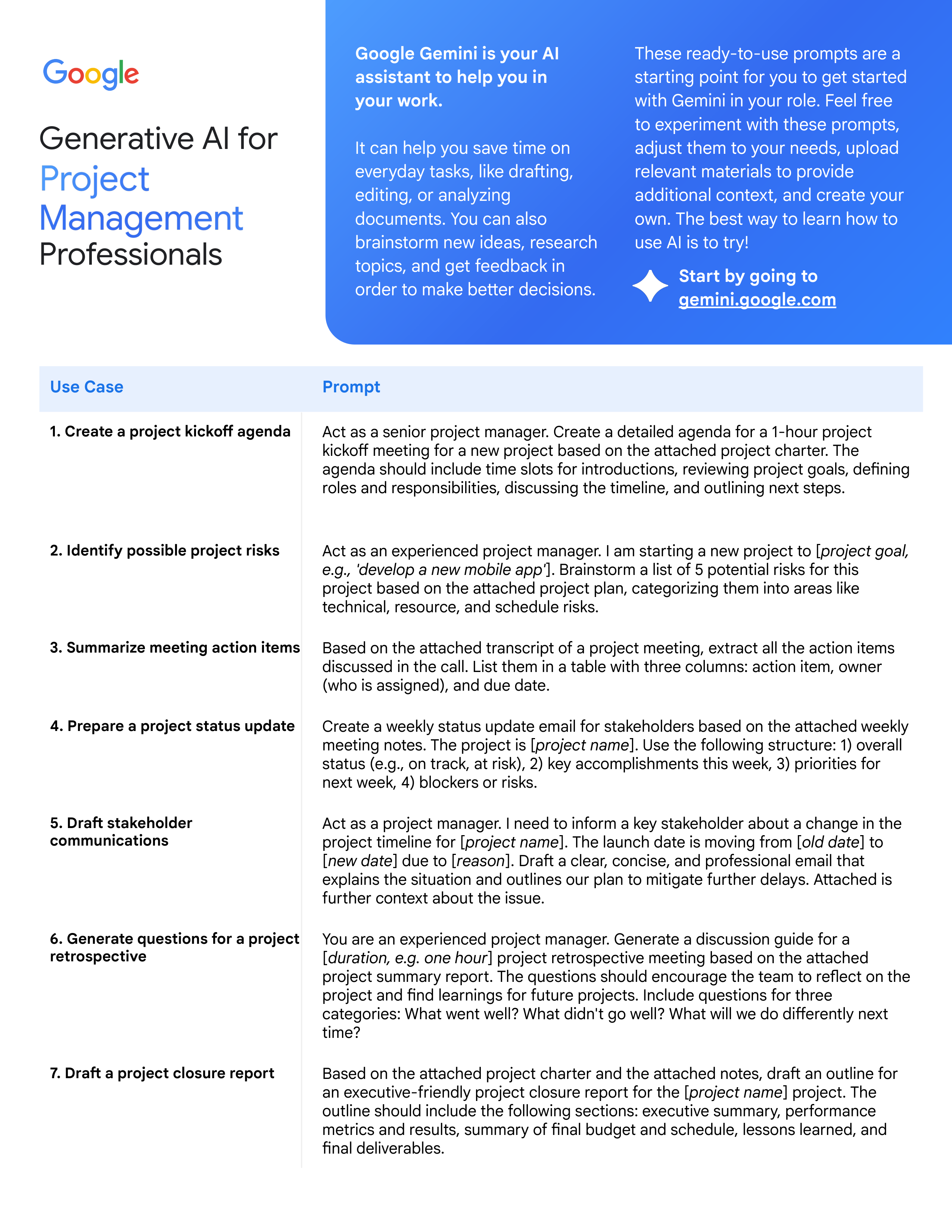
1. Create a project kickoff agenda
Act as a senior project manager. Create a detailed agenda for a 1-hour project
kickoff meeting for a new project based on the attached project charter. The
agenda should include time slots for introductions, reviewing project goals, defining
roles and responsibilities, discussing the timeline, and outlining next steps.
2. Identify possible project risks
Act as an experienced project manager. I am starting a new project to [
project goal,
e.g., 'develop a new mobile app'
]. Brainstorm a list of 5 potential risks for this
project based on the attached project plan, categorizing them into areas like
technical, resource, and schedule risks.
3. Summarize meeting action items
Based on the attached transcript of a project meeting, extract all the action items
discussed in the call. List them in a table with three columns: action item, owner
(who is assigned), and due date.
4. Prepare a project status update
Create a weekly status update email for stakeholders based on the attached weekly
meeting notes. The project is [
project name
]. Use the following structure: 1) overall
status (e.g., on track, at risk), 2) key accomplishments this week, 3) priorities for
next week, 4) blockers or risks.
5. Draft stakeholder
communications
Act as a project manager. I need to inform a key stakeholder about a change in the
project timeline for [
project name
]. The launch date is moving from [
old date
] to
[
new date
] due to [
reason
]. Draft a clear, concise, and professional email that
explains the situation and outlines our plan to mitigate further delays. Attached is
further context about the issue.
6. Generate questions for a project
retrospective
You are an experienced project manager. Generate a discussion guide for a
[
duration, e.g. one hour
] project retrospective meeting based on the attached
project summary report. The questions should encourage the team to reflect on the
project and find learnings for future projects. Include questions for three
categories: What went well? What didn't go well? What will we do differently next
time?
7. Draft a project closure report
Based on the attached project charter and the attached notes, draft an outline for
an executive-friendly project closure report for the [
project name
] project. The
outline should include the following sections: executive summary, performance
metrics and results, summary of final budget and schedule, lessons learned, and
final deliverables.
Generative AI for
Professionals
These ready-to-use prompts are a
starting point for you to get started
with Gemini in your role. Feel free
to experiment with these prompts,
adjust them to your needs, upload
relevant materials to provide
additional context, and create your
own. The best way to learn how to
use AI is to try!
Start by going to
gemini.google.com
Google Gemini is your AI
assistant to help you in
your work.
It can help you save time on
everyday tasks, like drafting,
editing, or analyzing
documents. You can also
brainstorm new ideas, research
topics, and get feedback in
order to make better decisions.


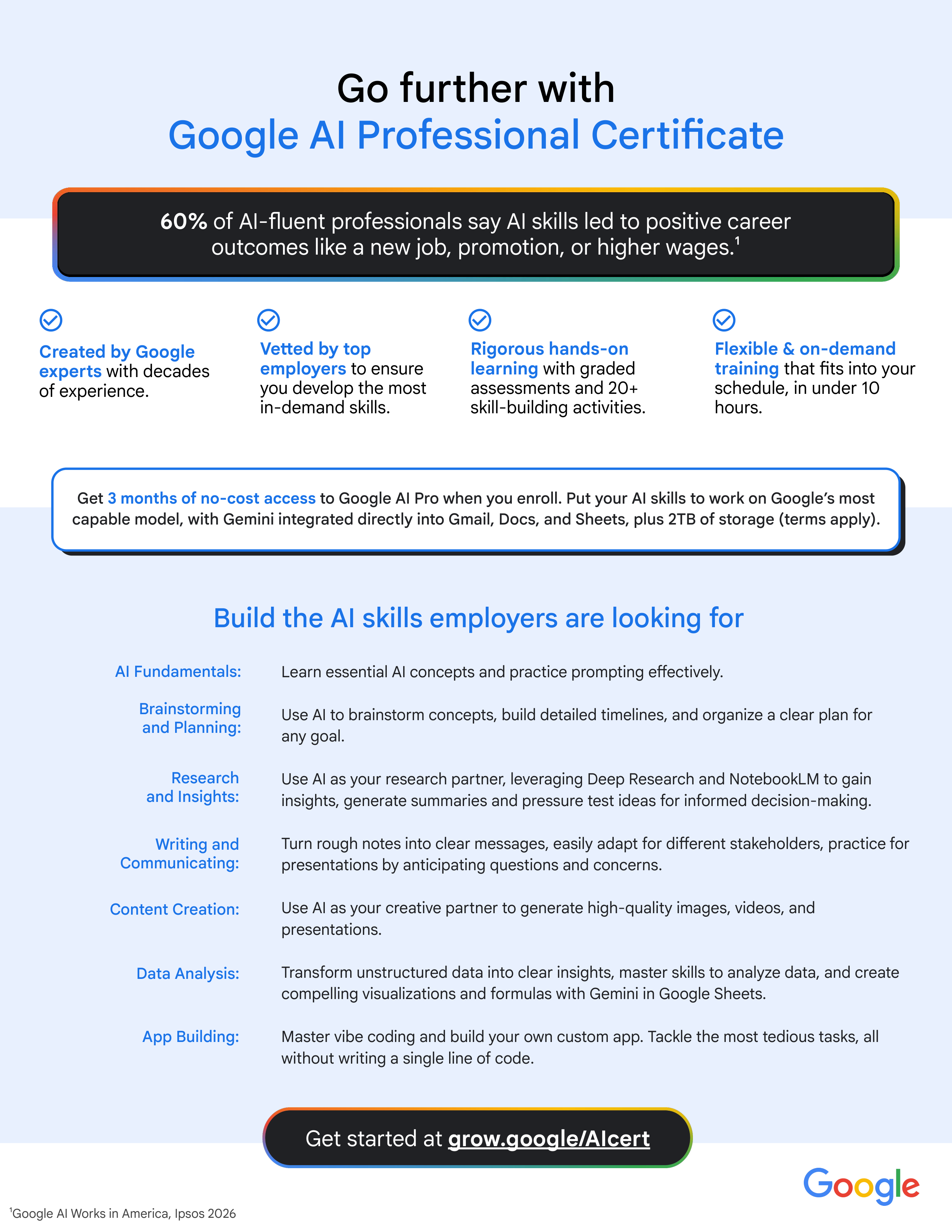
AI Fundamentals:
Brainstorming
and Planning:
Learn essential AI concepts and practice prompting effectively.
Use AI to brainstorm concepts, build detailed timelines, and organize a clear plan for
any goal.
Use AI as your research partner, leveraging Deep Research and NotebookLM to gain
insights, generate summaries and pressure test ideas for informed decision-making.
Turn rough notes into clear messages, easily adapt for different stakeholders, practice for
presentations by anticipating questions and concerns.
Use AI as your creative partner to generate high-quality images, videos, and
presentations.
Transform unstructured data into clear insights, master skills to analyze data, and create
compelling visualizations and formulas with Gemini in Google Sheets.

Master vibe coding and build your own custom app. Tackle the most tedious tasks, all

without writing a single line of code.
Vetted by top
employers
to ensure
you develop the most
in-demand skills.
Created by Google
experts
with decades
of experience.
¹
Google AI Works in America, Ipsos 2026
Build the AI skills employers are looking for
Rigorous hands-on
learning
with graded
assessments and 20+
skill-building activities.
Flexible & on-demand
training
that fits into your
schedule, in under 10
hours.
App Building:
Research
and Insights:
Writing and
Communicating:
Content Creation:
Data Analysis:
Get started at
grow.google/AIcert
Get
3 months of no-cost access
to Google AI Pro when you enroll. Put your AI skills to work on Google’s most
capable model, with Gemini integrated directly into Gmail, Docs, and Sheets, plus 2TB of storage (terms apply).
Go further with
Google AI Professional Certificate
60%
of AI-fluent professionals say AI skills led to positive career
outcomes like a new job, promotion, or higher wages.¹


grow.google/ai