
1
SAGE:
Smart
Home
Agent
with
Grounded
Execution
Dmitriy
Rivkin,
Francois
Hogan,
Amal
Feriani,
Abhisek
Konar,
Adam
Sigal,
Xue
Liu,
Gregory
Dudek
Abstract
—The
common
sense
reasoning
abilities
and
vast
general
knowledge
of
Large
Language
Models
(LLMs)
make
them
a
natural
fit
for
interpreting
user
requests
in
a
Smart
Home
assistant
context.
LLMs,
however,
lack
specific
knowledge
about the user and their home limit their potential impact. SAGE
(Smart
Home
Agent
with
Grounded
Execution),
overcomes
these
and
other
limitations
by
using
a
scheme
in
which
a
user
request
triggers
an
LLM-controlled
sequence
of
discrete
actions.
These
actions
can
be
used
to
retrieve
information,
interact
with
the
user,
or
manipulate
device
states.
SAGE
controls
this
process
through
a
dynamically
constructed
tree
of
LLM
prompts,
which
help
it
decide
which
action
to
take
next,
whether
an
action
was
successful,
and
when
to
terminate
the
process.
The
SAGE
action
set
augments
an
LLM’s
capabilities
to
support
some
of
the
most
critical
requirements
for
a
Smart
Home
assistant.
These
include:
flexible
and
scalable
user
preference
management
(
‘
‘is
my
team
playing
tonight?”),
access
to
any
smart
device’s
full
functionality
without
device-specific
code
via
API
reading
(
“turn
down
the
screen brightness on my dryer”
), persistent device state monitoring
(
“remind me to throw out the milk when I open the fridge”
), natural
device
references
using
only
a
photo
of
the
room
(
“turn
on
the
light
on
the
dresser”
),
and
more.
We
introduce
a
benchmark
of
50
new
and
challenging
smart
home
tasks
where
SAGE
achieves
a
75%
success
rate,
significantly
outperforming
existing
LLM-
enabled
baselines’
(30%
success
rate).
Index
Terms
—Autonomous
LLM
Agents,
Smart
Home,
IoT,
Generative
AI,
Embodied
AI,
Personalized
AI,
AI
Assistant.
I.
I
NTRODUCTION
This
article
presents
an
approach
for
unlocking
the
full
potential of LLMs for smart home assistants via LLM augmen-
tations
within
a
sequential
action
framework.
SAGE
(Smart
Home Agent with Grounded Execution) guides this sequential
process
via
a
dynamically
generated
tree
of
LLM
prompts
which
integrate
relevant
information
critical
to
a
correct
inter-
pretation
and
execution
of
a
user’s
request.
This
is
referred
to
as
an
“autonomous
LLM
agent”
[1]
strategy
because
it
allows
for
a
higher
degree
of
LLM
autonomy
than
more
rigid
earlier
frameworks,
such
as
[2]
and
[3],
where
LLMs
are
used
to
answer
one
or
more
questions
within
a
pre-defined
decision
making
pipeline,
but
are
not
able
to
guide
the
control
flow
of
the
process.
Actions
in
the
available
action
set
are
referred
to
as
“tools.”
Tools
have
both
inputs
(arguments)
and
outputs.
An
LLM
is
prompted
to
decide
which
tool
(and
arguments)
to
use.
Internally,
a
tool
may
query
a
database,
control
a
device,
interact
with
the
user,
or
any
number
of
other
behaviors,
including
building
and
executing
other
LLM
prompts.
When
the
tool
finishes
execution,
the
outputs
of
the
tool
are
used
to
construct
the
subsequent
prompt.
SAGE
effects
LLM
aug-
mentation
through
the
construction
of
tool
selection
prompts,
tool
interfaces,
tool
implementations,
and
tool
output
formats.
With these augmentations, SAGE is able to overcome inherent
shortcomings
of
LLMs
including
but
not
limited
to
a
lack
of
specific
knowledge
about
the
user,
their
home,
and
their
devices.
The
overall
approach
is
described
in
more
detail
in
Section II. Section III introduces the most important tools, and
describes
their
function
and
implementation.
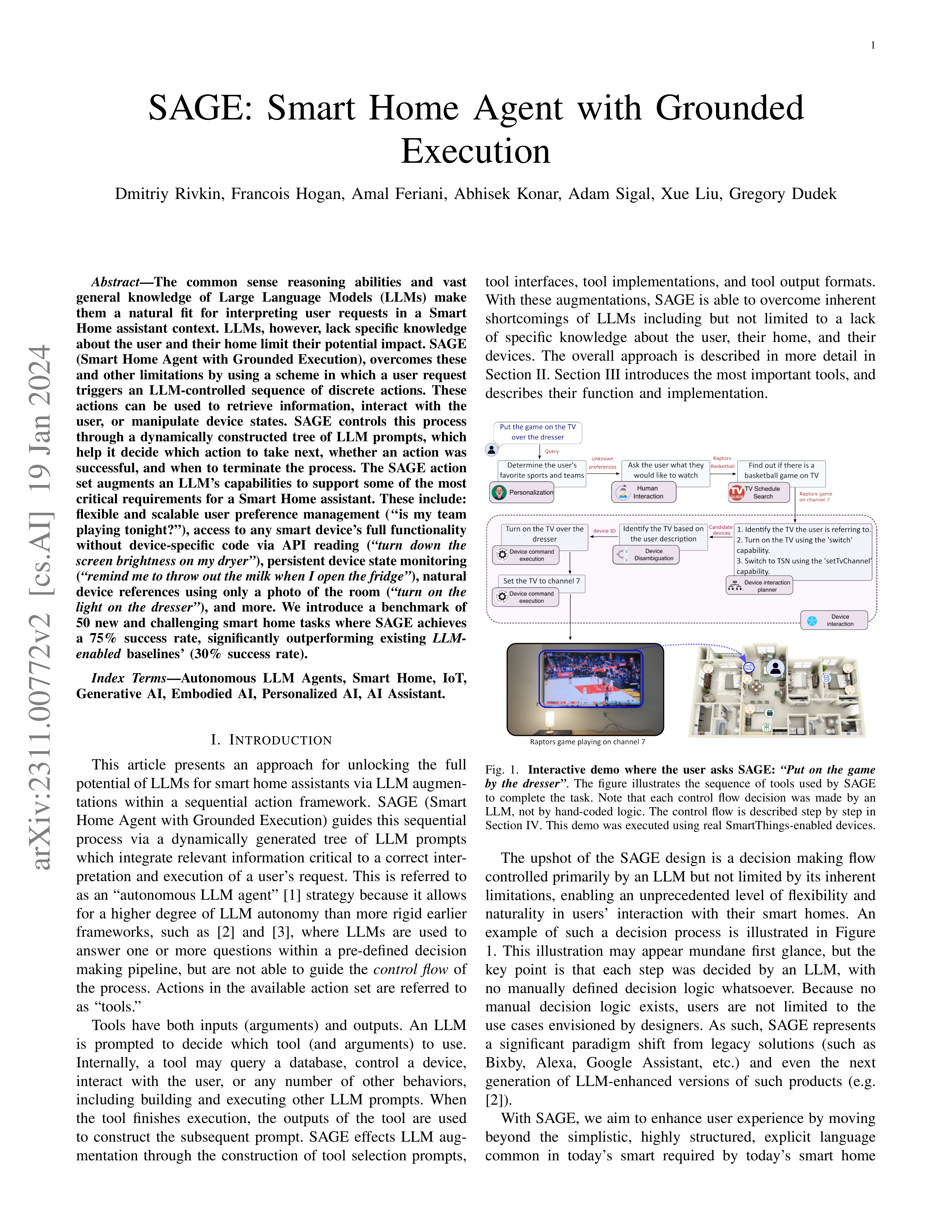
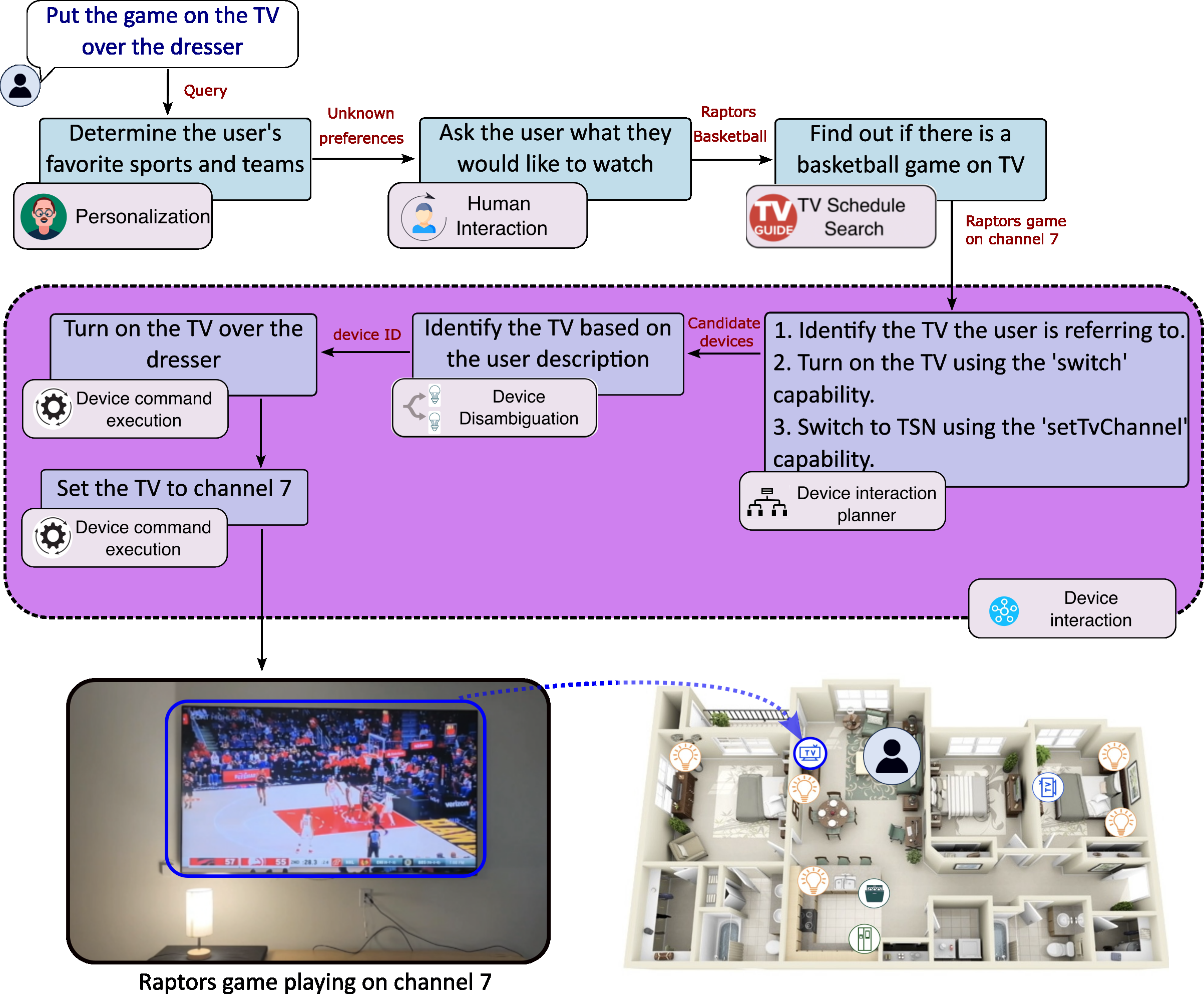
Fig.
1.
Interactive
demo
where
the
user
asks
SAGE:
“Put
on
the
game
by
the
dresser”
.
The
figure
illustrates
the
sequence
of
tools
used
by
SAGE
to
complete
the
task.
Note
that
each
control
flow
decision
was
made
by
an
LLM,
not
by
hand-coded
logic.
The
control
flow
is
described
step
by
step
in
Section IV. This demo was executed using real SmartThings-enabled devices.
The
upshot
of
the
SAGE
design
is
a
decision
making
flow
controlled primarily by an LLM but not limited by its inherent
limitations,
enabling
an
unprecedented
level
of
flexibility
and
naturality
in
users’
interaction
with
their
smart
homes.
An
example
of
such
a
decision
process
is
illustrated
in
Figure
1.
This
illustration
may
appear
mundane
first
glance,
but
the
key
point
is
that
each
step
was
decided
by
an
LLM,
with
no
manually
defined
decision
logic
whatsoever.
Because
no
manual
decision
logic
exists,
users
are
not
limited
to
the
use
cases
envisioned
by
designers.
As
such,
SAGE
represents
a
significant
paradigm
shift
from
legacy
solutions
(such
as
Bixby,
Alexa,
Google
Assistant,
etc.)
and
even
the
next
generation
of
LLM-enhanced
versions
of
such
products
(e.g.
[2]).
With SAGE, we aim to enhance user experience by moving
beyond
the
simplistic,
highly
structured,
explicit
language
common
in
today’s
smart
required
by
today’s
smart
home
arXiv:2311.00772v2 [cs.AI] 19 Jan 2024
2
assistant,
therefore
we
designed
an
evaluation
suite
to
test
its
ability
to
do
so.
This
benchmark
is
composed
of
50
challenging
tasks,
along
with
test
harnesses
and
validation
logic
to
allow
the
tests
to
run
without
hardware
(or
human
evaluators)
in
the
loop.
Details
are
included
in
Section
V.
We
evaluate
SAGE
with
a
number
of
LLMs
and
compare
it
to
two
LLM-enabled
baselines
in
Section
VI,
and
demonstrate
a
performance
improvement
of
over
2x
The
main
contributions
of
this
paper
are:
1)
Personalization tool:
A module for answering questions
about
user
preference
based
on
user
interaction
history.
2)
Device
interaction
tool:
A
module
for
interacting
with
any
smart
device
by
prompting
an
LLM
with
its
API
documentation.
3)
Device disambiguation tool:
A mechanism for allowing
users
to
refer
to
their
devices
in
a
natural
and
non-rigid
way,
as
they
normally
would
to
another
human,
based
on
a
single
photo
of
that
device
in
the
home.
4)
Persistent
command
handling
via
code-writing:
a
scheme
for
allowing
the
LLM
to
persistently
monitor
device
states
by
exploiting
LLM
code-writing
abilities.
5)
SAGE:
The
integration
of
these
tools
and
others
into
a
coherent
system
with
a
single
entry
point,
thereby
overcoming key inherent limitations of LLMs within the
smart
home
context.
6)
Performance
benchmark:
A
benchmark
of
50
tasks
to
validate
SAGE’s
performance.
II.
S
YSTEM
O
VERVIEW
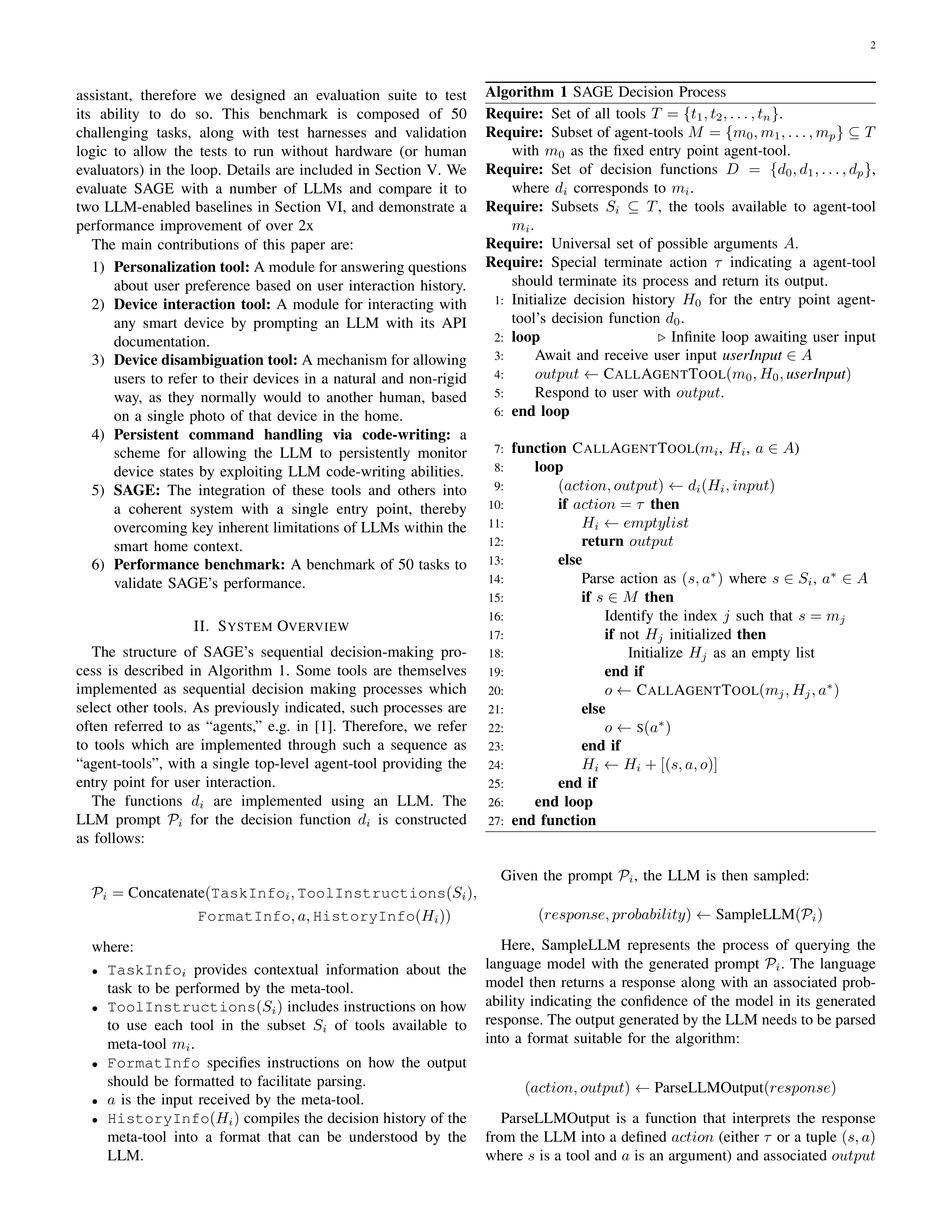
The
structure
of
SAGE’s
sequential
decision-making
pro-
cess
is
described
in
Algorithm
1.
Some
tools
are
themselves
implemented
as
sequential
decision
making
processes
which
select
other
tools.
As
previously
indicated,
such
processes
are
often
referred
to
as
“agents,”
e.g.
in
[1].
Therefore,
we
refer
to
tools
which
are
implemented
through
such
a
sequence
as
“agent-tools”,
with
a
single
top-level
agent-tool
providing
the
entry
point
for
user
interaction.
The
functions
d
i
are
implemented
using
an
LLM.
The
LLM
prompt
P
i
for
the
decision
function
d
i
is
constructed
as
follows:
P
i
=
Concatenate
(
TaskInfo
i
,
ToolInstructions
(
S
i
)
,
FormatInfo
, a,
HistoryInfo
(
H
i
))
where:
•
TaskInfo
i
provides
contextual
information
about
the
task
to
be
performed
by
the
meta-tool.
•
ToolInstructions
(
S
i
)
includes instructions on how
to
use
each
tool
in
the
subset
S
i
of
tools
available
to
meta-tool
m
i
.
•
FormatInfo
specifies
instructions
on
how
the
output
should
be
formatted
to
facilitate
parsing.
•
a
is
the
input
received
by
the
meta-tool.
•
HistoryInfo
(
H
i
)
compiles the decision history of the
meta-tool
into
a
format
that
can
be
understood
by
the
LLM.
Algorithm
1
SAGE
Decision
Process
Require:
Set
of
all
tools
T
=
{
t
1
, t
2
, . . . , t
n
}
.
Require:
Subset of agent-tools
M
=
{
m
0
, m
1
, . . . , m
p
} ⊆
T
with
m
0
as
the
fixed
entry
point
agent-tool.
Require:
Set
of
decision
functions
D
=
{
d
0
, d
1
, . . . , d
p
}
,
where
d
i
corresponds
to
m
i
.
Require:
Subsets
S
i
⊆
T
,
the
tools
available
to
agent-tool
m
i
.
Require:
Universal
set
of
possible
arguments
A
.
Require:
Special
terminate
action
τ
indicating
a
agent-tool
should
terminate
its
process
and
return
its
output.
1:
Initialize
decision
history
H
0
for
the
entry
point
agent-
tool’s
decision
function
d
0
.
2:
loop
▷
Infinite
loop
awaiting
user
input
3:
Await
and
receive
user
input
userInput
∈
A
4:
output
←
C
ALL
A
GENT
T
OOL
(
m
0
, H
0
,
userInput
)
5:
Respond
to
user
with
output
.
6:
end
loop
7:
function
C
ALL
A
GENT
T
OOL
(
m
i
,
H
i
,
a
∈
A
)
8:
loop
9:
(
action, output
)
←
d
i
(
H
i
, input
)
10:
if
action
=
τ
then
11:
H
i
←
emptylist
12:
return
output
13:
else
14:
Parse
action
as
(
s, a
∗
)
where
s
∈
S
i
,
a
∗
∈
A
15:
if
s
∈
M
then
16:
Identify
the
index
j
such
that
s
=
m
j
17:
if
not
H
j
initialized
then
18:
Initialize
H
j
as
an
empty
list
19:
end
if
20:
o
←
C
ALL
A
GENT
T
OOL
(
m
j
, H
j
, a
∗
)
21:
else
22:
o
←
S
(
a
∗
)
23:
end
if
24:
H
i
←
H
i
+ [(
s, a, o
)]
25:
end
if
26:
end
loop
27:
end
function
Given
the
prompt
P
i
,
the
LLM
is
then
sampled:
(
response, probability
)
←
SampleLLM
(
P
i
)
Here,
SampleLLM
represents
the
process
of
querying
the
language
model
with
the
generated
prompt
P
i
.
The
language
model
then
returns
a
response
along
with
an
associated
prob-
ability
indicating
the
confidence
of
the
model
in
its
generated
response. The output generated by the LLM needs to be parsed
into
a
format
suitable
for
the
algorithm:
(
action, output
)
←
ParseLLMOutput
(
response
)
ParseLLMOutput
is
a
function
that
interprets
the
response
from the LLM into a defined
action
(either
τ
or a tuple
(
s, a
)
where
s
is a tool and
a
is an argument) and associated
output
3
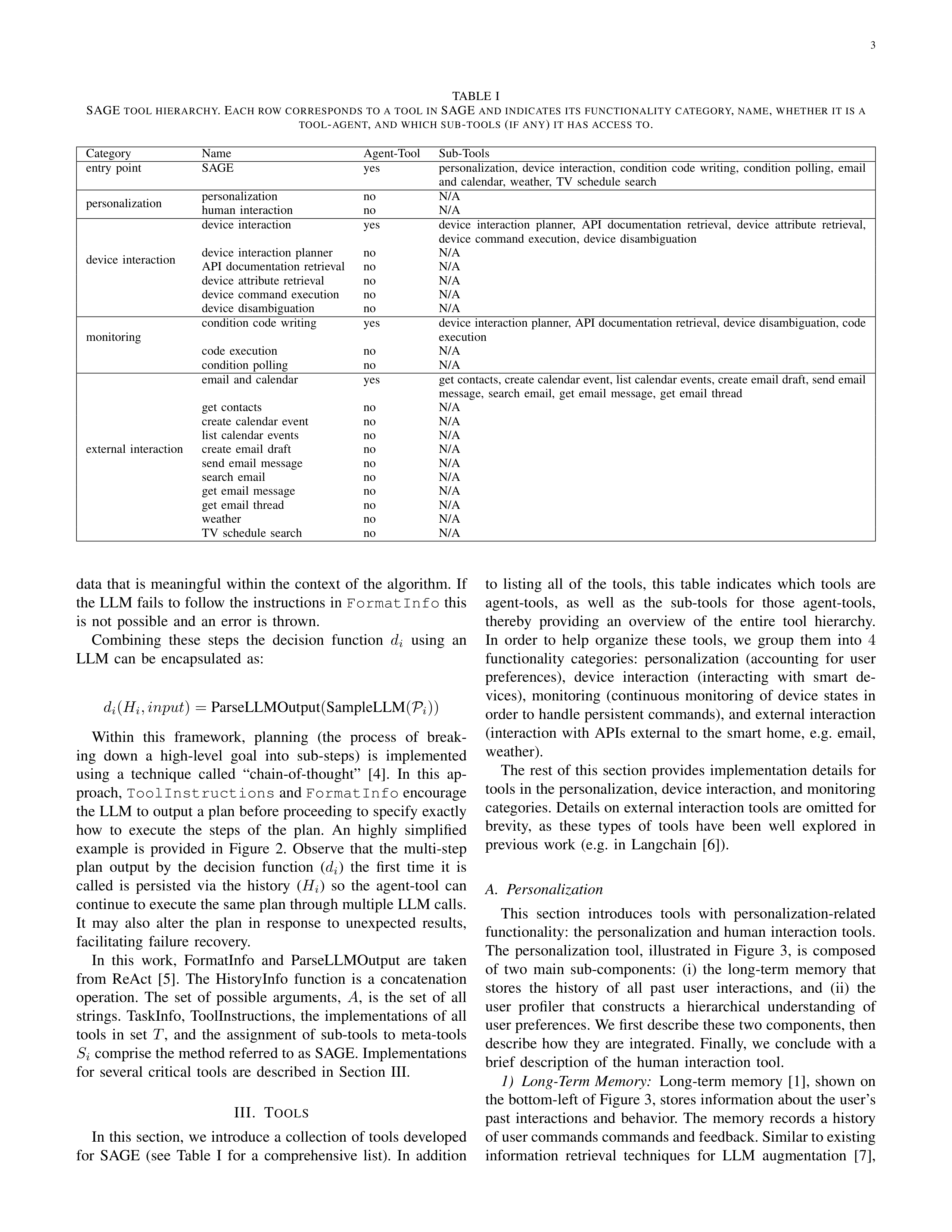
TABLE
I
SAGE
TOOL
HIERARCHY
.
E
ACH
ROW
CORRESPONDS
TO
A
TOOL
IN
SAGE
AND
INDICATES
ITS
FUNCTIONALITY
CATEGORY
,
NAME
,
WHETHER
IT
IS
A
TOOL
-
AGENT
,
AND
WHICH
SUB
-
TOOLS
(
IF
ANY
)
IT
HAS
ACCESS
TO
.
Category
Name
Agent-Tool
Sub-Tools
entry
point
SAGE
yes
personalization,
device
interaction,
condition
code
writing,
condition
polling,
email
and
calendar,
weather,
TV
schedule
search
personalization
personalization
no
N/A
human
interaction
no
N/A
device
interaction
device
interaction
yes
device
interaction
planner,
API
documentation
retrieval,
device
attribute
retrieval,
device
command
execution,
device
disambiguation
device
interaction
planner
no
N/A
API
documentation
retrieval
no
N/A
device
attribute
retrieval
no
N/A
device
command
execution
no
N/A
device
disambiguation
no
N/A
monitoring
condition
code
writing
yes
device interaction planner, API documentation retrieval, device disambiguation, code
execution
code
execution
no
N/A
condition
polling
no
N/A
external
interaction
email
and
calendar
yes
get contacts, create calendar event, list calendar events, create email draft, send email
message,
search
email,
get
email
message,
get
email
thread
get
contacts
no
N/A
create
calendar
event
no
N/A
list
calendar
events
no
N/A
create
email
draft
no
N/A
send
email
message
no
N/A
search
email
no
N/A
get
email
message
no
N/A
get
email
thread
no
N/A
weather
no
N/A
TV
schedule
search
no
N/A
data
that
is
meaningful
within
the
context
of
the
algorithm.
If
the LLM fails to follow the instructions in
FormatInfo
this
is
not
possible
and
an
error
is
thrown.
Combining
these
steps
the
decision
function
d
i
using
an
LLM
can
be
encapsulated
as:
d
i
(
H
i
, input
) =
ParseLLMOutput
(
SampleLLM
(
P
i
))
Within
this
framework,
planning
(the
process
of
break-
ing
down
a
high-level
goal
into
sub-steps)
is
implemented
using
a
technique
called
“chain-of-thought”
[4].
In
this
ap-
proach,
ToolInstructions
and
FormatInfo
encourage
the LLM to output a plan before proceeding to specify exactly
how
to
execute
the
steps
of
the
plan.
An
highly
simplified
example
is
provided
in
Figure
2.
Observe
that
the
multi-step
plan
output
by
the
decision
function
(
d
i
)
the
first
time
it
is
called
is
persisted
via
the
history
(
H
i
)
so
the
agent-tool
can
continue to execute the same plan through multiple LLM calls.
It
may
also
alter
the
plan
in
response
to
unexpected
results,
facilitating
failure
recovery.
In
this
work,
FormatInfo
and
ParseLLMOutput
are
taken
from
ReAct
[5].
The
HistoryInfo
function
is
a
concatenation
operation.
The
set
of
possible
arguments,
A
,
is
the
set
of
all
strings.
TaskInfo,
ToolInstructions,
the
implementations
of
all
tools
in
set
T
,
and
the
assignment
of
sub-tools
to
meta-tools
S
i
comprise the method referred to as SAGE. Implementations
for
several
critical
tools
are
described
in
Section
III.
III.
T
OOLS
In this section, we introduce a collection of tools developed
for
SAGE
(see
Table
I
for
a
comprehensive
list).
In
addition
to
listing
all
of
the
tools,
this
table
indicates
which
tools
are
agent-tools,
as
well
as
the
sub-tools
for
those
agent-tools,
thereby
providing
an
overview
of
the
entire
tool
hierarchy.
In
order
to
help
organize
these
tools,
we
group
them
into
4
functionality
categories:
personalization
(accounting
for
user
preferences),
device
interaction
(interacting
with
smart
de-
vices),
monitoring
(continuous
monitoring
of
device
states
in
order to handle persistent commands), and external interaction
(interaction
with
APIs
external
to
the
smart
home,
e.g.
email,
weather).
The
rest
of
this
section
provides
implementation
details
for
tools in the personalization, device interaction, and monitoring
categories. Details on external interaction tools are omitted for
brevity,
as
these
types
of
tools
have
been
well
explored
in
previous
work
(e.g.
in
Langchain
[6]).
A.
Personalization
This
section
introduces
tools
with
personalization-related
functionality:
the
personalization
and
human
interaction
tools.
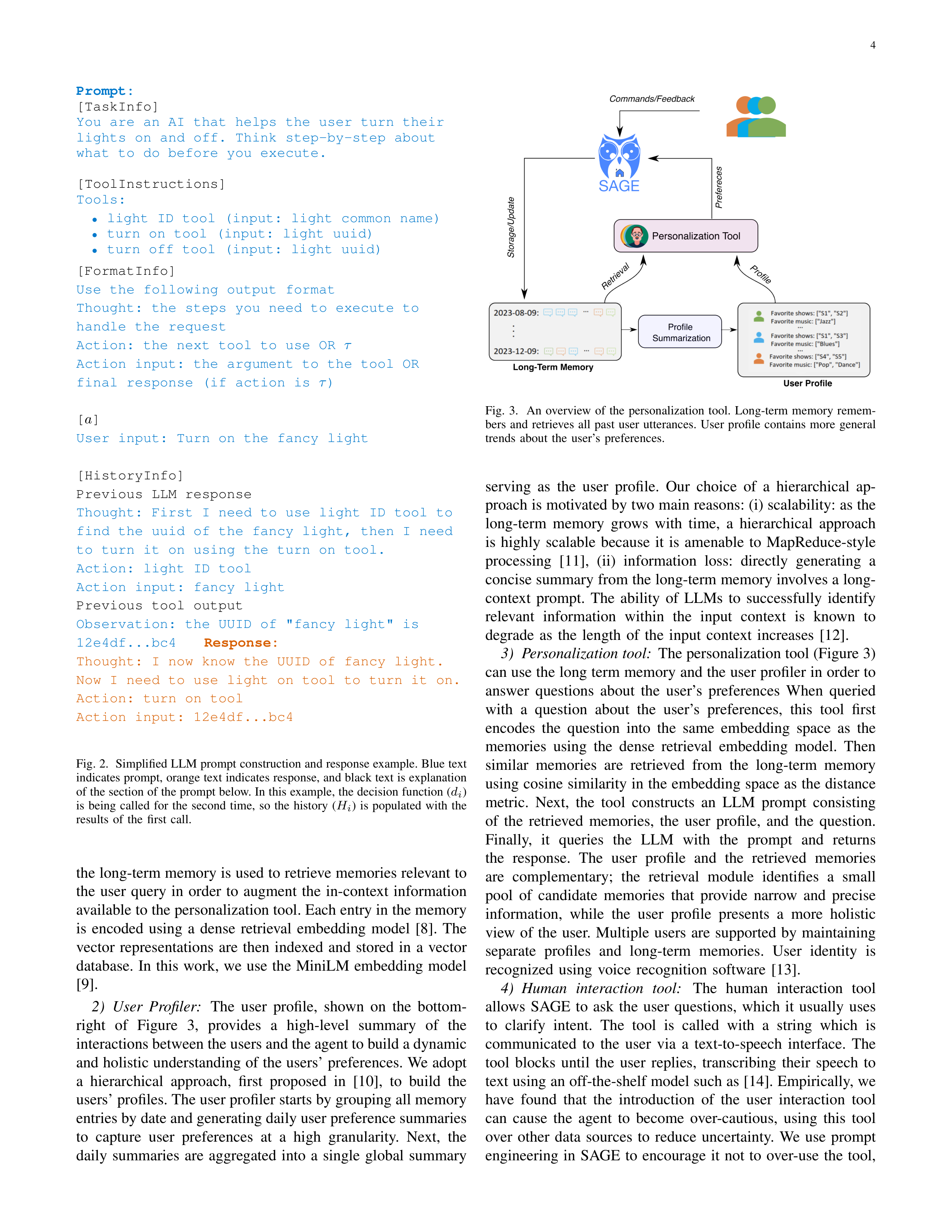
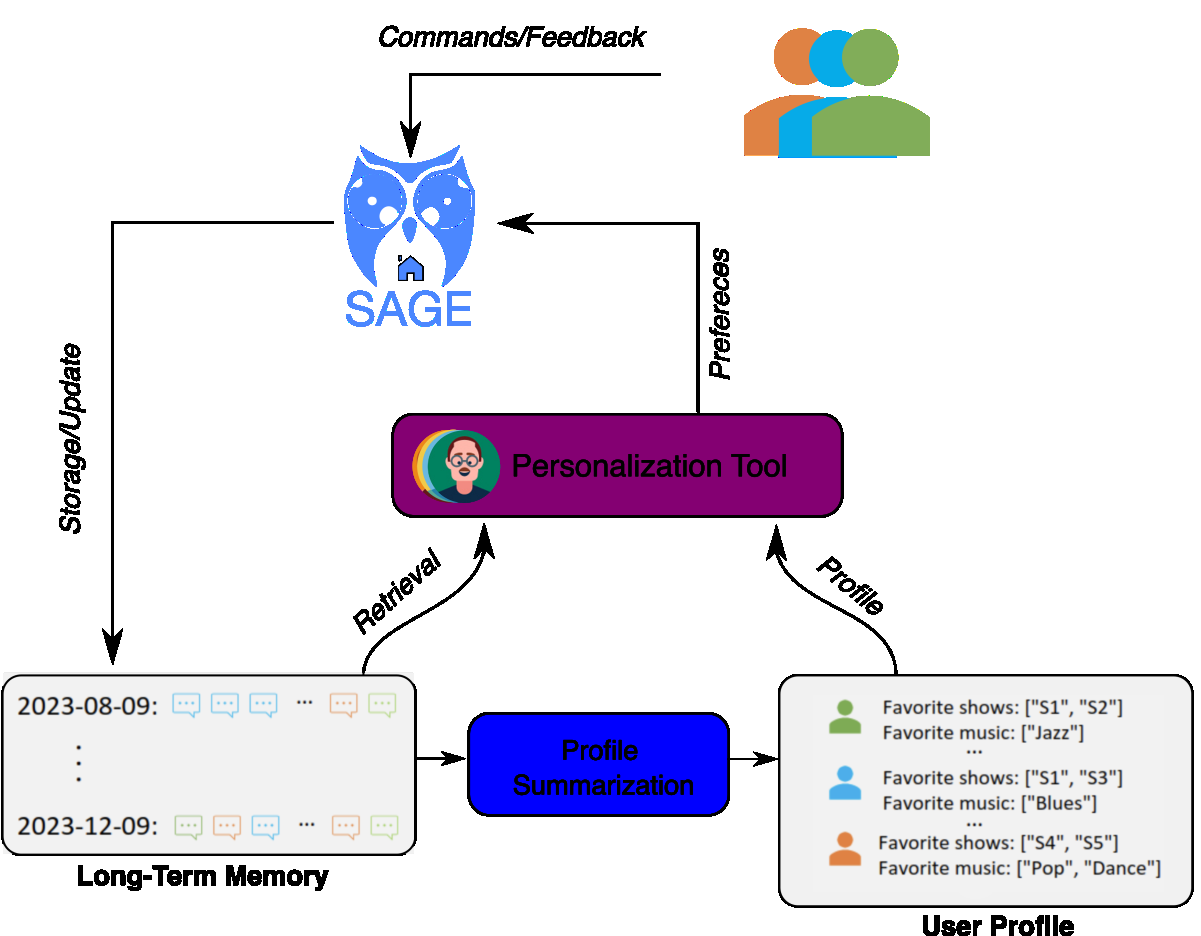
The
personalization
tool,
illustrated
in
Figure
3,
is
composed
of
two
main
sub-components:
(i)
the
long-term
memory
that
stores
the
history
of
all
past
user
interactions,
and
(ii)
the
user
profiler
that
constructs
a
hierarchical
understanding
of
user preferences. We first describe these two components, then
describe
how
they
are
integrated.
Finally,
we
conclude
with
a
brief
description
of
the
human
interaction
tool.
1)
Long-Term
Memory:
Long-term
memory
[1],
shown
on
the bottom-left of Figure 3, stores information about the user’s
past
interactions
and
behavior.
The
memory
records
a
history
of user commands commands and feedback. Similar to existing
information
retrieval
techniques
for
LLM
augmentation
[7],
4
Prompt:
[TaskInfo]
You
are
an
AI
that
helps
the
user
turn
their
lights
on
and
off.
Think
step-by-step
about
what
to
do
before
you
execute.
[ToolInstructions]
Tools:
•
light
ID
tool
(input:
light
common
name)
•
turn
on
tool
(input:
light
uuid)
•
turn
off
tool
(input:
light
uuid)
[FormatInfo]
Use
the
following
output
format
Thought:
the
steps
you
need
to
execute
to
handle
the
request
Action:
the
next
tool
to
use
OR
τ
Action
input:
the
argument
to
the
tool
OR
final
response
(if
action
is
τ
)
[
a
]
User
input:
Turn
on
the
fancy
light
[HistoryInfo]
Previous
LLM
response
Thought:
First
I
need
to
use
light
ID
tool
to
find
the
uuid
of
the
fancy
light,
then
I
need
to
turn
it
on
using
the
turn
on
tool.
Action:
light
ID
tool
Action
input:
fancy
light
Previous
tool
output
Observation:
the
UUID
of
"fancy
light"
is
12e4df...bc4
Response:
Thought:
I
now
know
the
UUID
of
fancy
light.
Now
I
need
to
use
light
on
tool
to
turn
it
on.
Action:
turn
on
tool
Action
input:
12e4df...bc4
Fig. 2.
Simplified LLM prompt construction and response example. Blue text
indicates prompt, orange text indicates response, and black text is explanation
of the section of the prompt below. In this example, the decision function (
d
i
)
is
being
called
for
the
second
time,
so
the
history
(
H
i
)
is
populated
with
the
results
of
the
first
call.
the long-term memory is used to retrieve memories relevant to
the
user
query
in
order
to
augment
the
in-context
information
available to the personalization tool. Each entry in the memory
is
encoded
using
a
dense
retrieval
embedding
model
[8].
The
vector
representations
are
then
indexed
and
stored
in
a
vector
database.
In
this
work,
we
use
the
MiniLM
embedding
model
[9].
2)
User
Profiler:
The
user
profile,
shown
on
the
bottom-
right
of
Figure
3,
provides
a
high-level
summary
of
the
interactions between the users and the agent to build a dynamic
and holistic understanding of the users’ preferences. We adopt
a
hierarchical
approach,
first
proposed
in
[10],
to
build
the
users’ profiles. The user profiler starts by grouping all memory
entries by date and generating daily user preference summaries
to
capture
user
preferences
at
a
high
granularity.
Next,
the
daily
summaries
are
aggregated
into
a
single
global
summary
Fig.
3.
An
overview
of
the
personalization
tool.
Long-term
memory
remem-
bers
and
retrieves
all
past
user
utterances.
User
profile
contains
more
general
trends
about
the
user’s
preferences.
serving
as
the
user
profile.
Our
choice
of
a
hierarchical
ap-
proach is motivated by two main reasons: (i) scalability: as the
long-term
memory
grows
with
time,
a
hierarchical
approach
is
highly
scalable
because
it
is
amenable
to
MapReduce-style
processing
[11],
(ii)
information
loss:
directly
generating
a
concise summary from the long-term memory involves a long-
context
prompt.
The
ability
of
LLMs
to
successfully
identify
relevant
information
within
the
input
context
is
known
to
degrade
as
the
length
of
the
input
context
increases
[12].
3)
Personalization tool:
The personalization tool (Figure 3)
can use the long term memory and the user profiler in order to
answer
questions
about
the
user’s
preferences
When
queried
with
a
question
about
the
user’s
preferences,
this
tool
first
encodes
the
question
into
the
same
embedding
space
as
the
memories
using
the
dense
retrieval
embedding
model.
Then
similar
memories
are
retrieved
from
the
long-term
memory
using cosine similarity in the embedding space as the distance
metric.
Next,
the
tool
constructs
an
LLM
prompt
consisting
of
the
retrieved
memories,
the
user
profile,
and
the
question.
Finally,
it
queries
the
LLM
with
the
prompt
and
returns
the
response.
The
user
profile
and
the
retrieved
memories
are
complementary;
the
retrieval
module
identifies
a
small
pool
of
candidate
memories
that
provide
narrow
and
precise
information,
while
the
user
profile
presents
a
more
holistic
view
of
the
user.
Multiple
users
are
supported
by
maintaining
separate
profiles
and
long-term
memories.
User
identity
is
recognized
using
voice
recognition
software
[13].
4)
Human
interaction
tool:
The
human
interaction
tool
allows
SAGE
to
ask
the
user
questions,
which
it
usually
uses
to
clarify
intent.
The
tool
is
called
with
a
string
which
is
communicated
to
the
user
via
a
text-to-speech
interface.
The
tool
blocks
until
the
user
replies,
transcribing
their
speech
to
text using an off-the-shelf model such as [14]. Empirically, we
have
found
that
the
introduction
of
the
user
interaction
tool
can
cause
the
agent
to
become
over-cautious,
using
this
tool
over
other
data
sources
to
reduce
uncertainty.
We
use
prompt
engineering
in
SAGE
to
encourage
it
not
to
over-use
the
tool,
5
but
how
to
best
trade
off
personalization,
human
interaction,
and
risk
aversion
is
a
topic
of
active
research.
B.
Device
Interaction
In
this
section,
we
introduce
the
set
of
tools
that
SAGE
uses to interact with smart devices. These tools enable flexible
device
interaction
that
is
scalable,
in
the
sense
that
new
devices can be integrated into the system with negligible extra
development
effort
and
its
capabilities
can
be
leveraged
to
the
fullest
extent
without
the
need
for
device-specific
code.
For
example,
if
a
user
adds
a
smart
fridge
to
their
smart
home
ecosystem,
SAGE
can
integrate
the
presence
of
the
fridge
and
all
of
its
capabilities
(e.g.
temperature
settings,
door
opening
detection,
power
consumption,
etc.)
into
its
decision
making
process
without
the
need
for
any
fridge-specific
code
to
be
written.
Most
smart
home
systems
(SmartThings,
Home
Assistant,
Google
Home,
Alexa,
etc.)
provide
APIs
for
interacting
with
the smart devices in users’ homes. These APIs are documented
online, and code examples for using them are available, mean-
ing that LLMs trained on web data (such as GPT4) are likely to
have
some
inherent
knowledge
of
these
APIs.
In
practice,
we
have found that LLMs often fail to use these APIs successfully
due
to
minor
errors
such
as
forgetting
the
exact
names
of
the
attributes
they
need
to
retrieve.
Furthermore,
some
devices
have
custom
functionality
for
which
no
documentation
is
available
online,
and
can
only
be
retrieved
by
querying
the
device’s
API.
These
challenges
can
be
overcome
if
details
of
API
usage
are
injected
into
the
prompt,
but
injecting
the
full
documentation
for
all
connected
devices
in
not
feasible,
as
doing so would far far exceeding the maximum prompt length
of
today’s
LLMs.
Motivated by LangChain’s OpenAPI toolkit [15], the device
interaction
tool
is
implemented
as
an
agent-tool.
This
agent-
tool
generates
a
high-level
plan
using
only
a
general
de-
scription
of
devices
and
their
associated
capabilities,
retrieves
detailed
documentation
for
the
subset
of
capabilities
that
are
required
by
the
plan,
then
uses
these
to
construct
API
calls.
This
behavior
is
enabled
through
a
collection
of
tools
detailed
below.
Device
interaction
planner
tool
:
Generates
a
sequence
of
steps
that
must
be
performed
by
the
device
interaction
agent-
tool to complete the given command. The tool is implemented
using
a
single
LLM
query.
This
query
includes
a
list
of
devices,
their
capabilities,
and
short
descriptions
of
what
each
capability
does.
It
also
includes
the
input
command
and
a
description
of
how
the
plan
should
be
structured.
The
query
specifies
that
each
step
of
the
generated
plan
should
include
one or more device IDs, one or more capabilities, and a natural
language
description
of
what
needs
to
be
done
in
that
step.
If
the
planner
cannot
directly
infer
the
correct
device
from
the
information it has been given, it can supply multiple candidate
devices
and
/
or
capabilities
to
the
device
disambiguation
tool
(detailed
below)
to
decide
on
the
correct
one.
The
Device
Disambiguation tool retrieves detailed documentation for each
proposed
capability,
giving
the
agent
sufficient
information
to
make a final choice. The use of a planning tool, as opposed to
relying on the chain-of-thought planning (described in Section
II)
of
the
device
interaction
agent-tool,
is
motivated
by
the
fact
that
this
planning
process
requires
a
large
amount
of
information
injected
into
the
prompt.
Adding
of
all
of
this
information directly to the device interaction agent-tool prompt
would
lead
to
significantly
higher
LLM
query
costs,
as
the
agent-tool
prompt
is
usually
called
many
times
within
the
course
of
a
single
use
of
the
device
interaction
tool.
API
documentation
retrieval
tool
:
Retrieves
documenta-
tion
about
a
requested
device’s
capabilities.
The
documenta-
tion
is
scraped
from
the
web
when
available,
otherwise
it
is
retrieved from the device using the API. While documentation
extracted from the device API is often lacking detailed natural
language
descriptions
of
usage,
it
contains
the
names
of
attributes,
commands,
and
command
arguments,
the
meaning
of
many
of
which
can
be
inferred
from
the
name
alone.
This
tool
takes
as
input
a
list
of
capabilities,
and
returns
detailed
documentation
for
each
in
JSON
format.
The
JSON
format
is
used
for
convenience,
since
this
is
the
format
returned
by
the
documentation
scraper
and
device
APIs.
Device
attribute
retrieval
tool
and
device
command
execution
tool
:
These
tools
allow
the
agent
to
communicate
with
the
API
to
read
attributes
and
execute
commands.
We
implement
these
tools
as
wrappers
around
the
SmartThings
REST
API
to
query
and
modify
device
states
[16].
In
order
to
use
these
tools,
the
documentation
retrieval
tool
must
first
be
called
in
order
to
retrieve
the
capability
details
and
format
the
inputs
properly.
Note
that
in
the
event
that
the
inputs
are
not
formatted
properly
and
the
API
throws
an
exception,
we
have
found empirically that if the text associated with this exception
is
propagated
back
to
the
device
interaction
tool
agent,
it
can
often
react
and
correct
the
API
request
accordingly.
Device
disambiguation
tool
:
Allows
the
system
to
resolve
which
devices
the
user
wants
to
control
in
scenarios
when
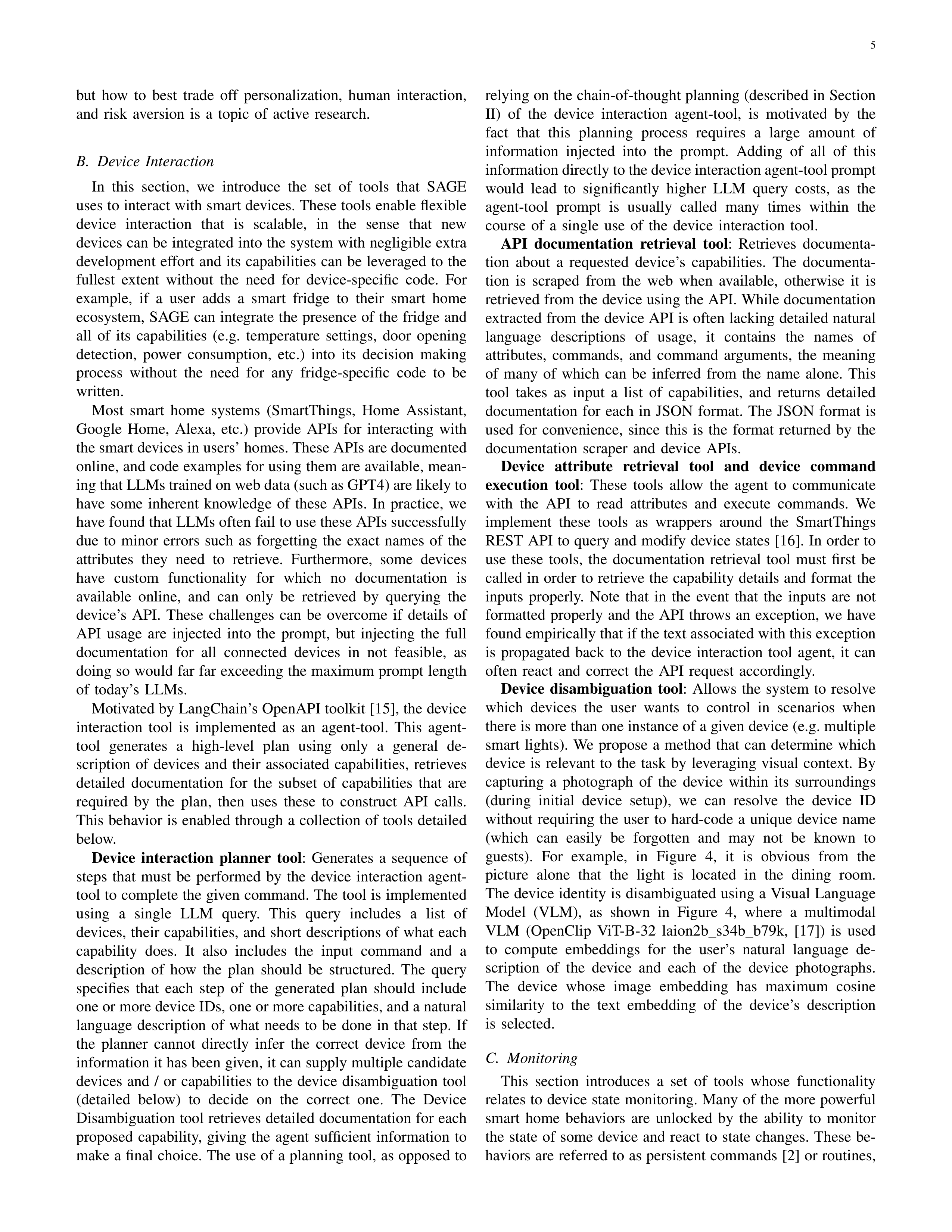
there is more than one instance of a given device (e.g. multiple
smart
lights).
We
propose
a
method
that
can
determine
which
device
is
relevant
to
the
task
by
leveraging
visual
context.
By
capturing
a
photograph
of
the
device
within
its
surroundings
(during
initial
device
setup),
we
can
resolve
the
device
ID
without
requiring
the
user
to
hard-code
a
unique
device
name
(which
can
easily
be
forgotten
and
may
not
be
known
to
guests).
For
example,
in
Figure
4,
it
is
obvious
from
the
picture
alone
that
the
light
is
located
in
the
dining
room.
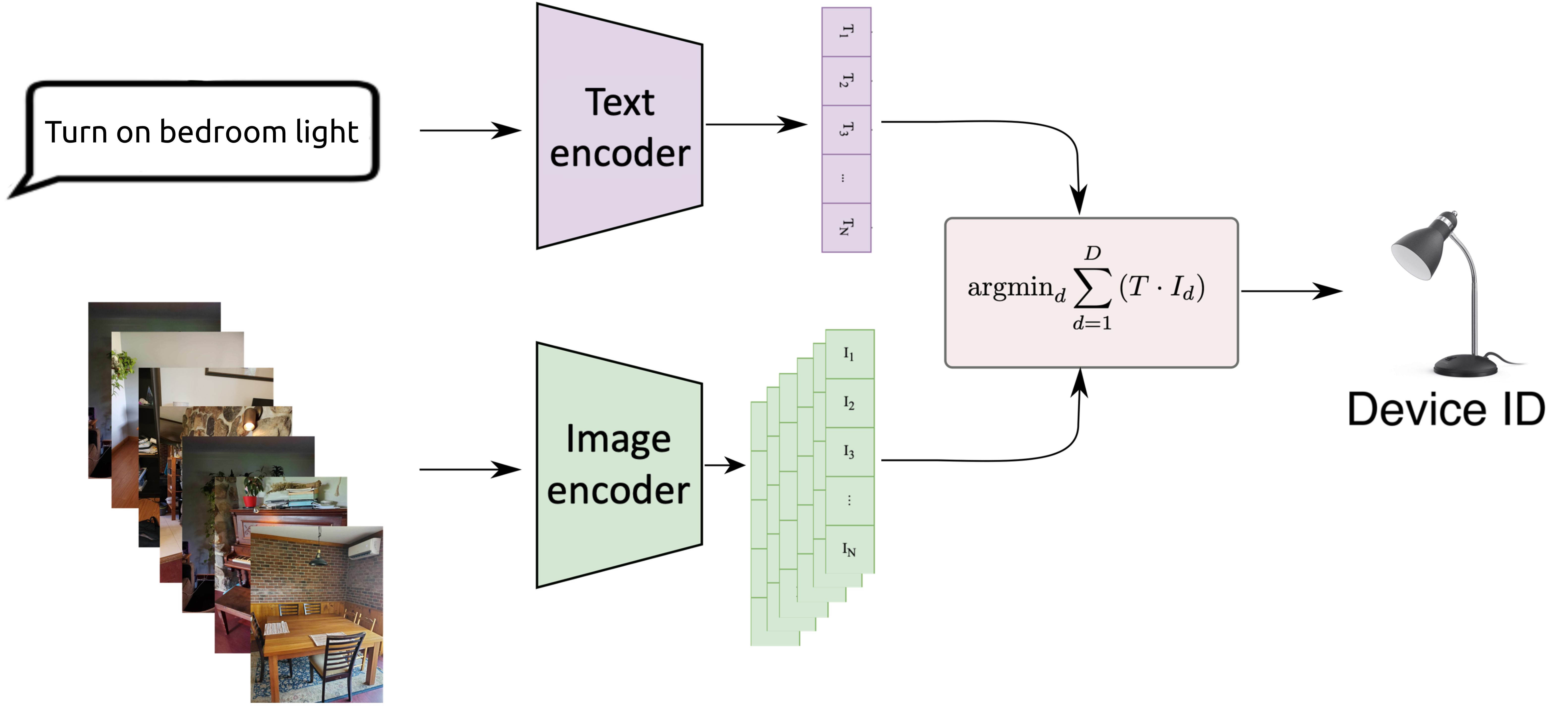
The device identity is disambiguated using a Visual Language
Model
(VLM),
as
shown
in
Figure
4,
where
a
multimodal
VLM
(OpenClip
ViT-B-32
laion2b
s34b
b79k,
[17])
is
used
to
compute
embeddings
for
the
user’s
natural
language
de-
scription
of
the
device
and
each
of
the
device
photographs.
The
device
whose
image
embedding
has
maximum
cosine
similarity
to
the
text
embedding
of
the
device’s
description
is
selected.
C.
Monitoring
This
section
introduces
a
set
of
tools
whose
functionality
relates to device state monitoring. Many of the more powerful
smart
home
behaviors
are
unlocked
by
the
ability
to
monitor
the
state
of
some
device
and
react
to
state
changes.
These
be-
haviors are referred to as persistent commands [2] or routines,
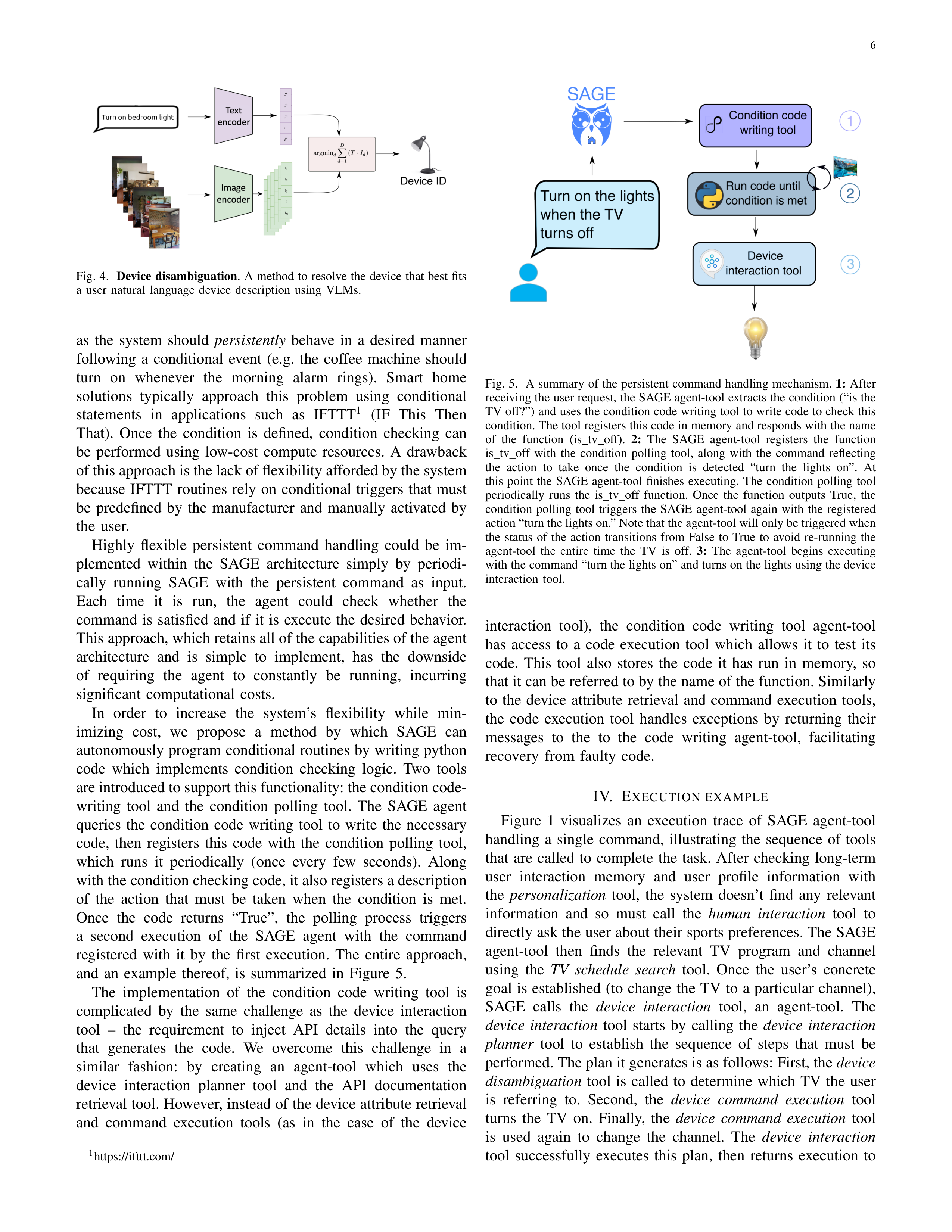
6
Fig.
4.
Device
disambiguation
.
A
method
to
resolve
the
device
that
best
fits
a
user
natural
language
device
description
using
VLMs.
as
the
system
should
persistently
behave
in
a
desired
manner
following
a
conditional
event
(e.g.
the
coffee
machine
should
turn
on
whenever
the
morning
alarm
rings).
Smart
home
solutions
typically
approach
this
problem
using
conditional
statements
in
applications
such
as
IFTTT
1
(IF
This
Then
That).
Once
the
condition
is
defined,
condition
checking
can
be
performed
using
low-cost
compute
resources.
A
drawback
of this approach is the lack of flexibility afforded by the system
because
IFTTT
routines
rely
on
conditional
triggers
that
must
be
predefined
by
the
manufacturer
and
manually
activated
by
the
user.
Highly
flexible
persistent
command
handling
could
be
im-
plemented
within
the
SAGE
architecture
simply
by
periodi-
cally
running
SAGE
with
the
persistent
command
as
input.
Each
time
it
is
run,
the
agent
could
check
whether
the
command
is
satisfied
and
if
it
is
execute
the
desired
behavior.
This approach, which retains all of the capabilities of the agent
architecture
and
is
simple
to
implement,
has
the
downside
of
requiring
the
agent
to
constantly
be
running,
incurring
significant
computational
costs.
In
order
to
increase
the
system’s
flexibility
while
min-
imizing
cost,
we
propose
a
method
by
which
SAGE
can
autonomously program conditional routines by writing python
code
which
implements
condition
checking
logic.
Two
tools
are introduced to support this functionality: the condition code-
writing
tool
and
the
condition
polling
tool.
The
SAGE
agent
queries
the
condition
code
writing
tool
to
write
the
necessary
code,
then
registers
this
code
with
the
condition
polling
tool,
which
runs
it
periodically
(once
every
few
seconds).
Along
with the condition checking code, it also registers a description
of
the
action
that
must
be
taken
when
the
condition
is
met.
Once
the
code
returns
“True”,
the
polling
process
triggers
a
second
execution
of
the
SAGE
agent
with
the
command
registered
with
it
by
the
first
execution.
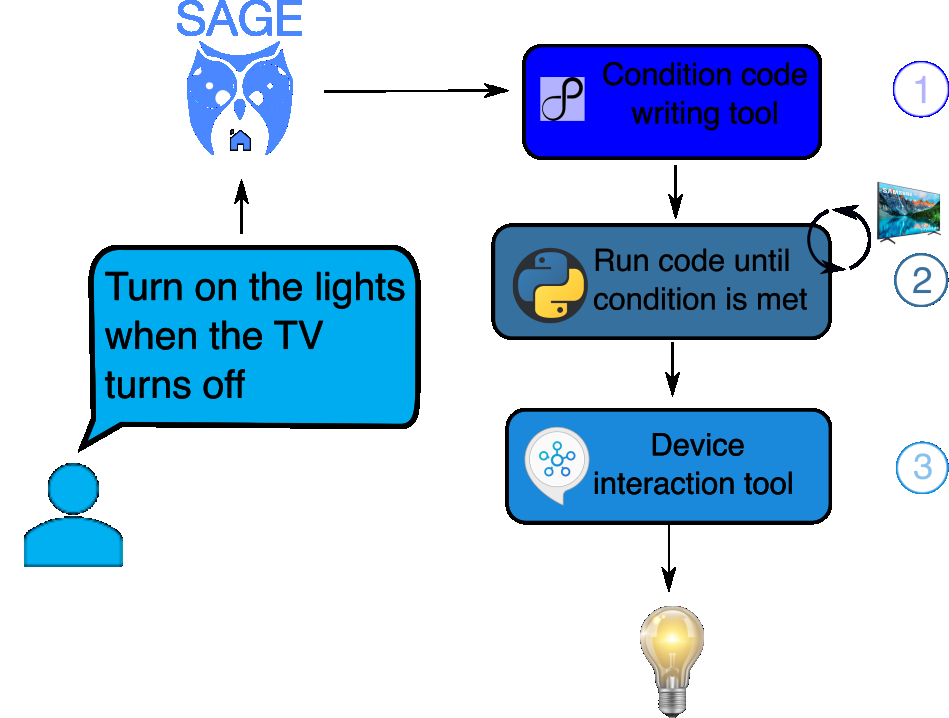
The
entire
approach,
and
an
example
thereof,
is
summarized
in
Figure
5.
The
implementation
of
the
condition
code
writing
tool
is
complicated
by
the
same
challenge
as
the
device
interaction
tool
–
the
requirement
to
inject
API
details
into
the
query
that
generates
the
code.
We
overcome
this
challenge
in
a
similar
fashion:
by
creating
an
agent-tool
which
uses
the
device
interaction
planner
tool
and
the
API
documentation
retrieval tool. However, instead of the device attribute retrieval
and
command
execution
tools
(as
in
the
case
of
the
device
1
https://ifttt.com/
Fig.
5.
A
summary
of
the
persistent
command
handling
mechanism.
1:
After
receiving the user request, the SAGE agent-tool extracts the condition (“is the
TV off?”) and uses the condition code writing tool to write code to check this
condition. The tool registers this code in memory and responds with the name
of
the
function
(is
tv
off).
2:
The
SAGE
agent-tool
registers
the
function
is
tv
off
with
the
condition
polling
tool,
along
with
the
command
reflecting
the
action
to
take
once
the
condition
is
detected
“turn
the
lights
on”.
At
this
point
the
SAGE
agent-tool
finishes
executing.
The
condition
polling
tool
periodically
runs
the
is
tv
off
function.
Once
the
function
outputs
True,
the
condition
polling
tool
triggers
the
SAGE
agent-tool
again
with
the
registered
action “turn the lights on.” Note that the agent-tool will only be triggered when
the
status
of
the
action
transitions
from
False
to
True
to
avoid
re-running
the
agent-tool
the
entire
time
the
TV
is
off.
3:
The
agent-tool
begins
executing
with the command “turn the lights on” and turns on the lights using the device
interaction
tool.
interaction
tool),
the
condition
code
writing
tool
agent-tool
has
access
to
a
code
execution
tool
which
allows
it
to
test
its
code.
This
tool
also
stores
the
code
it
has
run
in
memory,
so
that it can be referred to by the name of the function. Similarly
to
the
device
attribute
retrieval
and
command
execution
tools,
the
code
execution
tool
handles
exceptions
by
returning
their
messages
to
the
to
the
code
writing
agent-tool,
facilitating
recovery
from
faulty
code.
IV.
E
XECUTION
EXAMPLE
Figure
1
visualizes
an
execution
trace
of
SAGE
agent-tool
handling
a
single
command,
illustrating
the
sequence
of
tools
that
are
called
to
complete
the
task.
After
checking
long-term
user
interaction
memory
and
user
profile
information
with
the
personalization
tool,
the
system
doesn’t
find
any
relevant
information
and
so
must
call
the
human
interaction
tool
to
directly ask the user about their sports preferences. The SAGE
agent-tool
then
finds
the
relevant
TV
program
and
channel
using
the
TV
schedule
search
tool.
Once
the
user’s
concrete
goal
is
established
(to
change
the
TV
to
a
particular
channel),
SAGE
calls
the
device
interaction
tool,
an
agent-tool.
The
device
interaction
tool
starts
by
calling
the
device
interaction
planner
tool
to
establish
the
sequence
of
steps
that
must
be
performed. The plan it generates is as follows: First, the
device
disambiguation
tool
is
called
to
determine
which
TV
the
user
is
referring
to.
Second,
the
device
command
execution
tool
turns
the
TV
on.
Finally,
the
device
command
execution
tool
is
used
again
to
change
the
channel.
The
device
interaction
tool
successfully
executes
this
plan,
then
returns
execution
to
7
the top level SAGE agent-tool, which responds to the user and
terminates
the
run.
V.
E
VALUATION
To
evaluate
SAGE
and
competing
methods,
we
created
a
dataset
of
50
tasks.
Test
tasks
are
implemented
by
initializing
device states and memories, running the SAGE agent-tool with
an
input
command,
then
evaluating
whether
the
device
state
was
modified
appropriately.
For
tasks
that
involve
answering
a
user’s
questions
(as
opposed
to
modifying
device
states),
the
tests
are
designed
such
that
to
answer
the
question
the
agent
must
retrieve
a
specific
piece
of
information
(which
it
is
unlikely
to
be
able
to
guess).
An
LLM-based
evaluator
is
then used to check whether the answer contained the expected
information.
The
results
of
all
tests
are
binary
(pass
/
fail).
The
smart
device
configuration
(device
types,
IDs,
etc)
was
created by configuring a home with real SmartThings devices,
then
saving
the
state
of
these
devices.
The
devices
included:
2
televisions,
1
refrigerator,
1
dishwasher,
and
4
lights.
The
initial
states
of
the
devices
are
modified
by
the
initialization
routine
of
each
task.
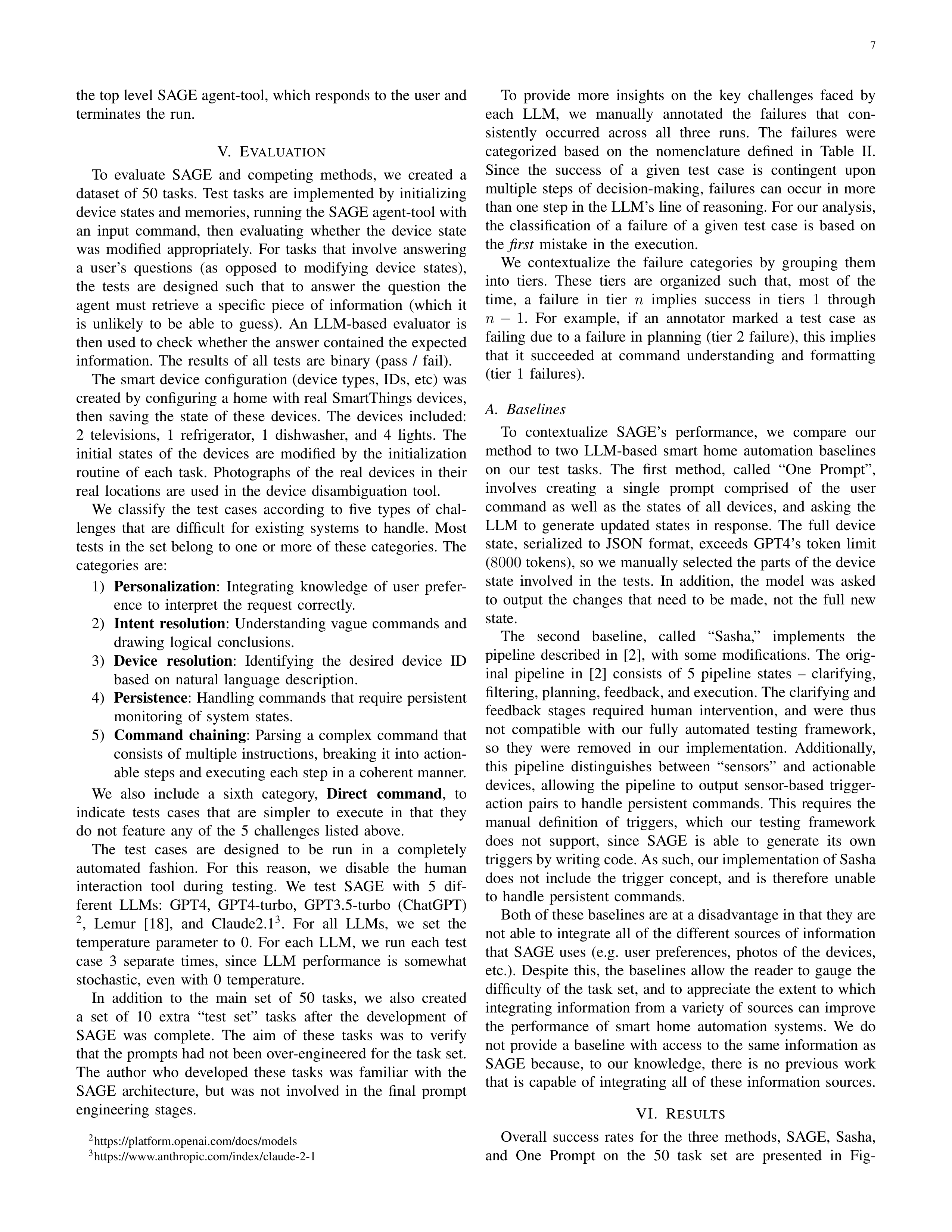
Photographs
of
the
real
devices
in
their
real
locations
are
used
in
the
device
disambiguation
tool.
We
classify
the
test
cases
according
to
five
types
of
chal-
lenges
that
are
difficult
for
existing
systems
to
handle.
Most
tests
in
the
set
belong
to
one
or
more
of
these
categories.
The
categories
are:
1)
Personalization
:
Integrating
knowledge
of
user
prefer-
ence
to
interpret
the
request
correctly.
2)
Intent
resolution
:
Understanding
vague
commands
and
drawing
logical
conclusions.
3)
Device
resolution
:
Identifying
the
desired
device
ID
based
on
natural
language
description.
4)
Persistence
:
Handling
commands
that
require
persistent
monitoring
of
system
states.
5)
Command
chaining
:
Parsing
a
complex
command
that
consists
of
multiple
instructions,
breaking
it
into
action-
able steps and executing each step in a coherent manner.
We
also
include
a
sixth
category,
Direct
command
,
to
indicate
tests
cases
that
are
simpler
to
execute
in
that
they
do
not
feature
any
of
the
5
challenges
listed
above.
The
test
cases
are
designed
to
be
run
in
a
completely
automated
fashion.
For
this
reason,
we
disable
the
human
interaction
tool
during
testing.
We
test
SAGE
with
5
dif-
ferent
LLMs:
GPT4,
GPT4-turbo,
GPT3.5-turbo
(ChatGPT)
2
,
Lemur
[18],
and
Claude2.1
3
.
For
all
LLMs,
we
set
the
temperature
parameter
to
0.
For
each
LLM,
we
run
each
test
case
3
separate
times,
since
LLM
performance
is
somewhat
stochastic,
even
with
0
temperature.
In
addition
to
the
main
set
of
50
tasks,
we
also
created
a
set
of
10
extra
“test
set”
tasks
after
the
development
of
SAGE
was
complete.
The
aim
of
these
tasks
was
to
verify
that the prompts had not been over-engineered for the task set.
The
author
who
developed
these
tasks
was
familiar
with
the
SAGE
architecture,
but
was
not
involved
in
the
final
prompt
engineering
stages.
2
https://platform.openai.com/docs/models
3
https://www.anthropic.com/index/claude-2-1
To
provide
more
insights
on
the
key
challenges
faced
by
each
LLM,
we
manually
annotated
the
failures
that
con-
sistently
occurred
across
all
three
runs.
The
failures
were
categorized
based
on
the
nomenclature
defined
in
Table
II.
Since
the
success
of
a
given
test
case
is
contingent
upon
multiple
steps
of
decision-making,
failures
can
occur
in
more
than one step in the LLM’s line of reasoning. For our analysis,
the
classification
of
a
failure
of
a
given
test
case
is
based
on
the
first
mistake
in
the
execution.
We
contextualize
the
failure
categories
by
grouping
them
into
tiers.
These
tiers
are
organized
such
that,
most
of
the
time,
a
failure
in
tier
n
implies
success
in
tiers
1
through
n
−
1
.
For
example,
if
an
annotator
marked
a
test
case
as
failing
due
to
a
failure
in
planning
(tier
2
failure),
this
implies
that
it
succeeded
at
command
understanding
and
formatting
(tier
1
failures).
A.
Baselines
To
contextualize
SAGE’s
performance,
we
compare
our
method
to
two
LLM-based
smart
home
automation
baselines
on
our
test
tasks.
The
first
method,
called
“One
Prompt”,
involves
creating
a
single
prompt
comprised
of
the
user
command
as
well
as
the
states
of
all
devices,
and
asking
the
LLM
to
generate
updated
states
in
response.
The
full
device
state,
serialized
to
JSON
format,
exceeds
GPT4’s
token
limit
(
8000
tokens), so we manually selected the parts of the device
state
involved
in
the
tests.
In
addition,
the
model
was
asked
to
output
the
changes
that
need
to
be
made,
not
the
full
new
state.
The
second
baseline,
called
“Sasha,”
implements
the
pipeline
described
in
[2],
with
some
modifications.
The
orig-
inal
pipeline
in
[2]
consists
of
5
pipeline
states
–
clarifying,
filtering, planning, feedback, and execution. The clarifying and
feedback
stages
required
human
intervention,
and
were
thus
not
compatible
with
our
fully
automated
testing
framework,
so
they
were
removed
in
our
implementation.
Additionally,
this
pipeline
distinguishes
between
“sensors”
and
actionable
devices,
allowing
the
pipeline
to
output
sensor-based
trigger-
action
pairs
to
handle
persistent
commands.
This
requires
the
manual
definition
of
triggers,
which
our
testing
framework
does
not
support,
since
SAGE
is
able
to
generate
its
own
triggers by writing code. As such, our implementation of Sasha
does
not
include
the
trigger
concept,
and
is
therefore
unable
to
handle
persistent
commands.
Both of these baselines are at a disadvantage in that they are
not able to integrate all of the different sources of information
that
SAGE
uses
(e.g.
user
preferences,
photos
of
the
devices,
etc.).
Despite
this,
the
baselines
allow
the
reader
to
gauge
the
difficulty
of
the
task
set,
and
to
appreciate
the
extent
to
which
integrating
information
from
a
variety
of
sources
can
improve
the
performance
of
smart
home
automation
systems.
We
do
not
provide
a
baseline
with
access
to
the
same
information
as
SAGE
because,
to
our
knowledge,
there
is
no
previous
work
that
is
capable
of
integrating
all
of
these
information
sources.
VI.
R
ESULTS
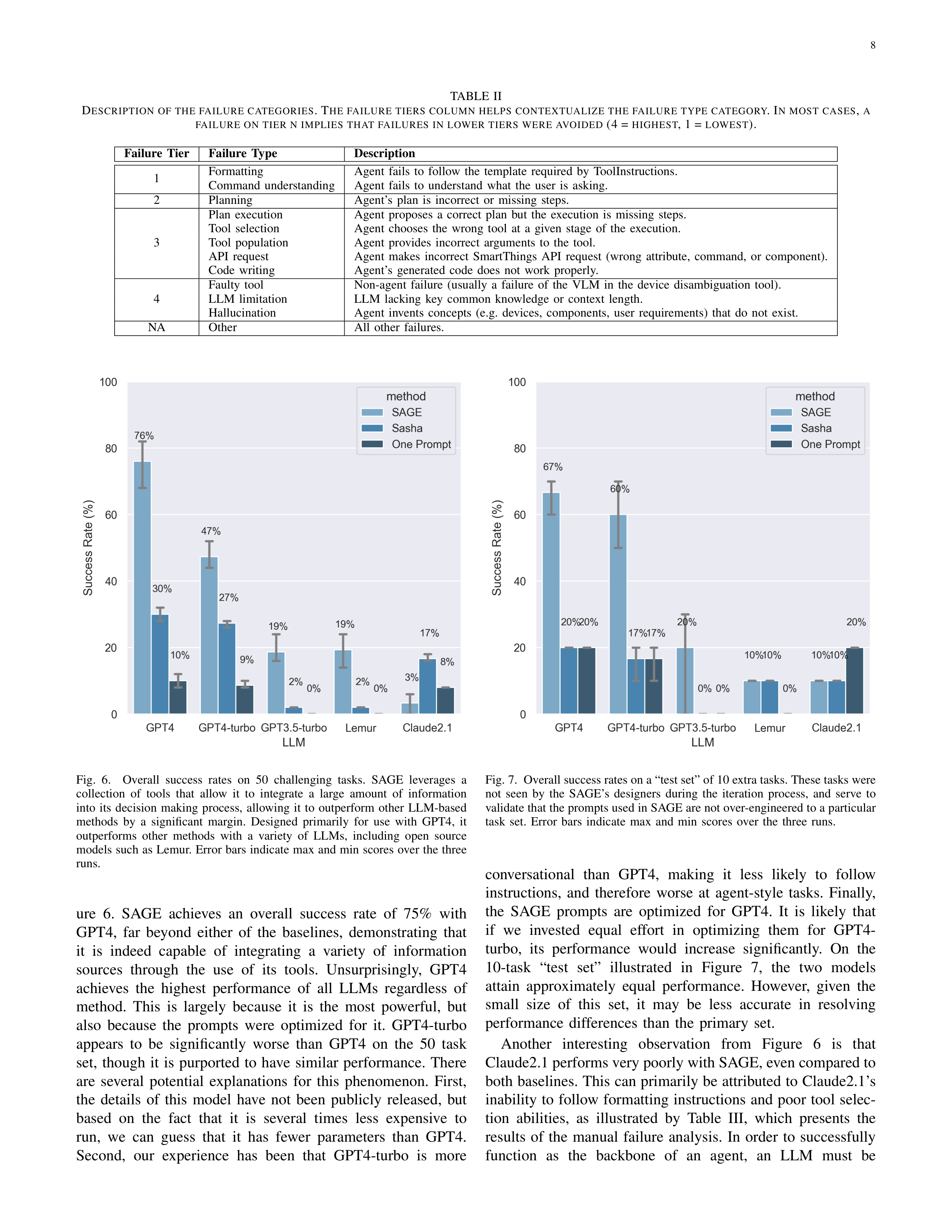
Overall
success
rates
for
the
three
methods,
SAGE,
Sasha,
and
One
Prompt
on
the
50
task
set
are
presented
in
Fig-
8
TABLE
II
D
ESCRIPTION
OF
THE
FAILURE
CATEGORIES
.
T
HE
FAILURE
TIERS
COLUMN
HELPS
CONTEXTUALIZE
THE
FAILURE
TYPE
CATEGORY
. I
N
MOST
CASES
,
A
FAILURE
ON
TIER
N
IMPLIES
THAT
FAILURES
IN
LOWER
TIERS
WERE
AVOIDED
(4 =
HIGHEST
, 1 =
LOWEST
).
Failure
Tier
Failure
Type
Description
1
Formatting
Agent
fails
to
follow
the
template
required
by
ToolInstructions.
Command
understanding
Agent
fails
to
understand
what
the
user
is
asking.
2
Planning
Agent’s
plan
is
incorrect
or
missing
steps.
3
Plan
execution
Agent
proposes
a
correct
plan
but
the
execution
is
missing
steps.
Tool
selection
Agent
chooses
the
wrong
tool
at
a
given
stage
of
the
execution.
Tool
population
Agent
provides
incorrect
arguments
to
the
tool.
API
request
Agent
makes
incorrect
SmartThings
API
request
(wrong
attribute,
command,
or
component).
Code
writing
Agent’s
generated
code
does
not
work
properly.
4
Faulty
tool
Non-agent
failure
(usually
a
failure
of
the
VLM
in
the
device
disambiguation
tool).
LLM
limitation
LLM
lacking
key
common
knowledge
or
context
length.
Hallucination
Agent
invents
concepts
(e.g.
devices,
components,
user
requirements)
that
do
not
exist.
NA
Other
All
other
failures.
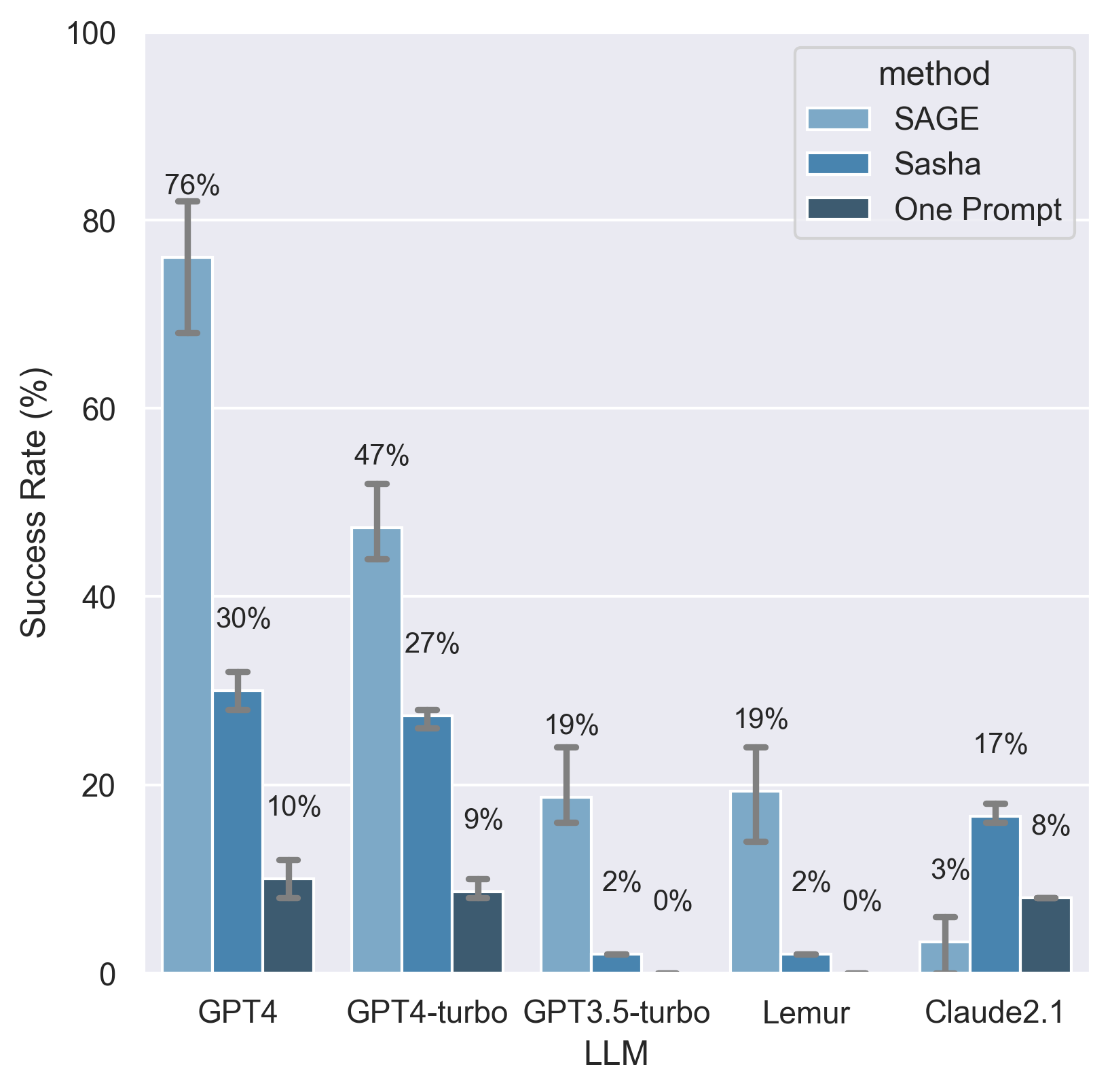
Fig.
6.
Overall
success
rates
on
50
challenging
tasks.
SAGE
leverages
a
collection
of
tools
that
allow
it
to
integrate
a
large
amount
of
information
into
its
decision
making
process,
allowing
it
to
outperform
other
LLM-based
methods
by
a
significant
margin.
Designed
primarily
for
use
with
GPT4,
it
outperforms
other
methods
with
a
variety
of
LLMs,
including
open
source
models
such
as
Lemur.
Error
bars
indicate
max
and
min
scores
over
the
three
runs.
ure
6.
SAGE
achieves
an
overall
success
rate
of
75%
with
GPT4,
far
beyond
either
of
the
baselines,
demonstrating
that
it
is
indeed
capable
of
integrating
a
variety
of
information
sources
through
the
use
of
its
tools.
Unsurprisingly,
GPT4
achieves
the
highest
performance
of
all
LLMs
regardless
of
method.
This
is
largely
because
it
is
the
most
powerful,
but
also
because
the
prompts
were
optimized
for
it.
GPT4-turbo
appears
to
be
significantly
worse
than
GPT4
on
the
50
task
set,
though
it
is
purported
to
have
similar
performance.
There
are
several
potential
explanations
for
this
phenomenon.
First,
the
details
of
this
model
have
not
been
publicly
released,
but
based
on
the
fact
that
it
is
several
times
less
expensive
to
run,
we
can
guess
that
it
has
fewer
parameters
than
GPT4.
Second,
our
experience
has
been
that
GPT4-turbo
is
more
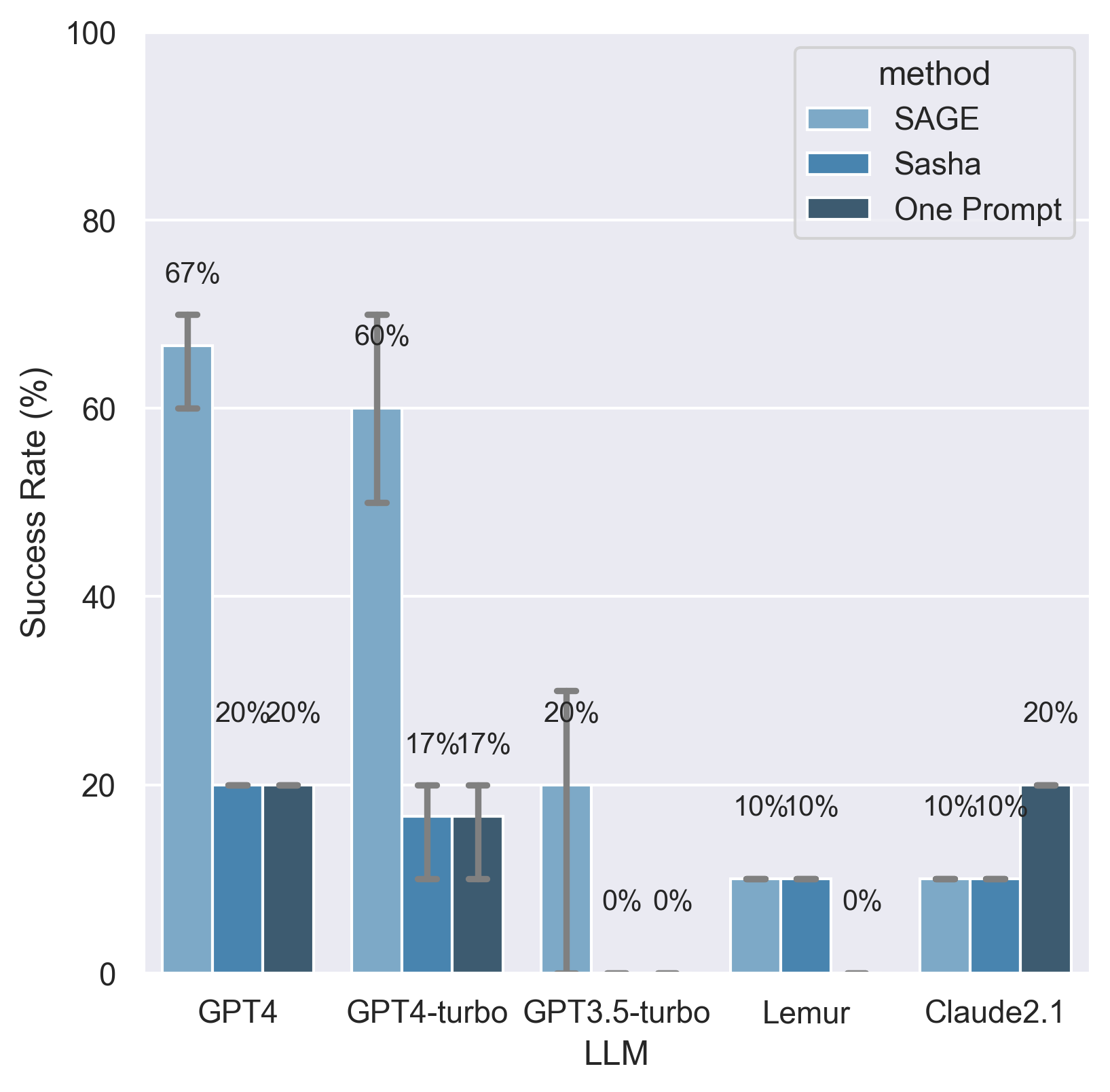
Fig. 7.
Overall success rates on a “test set” of 10 extra tasks. These tasks were
not
seen
by
the
SAGE’s
designers
during
the
iteration
process,
and
serve
to
validate that the prompts used in SAGE are not over-engineered to a particular
task
set.
Error
bars
indicate
max
and
min
scores
over
the
three
runs.
conversational
than
GPT4,
making
it
less
likely
to
follow
instructions,
and
therefore
worse
at
agent-style
tasks.
Finally,
the
SAGE
prompts
are
optimized
for
GPT4.
It
is
likely
that
if
we
invested
equal
effort
in
optimizing
them
for
GPT4-
turbo,
its
performance
would
increase
significantly.
On
the
10-task
“test
set”
illustrated
in
Figure
7,
the
two
models
attain
approximately
equal
performance.
However,
given
the
small
size
of
this
set,
it
may
be
less
accurate
in
resolving
performance
differences
than
the
primary
set.
Another
interesting
observation
from
Figure
6
is
that
Claude2.1 performs very poorly with SAGE, even compared to
both baselines. This can primarily be attributed to Claude2.1’s
inability
to
follow
formatting
instructions
and
poor
tool
selec-
tion
abilities,
as
illustrated
by
Table
III,
which
presents
the
results
of
the
manual
failure
analysis.
In
order
to
successfully
function
as
the
backbone
of
an
agent,
an
LLM
must
be
9
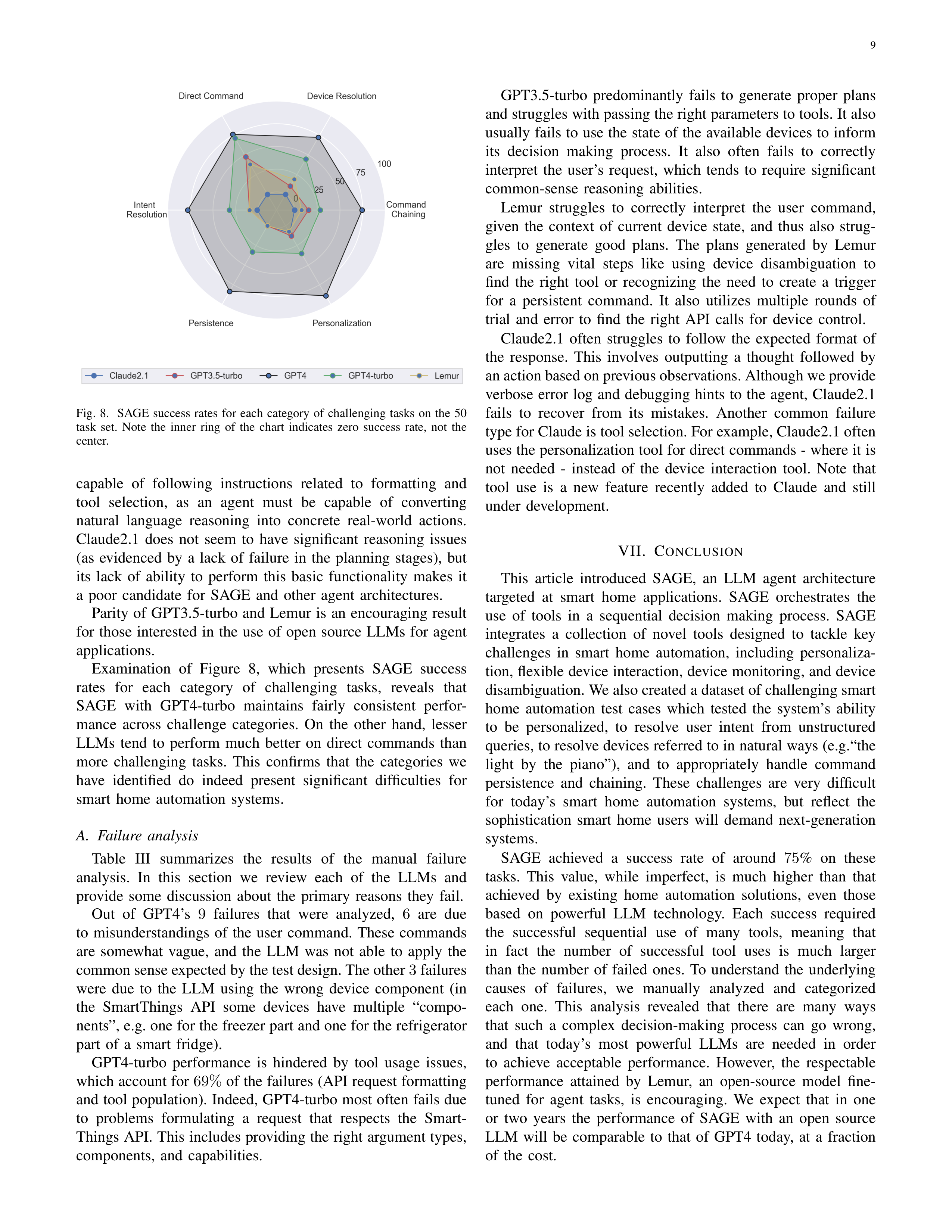
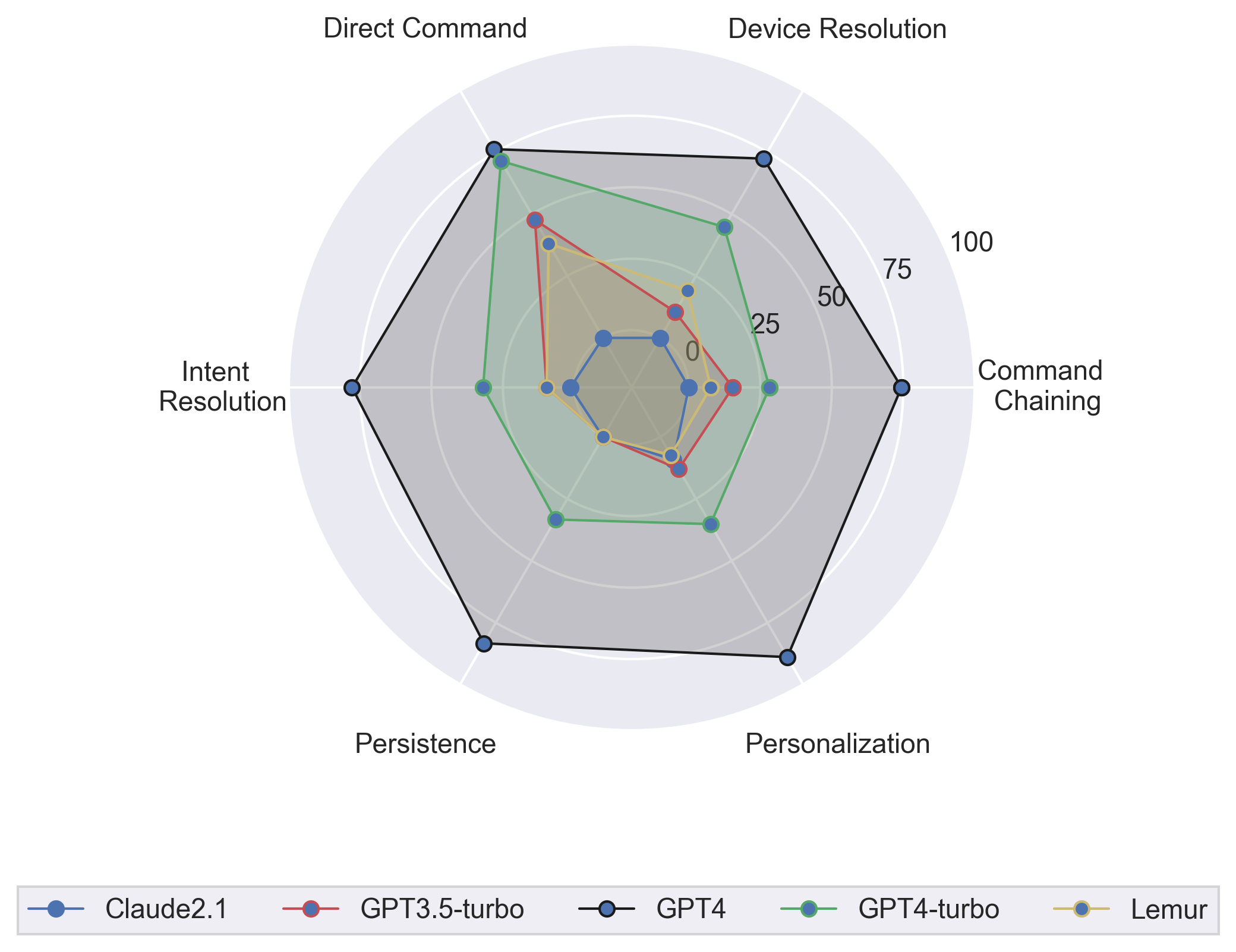
Fig.
8.
SAGE
success
rates
for
each
category
of
challenging
tasks
on
the
50
task
set.
Note
the
inner
ring
of
the
chart
indicates
zero
success
rate,
not
the
center.
capable
of
following
instructions
related
to
formatting
and
tool
selection,
as
an
agent
must
be
capable
of
converting
natural
language
reasoning
into
concrete
real-world
actions.
Claude2.1
does
not
seem
to
have
significant
reasoning
issues
(as
evidenced
by
a
lack
of
failure
in
the
planning
stages),
but
its
lack
of
ability
to
perform
this
basic
functionality
makes
it
a
poor
candidate
for
SAGE
and
other
agent
architectures.
Parity
of
GPT3.5-turbo
and
Lemur
is
an
encouraging
result
for
those
interested
in
the
use
of
open
source
LLMs
for
agent
applications.
Examination
of
Figure
8,
which
presents
SAGE
success
rates
for
each
category
of
challenging
tasks,
reveals
that
SAGE
with
GPT4-turbo
maintains
fairly
consistent
perfor-
mance
across
challenge
categories.
On
the
other
hand,
lesser
LLMs
tend
to
perform
much
better
on
direct
commands
than
more
challenging
tasks.
This
confirms
that
the
categories
we
have
identified
do
indeed
present
significant
difficulties
for
smart
home
automation
systems.
A.
Failure
analysis
Table
III
summarizes
the
results
of
the
manual
failure
analysis.
In
this
section
we
review
each
of
the
LLMs
and
provide
some
discussion
about
the
primary
reasons
they
fail.
Out
of
GPT4’s
9
failures
that
were
analyzed,
6
are
due
to
misunderstandings
of
the
user
command.
These
commands
are
somewhat
vague,
and
the
LLM
was
not
able
to
apply
the
common sense expected by the test design. The other
3
failures
were
due
to
the
LLM
using
the
wrong
device
component
(in
the
SmartThings
API
some
devices
have
multiple
“compo-
nents”, e.g. one for the freezer part and one for the refrigerator
part
of
a
smart
fridge).
GPT4-turbo
performance
is
hindered
by
tool
usage
issues,
which account for
69%
of the failures (API request formatting
and tool population). Indeed, GPT4-turbo most often fails due
to
problems
formulating
a
request
that
respects
the
Smart-
Things API. This includes providing the right argument types,
components,
and
capabilities.
GPT3.5-turbo
predominantly
fails
to
generate
proper
plans
and struggles with passing the right parameters to tools. It also
usually
fails
to
use
the
state
of
the
available
devices
to
inform
its
decision
making
process.
It
also
often
fails
to
correctly
interpret
the
user’s
request,
which
tends
to
require
significant
common-sense
reasoning
abilities.
Lemur
struggles
to
correctly
interpret
the
user
command,
given
the
context
of
current
device
state,
and
thus
also
strug-
gles
to
generate
good
plans.
The
plans
generated
by
Lemur
are
missing
vital
steps
like
using
device
disambiguation
to
find
the
right
tool
or
recognizing
the
need
to
create
a
trigger
for
a
persistent
command.
It
also
utilizes
multiple
rounds
of
trial
and
error
to
find
the
right
API
calls
for
device
control.
Claude2.1
often
struggles
to
follow
the
expected
format
of
the
response.
This
involves
outputting
a
thought
followed
by
an action based on previous observations. Although we provide
verbose
error
log
and
debugging
hints
to
the
agent,
Claude2.1
fails
to
recover
from
its
mistakes.
Another
common
failure
type for Claude is tool selection. For example, Claude2.1 often
uses the personalization tool for direct commands - where it is
not
needed
-
instead
of
the
device
interaction
tool.
Note
that
tool
use
is
a
new
feature
recently
added
to
Claude
and
still
under
development.
VII.
C
ONCLUSION
This
article
introduced
SAGE,
an
LLM
agent
architecture
targeted
at
smart
home
applications.
SAGE
orchestrates
the
use
of
tools
in
a
sequential
decision
making
process.
SAGE
integrates
a
collection
of
novel
tools
designed
to
tackle
key
challenges
in
smart
home
automation,
including
personaliza-
tion, flexible device interaction, device monitoring, and device
disambiguation. We also created a dataset of challenging smart
home
automation
test
cases
which
tested
the
system’s
ability
to
be
personalized,
to
resolve
user
intent
from
unstructured
queries, to resolve devices referred to in natural ways (e.g.“the
light
by
the
piano”),
and
to
appropriately
handle
command
persistence
and
chaining.
These
challenges
are
very
difficult
for
today’s
smart
home
automation
systems,
but
reflect
the
sophistication
smart
home
users
will
demand
next-generation
systems.
SAGE
achieved
a
success
rate
of
around
75
%
on
these
tasks.
This
value,
while
imperfect,
is
much
higher
than
that
achieved
by
existing
home
automation
solutions,
even
those
based
on
powerful
LLM
technology.
Each
success
required
the
successful
sequential
use
of
many
tools,
meaning
that
in
fact
the
number
of
successful
tool
uses
is
much
larger
than
the
number
of
failed
ones.
To
understand
the
underlying
causes
of
failures,
we
manually
analyzed
and
categorized
each
one.
This
analysis
revealed
that
there
are
many
ways
that
such
a
complex
decision-making
process
can
go
wrong,
and
that
today’s
most
powerful
LLMs
are
needed
in
order
to
achieve
acceptable
performance.
However,
the
respectable
performance
attained
by
Lemur,
an
open-source
model
fine-
tuned
for
agent
tasks,
is
encouraging.
We
expect
that
in
one
or
two
years
the
performance
of
SAGE
with
an
open
source
LLM
will
be
comparable
to
that
of
GPT4
today,
at
a
fraction
of
the
cost.
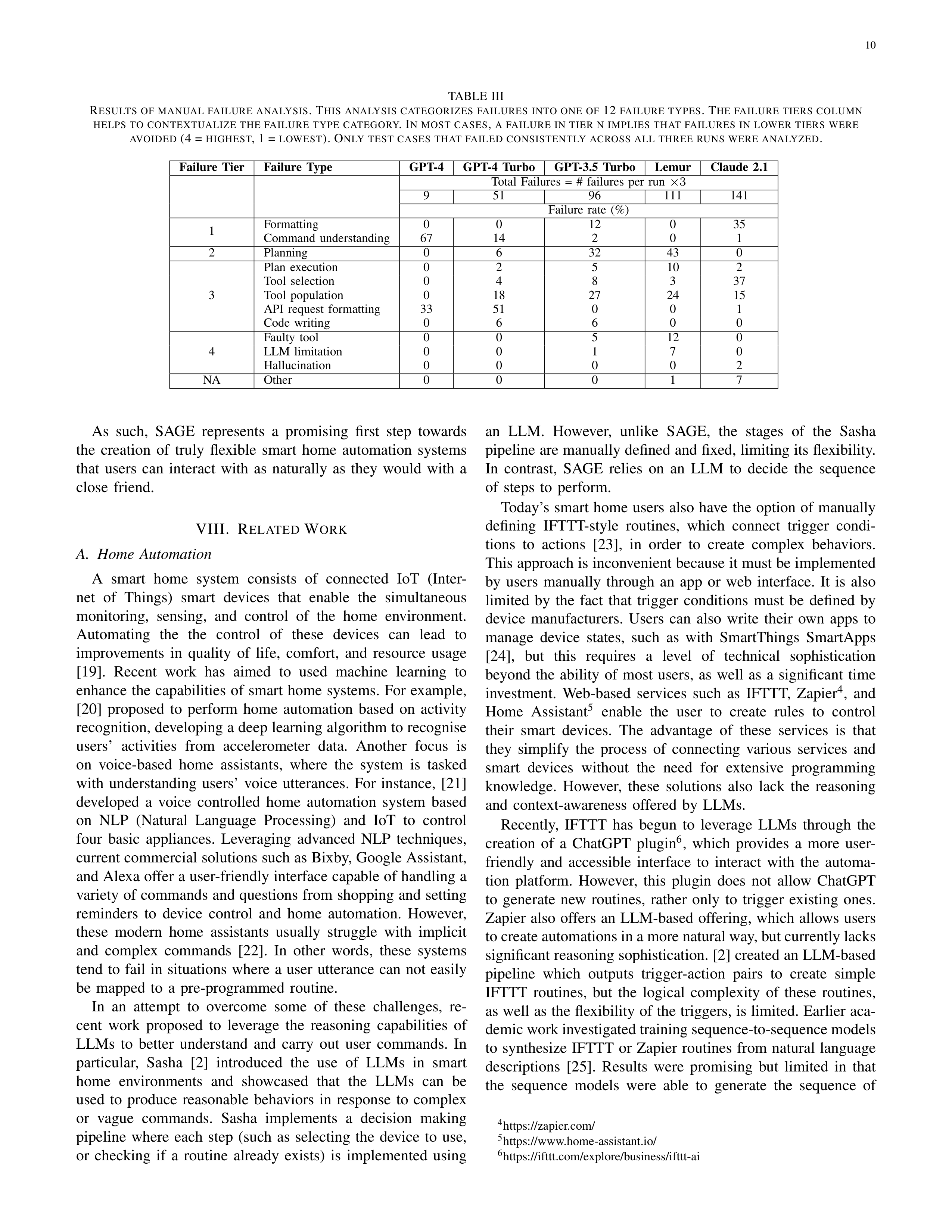
10
TABLE
III
R
ESULTS
OF
MANUAL
FAILURE
ANALYSIS
.
T
HIS
ANALYSIS
CATEGORIZES
FAILURES
INTO
ONE
OF
12
FAILURE
TYPES
. T
HE
FAILURE
TIERS
COLUMN
HELPS
TO
CONTEXTUALIZE
THE
FAILURE
TYPE
CATEGORY
. I
N
MOST
CASES
,
A
FAILURE
IN
TIER
N
IMPLIES
THAT
FAILURES
IN
LOWER
TIERS
WERE
AVOIDED
(4 =
HIGHEST
,
1
=
LOWEST
).
O
NLY
TEST
CASES
THAT
FAILED
CONSISTENTLY
ACROSS
ALL
THREE
RUNS
WERE
ANALYZED
.
Failure
Tier
Failure
Type
GPT-4
GPT-4
Turbo
GPT-3.5
Turbo
Lemur
Claude
2.1
Total
Failures
=
#
failures
per
run
×
3
9
51
96
111
141
Failure
rate
(%)
1
Formatting
0
0
12
0
35
Command
understanding
67
14
2
0
1
2
Planning
0
6
32
43
0
3
Plan
execution
0
2
5
10
2
Tool
selection
0
4
8
3
37
Tool
population
0
18
27
24
15
API
request
formatting
33
51
0
0
1
Code
writing
0
6
6
0
0
4
Faulty
tool
0
0
5
12
0
LLM
limitation
0
0
1
7
0
Hallucination
0
0
0
0
2
NA
Other
0
0
0
1
7
As
such,
SAGE
represents
a
promising
first
step
towards
the
creation
of
truly
flexible
smart
home
automation
systems
that
users
can
interact
with
as
naturally
as
they
would
with
a
close
friend.
VIII.
R
ELATED
W
ORK
A.
Home
Automation
A
smart
home
system
consists
of
connected
IoT
(Inter-
net
of
Things)
smart
devices
that
enable
the
simultaneous
monitoring,
sensing,
and
control
of
the
home
environment.
Automating
the
the
control
of
these
devices
can
lead
to
improvements
in
quality
of
life,
comfort,
and
resource
usage
[19].
Recent
work
has
aimed
to
used
machine
learning
to
enhance
the
capabilities
of
smart
home
systems.
For
example,
[20]
proposed
to
perform
home
automation
based
on
activity
recognition, developing a deep learning algorithm to recognise
users’
activities
from
accelerometer
data.
Another
focus
is
on
voice-based
home
assistants,
where
the
system
is
tasked
with
understanding
users’
voice
utterances.
For
instance,
[21]
developed
a
voice
controlled
home
automation
system
based
on
NLP
(Natural
Language
Processing)
and
IoT
to
control
four
basic
appliances.
Leveraging
advanced
NLP
techniques,
current commercial solutions such as Bixby, Google Assistant,
and Alexa offer a user-friendly interface capable of handling a
variety of commands and questions from shopping and setting
reminders
to
device
control
and
home
automation.
However,
these
modern
home
assistants
usually
struggle
with
implicit
and
complex
commands
[22].
In
other
words,
these
systems
tend
to
fail
in
situations
where
a
user
utterance
can
not
easily
be
mapped
to
a
pre-programmed
routine.
In
an
attempt
to
overcome
some
of
these
challenges,
re-
cent
work
proposed
to
leverage
the
reasoning
capabilities
of
LLMs
to
better
understand
and
carry
out
user
commands.
In
particular,
Sasha
[2]
introduced
the
use
of
LLMs
in
smart
home
environments
and
showcased
that
the
LLMs
can
be
used
to
produce
reasonable
behaviors
in
response
to
complex
or
vague
commands.
Sasha
implements
a
decision
making
pipeline
where
each
step
(such
as
selecting
the
device
to
use,
or
checking
if
a
routine
already
exists)
is
implemented
using
an
LLM.
However,
unlike
SAGE,
the
stages
of
the
Sasha
pipeline are manually defined and fixed, limiting its flexibility.
In
contrast,
SAGE
relies
on
an
LLM
to
decide
the
sequence
of
steps
to
perform.
Today’s
smart
home
users
also
have
the
option
of
manually
defining
IFTTT-style
routines,
which
connect
trigger
condi-
tions
to
actions
[23],
in
order
to
create
complex
behaviors.
This approach is inconvenient because it must be implemented
by
users
manually
through
an
app
or
web
interface.
It
is
also
limited
by
the
fact
that
trigger
conditions
must
be
defined
by
device
manufacturers.
Users
can
also
write
their
own
apps
to
manage
device
states,
such
as
with
SmartThings
SmartApps
[24],
but
this
requires
a
level
of
technical
sophistication
beyond
the
ability
of
most
users,
as
well
as
a
significant
time
investment.
Web-based
services
such
as
IFTTT,
Zapier
4
,
and
Home
Assistant
5
enable
the
user
to
create
rules
to
control
their
smart
devices.
The
advantage
of
these
services
is
that
they
simplify
the
process
of
connecting
various
services
and
smart
devices
without
the
need
for
extensive
programming
knowledge.
However,
these
solutions
also
lack
the
reasoning
and
context-awareness
offered
by
LLMs.
Recently,
IFTTT
has
begun
to
leverage
LLMs
through
the
creation
of
a
ChatGPT
plugin
6
,
which
provides
a
more
user-
friendly
and
accessible
interface
to
interact
with
the
automa-
tion
platform.
However,
this
plugin
does
not
allow
ChatGPT
to
generate
new
routines,
rather
only
to
trigger
existing
ones.
Zapier
also
offers
an
LLM-based
offering,
which
allows
users
to create automations in a more natural way, but currently lacks
significant reasoning sophistication. [2] created an LLM-based
pipeline
which
outputs
trigger-action
pairs
to
create
simple
IFTTT
routines,
but
the
logical
complexity
of
these
routines,
as well as the flexibility of the triggers, is limited. Earlier aca-
demic work investigated training sequence-to-sequence models
to
synthesize
IFTTT
or
Zapier
routines
from
natural
language
descriptions
[25].
Results
were
promising
but
limited
in
that
the
sequence
models
were
able
to
generate
the
sequence
of
4
https://zapier.com/
5
https://www.home-assistant.io/
6
https://ifttt.com/explore/business/ifttt-ai
11
functions
to
call,
but
not
the
arguments
to
those
functions.
B.
Autonomous
Agents
LLM-powered
autonomous
agents
are
designed
to
to
per-
form
complex
and
diverse
tasks.
Usually,
this
involves
de-
composing
the
task
into
multiple
stages
or
subtasks.
Several
agent architecture designs have been proposed in the literature
[1].
Chain-of-Thought
(CoT)
[4]
is
a
well-known
prompting
technique that enables the agent to perform complex reasoning
through step-by-step planing and acting. In the CoT implemen-
tations, several CoT demonstrations are inserted in the prompt
to guide the agent’s reasoning process. Alternatively, zero-shot
CoT [26] demonstrated the reasoning capabilities of LLMs by
simply adding the sentence “think step by step” in the prompt.
Another
line
of
work
extended
CoT
by
adopting
a
tree-like
reasoning
structure
where
each
intermediate
step
can
have
its
own
set
of
sub-steps
(e.g.
[27]).
The
aforementioned
work
did
not
consider
environment
feedback
(i.e.
the
outcomes
of
actions
already
taken)
in
the
plan
generation
process.
Subse-
quent work did incorporate this feedback. For example, ReAct
agent [5] incorporates observations from the environment (e.g.,
outcomes
of
API
calls
or
tools)
received
after
taking
an
action. These observations are taken into consideration in each
subsequent
reasoning
step.
Human
feedback
can
also
help
the
agent
adapt
and
refine
its
plan
by
asking
for
more
details,
preferences
etc.
Another
important
part
of
the
agent
design
is
the
use
of
external
tools
for
action
execution.
These
enable
the
agent
to
go
beyond
its
internal
knowledge.
APIs
are
the
most
common
type
of
tool,
and
LLMs
(such
as
Gorilla
[28]
and
ToolLLM
[29]) have been trained specifically for API use. In addition to
APIs,
external
knowledge
bases
(e.g.
databases
of
documents)
can
be
used
as
a
tool
to
acquire
specific
information
or
expert
knowledge
[30].
R
EFERENCES
[1]
L.
Wang,
C.
Ma,
X.
Feng,
Z.
Zhang,
H.
ran
Yang,
J.
Zhang,
Z.-Y.
Chen,
J.
Tang,
X.
Chen,
Y.
Lin,
W.
X.
Zhao,
Z.
Wei,
and
J.
rong
Wen,
“A
survey
on
large
language
model
based
autonomous
agents,”
ArXiv
,
vol.
abs/2308.11432,
2023.
[Online].
Available:
https://api.semanticscholar.org/CorpusID:261064713
[2]
E.
King,
H.
Yu,
S.
Lee,
and
C.
Julien,
“Sasha:
creative
goal-oriented
reasoning
in
smart
homes
with
large
language
models,”
arXiv
preprint
arXiv:2305.09802
,
2023.
[3]
Zapier,
“Zapier,”
https://actions.zapier.com/.
[4]
J.
Wei,
X.
Wang,
D.
Schuurmans,
M.
Bosma,
F.
Xia,
E.
Chi,
Q.
V.
Le,
D.
Zhou
et
al.
,
“Chain-of-thought
prompting
elicits
reasoning
in
large
language
models,”
Advances
in
Neural
Information
Processing
Systems
,
vol.
35,
pp.
24 824–24 837,
2022.
[5]
S.
Yao,
J.
Zhao,
D.
Yu,
N.
Du,
I.
Shafran,
K.
Narasimhan,
and
Y.
Cao,
“React:
Synergizing
reasoning
and
acting
in
language
models,”
arXiv
preprint
arXiv:2210.03629
,
2022.
[6]
H.
Chase,
“Langchain,”
https://github.com/langchain-ai/langchain.
[7]
Y.
Zhu,
H.
Yuan,
S.
Wang,
J.
Liu,
W.
Liu,
C.
Deng,
Z.
Dou,
and
J.-
R.
Wen,
“Large
language
models
for
information
retrieval:
A
survey,”
arXiv
preprint
arXiv:2308.07107
,
2023.
[8]
V.
Karpukhin,
B.
O˘guz,
S.
Min,
P.
Lewis,
L.
Wu,
S.
Edunov,
D.
Chen,
and
W.-t.
Yih,
“Dense
passage
retrieval
for
open-domain
question
answering,”
arXiv
preprint
arXiv:2004.04906
,
2020.
[9]
W.
Wang,
F.
Wei,
L.
Dong,
H.
Bao,
N.
Yang,
and
M.
Zhou,
“Minilm:
Deep
self-attention
distillation
for
task-agnostic
compression
of
pre-
trained
transformers,”
CoRR
,
vol.
abs/2002.10957,
2020.
[10]
W.
Zhong,
L.
Guo,
Q.
Gao,
and
Y.
Wang,
“Memorybank:
Enhanc-
ing
large
language
models
with
long-term
memory,”
arXiv
preprint
arXiv:2305.10250
,
2023.
[11]
J.
Dean
and
S.
Ghemawat,
“Mapreduce:
Simplified
data
processing
on
large
clusters,”
Commun.
ACM
,
vol.
51,
no.
1,
p.
107–113,
jan
2008.
[12]
N. F. Liu, K. Lin, J. Hewitt, A. Paranjape, M. Bevilacqua, F. Petroni, and
P. Liang, “Lost in the middle: How language models use long contexts,”
arXiv
preprint
arXiv:2307.03172
,
2023.
[13]
“Vosk
speech
recognition
toolbox,”
https://github.com/alphacep/
vosk-api,
accessed:
2023-10-27.
[14]
A.
Radford,
J.
W.
Kim,
T.
Xu,
G.
Brockman,
C.
McLeavey,
and
I.
Sutskever,
“Robust
speech
recognition
via
large-scale
weak
supervision,” 2022. [Online]. Available: https://arxiv.org/abs/2212.04356
[15]
“Langchain
openapi
toolkit,”
https://python.langchain.com/docs/
integrations/toolkits/openapi,
accessed:
2023-10-26.
[16]
“Smartthings api,” https://developer.smartthings.com/docs/api/public, ac-
cessed:
2023-10-26.
[17]
G.
Ilharco,
M.
Wortsman,
R.
Wightman,
C.
Gordon,
N.
Carlini,
R.
Taori,
A.
Dave,
V.
Shankar,
H.
Namkoong,
J.
Miller,
H.
Hajishirzi,
A.
Farhadi,
and
L.
Schmidt,
“Openclip,”
Jul.
2021,
if
you
use
this
software,
please
cite
it
as
below.
[Online].
Available:
https://doi.org/10.5281/zenodo.5143773
[18]
Y.
Xu,
H.
Su,
C.
Xing,
B.
Mi,
Q.
Liu,
W.
Shi,
B.
Hui,
F.
Zhou,
Y.
Liu,
T.
Xie,
Z.
Cheng,
S.
Zhao,
L.
Kong,
B.
Wang,
C.
Xiong,
and
T.
Yu,
“Lemur:
Harmonizing
natural
language
and
code
for
language
agents,”
2023.
[19]
C.-W. C. Ki, E. Cho, and J.-E. Lee, “Can an intelligent personal assistant
(ipa)
be
your
friend?
para-friendship
development
mechanism
between
ipas
and
their
users,”
Computers
in
Human
Behavior
,
vol.
111,
p.
106412,
2020.
[20]
R.
D.
Manu,
S.
Kumar,
S.
Snehashish,
and
K.
Rekha,
“Smart
home
automation using iot and deep learning,”
International Research Journal
of
Engineering
and
Technology
,
vol.
6,
no.
4,
pp.
1–4,
2019.
[21]
P.
J.
Rani,
J.
Bakthakumar,
B.
P.
Kumaar,
U.
P.
Kumaar,
and
S.
Kumar,
“Voice
controlled
home
automation
system
using
natural
language
processing
(nlp)
and
internet
of
things
(iot),”
in
2017
Third
Interna-
tional
Conference
on
Science
Technology
Engineering
&
Management
(ICONSTEM)
,
2017,
pp.
368–373.
[22]
E.
Luger
and
A.
Sellen,
“”Like
having
a
really
bad
PA”:
The
gulf
between
user
expectation
and
experience
of
conversational
agents,”
in
Proceedings
of
CHI
2016
,
2016.
[23]
H.
Yu,
J.
Hua,
and
C.
Julien,
“Dataset:
Analysis
of
IFTTT
recipes
to
study
how
humans
use
internet-of-things
(iot)
devices,”
CoRR
,
vol.
abs/2110.00068,
2021.
[24]
“Smartthings
smartapp
documentation,”
https://developer.smartthings.
com/docs/connected-services/create-a-smartapp,
accessed:
2023-10-27.
[25]
D. Dalal and B. V. Galbraith, “Evaluating sequence-to-sequence learning
models
for
if-then
program
synthesis,”
CoRR
,
vol.
abs/2002.03485,
2020.
[Online].
Available:
https://arxiv.org/abs/2002.03485
[26]
T.
Kojima,
S.
S.
Gu,
M.
Reid,
Y.
Matsuo,
and
Y.
Iwasawa,
“Large
lan-
guage
models
are
zero-shot
reasoners,”
Advances
in
neural
information
processing
systems
,
vol.
35,
pp.
22 199–22 213,
2022.
[27]
S.
Yao,
D.
Yu,
J.
Zhao,
I.
Shafran,
T.
L.
Griffiths,
Y.
Cao,
and
K. Narasimhan, “Tree of thoughts: Deliberate problem solving with large
language
models,”
arXiv
preprint
arXiv:2305.10601
,
2023.
[28]
S.
G.
Patil,
T.
Zhang,
X.
Wang,
and
J.
E.
Gonzalez,
“Gorilla:
Large
language
model
connected
with
massive
apis,”
arXiv
preprint
arXiv:2305.15334
,
2023.
[29]
Y. Qin, S. Liang, Y. Ye, K. Zhu, L. Yan, Y. Lu, Y. Lin, X. Cong, X. Tang,
B.
Qian,
S.
Zhao,
R.
Tian,
R.
Xie,
J.
Zhou,
M.
Gerstein,
D.
Li,
Z.
Liu,
and
M.
Sun,
“Toolllm:
Facilitating
large
language
models
to
master
16000+
real-world
apis,”
2023.
[30]
Y.
Ge,
W.
Hua,
J.
Ji,
J.
Tan,
S.
Xu,
and
Y.
Zhang,
“Openagi:
When
llm
meets
domain
experts,”
arXiv
preprint
arXiv:2304.04370
,
2023.