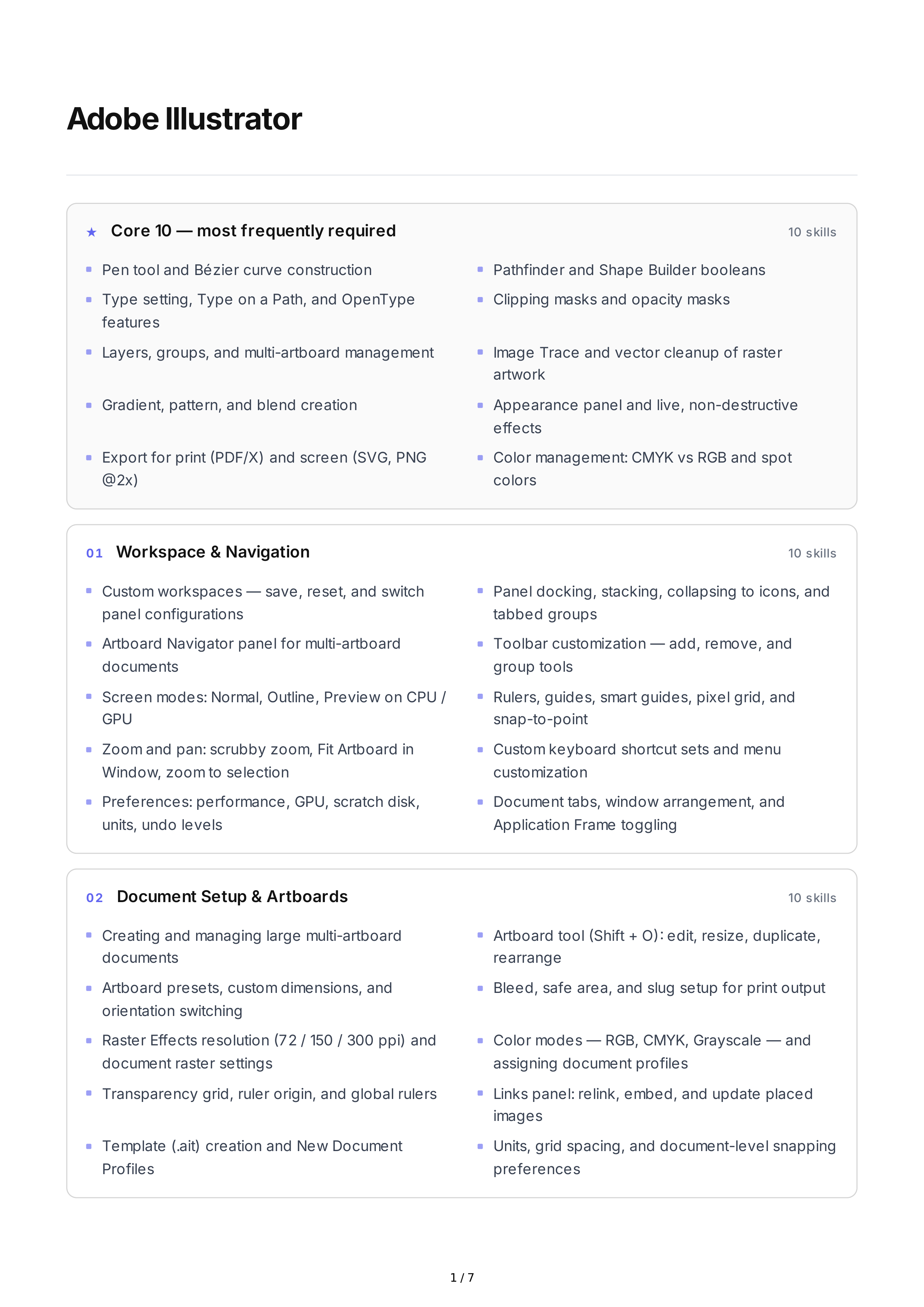
Adobe
Illustrator
★
Core
10 —
most
frequently
required
10
skills
01
Workspace
&
Navigation
10
skills
02
Document
Setup
&
Artboards
10
skills
Pen
tool
and
Bézier
curve
construction
Pathfinder
and
Shape
Builder
booleans
Type
setting
,
Type
on
a
Path
,
and
OpenType
features
Clipping
masks
and
opacity
masks
Layers
,
groups
,
and
multi
-
artboard
management
Image
Trace
and
vector
cleanup
of
raster
artwork
Gradient
,
pattern
,
and
blend
creation
Appearance
panel
and
live
,
non
-
destructive
effects
Export
for
print
(
PDF
/
X
)
and
screen
(
SVG
,
PNG
@2
x
)
Color
management
:
CMYK
vs
RGB
and
spot
colors
Custom
workspaces
—
save
,
reset
,
and
switch
panel
configurations
Panel
docking
,
stacking
,
collapsing
to
icons
,
and
tabbed
groups
Artboard
Navigator
panel
for
multi
-
artboard
documents
Toolbar
customization
—
add
,
remove
,
and
group
tools
Screen
modes
:
Normal
,
Outline
,
Preview
on
CPU
/
GPU
Rulers
,
guides
,
smart
guides
,
pixel
grid
,
and
snap
-
to
-
point
Zoom
and
pan
:
scrubby
zoom
,
Fit
Artboard
in
Window
,
zoom
to
selection
Custom
keyboard
shortcut
sets
and
menu
customization
Preferences
:
performance
,
GPU
,
scratch
disk
,
units
,
undo
levels
Document
tabs
,
window
arrangement
,
and
Application
Frame
toggling
Creating
and
managing
large
multi
-
artboard
documents
Artboard
tool
(
Shift
+
O
):
edit
,
resize
,
duplicate
,
rearrange
Artboard
presets
,
custom
dimensions
,
and
orientation
switching
Bleed
,
safe
area
,
and
slug
setup
for
print
output
Raster
Effects
resolution
(72 / 150 / 300
ppi
)
and
document
raster
settings
Color
modes
—
RGB
,
CMYK
,
Grayscale
—
and
assigning
document
profiles
Transparency
grid
,
ruler
origin
,
and
global
rulers
Links
panel
:
relink
,
embed
,
and
update
placed
images
Template
(.
ait
)
creation
and
New
Document
Profiles
Units
,
grid
spacing
,
and
document
-
level
snapping
preferences
1 / 7
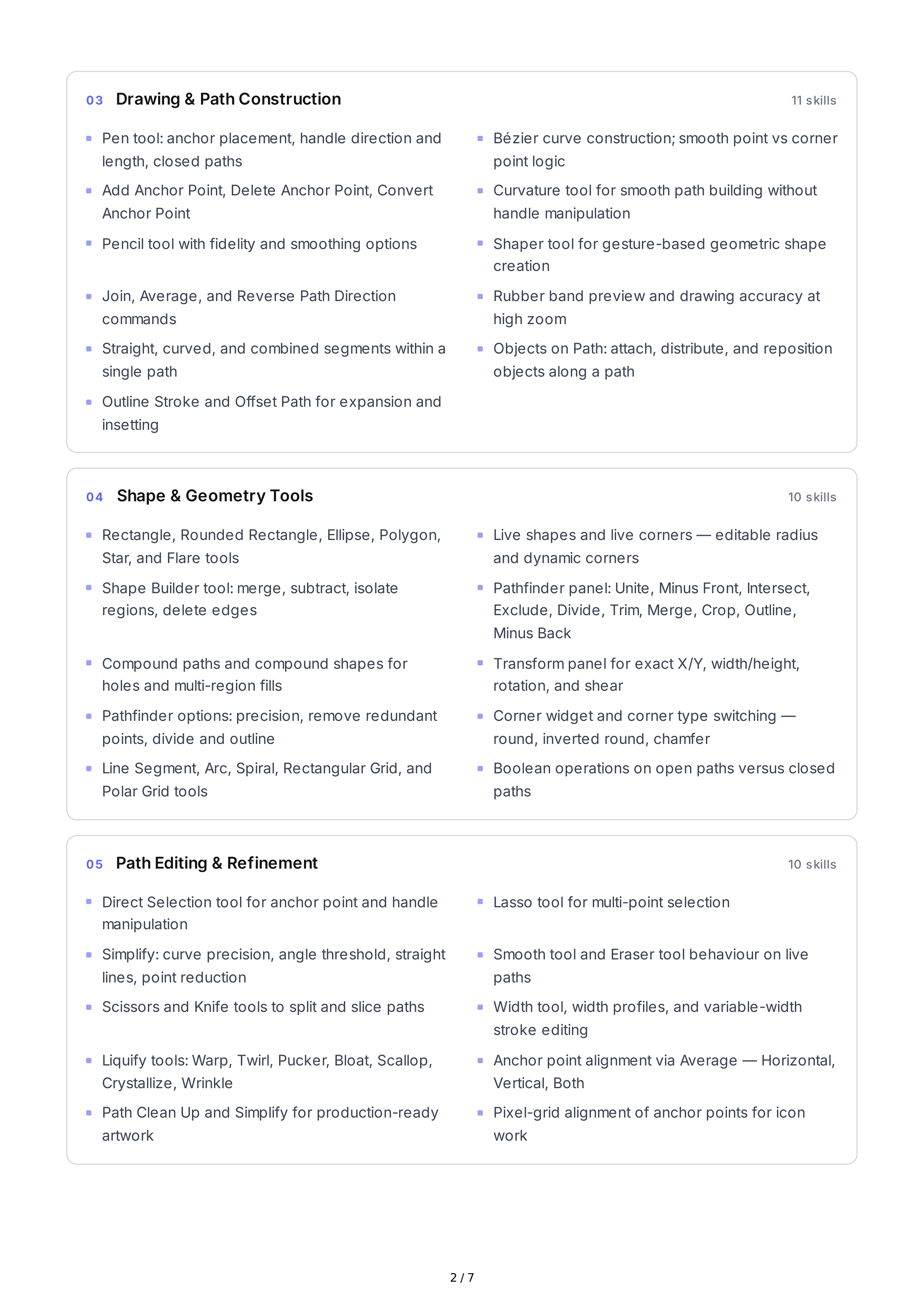
03
Drawing
&
Path
Construction
11
skills
04
Shape
&
Geometry
Tools
10
skills
05
Path
Editing
&
Refinement
10
skills
Pen
tool
:
anchor
placement
,
handle
direction
and
length
,
closed
paths
Bézier
curve
construction
;
smooth
point
vs
corner
point
logic
Add
Anchor
Point
,
Delete
Anchor
Point
,
Convert
Anchor
Point
Curvature
tool
for
smooth
path
building
without
handle
manipulation
Pencil
tool
with
fidelity
and
smoothing
options
Shaper
tool
for
gesture
-
based
geometric
shape
creation
Join
,
Average
,
and
Reverse
Path
Direction
commands
Rubber
band
preview
and
drawing
accuracy
at
high
zoom
Straight
,
curved
,
and
combined
segments
within
a
single
path
Objects
on
Path
:
attach
,
distribute
,
and
reposition
objects
along
a
path
Outline
Stroke
and
Offset
Path
for
expansion
and
insetting
Rectangle
,
Rounded
Rectangle
,
Ellipse
,
Polygon
,
Star
,
and
Flare
tools
Live
shapes
and
live
corners
—
editable
radius
and
dynamic
corners
Shape
Builder
tool
:
merge
,
subtract
,
isolate
regions
,
delete
edges
Pathfinder
panel
:
Unite
,
Minus
Front
,
Intersect
,
Exclude
,
Divide
,
Trim
,
Merge
,
Crop
,
Outline
,
Minus
Back
Compound
paths
and
compound
shapes
for
holes
and
multi
-
region
fills
Transform
panel
for
exact
X
/
Y
,
width
/
height
,
rotation
,
and
shear
Pathfinder
options
:
precision
,
remove
redundant
points
,
divide
and
outline
Corner
widget
and
corner
type
switching
—
round
,
inverted
round
,
chamfer
Line
Segment
,
Arc
,
Spiral
,
Rectangular
Grid
,
and
Polar
Grid
tools
Boolean
operations
on
open
paths
versus
closed
paths
Direct
Selection
tool
for
anchor
point
and
handle
manipulation
Lasso
tool
for
multi
-
point
selection
Simplify
:
curve
precision
,
angle
threshold
,
straight
lines
,
point
reduction
Smooth
tool
and
Eraser
tool
behaviour
on
live
paths
Scissors
and
Knife
tools
to
split
and
slice
paths
Width
tool
,
width
profiles
,
and
variable
-
width
stroke
editing
Liquify
tools
:
Warp
,
Twirl
,
Pucker
,
Bloat
,
Scallop
,
Crystallize
,
Wrinkle
Anchor
point
alignment
via
Average
—
Horizontal
,
Vertical
,
Both
Path
Clean
Up
and
Simplify
for
production
-
ready
artwork
Pixel
-
grid
alignment
of
anchor
points
for
icon
work
2 / 7
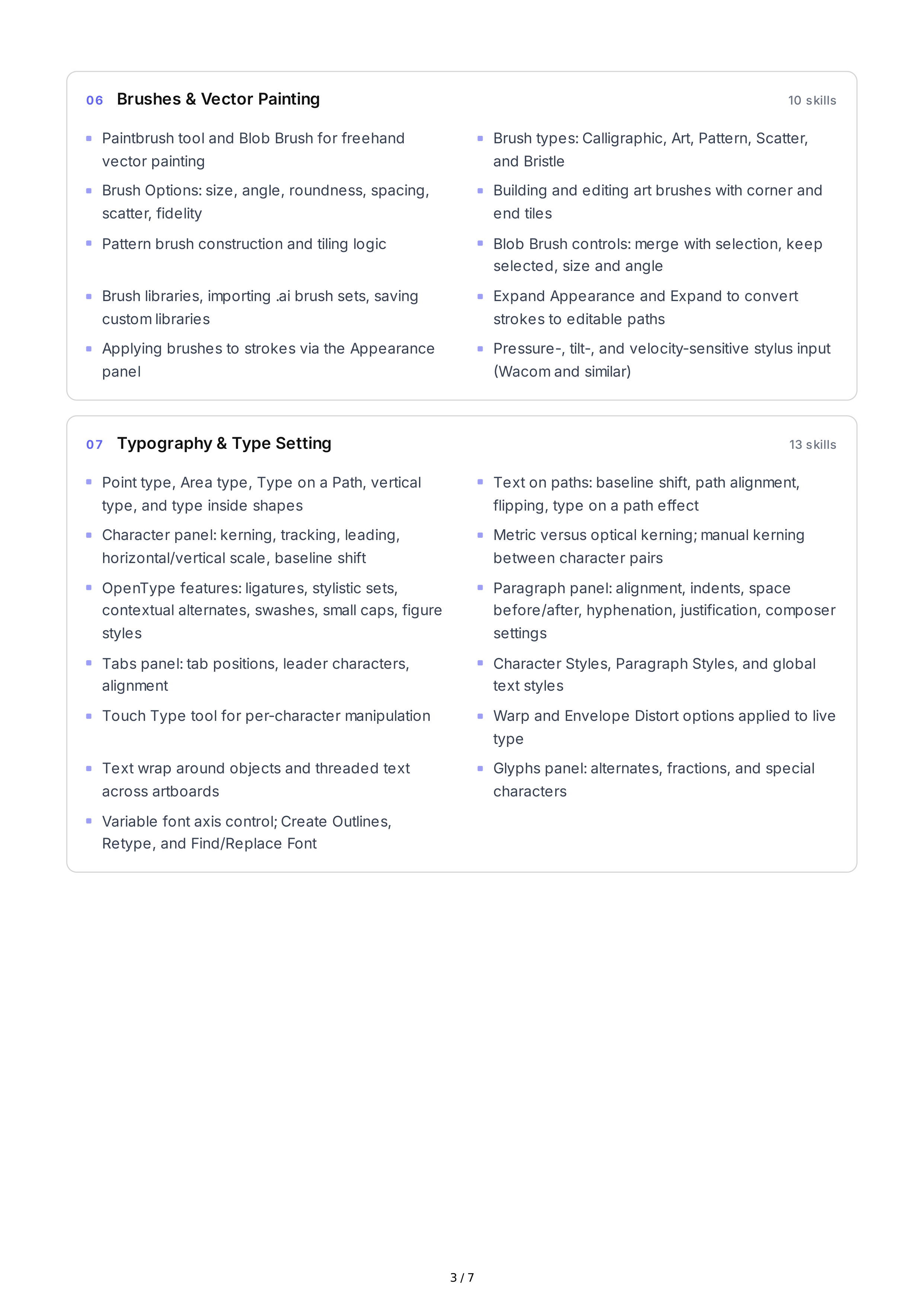
06
Brushes
&
Vector
Painting
10
skills
07
Typography
&
Type
Setting
13
skills
Paintbrush
tool
and
Blob
Brush
for
freehand
vector
painting
Brush
types
:
Calligraphic
,
Art
,
Pattern
,
Scatter
,
and
Bristle
Brush
Options
:
size
,
angle
,
roundness
,
spacing
,
scatter
,
fidelity
Building
and
editing
art
brushes
with
corner
and
end
tiles
Pattern
brush
construction
and
tiling
logic
Blob
Brush
controls
:
merge
with
selection
,
keep
selected
,
size
and
angle
Brush
libraries
,
importing
.
ai
brush
sets
,
saving
custom
libraries
Expand
Appearance
and
Expand
to
convert
strokes
to
editable
paths
Applying
brushes
to
strokes
via
the
Appearance
panel
Pressure
-,
tilt
-,
and
velocity
-
sensitive
stylus
input
(
Wacom
and
similar
)
Point
type
,
Area
type
,
Type
on
a
Path
,
vertical
type
,
and
type
inside
shapes
Text
on
paths
:
baseline
shift
,
path
alignment
,
flipping
,
type
on
a
path
effect
Character
panel
:
kerning
,
tracking
,
leading
,
horizontal
/
vertical
scale
,
baseline
shift
Metric
versus
optical
kerning
;
manual
kerning
between
character
pairs
OpenType
features
:
ligatures
,
stylistic
sets
,
contextual
alternates
,
swashes
,
small
caps
,
figure
styles
Paragraph
panel
:
alignment
,
indents
,
space
before
/
after
,
hyphenation
,
justification
,
composer
settings
Tabs
panel
:
tab
positions
,
leader
characters
,
alignment
Character
Styles
,
Paragraph
Styles
,
and
global
text
styles
Touch
Type
tool
for
per
-
character
manipulation
Warp
and
Envelope
Distort
options
applied
to
live
type
Text
wrap
around
objects
and
threaded
text
across
artboards
Glyphs
panel
:
alternates
,
fractions
,
and
special
characters
Variable
font
axis
control
;
Create
Outlines
,
Retype
,
and
Find
/
Replace
Font
3 / 7
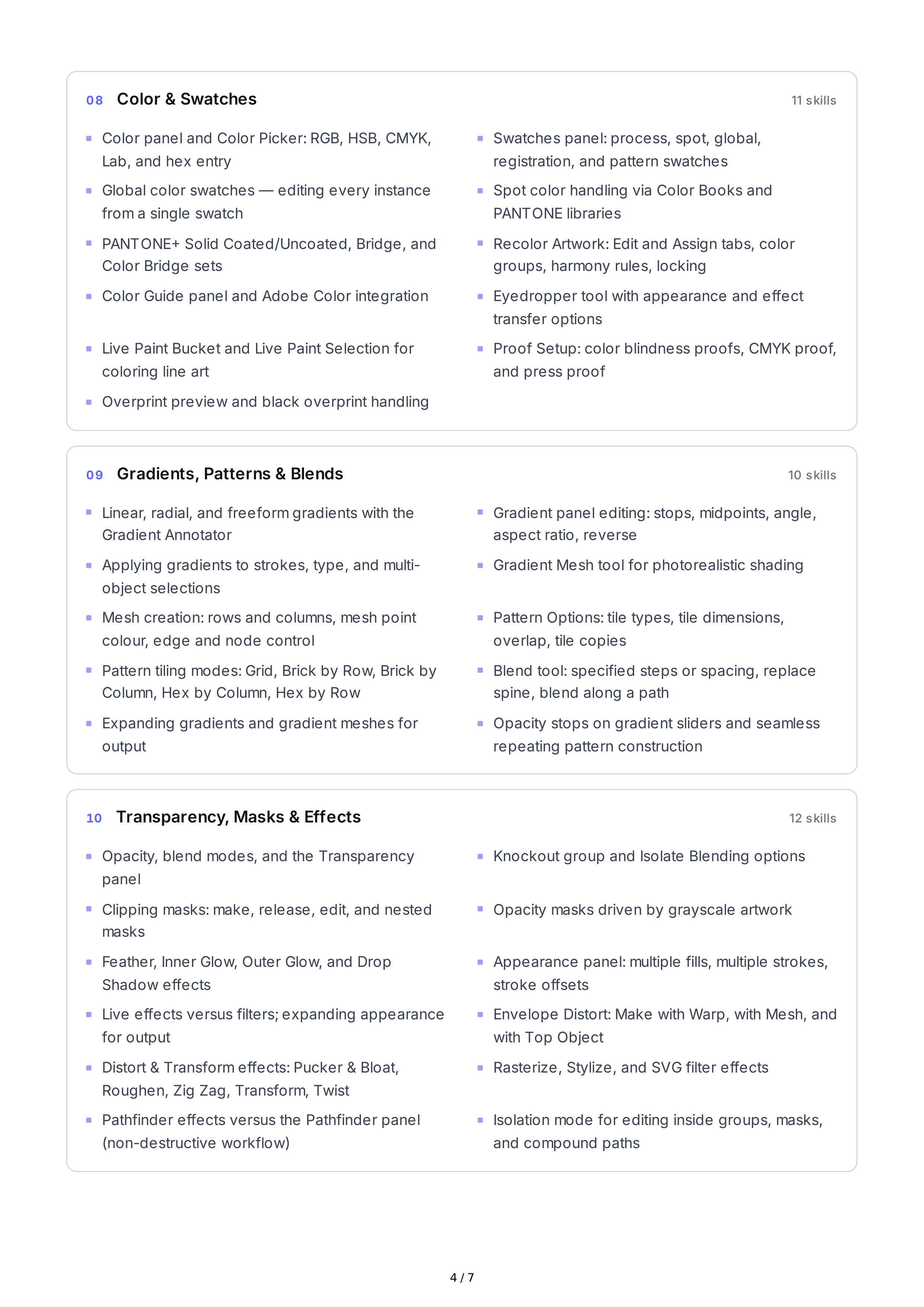
08
Color
&
Swatches
11
skills
09
Gradients
,
Patterns
&
Blends
10
skills
10
Transparency
,
Masks
&
Effects
12
skills
Color
panel
and
Color
Picker
:
RGB
,
HSB
,
CMYK
,
Lab
,
and
hex
entry
Swatches
panel
:
process
,
spot
,
global
,
registration
,
and
pattern
swatches
Global
color
swatches
—
editing
every
instance
from
a
single
swatch
Spot
color
handling
via
Color
Books
and
PANTONE
libraries
PANTONE
+
Solid
Coated
/
Uncoated
,
Bridge
,
and
Color
Bridge
sets
Recolor
Artwork
:
Edit
and
Assign
tabs
,
color
groups
,
harmony
rules
,
locking
Color
Guide
panel
and
Adobe
Color
integration
Eyedropper
tool
with
appearance
and
effect
transfer
options
Live
Paint
Bucket
and
Live
Paint
Selection
for
coloring
line
art
Proof
Setup
:
color
blindness
proofs
,
CMYK
proof
,
and
press
proof
Overprint
preview
and
black
overprint
handling
Linear
,
radial
,
and
freeform
gradients
with
the
Gradient
Annotator
Gradient
panel
editing
:
stops
,
midpoints
,
angle
,
aspect
ratio
,
reverse
Applying
gradients
to
strokes
,
type
,
and
multi
-
object
selections
Gradient
Mesh
tool
for
photorealistic
shading
Mesh
creation
:
rows
and
columns
,
mesh
point
colour
,
edge
and
node
control
Pattern
Options
:
tile
types
,
tile
dimensions
,
overlap
,
tile
copies
Pattern
tiling
modes
:
Grid
,
Brick
by
Row
,
Brick
by
Column
,
Hex
by
Column
,
Hex
by
Row
Blend
tool
:
specified
steps
or
spacing
,
replace
spine
,
blend
along
a
path
Expanding
gradients
and
gradient
meshes
for
output
Opacity
stops
on
gradient
sliders
and
seamless
repeating
pattern
construction
Opacity
,
blend
modes
,
and
the
Transparency
panel
Knockout
group
and
Isolate
Blending
options
Clipping
masks
:
make
,
release
,
edit
,
and
nested
masks
Opacity
masks
driven
by
grayscale
artwork
Feather
,
Inner
Glow
,
Outer
Glow
,
and
Drop
Shadow
effects
Appearance
panel
:
multiple
fills
,
multiple
strokes
,
stroke
offsets
Live
effects
versus
filters
;
expanding
appearance
for
output
Envelope
Distort
:
Make
with
Warp
,
with
Mesh
,
and
with
Top
Object
Distort
&
Transform
effects
:
Pucker
&
Bloat
,
Roughen
,
Zig
Zag
,
Transform
,
Twist
Rasterize
,
Stylize
,
and
SVG
filter
effects
Pathfinder
effects
versus
the
Pathfinder
panel
(
non
-
destructive
workflow
)
Isolation
mode
for
editing
inside
groups
,
masks
,
and
compound
paths
4 / 7
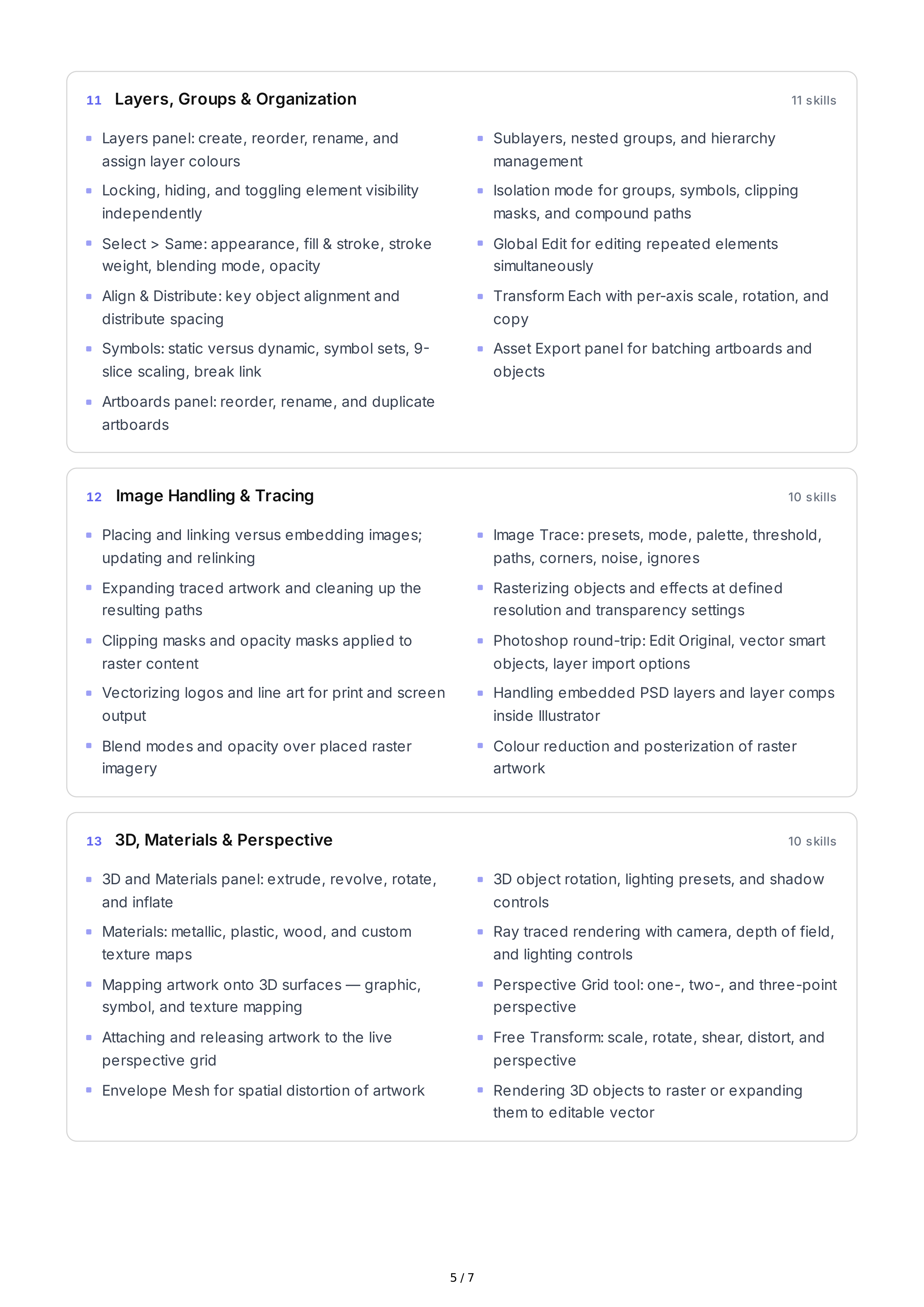
11
Layers
,
Groups
&
Organization
11
skills
12
Image
Handling
&
Tracing
10
skills
13
3
D
,
Materials
&
Perspective
10
skills
Layers
panel
:
create
,
reorder
,
rename
,
and
assign
layer
colours
Sublayers
,
nested
groups
,
and
hierarchy
management
Locking
,
hiding
,
and
toggling
element
visibility
independently
Isolation
mode
for
groups
,
symbols
,
clipping
masks
,
and
compound
paths
Select
>
Same
:
appearance
,
fill
&
stroke
,
stroke
weight
,
blending
mode
,
opacity
Global
Edit
for
editing
repeated
elements
simultaneously
Align
&
Distribute
:
key
object
alignment
and
distribute
spacing
Transform
Each
with
per
-
axis
scale
,
rotation
,
and
copy
Symbols
:
static
versus
dynamic
,
symbol
sets
, 9-
slice
scaling
,
break
link
Asset
Export
panel
for
batching
artboards
and
objects
Artboards
panel
:
reorder
,
rename
,
and
duplicate
artboards
Placing
and
linking
versus
embedding
images
;
updating
and
relinking
Image
Trace
:
presets
,
mode
,
palette
,
threshold
,
paths
,
corners
,
noise
,
ignores
Expanding
traced
artwork
and
cleaning
up
the
resulting
paths
Rasterizing
objects
and
effects
at
defined
resolution
and
transparency
settings
Clipping
masks
and
opacity
masks
applied
to
raster
content
Photoshop
round
-
trip
:
Edit
Original
,
vector
smart
objects
,
layer
import
options
Vectorizing
logos
and
line
art
for
print
and
screen
output
Handling
embedded
PSD
layers
and
layer
comps
inside
Illustrator
Blend
modes
and
opacity
over
placed
raster
imagery
Colour
reduction
and
posterization
of
raster
artwork
3
D
and
Materials
panel
:
extrude
,
revolve
,
rotate
,
and
inflate
3
D
object
rotation
,
lighting
presets
,
and
shadow
controls
Materials
:
metallic
,
plastic
,
wood
,
and
custom
texture
maps
Ray
traced
rendering
with
camera
,
depth
of
field
,
and
lighting
controls
Mapping
artwork
onto
3
D
surfaces
—
graphic
,
symbol
,
and
texture
mapping
Perspective
Grid
tool
:
one
-,
two
-,
and
three
-
point
perspective
Attaching
and
releasing
artwork
to
the
live
perspective
grid
Free
Transform
:
scale
,
rotate
,
shear
,
distort
,
and
perspective
Envelope
Mesh
for
spatial
distortion
of
artwork
Rendering
3
D
objects
to
raster
or
expanding
them
to
editable
vector
5 / 7
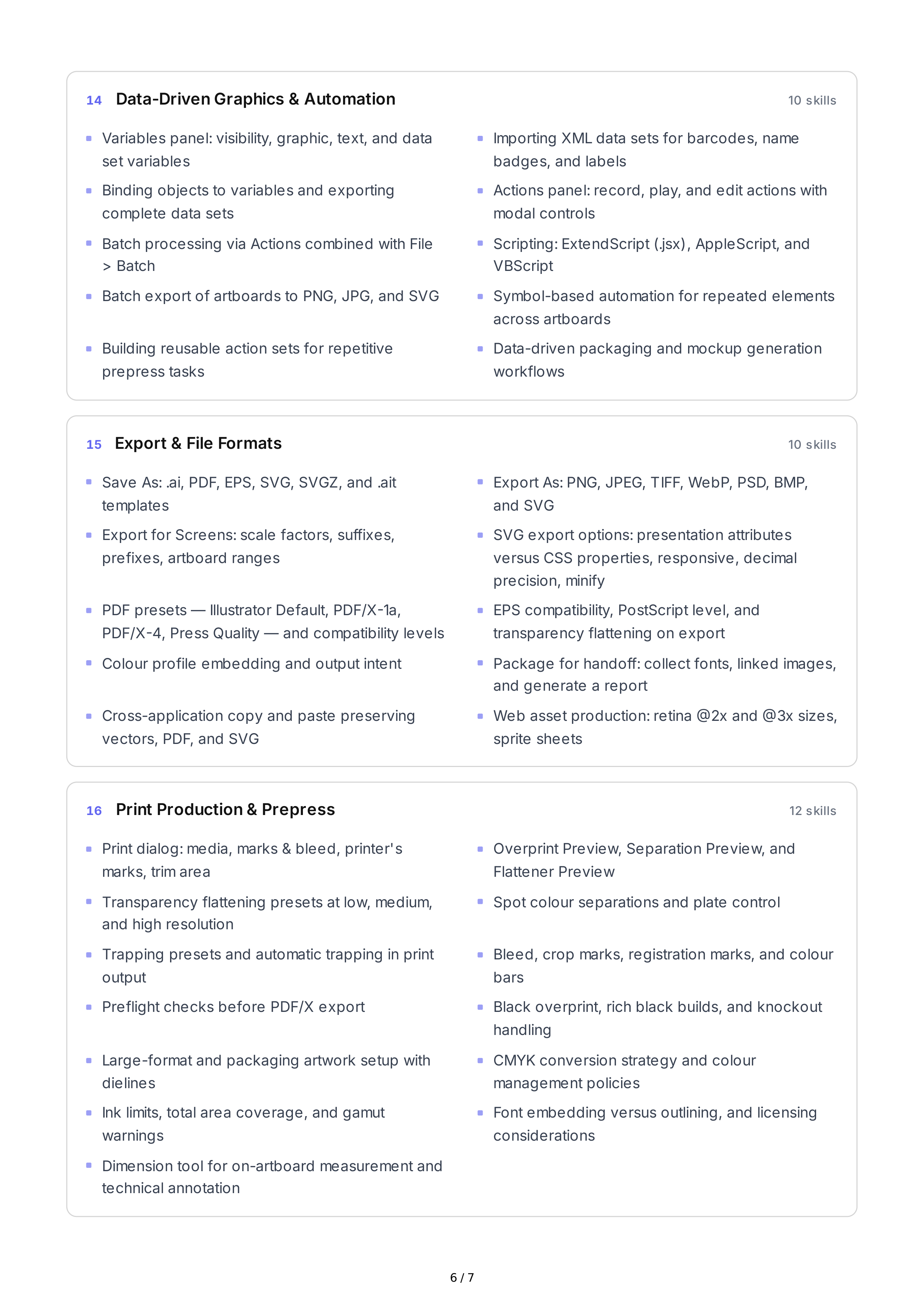
14
Data
-
Driven
Graphics
&
Automation
10
skills
15
Export
&
File
Formats
10
skills
16
Print
Production
&
Prepress
12
skills
Variables
panel
:
visibility
,
graphic
,
text
,
and
data
set
variables
Importing
XML
data
sets
for
barcodes
,
name
badges
,
and
labels
Binding
objects
to
variables
and
exporting
complete
data
sets
Actions
panel
:
record
,
play
,
and
edit
actions
with
modal
controls
Batch
processing
via
Actions
combined
with
File
>
Batch
Scripting
:
ExtendScript
(.
jsx
),
AppleScript
,
and
VBScript
Batch
export
of
artboards
to
PNG
,
JPG
,
and
SVG
Symbol
-
based
automation
for
repeated
elements
across
artboards
Building
reusable
action
sets
for
repetitive
prepress
tasks
Data
-
driven
packaging
and
mockup
generation
workflows
Save
As
: .
ai
,
PDF
,
EPS
,
SVG
,
SVGZ
,
and
.
ait
templates
Export
As
:
PNG
,
JPEG
,
TIFF
,
WebP
,
PSD
,
BMP
,
and
SVG
Export
for
Screens
:
scale
factors
,
suffixes
,
prefixes
,
artboard
ranges
SVG
export
options
:
presentation
attributes
versus
CSS
properties
,
responsive
,
decimal
precision
,
minify
PDF
presets
—
Illustrator
Default
,
PDF
/
X
-1
a
,
PDF
/
X
-4,
Press
Quality
—
and
compatibility
levels
EPS
compatibility
,
PostScript
level
,
and
transparency
flattening
on
export
Colour
profile
embedding
and
output
intent
Package
for
handoff
:
collect
fonts
,
linked
images
,
and
generate
a
report
Cross
-
application
copy
and
paste
preserving
vectors
,
PDF
,
and
SVG
Web
asset
production
:
retina
@2
x
and
@3
x
sizes
,
sprite
sheets
Print
dialog
:
media
,
marks
&
bleed
,
printer
'
s
marks
,
trim
area
Overprint
Preview
,
Separation
Preview
,
and
Flattener
Preview
Transparency
flattening
presets
at
low
,
medium
,
and
high
resolution
Spot
colour
separations
and
plate
control
Trapping
presets
and
automatic
trapping
in
print
output
Bleed
,
crop
marks
,
registration
marks
,
and
colour
bars
Preflight
checks
before
PDF
/
X
export
Black
overprint
,
rich
black
builds
,
and
knockout
handling
Large
-
format
and
packaging
artwork
setup
with
dielines
CMYK
conversion
strategy
and
colour
management
policies
Ink
limits
,
total
area
coverage
,
and
gamut
warnings
Font
embedding
versus
outlining
,
and
licensing
considerations
Dimension
tool
for
on
-
artboard
measurement
and
technical
annotation
6 / 7
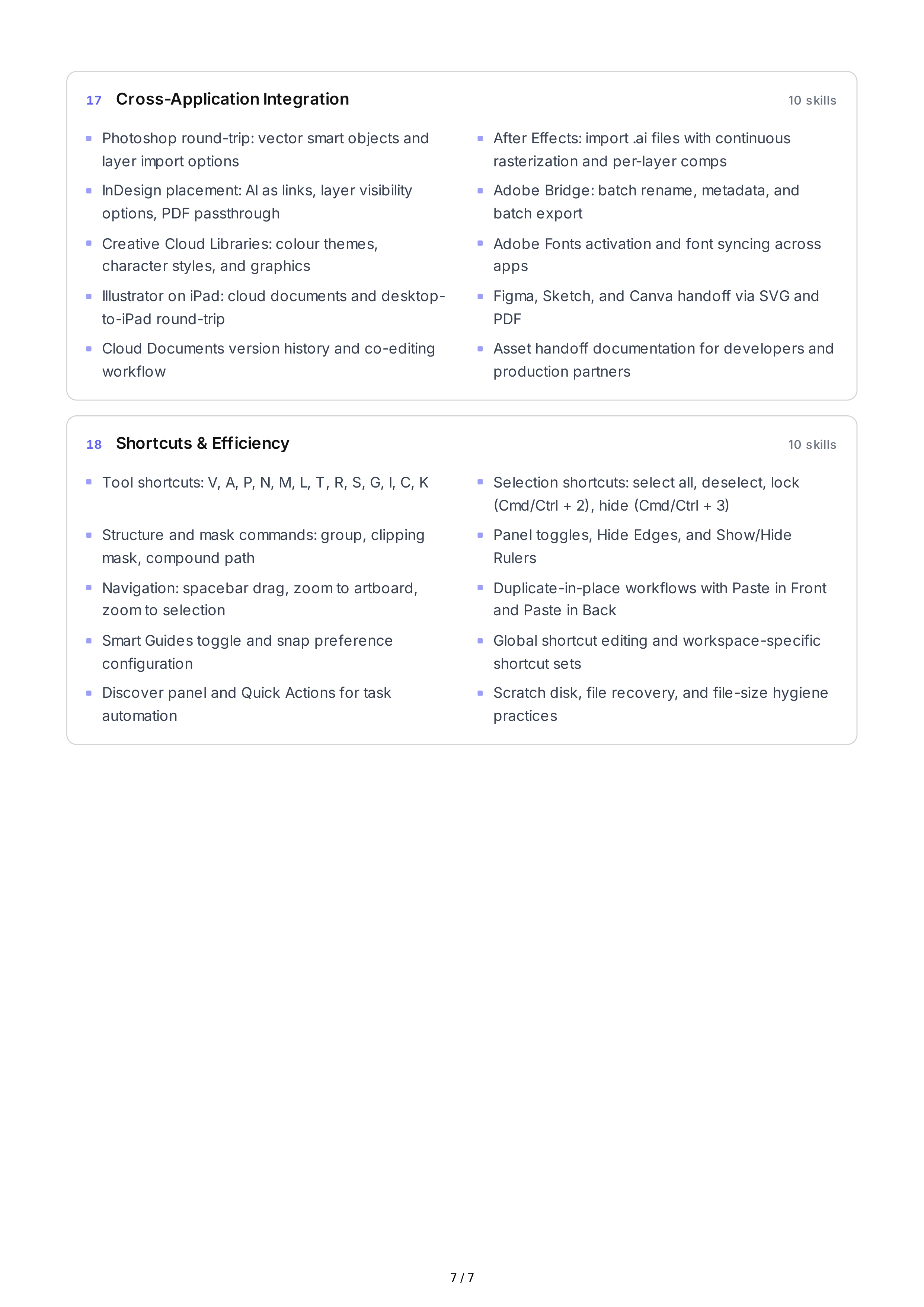
17
Cross
-
Application
Integration
10
skills
18
Shortcuts
&
Efficiency
10
skills
Photoshop
round
-
trip
:
vector
smart
objects
and
layer
import
options
After
Effects
:
import
.
ai
files
with
continuous
rasterization
and
per
-
layer
comps
InDesign
placement
:
AI
as
links
,
layer
visibility
options
,
PDF
passthrough
Adobe
Bridge
:
batch
rename
,
metadata
,
and
batch
export
Creative
Cloud
Libraries
:
colour
themes
,
character
styles
,
and
graphics
Adobe
Fonts
activation
and
font
syncing
across
apps
Illustrator
on
iPad
:
cloud
documents
and
desktop
-
to
-
iPad
round
-
trip
Figma
,
Sketch
,
and
Canva
handoff
via
SVG
and
PDF
Cloud
Documents
version
history
and
co
-
editing
workflow
Asset
handoff
documentation
for
developers
and
production
partners
Tool
shortcuts
:
V
,
A
,
P
,
N
,
M
,
L
,
T
,
R
,
S
,
G
,
I
,
C
,
K
Selection
shortcuts
:
select
all
,
deselect
,
lock
(
Cmd
/
Ctrl
+ 2),
hide
(
Cmd
/
Ctrl
+ 3)
Structure
and
mask
commands
:
group
,
clipping
mask
,
compound
path
Panel
toggles
,
Hide
Edges
,
and
Show
/
Hide
Rulers
Navigation
:
spacebar
drag
,
zoom
to
artboard
,
zoom
to
selection
Duplicate
-
in
-
place
workflows
with
Paste
in
Front
and
Paste
in
Back
Smart
Guides
toggle
and
snap
preference
configuration
Global
shortcut
editing
and
workspace
-
specific
shortcut
sets
Discover
panel
and
Quick
Actions
for
task
automation
Scratch
disk
,
file
recovery
,
and
file
-
size
hygiene
practices
7 / 7