Microsoft
Word
C O N T EN T S
01
Document
Setup
&
Page
Formatting
02
Styles
&
Document
Structure
03
Text
Formatting
&
Editing
04
Sections
,
Headers
&
Footers
05
Tables
&
Data
Presentation
06
Graphics
,
Charts
&
Visual
Elements
07
Long
-
Document
&
Reference
Tools
08
Collaboration
&
Review
09
Mail
Merge
&
Document
Automation
10
Output
,
Export
&
Compatibility
11
Accessibility
&
Compliance
12
Productivity
&
Interface
0 1
Document
Setup
&
Page
Formatting
0 2
Styles
&
Document
Structure
Page
setup
—
Margins
,
orientation
,
paper
size
,
custom
sizes
,
gutters
and
mirror
margins
.
Themes
—
Apply
and
customize
document
theme
fonts
,
theme
colors
,
and
theme
effects
.
Paragraph
formatting
—
Alignment
,
indents
,
line
spacing
,
space
before
/
after
,
and
widow
-
orphan
control
.
Bullets
and
numbering
—
Multi
-
level
lists
,
custom
list
styles
,
and
restarting
or
continuing
numbering
.
Borders
and
shading
—
Paragraph
borders
,
page
borders
,
character
shading
,
and
box
borders
.
Tab
stops
—
Custom
tab
stops
with
leader
dots
and
left
,
center
,
right
,
or
decimal
alignment
.
Text
boxes
—
Insert
,
rotate
,
position
,
and
link
text
boxes
for
pull
quotes
and
sidebars
.
Styles
pane
—
Create
,
modify
,
apply
,
and
delete
paragraph
,
character
,
and
linked
styles
.
Style
inheritance
—
Base
styles
, "
Style
Based
On
,"
and
next
-
style
assignment
for
cascading
rules
.
Heading
styles
—
Apply
Heading
1–9
to
build
the
document
outline
and
navigation
tree
.
Style
sets
—
Switch
document
style
sets
and
manage
the
Quick
Styles
gallery
.
Reveal
Formatting
—
Diagnose
inconsistent
formatting
with
the
Style
Inspector
and
Reveal
Formatting
pane
.
Manage
Styles
—
Import
and
export
styles
between
documents
;
restrict
which
styles
users
may
apply
.
Outline
view
—
Promote
,
demote
,
and
reorganize
whole
sections
in
Outline
view
.
1 / 4
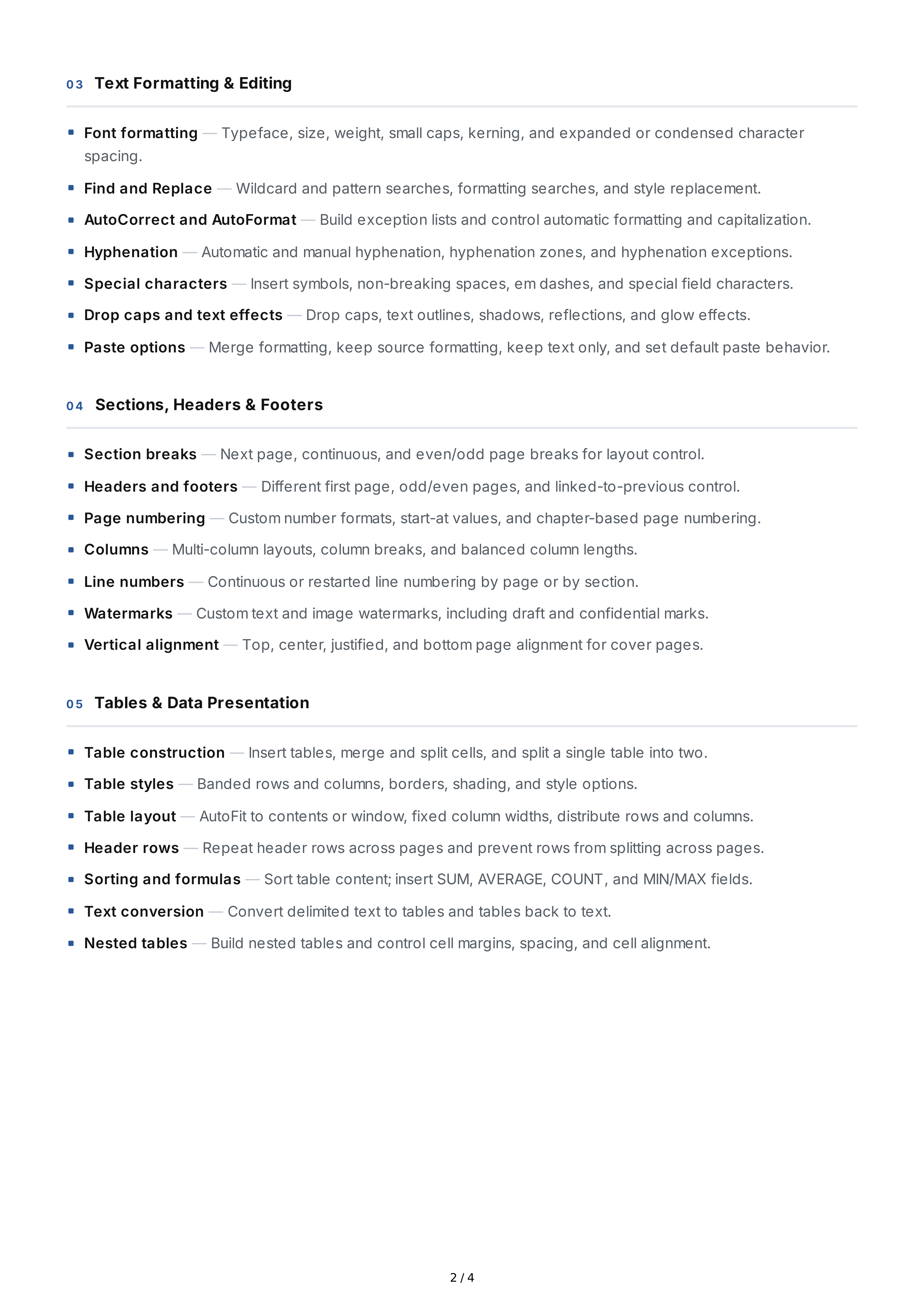
0 3
Text
Formatting
&
Editing
0 4
Sections
,
Headers
&
Footers
0 5
Tables
&
Data
Presentation
Font
formatting
—
Typeface
,
size
,
weight
,
small
caps
,
kerning
,
and
expanded
or
condensed
character
spacing
.
Find
and
Replace
—
Wildcard
and
pattern
searches
,
formatting
searches
,
and
style
replacement
.
AutoCorrect
and
AutoFormat
—
Build
exception
lists
and
control
automatic
formatting
and
capitalization
.
Hyphenation
—
Automatic
and
manual
hyphenation
,
hyphenation
zones
,
and
hyphenation
exceptions
.
Special
characters
—
Insert
symbols
,
non
-
breaking
spaces
,
em
dashes
,
and
special
field
characters
.
Drop
caps
and
text
effects
—
Drop
caps
,
text
outlines
,
shadows
,
reflections
,
and
glow
effects
.
Paste
options
—
Merge
formatting
,
keep
source
formatting
,
keep
text
only
,
and
set
default
paste
behavior
.
Section
breaks
—
Next
page
,
continuous
,
and
even
/
odd
page
breaks
for
layout
control
.
Headers
and
footers
—
Different
first
page
,
odd
/
even
pages
,
and
linked
-
to
-
previous
control
.
Page
numbering
—
Custom
number
formats
,
start
-
at
values
,
and
chapter
-
based
page
numbering
.
Columns
—
Multi
-
column
layouts
,
column
breaks
,
and
balanced
column
lengths
.
Line
numbers
—
Continuous
or
restarted
line
numbering
by
page
or
by
section
.
Watermarks
—
Custom
text
and
image
watermarks
,
including
draft
and
confidential
marks
.
Vertical
alignment
—
Top
,
center
,
justified
,
and
bottom
page
alignment
for
cover
pages
.
Table
construction
—
Insert
tables
,
merge
and
split
cells
,
and
split
a
single
table
into
two
.
Table
styles
—
Banded
rows
and
columns
,
borders
,
shading
,
and
style
options
.
Table
layout
—
AutoFit
to
contents
or
window
,
fixed
column
widths
,
distribute
rows
and
columns
.
Header
rows
—
Repeat
header
rows
across
pages
and
prevent
rows
from
splitting
across
pages
.
Sorting
and
formulas
—
Sort
table
content
;
insert
SUM
,
AVERAGE
,
COUNT
,
and
MIN
/
MAX
fields
.
Text
conversion
—
Convert
delimited
text
to
tables
and
tables
back
to
text
.
Nested
tables
—
Build
nested
tables
and
control
cell
margins
,
spacing
,
and
cell
alignment
.
2 / 4
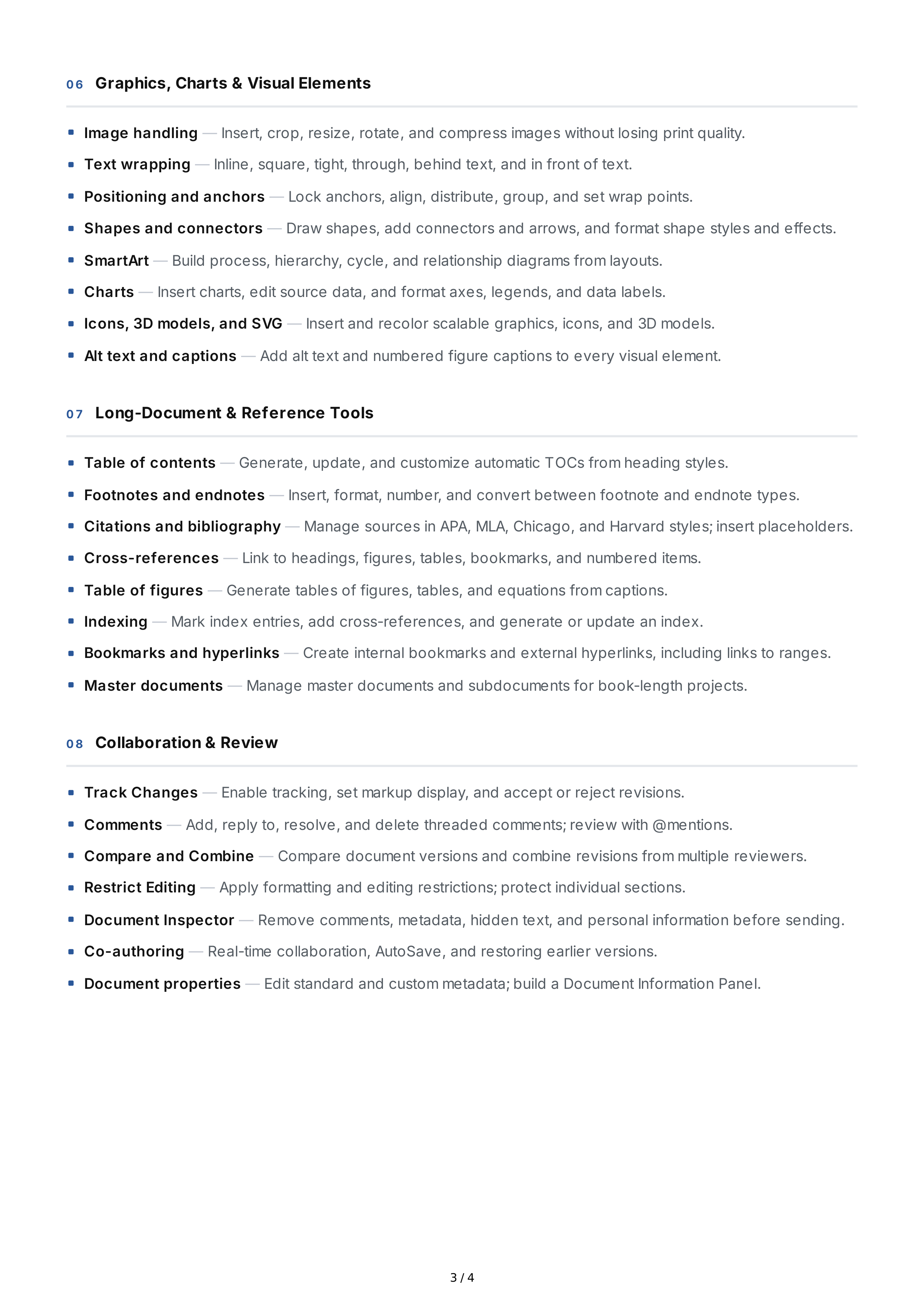
0 6
Graphics
,
Charts
&
Visual
Elements
0 7
Long
-
Document
&
Reference
Tools
0 8
Collaboration
&
Review
Image
handling
—
Insert
,
crop
,
resize
,
rotate
,
and
compress
images
without
losing
print
quality
.
Text
wrapping
—
Inline
,
square
,
tight
,
through
,
behind
text
,
and
in
front
of
text
.
Positioning
and
anchors
—
Lock
anchors
,
align
,
distribute
,
group
,
and
set
wrap
points
.
Shapes
and
connectors
—
Draw
shapes
,
add
connectors
and
arrows
,
and
format
shape
styles
and
effects
.
SmartArt
—
Build
process
,
hierarchy
,
cycle
,
and
relationship
diagrams
from
layouts
.
Charts
—
Insert
charts
,
edit
source
data
,
and
format
axes
,
legends
,
and
data
labels
.
Icons
, 3
D
models
,
and
SVG
—
Insert
and
recolor
scalable
graphics
,
icons
,
and
3
D
models
.
Alt
text
and
captions
—
Add
alt
text
and
numbered
figure
captions
to
every
visual
element
.
Table
of
contents
—
Generate
,
update
,
and
customize
automatic
TOCs
from
heading
styles
.
Footnotes
and
endnotes
—
Insert
,
format
,
number
,
and
convert
between
footnote
and
endnote
types
.
Citations
and
bibliography
—
Manage
sources
in
APA
,
MLA
,
Chicago
,
and
Harvard
styles
;
insert
placeholders
.
Cross
-
references
—
Link
to
headings
,
figures
,
tables
,
bookmarks
,
and
numbered
items
.
Table
of
figures
—
Generate
tables
of
figures
,
tables
,
and
equations
from
captions
.
Indexing
—
Mark
index
entries
,
add
cross
-
references
,
and
generate
or
update
an
index
.
Bookmarks
and
hyperlinks
—
Create
internal
bookmarks
and
external
hyperlinks
,
including
links
to
ranges
.
Master
documents
—
Manage
master
documents
and
subdocuments
for
book
-
length
projects
.
Track
Changes
—
Enable
tracking
,
set
markup
display
,
and
accept
or
reject
revisions
.
Comments
—
Add
,
reply
to
,
resolve
,
and
delete
threaded
comments
;
review
with
@
mentions
.
Compare
and
Combine
—
Compare
document
versions
and
combine
revisions
from
multiple
reviewers
.
Restrict
Editing
—
Apply
formatting
and
editing
restrictions
;
protect
individual
sections
.
Document
Inspector
—
Remove
comments
,
metadata
,
hidden
text
,
and
personal
information
before
sending
.
Co
-
authoring
—
Real
-
time
collaboration
,
AutoSave
,
and
restoring
earlier
versions
.
Document
properties
—
Edit
standard
and
custom
metadata
;
build
a
Document
Information
Panel
.
3 / 4
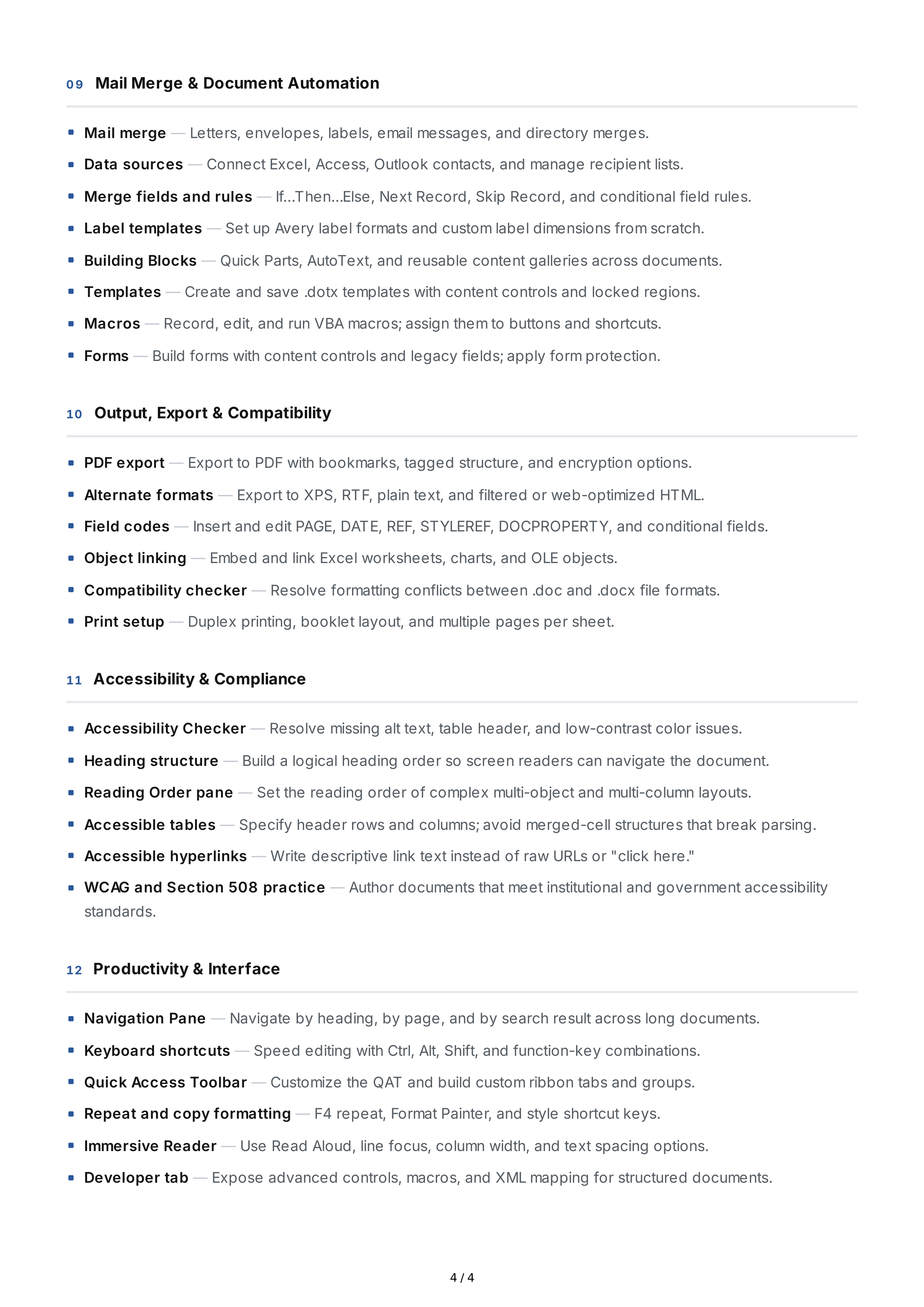
0 9
Mail
Merge
&
Document
Automation
10
Output
,
Export
&
Compatibility
11
Accessibility
&
Compliance
12
Productivity
&
Interface
Mail
merge
—
Letters
,
envelopes
,
labels
,
email
messages
,
and
directory
merges
.
Data
sources
—
Connect
Excel
,
Access
,
Outlook
contacts
,
and
manage
recipient
lists
.
Merge
fields
and
rules
—
If
…
Then
…
Else
,
Next
Record
,
Skip
Record
,
and
conditional
field
rules
.
Label
templates
—
Set
up
Avery
label
formats
and
custom
label
dimensions
from
scratch
.
Building
Blocks
—
Quick
Parts
,
AutoText
,
and
reusable
content
galleries
across
documents
.
Templates
—
Create
and
save
.
dotx
templates
with
content
controls
and
locked
regions
.
Macros
—
Record
,
edit
,
and
run
VBA
macros
;
assign
them
to
buttons
and
shortcuts
.
Forms
—
Build
forms
with
content
controls
and
legacy
fields
;
apply
form
protection
.
PDF
export
—
Export
to
PDF
with
bookmarks
,
tagged
structure
,
and
encryption
options
.
Alternate
formats
—
Export
to
XPS
,
RTF
,
plain
text
,
and
filtered
or
web
-
optimized
HTML
.
Field
codes
—
Insert
and
edit
PAGE
,
DATE
,
REF
,
STYLEREF
,
DOCPROPERTY
,
and
conditional
fields
.
Object
linking
—
Embed
and
link
Excel
worksheets
,
charts
,
and
OLE
objects
.
Compatibility
checker
—
Resolve
formatting
conflicts
between
.
doc
and
.
docx
file
formats
.
Print
setup
—
Duplex
printing
,
booklet
layout
,
and
multiple
pages
per
sheet
.
Accessibility
Checker
—
Resolve
missing
alt
text
,
table
header
,
and
low
-
contrast
color
issues
.
Heading
structure
—
Build
a
logical
heading
order
so
screen
readers
can
navigate
the
document
.
Reading
Order
pane
—
Set
the
reading
order
of
complex
multi
-
object
and
multi
-
column
layouts
.
Accessible
tables
—
Specify
header
rows
and
columns
;
avoid
merged
-
cell
structures
that
break
parsing
.
Accessible
hyperlinks
—
Write
descriptive
link
text
instead
of
raw
URLs
or
"
click
here
."
WCAG
and
Section
508
practice
—
Author
documents
that
meet
institutional
and
government
accessibility
standards
.
Navigation
Pane
—
Navigate
by
heading
,
by
page
,
and
by
search
result
across
long
documents
.
Keyboard
shortcuts
—
Speed
editing
with
Ctrl
,
Alt
,
Shift
,
and
function
-
key
combinations
.
Quick
Access
Toolbar
—
Customize
the
QAT
and
build
custom
ribbon
tabs
and
groups
.
Repeat
and
copy
formatting
—
F
4
repeat
,
Format
Painter
,
and
style
shortcut
keys
.
Immersive
Reader
—
Use
Read
Aloud
,
line
focus
,
column
width
,
and
text
spacing
options
.
Developer
tab
—
Expose
advanced
controls
,
macros
,
and
XML
mapping
for
structured
documents
.
4 / 4