Adobe
Photoshop
—
Hard
Skills
CO NT E NT S
01
Workspace
&
Document
Setup
02
Selections
&
Masking
03
Layers
&
Nondestructive
Compositing
04
Retouching
&
Restoration
05
Color
Correction
&
Grading
06
Typography
07
Vector
,
Path
&
Shape
Work
08
Painting
,
Brushes
&
Illustration
09
Filters
,
Warp
&
Distortion
10
Photomontage
&
Compositing
11
Print
Production
&
Prepress
12
Web
,
UI
&
Asset
Export
13
Automation
,
Batch
&
Scripting
14
Generative
AI
&
Neural
Filters
15
Video
, 3
D
&
Motion
Basics
16
Formats
,
Color
&
Asset
Handling
AT
A
G LANCE
—
T HE
20
MO ST
RE Q UE ST E D
HARD
SKILLS
The
competencies
that
appear
most
often
in
retoucher
,
production
artist
,
and
digital
designer
job
descriptions
.
Layer
masking
&
nondestructive
editing
01
Selections
—
Object
Selection
&
Select
Subject
02
Select
and
Mask
workspace
03
Pen
tool
&
path
-
based
masking
04
Curves
&
Levels
color
correction
05
Frequency
separation
retouching
06
Dodge
&
burn
07
Smart
Objects
&
Smart
Filters
08
Adjustment
layers
09
Blending
modes
&
Blend
If
10
Content
-
Aware
Fill
&
Generative
Fill
11
Camera
Raw
filter
&
DNG
processing
12
Actions
,
batch
processing
&
droplets
13
Artboards
&
multi
-
size
asset
export
14
CMYK
prepress
setup
&
PDF
/
X
export
15
Color
management
&
ICC
profiles
16
Neural
Filters
gallery
17
Character
&
paragraph
styles
18
Vanishing
Point
&
Perspective
Warp
19
Channels
&
luminosity
masking
20
1 / 6
01
Workspace
&
Document
Setup
02
Selections
&
Masking
03
Layers
&
Nondestructive
Compositing
Custom
workspaces
,
panel
docking
,
and
saved
layouts
Keyboard
shortcut
customization
and
menu
editing
Document
creation
:
dimensions
,
resolution
(
PPI
),
color
mode
,
bit
depth
Artboards
for
multi
-
size
and
multi
-
page
deliverables
Scratch
disk
allocation
,
RAM
,
and
performance
preferences
History
panel
,
snapshots
,
and
history
state
limits
Rulers
,
guides
,
grids
,
and
smart
guide
alignment
Screen
modes
and
multi
-
document
window
workflow
File
Info
metadata
templates
and
document
notes
Workspace
presets
for
retouching
,
painting
,
and
prepress
Marquee
tools
—
rectangular
,
elliptical
,
single
row
/
column
Lasso
,
Polygonal
Lasso
,
and
Magnetic
Lasso
Quick
Selection
and
Magic
Wand
(
tolerance
,
contiguous
,
sample
all
layers
)
Object
Selection
tool
and
Select
Subject
Select
and
Mask
workspace
—
edge
detection
and
hair
refinement
Color
Range
and
Focus
Area
selections
Pen
tool
and
curvature
pen
path
selections
Channel
-
based
masking
with
alpha
channels
and
Calculations
Luminosity
masks
and
blend
-
based
masking
Layer
masks
,
vector
masks
,
and
clipping
masks
Quick
Mask
mode
and
edge
refinement
brushes
Selection
saving
,
loading
,
and
add
/
subtract
/
intersect
modes
Sky
selection
and
one
-
click
background
removal
Layer
groups
,
nesting
,
and
color
-
coding
conventions
Blending
modes
—
Multiply
,
Screen
,
Overlay
,
Soft
Light
,
Color
Dodge
,
and
more
Blend
If
controls
for
Underlying
Layer
and
This
Layer
Opacity
versus
Fill
blending
behaviour
Smart
Objects
,
linked
Smart
Objects
,
and
Smart
Filters
Adjustment
layers
—
Curves
,
Levels
,
Hue
/
Saturation
,
Selective
Color
,
Gradient
Map
,
Black
&
White
Layer
styles
,
style
copying
,
and
global
light
control
Clipping
masks
and
layer
comps
for
design
variants
Nondestructive
dodge
and
burn
on
50%
gray
layers
Pass
-
through
versus
isolated
group
blending
Layer
filtering
,
layer
search
,
and
naming
standards
Layer
locking
,
linking
,
and
auto
-
select
controls
2 / 6
04
Retouching
&
Restoration
05
Color
Correction
&
Grading
06
Typography
Healing
Brush
,
Spot
Healing
Brush
,
and
Patch
tool
Content
-
Aware
Fill
,
Move
,
Patch
,
and
Crop
Clone
Stamp
with
aligned
and
sampled
source
control
Frequency
separation
—
low
and
high
frequency
retouching
Dodge
and
burn
—
curve
-
based
and
brush
-
based
techniques
Liquify
and
Face
-
Aware
Liquify
with
freeze
masks
Skin
smoothing
with
texture
retention
Teeth
whitening
,
eye
brightening
,
and
sclera
cleanup
Hair
masking
and
flyaway
removal
Scan
restoration
—
dust
,
scratches
,
creases
,
and
paper
texture
Perspective
correction
of
scanned
or
tilted
photographs
Sharpening
—
Unsharp
Mask
,
Smart
Sharpen
,
High
Pass
Noise
reduction
and
grain
management
Colorization
of
black
-
and
-
white
photographs
Levels
,
Curves
,
and
per
-
channel
curve
adjustments
Color
Balance
,
Selective
Color
,
and
Hue
/
Saturation
Vibrance
and
targeted
saturation
control
Camera
Raw
filter
and
non
-
destructive
raw
adjustments
Gradient
Map
toning
and
duotone
construction
Split
toning
and
cinematic
color
grading
Match
Color
and
color
transfer
between
images
White
balance
,
gray
-
point
,
and
black
-
point
correction
Auto
Tone
,
Auto
Contrast
,
Auto
Color
,
and
manual
refinement
3
D
LUT
(.
cube
)
loading
and
application
16-
bit
and
32-
bit
color
workflows
Gamut
warning
,
soft
proofing
,
and
on
-
screen
proof
simulation
Point
type
and
paragraph
type
Area
type
,
type
on
a
path
,
and
type
inside
shapes
Character
panel
—
kerning
,
tracking
,
leading
,
baseline
shift
,
vertical
scale
Paragraph
panel
—
alignment
,
indents
,
hyphenation
,
justification
OpenType
features
—
ligatures
,
stylistic
sets
,
swashes
,
oldstyle
figures
Character
and
paragraph
styles
Warp
Text
and
type
deformation
Variable
font
axis
adjustment
Missing
font
resolution
and
font
substitution
Text
wrap
,
paragraph
spacing
,
and
baseline
grid
alignment
Converting
live
type
to
shapes
and
outlines
for
output
3 / 6
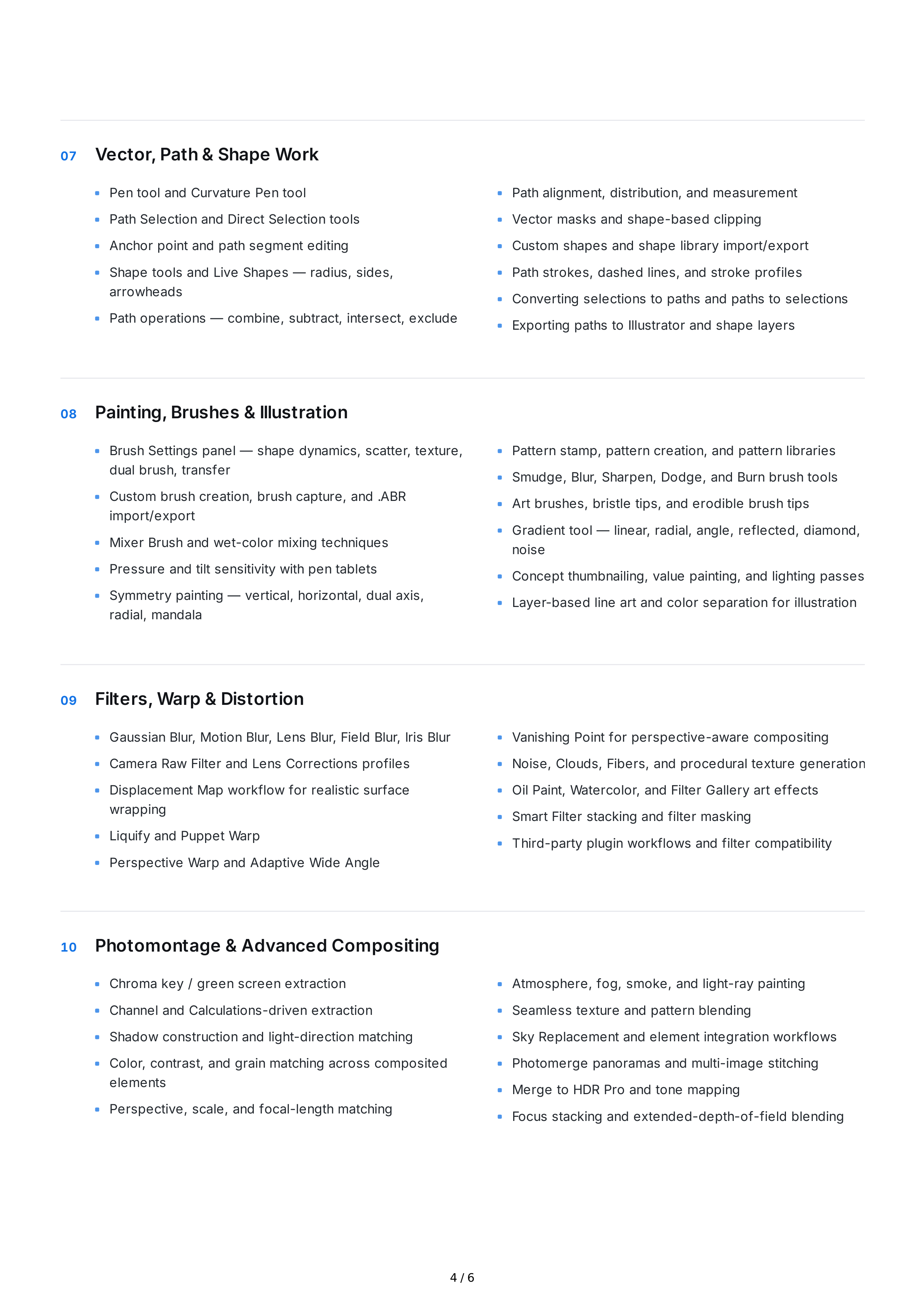
07
Vector
,
Path
&
Shape
Work
08
Painting
,
Brushes
&
Illustration
09
Filters
,
Warp
&
Distortion
10
Photomontage
&
Advanced
Compositing
Pen
tool
and
Curvature
Pen
tool
Path
Selection
and
Direct
Selection
tools
Anchor
point
and
path
segment
editing
Shape
tools
and
Live
Shapes
—
radius
,
sides
,
arrowheads
Path
operations
—
combine
,
subtract
,
intersect
,
exclude
Path
alignment
,
distribution
,
and
measurement
Vector
masks
and
shape
-
based
clipping
Custom
shapes
and
shape
library
import
/
export
Path
strokes
,
dashed
lines
,
and
stroke
profiles
Converting
selections
to
paths
and
paths
to
selections
Exporting
paths
to
Illustrator
and
shape
layers
Brush
Settings
panel
—
shape
dynamics
,
scatter
,
texture
,
dual
brush
,
transfer
Custom
brush
creation
,
brush
capture
,
and
.
ABR
import
/
export
Mixer
Brush
and
wet
-
color
mixing
techniques
Pressure
and
tilt
sensitivity
with
pen
tablets
Symmetry
painting
—
vertical
,
horizontal
,
dual
axis
,
radial
,
mandala
Pattern
stamp
,
pattern
creation
,
and
pattern
libraries
Smudge
,
Blur
,
Sharpen
,
Dodge
,
and
Burn
brush
tools
Art
brushes
,
bristle
tips
,
and
erodible
brush
tips
Gradient
tool
—
linear
,
radial
,
angle
,
reflected
,
diamond
,
noise
Concept
thumbnailing
,
value
painting
,
and
lighting
passes
Layer
-
based
line
art
and
color
separation
for
illustration
Gaussian
Blur
,
Motion
Blur
,
Lens
Blur
,
Field
Blur
,
Iris
Blur
Camera
Raw
Filter
and
Lens
Corrections
profiles
Displacement
Map
workflow
for
realistic
surface
wrapping
Liquify
and
Puppet
Warp
Perspective
Warp
and
Adaptive
Wide
Angle
Vanishing
Point
for
perspective
-
aware
compositing
Noise
,
Clouds
,
Fibers
,
and
procedural
texture
generation
Oil
Paint
,
Watercolor
,
and
Filter
Gallery
art
effects
Smart
Filter
stacking
and
filter
masking
Third
-
party
plugin
workflows
and
filter
compatibility
Chroma
key
/
green
screen
extraction
Channel
and
Calculations
-
driven
extraction
Shadow
construction
and
light
-
direction
matching
Color
,
contrast
,
and
grain
matching
across
composited
elements
Perspective
,
scale
,
and
focal
-
length
matching
Atmosphere
,
fog
,
smoke
,
and
light
-
ray
painting
Seamless
texture
and
pattern
blending
Sky
Replacement
and
element
integration
workflows
Photomerge
panoramas
and
multi
-
image
stitching
Merge
to
HDR
Pro
and
tone
mapping
Focus
stacking
and
extended
-
depth
-
of
-
field
blending
4 / 6
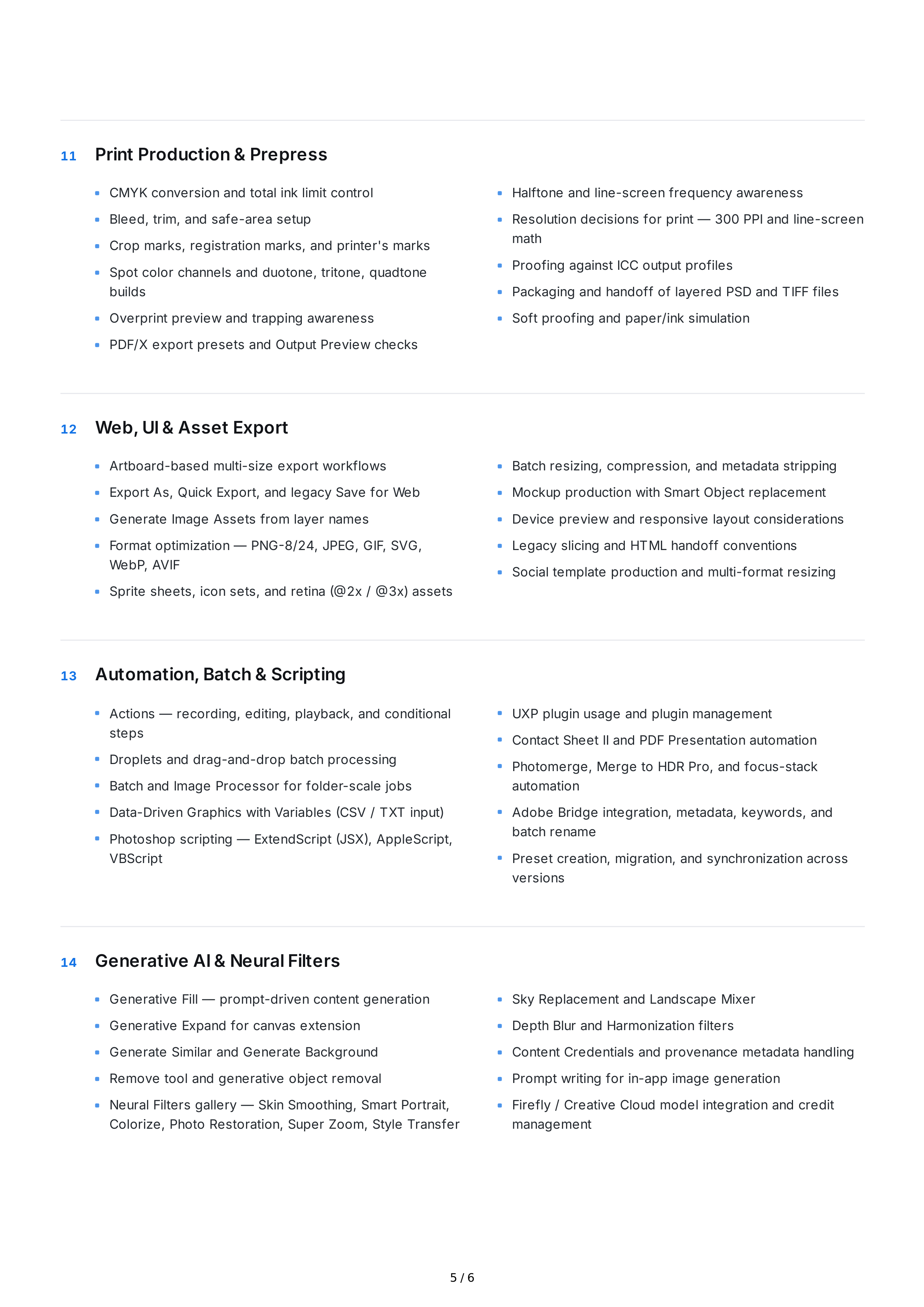
11
Print
Production
&
Prepress
12
Web
,
UI
&
Asset
Export
13
Automation
,
Batch
&
Scripting
14
Generative
AI
&
Neural
Filters
CMYK
conversion
and
total
ink
limit
control
Bleed
,
trim
,
and
safe
-
area
setup
Crop
marks
,
registration
marks
,
and
printer
'
s
marks
Spot
color
channels
and
duotone
,
tritone
,
quadtone
builds
Overprint
preview
and
trapping
awareness
PDF
/
X
export
presets
and
Output
Preview
checks
Halftone
and
line
-
screen
frequency
awareness
Resolution
decisions
for
print
— 300
PPI
and
line
-
screen
math
Proofing
against
ICC
output
profiles
Packaging
and
handoff
of
layered
PSD
and
TIFF
files
Soft
proofing
and
paper
/
ink
simulation
Artboard
-
based
multi
-
size
export
workflows
Export
As
,
Quick
Export
,
and
legacy
Save
for
Web
Generate
Image
Assets
from
layer
names
Format
optimization
—
PNG
-8/24,
JPEG
,
GIF
,
SVG
,
WebP
,
AVIF
Sprite
sheets
,
icon
sets
,
and
retina
(@2
x
/ @3
x
)
assets
Batch
resizing
,
compression
,
and
metadata
stripping
Mockup
production
with
Smart
Object
replacement
Device
preview
and
responsive
layout
considerations
Legacy
slicing
and
HTML
handoff
conventions
Social
template
production
and
multi
-
format
resizing
Actions
—
recording
,
editing
,
playback
,
and
conditional
steps
Droplets
and
drag
-
and
-
drop
batch
processing
Batch
and
Image
Processor
for
folder
-
scale
jobs
Data
-
Driven
Graphics
with
Variables
(
CSV
/
TXT
input
)
Photoshop
scripting
—
ExtendScript
(
JSX
),
AppleScript
,
VBScript
UXP
plugin
usage
and
plugin
management
Contact
Sheet
II
and
PDF
Presentation
automation
Photomerge
,
Merge
to
HDR
Pro
,
and
focus
-
stack
automation
Adobe
Bridge
integration
,
metadata
,
keywords
,
and
batch
rename
Preset
creation
,
migration
,
and
synchronization
across
versions
Generative
Fill
—
prompt
-
driven
content
generation
Generative
Expand
for
canvas
extension
Generate
Similar
and
Generate
Background
Remove
tool
and
generative
object
removal
Neural
Filters
gallery
—
Skin
Smoothing
,
Smart
Portrait
,
Colorize
,
Photo
Restoration
,
Super
Zoom
,
Style
Transfer
Sky
Replacement
and
Landscape
Mixer
Depth
Blur
and
Harmonization
filters
Content
Credentials
and
provenance
metadata
handling
Prompt
writing
for
in
-
app
image
generation
Firefly
/
Creative
Cloud
model
integration
and
credit
management
5 / 6
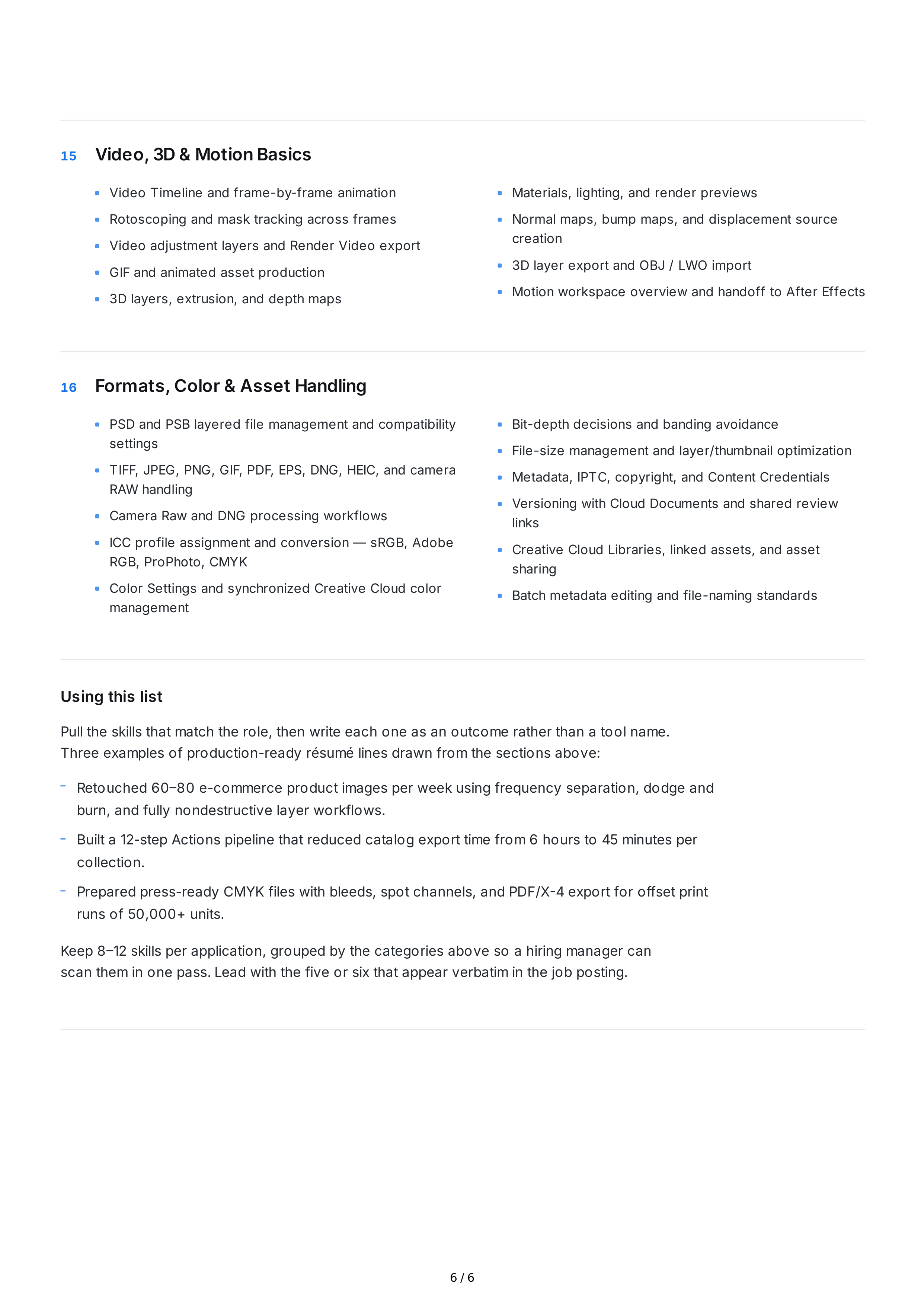
15
Video
, 3
D
&
Motion
Basics
16
Formats
,
Color
&
Asset
Handling
Using
this
list
Pull
the
skills
that
match
the
role
,
then
write
each
one
as
an
outcome
rather
than
a
tool
name
.
Three
examples
of
production
-
ready
résumé
lines
drawn
from
the
sections
above
:
Keep
8–12
skills
per
application
,
grouped
by
the
categories
above
so
a
hiring
manager
can
scan
them
in
one
pass
.
Lead
with
the
five
or
six
that
appear
verbatim
in
the
job
posting
.
Video
Timeline
and
frame
-
by
-
frame
animation
Rotoscoping
and
mask
tracking
across
frames
Video
adjustment
layers
and
Render
Video
export
GIF
and
animated
asset
production
3
D
layers
,
extrusion
,
and
depth
maps
Materials
,
lighting
,
and
render
previews
Normal
maps
,
bump
maps
,
and
displacement
source
creation
3
D
layer
export
and
OBJ
/
LWO
import
Motion
workspace
overview
and
handoff
to
After
Effects
PSD
and
PSB
layered
file
management
and
compatibility
settings
TIFF
,
JPEG
,
PNG
,
GIF
,
PDF
,
EPS
,
DNG
,
HEIC
,
and
camera
RAW
handling
Camera
Raw
and
DNG
processing
workflows
ICC
profile
assignment
and
conversion
—
sRGB
,
Adobe
RGB
,
ProPhoto
,
CMYK
Color
Settings
and
synchronized
Creative
Cloud
color
management
Bit
-
depth
decisions
and
banding
avoidance
File
-
size
management
and
layer
/
thumbnail
optimization
Metadata
,
IPTC
,
copyright
,
and
Content
Credentials
Versioning
with
Cloud
Documents
and
shared
review
links
Creative
Cloud
Libraries
,
linked
assets
,
and
asset
sharing
Batch
metadata
editing
and
file
-
naming
standards
Retouched
60–80
e
-
commerce
product
images
per
week
using
frequency
separation
,
dodge
and
burn
,
and
fully
nondestructive
layer
workflows
.
Built
a
12-
step
Actions
pipeline
that
reduced
catalog
export
time
from
6
hours
to
45
minutes
per
collection
.
Prepared
press
-
ready
CMYK
files
with
bleeds
,
spot
channels
,
and
PDF
/
X
-4
export
for
offset
print
runs
of
50,000+
units
.
6 / 6